

.svg)
.avif)
.svg)
The review cycle just finished. It took five weeks, most managers submitted on the last day, the calibration meeting ran two hours over, and at least one rating is now sitting in an HR inbox with a legal question attached to it.
That administrative headache is only half the issue; the traditional process itself is fundamentally broken. Data from Gallup show that only 14% of workers feel inspired by their reviews, just 26% find them accurate, and only 29% view them as fair. Consequently, conventional evaluations backfire and actively damage employee performance in 33% of cases.
If you are an HR manager at a company of 50 to 500 employees still relying on Google Forms, shared documents, or basic HRIS modules, the options below are worth a close look. We focus specifically on dedicated performance review software—platforms featuring configurable templates, calibration tooling, 360-degree feedback, and robust reporting.
Whether you need a mid-market platform that bundles goals and recognition, or a lightweight tool built to eliminate the six-week drama, these solutions ensure the review cycle works for your team rather than against them.
Here's a video covering our top 5 performance review software picks for 2026, including what makes each one worth considering:
What to Look for in Performance Review Software
The best performance review software keeps things simple and effective. Focus on these 5 essentials:
1. Review Architecture: Does the Cycle Fit How Your Organization Actually Works?
A platform that handles one review type cleanly but requires professional services to configure a second is not flexible: it is rigid with a good demo.
Look for configurable review types (annual, semi-annual, quarterly, project-end, probationary, peer, upward, 360), the ability to run parallel cycles without conflicts, and flexible question libraries with rating scales, competency rubrics, and behavioral anchors alongside open text.
The practical test: take your last cycle, write down every manual exception you handled (different templates for engineers versus sales, different timelines for a newly-acquired team), and ask the vendor to configure those in a live demo.
If they need a professional services engagement to replicate what your HR coordinator currently manages in Google Sheets, the platform is too rigid. You can find additional guidance on running a structured review cycle in our review cycle guide.
2. Manager Experience: Will Managers Actually Complete the Review?
The most common failure mode in performance review software is strong HR adoption and poor manager adoption. A platform that forces managers to open a separate browser tab, remember a new login, and write reviews from scratch outside their regular workflow will produce a 60% completion rate by the deadline and a 95% rate two weeks late, after three reminder emails from HR.
Evaluate where the manager actually does the work. Is it inside Microsoft Teams, Slack, or Outlook, or only on a dedicated web app? Can the manager save a draft and return from a different device three days later? Do AI-assisted drafting features pull from prior 1-on-1 notes and goal updates so the manager is editing rather than starting from scratch?
Ask vendors to walk you through the manager view before the HR admin view in the demo. Vendors lead with the admin interface because that is who signs the contract. The manager interface determines whether the investment works.
3. Calibration: Defensible Ratings, Not Negotiated Ones
Calibration separates platforms built for HR administrators from platforms built for organizations where review outcomes carry legal and compensation weight. Most SMB tools treat calibration as a post-review conversation. Enterprise platforms build calibration directly into the cycle.
Look for structured calibration sessions with visible rating distributions before and after; the ability to flag outlier patterns (a manager who rated everyone at the highest level, a team with an implausibly narrow spread); bias surfacing across tenure, department, and where legally permissible, demographic data; audit trails for every rating change with a rationale field; and locked ratings after calibration so a manager cannot quietly revise a score.
For organizations past 500 employees, or anywhere performance ratings connect directly to pay decisions, calibration tooling is not optional. Our article on performance review calibration covers the practical setup in detail.
4. Integration with Your HRIS and Daily Work Stack
Two questions matter here and they are different questions.
First: does the platform sync with your HRIS bi-directionally? That means org chart, manager assignments, job levels, departments, and employee start dates stay current automatically when someone changes managers mid-cycle. A platform that requires CSV uploads to refresh the org chart will be inaccurate within the first two weeks of any cycle.
Second: does the platform deliver review prompts and reminders inside the tools your managers already use? For Microsoft 365 organizations, native Microsoft Teams integration is the single largest driver of manager completion rates. For Slack-first organizations, the equivalent applies. These are not the same as a notification-only integration: "sends a Slack message" and "lets the manager complete the review inside Slack" are different capabilities.
Ask vendors to specify which HRIS integrations are native, which are partner-built, and which are CSV-only.
5. AI Features: Useful or Just Marketing?
Every platform in this category has released AI features in the past two years. Most are review-drafting tools that summarize prior feedback and goal progress into a starting-point review. Some save managers 30 to 40 minutes per review; others produce generic output that managers rewrite entirely.
The only reliable test is a live demo with a realistic synthetic employee: three prior 1-on-1 notes, two completed goals, and four pieces of peer feedback. Judge the draft output as if you were the manager who has to submit it.
Look for vendors that mark AI-generated content explicitly for manager review and that let administrators disable AI generation entirely for compliance reasons. Hallucination risk is real: a generated review referencing a project the employee never worked on creates a paper trail problem before you even get to calibration.
The 360 feedback software article covers AI features specifically in the peer feedback collection context, if that is your primary concern.
How We Evaluated These Platforms
This list was not built from vendor submissions or sponsored placements. Our team ran a structured research process across multiple layers before any platform made the cut.
We started with review aggregators, including G2 and Capterra, analyzing sentiment patterns across hundreds of verified user reviews rather than relying on star ratings alone. From there, we cross-referenced analyst coverage, community discussions, and HR practitioner forums to surface recurring complaints that polished marketing pages tend to obscure.
Where free trials or freemium tiers were available, we tested them directly, evaluating review template flexibility, calibration workflow depth, manager UX, AI drafting quality, and how far action planning actually goes beyond a completed form. Platforms that looked strong on paper but fell short in hands-on testing were cut from consideration.
The final list reflects platforms that hold up across the criteria outlined above: review architecture flexibility, manager adoption design, calibration rigor, HRIS integration depth, and AI feature quality. No platform paid to be included.
The 10 Best Performance Review Software Platforms in 2026
The ideal software moves evaluations out of siloed documents, streamlines calibration, and provides clear tracking so HR isn't stuck chasing missing forms on deadline day. The platforms below are selected based on their core focus on the review cycle, template flexibility, and calibration capabilities.
1. Lattice — Best Overall for Mid-Market Organizations
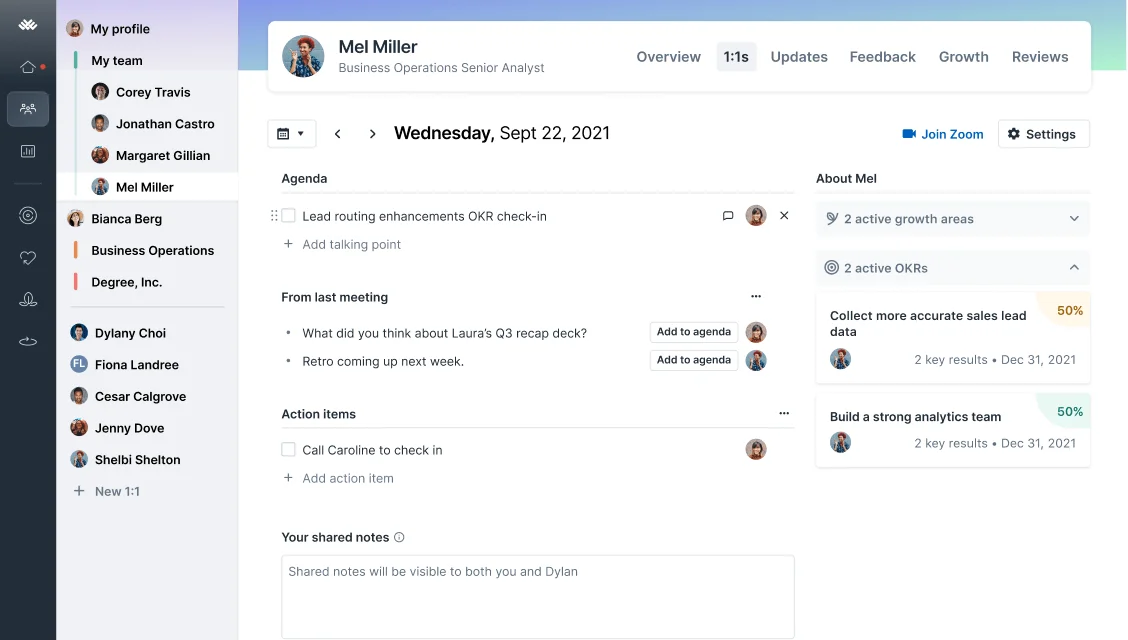
Lattice is the strongest general-purpose performance review platform for organizations between 200 and 2,000 employees. It combines configurable review cycles, OKR tracking, 1-on-1 tooling, and engagement surveys in one platform, which means mid-market HR teams can consolidate three or four separate vendor relationships. For buyers in the "Refugee" category, migrating off a clunky HRIS review module, Lattice is frequently the most-demoed alternative.
The platform's AI review drafting pulls from prior 1-on-1 notes, goal updates, and peer feedback, and the output quality is among the better examples we tested in this category. Calibration tooling includes visible rating distributions, an outlier-flagging mechanism, and locked ratings post-session.
Key Features
- Configurable review cycles: annual, semi-annual, quarterly, project-end, 360, upward, and peer review in parallel
- AI-assisted review draft generation from prior 1-on-1 notes, goal progress, and collected peer feedback
- Calibration module with rating distribution visualization, outlier flagging, and post-calibration rating locks
- OKR and goal cascading from company level to individual, with review-cycle integration
- 1-on-1 meeting module with shared agendas, recurring talking points, and action item tracking
- HRIS integrations with Workday, BambooHR, ADP, Rippling, HiBob, and others (native, not CSV-only)
- Engagement survey module that can feed performance decisions in the same platform
Pros and Cons
Pros: "Having a central place to manage 1:1s and performance reviews is an improvement to managing those functions in a more ad hoc manner (i.e. in documents, note taking apps, etc.)" — Capterra reviewer
- Review cycle configuration is among the most flexible in the mid-market segment. Multiple parallel cycles with different templates per department or job level can be set up without professional services.
- The 1-on-1 tooling is consistently rated among the strongest in the category on G2. Managers can track prior meeting notes, action items, and goal progress in a single view, which feeds the AI drafting feature with useful data.
- HRIS integration depth is genuine. Bi-directional sync with Workday, BambooHR, and Rippling keeps org charts current automatically. Several G2 reviewers specifically cite this as a reason they moved from a competitor.
Cons: "I think Lattice offers digital features and resources of high operational quality, my experience has been positive and professional and I have no negative comments about its digital performance and functionality." — G2 reviewer
- The $4,000 annual minimum makes Lattice prohibitively expensive for teams under roughly 30 users. Pricing compounds when engagement and compensation modules are added on top of the base Talent Management plan.
- Navigation for goal management draws consistent criticism on G2 and Gartner Peer Insights. Users accustomed to a straightforward OKR tool find Lattice's goal hierarchy unintuitive on first use.
- Calibration workflow requires the admin to manually advance each stage; it cannot be automated by date. For large HR teams running concurrent calibrations across departments, this adds manual overhead.
Pricing
Base price starts at $11/user/month (billed annually). The platform allows organizations to build a custom package based on their needs, with base products priced from $4 to $8 per user per month. Add-ons range from $4 to $6 per user per month. Custom quotes available for teams over 500 employees.
2. Teamflect — Best for Microsoft 365 Organizations

Teamflect solves the exact user adoption and administrative friction points that cause traditional review cycles to fail. While conventional processes suffer because employees resist logging into separate, clunky HR platforms, Teamflect achieves high participation rates by living entirely inside Microsoft Teams and Outlook.
For the mid-market organization running on Microsoft 365, it eliminates the "six-week drama" of chasing uncompleted forms by embedding the entire evaluation workflow into the tools staff open every morning. It’s currently the highest-rated performance management software in the Microsoft Teams App Store, making it the definitive choice for organizations heavily embedded in the Microsoft ecosystem for 2026.
Key Features
- Runs reviews, 360-degree feedback, and pulse surveys directly within Teams chat and Outlook interfaces, utilizing Entra ID to automatically sync organizational charts
- Review templates automatically surface historical 1-on-1 meeting notes, shared agendas, and goal progress directly into the evaluation window, cutting down on manager writing fatigue
- Built-in AI helps managers write constructive comments and audit responses for bias
- Full integration with Microsoft 365 Copilot allows teams to update goals and summarize entire feedback cycles via natural language prompts
- Features built-in 9-box talent matrices and individual development plans (IDPs), with native Power BI connectivity to turn performance metrics into executive dashboards
- Integrates with Microsoft Power Automate to trigger automated review cycles based on key milestones (such as probation ends) and bi-directionally syncs action items with Microsoft To Do
- Out-of-the-box data synchronization with more than 225 HRIS platforms, including BambooHR, Rippling, and Gusto
Pros and Cons
Pros: “I like Teamflect for its simplicity and how it integrates into Teams, allowing me to keep it open during a meeting. This makes it easy to track and review notes from previous meetings. The initial setup was very easy, which was a plus.” — G2 reviewer
- Manager adoption in Microsoft 365 environments is meaningfully higher than with standalone platforms, because the review interface is already open in the same window as the meeting. The friction of a separate login or app switch disappears.
- The free plan (up to 10 users, full feature access) lets small teams run a complete review cycle before committing to a paid plan. This is uncommon in the category.
- For organizations with strict data governance requirements, the Enterprise plan's bring-your-own-key encryption and custom data residency options address security concerns that most platforms in this segment cannot match.
Cons: "While i realize it is a Teams app first, it would be nice to have a widget of sorts that i can pin to my desktop and constantly see my goals for the day and tasks if possible." — Capterra reviewer
- Requires a Microsoft 365 environment. Google Workspace organizations, or teams that have moved away from Teams as their primary collaboration tool, will find no benefit from the native integration that defines the product's value.
- No native payroll, HRIS depth, or leave management. Teamflect is a performance and engagement layer, not an HR system of record. You will still need a separate HRIS. Teamflect does integrate with over 200 HRIS platforms.
Pricing
Teamflect offers a free tier with full feature access for up to 10 users. For larger teams, paid plans are billed annually and start at $7 per user, per month for the Essential tier, rising to $11 per user, per month for the Professional tier, while Enterprise accounts require a custom quote. Additionally, non-profit organizations qualify for discounts of up to 60% on annual plans.
3. 15Five — Best for Moving from Annual to Continuous Performance Reviews

15Five was built around a specific premise: weekly check-ins of 15 minutes or fewer, with five questions, accumulating into a picture of performance that feeds into quarterly and annual reviews. That structure is still the core of the product, and it remains the strongest tool in this list for organizations that have decided the annual-only review is the wrong model.
The Perform plan includes reviews, OKRs, 360-degree feedback, a talent matrix, and an HR Outcomes Dashboard designed to connect manager behavior to retention outcomes.
Key Features
- Weekly check-in format (configurable cadence) feeding quarterly and annual review cycles
- 360-degree feedback collection built into the review cycle, not a separate workflow
- OKR and goal tracking with visibility from company level to individual
- Talent matrix (9-box) for calibration and succession planning
- HR Outcomes Dashboard connecting engagement and manager effectiveness metrics to retention data
- AI-assisted review drafting pulling from check-in history and goal progress
- Integrations with Slack, Microsoft Teams, BambooHR, Workday, ADP, and Google Workspace
Pros and Cons
Pros: "A system to continuously understand how employees are doing and improve it. It is a system mostly used by HR to review performance of the employees and Goals so this software helps it and give an automated solution." — G2 reviewer
- The check-in format generates a structured data trail that genuinely reduces manager writing time at review season. Managers editing a draft from accumulated check-in data take noticeably less time than managers starting from a blank form.
- The HR Outcomes Dashboard is one of the few reporting tools in the SMB segment that connects manager effectiveness scores to actual retention data. HR teams that need to make a budget case to a CFO have a clearer story to tell.
- Implementation time is shorter than most mid-market platforms in this category. Multiple G2 reviewers for teams of 100 to 300 employees report going from contract to first review cycle in two to three weeks.
Cons: "It can be a bit hard to learn but once you get the hang of the platform it is very user friendly.” — Capterra reviewer
- Custom question configuration in engagement surveys and performance reviews is less intuitive than PerformYard or Lattice. Several G2 reviewers note the friction of building non-standard questions or editing an in-progress review cycle.
- The Engage plan (surveys and engagement tools) and the Perform plan (performance reviews and OKRs) are priced separately. Organizations wanting both need to budget for both tiers, which pushes total cost closer to Lattice's all-in pricing.
- 15Five is built for continuous feedback culture. Organizations that want a straightforward annual review without the check-in infrastructure will find it over-engineered for the use case.
Pricing
15Five offers three annual pricing tiers based on your organizational focus. The core performance review features live in the Perform tier at $11 per user, per month, which unlocks structured evaluations, OKRs, 360-degree feedback, talent matrices, and career development planning. For complete access, the Total Platform plan combines both suites at $16 per user, per month, adding manager training microlearnings and advanced HR dashboards.
4. Culture Amp Perform — Best When Engagement Data Needs to Inform Performance Decisions

Culture Amp built its reputation on employee engagement benchmarking. The Perform module adds structured performance review cycles, 360-degree feedback, and calibration tooling to a platform that already holds one of the largest employee engagement datasets in the market, spanning more than 6,500 companies.
For HR teams that want to understand whether engagement scores predict performance outcomes, or whether a rating distribution problem correlates with a specific manager cohort's engagement numbers, that data depth is genuinely difficult to replicate elsewhere.
Key Features
- Configurable performance review cycles with 360-degree feedback, self-assessments, and peer reviews
- Calibration module with pre- and post-calibration rating distribution views and bias-surfacing tools
- AI-powered text analysis of open feedback, surfacing themes and flagging language patterns
- Integration with the Culture Amp engagement platform for cross-referencing performance and engagement data
- DEI measurement module with specialized survey templates and demographic data overlays (where legally permitted)
- Action planning tools that connect review outcomes to structured development conversations
- HRIS integrations with Workday, BambooHR, ADP, and other major systems
Pros and Cons
Pros: "Hard to land on one thing but it has to be their people. The teams they put together are authentic, responsive kind, and really want to help us." — G2 reviewer
- The calibration tooling is among the most complete available outside Workday and SAP. Pre-calibration rating distributions, post-calibration comparisons, and locking mechanisms are all present in one workflow.
- The engagement benchmark dataset gives People teams a reference point that standalone performance platforms cannot match. Knowing that your team's engagement scores are 12 points below industry median in the same quarter as a performance dip is a different conversation with leadership than having either data point alone.
- Customer success quality is consistently praised across G2 and Gartner Peer Insights reviews. For enterprise HR teams running their first calibration session, that support matters.
Cons: "Sometimes the range of the questions can be too broad or the selection of answers doesn't quite fit the question." — Capterra reviewer
- Survey question customization within the performance module is more constrained than buyers accustomed to PerformYard or Lattice expect. The platform's standardization (a feature for benchmarking) becomes a limitation when your internal competency framework requires specific question phrasing.
- Pricing is custom and quote-based. The engagement entry tier typically starts above $4,500 per year; Perform module pricing is separate and adds to that figure. Budget uncertainty until you are in a sales cycle is a real friction point for mid-market buyers.
- The platform works best for organizations of 200 employees or more. Smaller teams rarely get full value from the benchmarking features that justify the price difference versus lighter tools.
Pricing
Culture Amp offers custom, scale-based pricing across three core modules, with all subscriptions including 1-on-1 templates, enterprise-grade security, and native Slack, Microsoft Teams, and HRIS integrations. Modules include Engage, Perform, and Develop.
5. Leapsome — Best for European Mid-Market and Unified Talent Platform Buyers
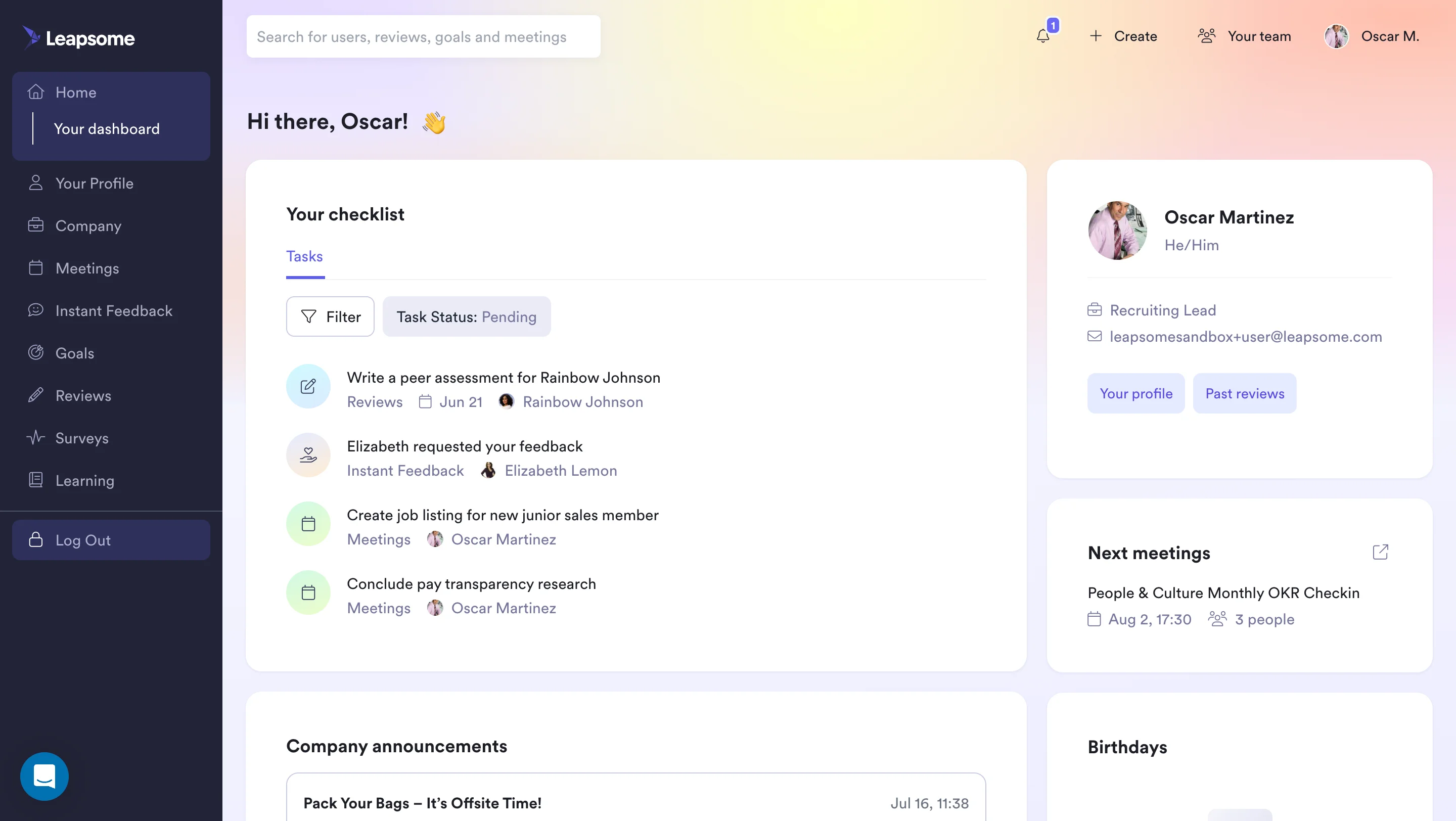
Leapsome combines performance reviews, OKRs, 1-on-1 meeting management, employee engagement surveys, a learning management module, and compensation planning into one platform. The breadth is real, not marketing.
For mid-market HR teams managing multiple point solutions for each of those functions, Leapsome is one of the more credible consolidation options in the category. It is particularly strong in the DACH region and broader European markets, where GDPR-native data architecture is a baseline requirement rather than an add-on. The AI review drafting capability was overhauled in 2024 and is now competitive with Lattice's equivalent feature.
Key Features
- Configurable review cycles: annual, project-based, probationary, 360-degree, and peer reviews
- OKR and goal tracking with visual dashboards and automated progress sync with tools like Jira
- AI-powered review assistant that drafts reviews from prior 1-on-1 notes, goal updates, and peer feedback
- Engagement, eNPS, onboarding, and exit surveys with real-time analytics in the same platform
- Learning management module for development tracking and training completion
- Compensation review workflows integrated with performance ratings
- GDPR-native data architecture with EU data residency options
Pros and Cons
Pros: "AI powered platforms that automate and interconnect all HR processes with leapsome flexible, design to drive growth. Cheaper" — Capterra reviewer
- The modular structure lets organizations start with reviews and goals, then add learning and compensation over time. That flexibility reduces the upfront commitment and shortens time-to-value for teams skeptical of large platform rollouts.
- Goal sync with Jira is one of the more useful integrations for product and engineering teams whose work primarily lives in project management tools. Goal progress updates automatically without manual input from managers or employees.
- The AI drafting feature, post-2024 overhaul, produces outputs that G2 reviewers describe as genuinely useful starting points rather than generic text requiring full rewrite.
Cons: "Its hard to find always a correct tab,It's often difficult to find the correct tab, and the names could be more flexible.It's often difficult to find the correct tab, and the names could be more flexible. names could be more adjustable" — G2 reviewer
- Navigation is the most consistent criticism in G2 and Capterra reviews. Users report difficulty finding specific features, particularly when switching between modules. The breadth that makes Leapsome attractive as a unified platform also creates cognitive load in daily use.
- Microsoft Teams integration is present but not native in the same sense as Teamflect. For Microsoft 365 organizations where Teams is the primary work surface, Leapsome requires managers to context-switch to a separate application.
- Pricing is custom and not publicly disclosed, which creates the same budget uncertainty problem as Culture Amp.
Pricing
Leapsome utilizes a flexible, modular pricing model that allows businesses to purchase only the specific HR processes they need. To lower the barrier to entry, they offer a contract-buyout promotion: companies currently locked into a contract with a competing HRIS can transition to Leapsome immediately and pay nothing while their legacy agreement runs its course, up until December 2026.
6. Workday Performance Management — Best for Those Already on Workday HCM
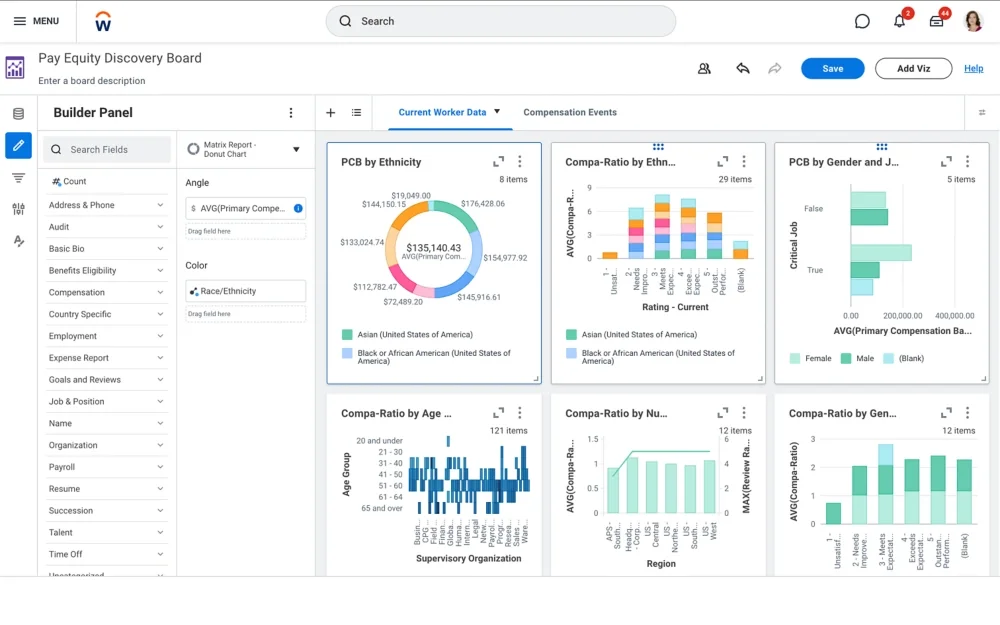
Workday Performance Management is the straightforward answer for large organizations whose HRIS is already Workday: the integration problem disappears, org charts stay current automatically, and reviews, talent reviews, succession planning, and 9-box calibration all sit in the same system of record. The tradeoff is configuration time measured in months rather than weeks, and a platform that, once configured, resists modification without IT involvement.
This is not a recommendation for organizations evaluating Workday for the first time on the basis of its review features. It belongs at this position on the list because, for enterprises already inside the Workday ecosystem, switching to a dedicated performance review platform introduces an integration problem in exchange for a UX improvement. Whether that trade is worth it depends on how severely the current Workday review experience is failing.
Key Features
- Native integration with Workday HCM: org chart, manager assignments, and employee records stay current without manual intervention
- Structured calibration sessions with talent reviews, 9-box grid, and succession planning workflows
- 360-degree feedback, goal setting, and continuous feedback within a single HCM system of record
- AI-driven sentiment analysis for employee feedback and performance trends
- Workforce planning with headcount modeling connected to performance data
- Multi-country, multi-language, multi-currency support for global enterprises
- Audit trail and compliance reporting designed for regulated industries
Pros and Cons
Pros: "ease of use, simple to navigate most of the time. Timekeeping is very simple to use on it, though wish I could view schedules and corrections as a whole." — Capterra reviewer
- For organizations already on Workday HCM, the absence of an HRIS integration problem is a genuine and significant advantage. The org chart is always current. Manager changes mid-cycle propagate automatically. That reliability alone eliminates a class of errors that dedicated review platforms introduce.
- Calibration, talent review, and succession planning functionality is enterprise-grade. The 9-box workflow, rating distribution analytics, and post-calibration locking are all present without add-ons.
- Compliance tooling for multi-jurisdiction environments is among the strongest in the category. For global enterprises running reviews across 10 or more countries, the alternative is a dedicated platform plus a substantial integration project.
Cons: "Well, sometimes it's a little tedious to enter and to find what you're looking for. But once you learn how to use it, you're good to go. And it was hard to learn at the beginning, some of the features, but after we learned them, it was amazing." — G2 reviewer
- Configuration is complex and typically requires dedicated HR IT resources or an implementation partner. Organizations expecting to configure and launch within 90 days should ask Workday specifically about their timeline for a similar-scale customer before signing.
- The review interface, while functional, draws consistent navigation criticism in G2 reviews. Users report more clicks than expected for common tasks.
- Pricing is bundled inside Workday HCM contracts and not publicly disclosed. Buyer-reported ranges on G2 suggest $100–$200 per employee per year all-in for HCM. Extracting a performance-specific cost from a Workday contract is not straightforward.
Pricing
Workday Adaptive Planning offers a 30-day free trial providing guided access to its core reporting and dashboard capabilities. For ongoing deployment, the platform shifts to a quote-based pricing model across two commercial tiers, both supporting unlimited what-if scenarios and native connectivity to any ERP or general ledger.
7. SAP SuccessFactors Performance & Goals — Best for Global Those in SAP Ecosystem
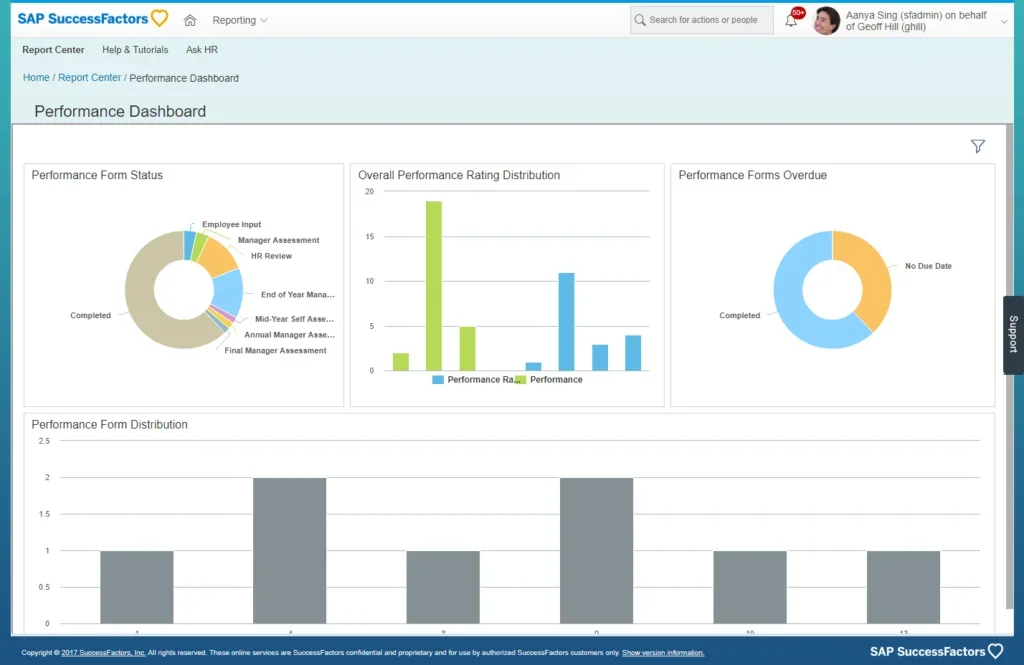
SAP SuccessFactors Performance & Goals is the category answer for true global enterprises: organizations running review cycles across 15 or more countries, with different rating scales, different legal frameworks for what can appear in a performance document, and different language requirements for the same review template. The platform supports that complexity in ways that mid-market tools do not attempt to address. It is a Gartner Leader for Cloud HCM Suites and has been releasing AI-enabled performance features since 2024.
This is not a platform for organizations under 2,000 employees. The configuration overhead, pricing structure, and required IT resources are calibrated for organizations that have dedicated HR IT teams.
Key Features
- Multi-country, multi-language, multi-rating-scale review cycle configuration from a single platform
- AI-enabled performance management features including review drafting and performance prediction (released 2024–2025)
- Calibration, talent review, and succession planning tools with global visibility
- Integration with SAP HCM and broader SAP ERP ecosystem
- Configurable competency frameworks with behavioral anchors across job families and geographies
- Compliance tooling for GDPR, CCPA, and country-specific labor law requirements
- Advanced analytics and reporting for global talent populations
Pros and Cons
Pros: "The ease of use and its interface is very simple for those who have or not experience with the software" — Capterra reviewer
- Multi-country review management from a single admin interface is the defining capability. Running parallel review cycles with different templates, rating scales, and language versions for a 10-country enterprise in a mid-market tool is a project. In SAP SuccessFactors, it is configuration.
- The integration with SAP HCM and SAP ERP eliminates the data-sync problem for organizations already in the SAP ecosystem, in the same way Workday eliminates it for Workday customers.
- AI performance features, particularly review drafting and performance trend analysis, are substantive. Several Gartner Peer Insights reviews from 2025 cite these features as meaningfully reducing HR administration time during peak review periods.
Cons: "Takes bit time to get used it rest it is very good application to use. Highly recommend and few things can be made easier to understand it quickly. And training is also bit tricky" — G2 reviewer
- Implementation requires dedicated HR IT resources and typically an SAP implementation partner. Multiple Gartner reviewers cite configuration timelines of six months or more for mid-complexity global deployments.
- For organizations outside the SAP ecosystem, the integration case for SuccessFactors is weaker. The platform's strengths are most fully realized inside an SAP environment.
- Custom pricing with no public figures. Buyer-reported contracts for global enterprises typically represent significant multi-year commitments. Budget clarity requires entering a formal sales process.
Pricing
SAP SuccessFactors Recruiting utilizes user-based licensing, with custom pricing calculated per authorized user, per month. Full pricing figures, specific contract durations, and system prerequisites are hidden from the public tier and require a direct quote request from the vendor.
8. BambooHR Performance Management — Best HRIS Integrated Solution
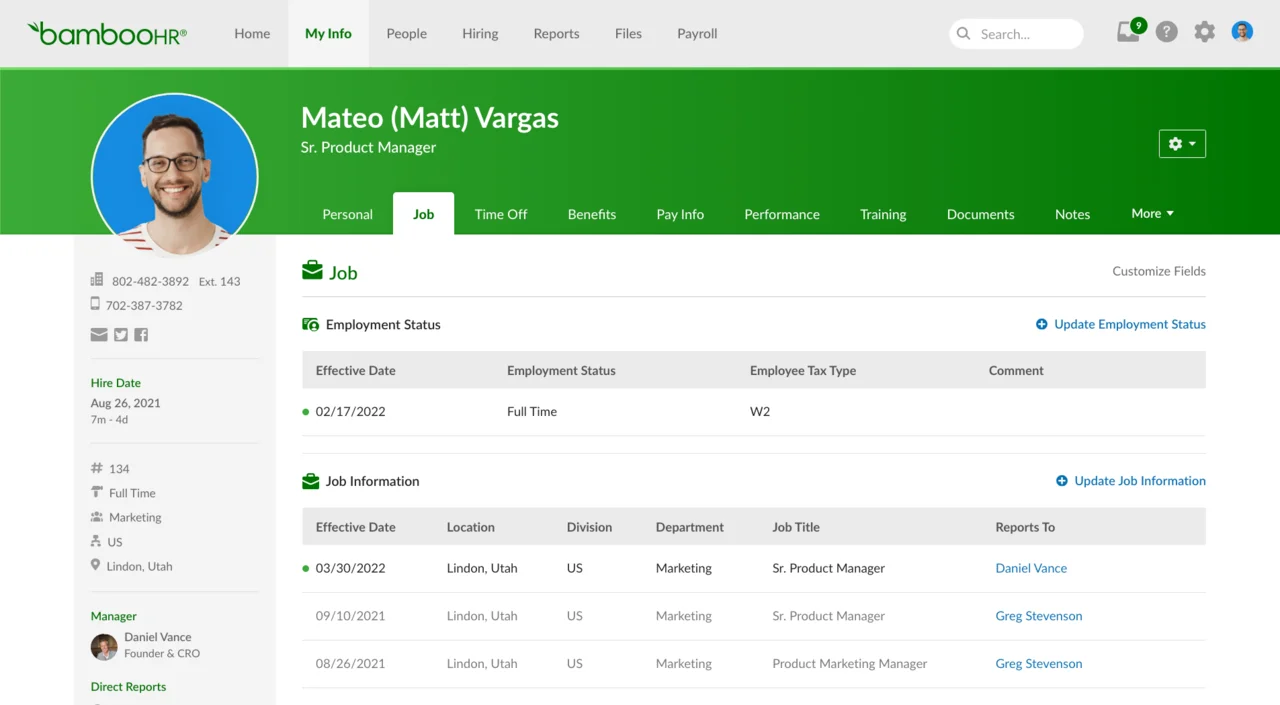
BambooHR's performance management module is the path of least resistance for HR teams already using BambooHR as their HRIS. The integration is native, employee records stay current automatically, and the manager experience is one of the cleaner interfaces in the SMB segment.
The honest framing is that performance reviews were added to BambooHR rather than built around it: the HRIS core is the product, and the review module is a well-executed addition. Buyers evaluating BambooHR primarily for its review features, without a prior BambooHR HRIS relationship, will find Lattice, 15Five, or PerformYard offer more review-specific depth.
Key Features
- Native integration with BambooHR HRIS: org chart, employee records, and manager assignments stay current automatically
- Configurable performance review templates with self-assessments, manager assessments, and peer reviews
- Goal tracking and feedback collection within the same platform as HR records
- Automated review cycle reminders and completion tracking
- eNPS and employee satisfaction surveys within the HR platform
- Mobile-accessible review completion for managers and employees
- Reporting on review completion rates and goal progress, exportable alongside HR data
Pros and Cons
Pros: "BambooHR is very easy to use. I especially like the holiday booking system and the organisation chart is great!" — Capterra reviewer
- For BambooHR HRIS customers, the performance module adds review functionality without adding a vendor relationship, an integration project, or a separate login. For HR managers already stretched thin, that operational simplicity has real value.
- Manager UX is clean and consistently well-rated across G2 reviews. Completion rates for organizations that switch from ad hoc review processes to BambooHR's structured cycle tend to improve for reasons of simple accessibility.
- Reporting ties performance data directly to HR records, which makes it easier to cross-reference review outcomes with tenure, department, or compensation data without exporting from two separate systems.
Cons: "BambooHR offers payroll, but it’s a separate paid add-on and is primarily optimized for US-based employees. While it handles standard HR reports well, pulling highly customized reports or more complex data analytics can feel restrictive." — G2 reviewer
- Review architecture flexibility is lighter than dedicated performance review platforms. Template customization, parallel cycle management, and question type variety are more constrained than what PerformYard, Lattice, or 15Five offer.
- Calibration tooling is minimal. There is no structured calibration session workflow, no rating distribution visualization, and no post-calibration rating lock. For organizations where calibration rigor matters, this is a structural gap.
- The performance module is a paid add-on on top of the BambooHR base plan. Total cost needs to be evaluated as base HRIS cost plus performance add-on, not as a standalone review platform price.
Pricing
BambooHR offers per-employee, per-month subscription pricing across three product tiers, with volume discounts available for larger workforces.
The Core plan ($10/employee/month) covers foundational HR automation, including onboarding, data reporting, benefits tracking, and compliance tools. The Pro tier ($17/employee/month) layer adds the platform's core performance management features and an employee community hub.
For advanced data access, the Elite tier ($25/employee/month) introduces complete compensation management, benchmarking, and custom analytics dashboards.
9. Betterworks — A Review Software with Strong OKR Features
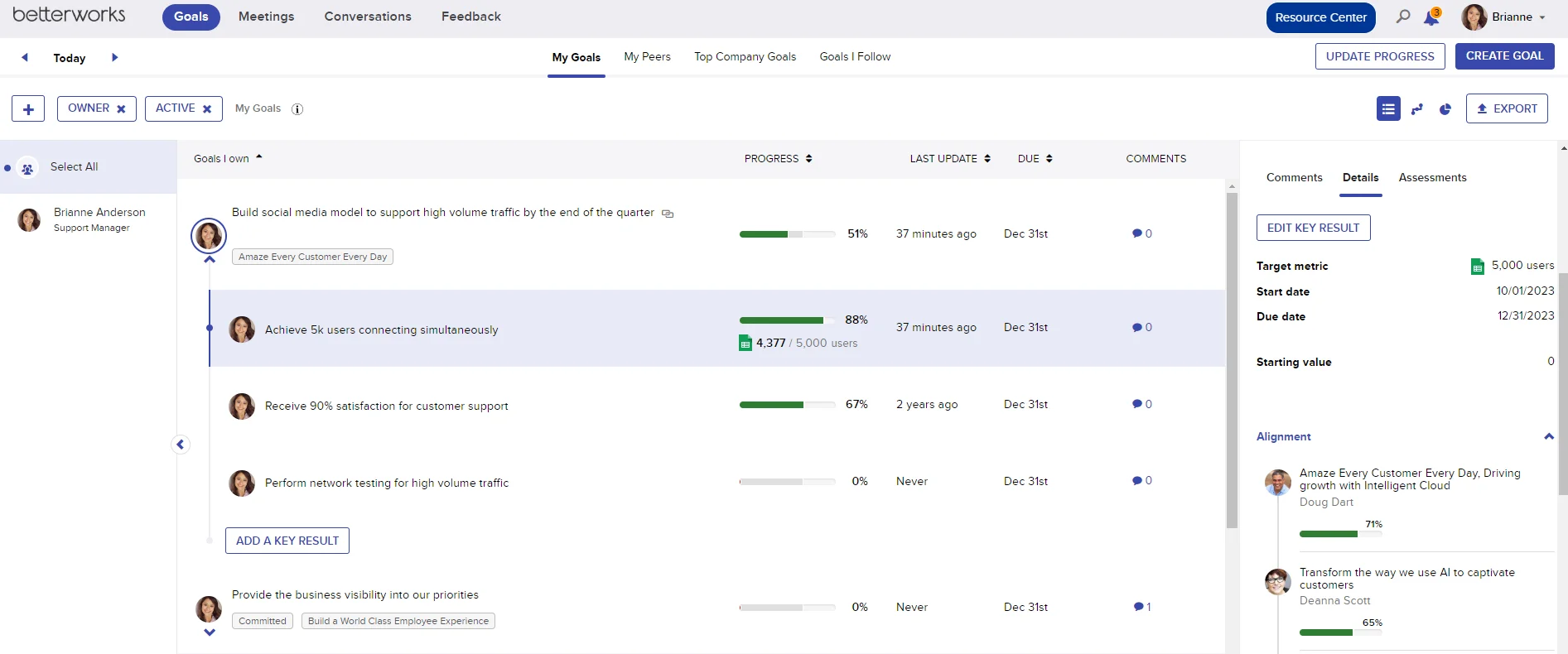
Betterworks began as an OKR platform and has built its performance review functionality outward from that foundation. The result is a platform where goal achievement is the primary input to the performance rating, and the review is structured around what the employee did against their stated objectives rather than a general competency assessment.
That approach works well for organizations in tech, professional services, and other environments where goals are specific, measurable, and tied to business outcomes. It fits less cleanly for organizations whose performance framework centers on behavioral competencies or values-based assessment.
Key Features
- OKR tracking integrated directly into the review cycle: goal completion data feeds the performance rating automatically
- Continuous feedback and check-in tools designed to run throughout the goal period, not only at review time
- Calibration module with rating distribution analytics, outlier identification, and post-calibration locking
- 360-degree feedback collection integrated with the review workflow
- AI-assisted review drafting pulling from goal progress, check-in history, and peer feedback
- Integrations with Workday, SAP, Microsoft Teams, Slack, and major HRIS platforms
- Analytics connecting goal achievement rates to review outcomes and retention data
Pros and Cons
Pros: "Betterworks makes talent management a breeze so that users can focus on meaningful results and conversations." — G2 reviewer
- The OKR-to-review integration is the most direct in this category. Goal completion data does not have to be manually referenced in the review form; it is surfaced automatically within the review workflow.
- Calibration tooling is substantive. Rating distribution visualization, manager outlier flagging, and audit trail logging put Betterworks ahead of most mid-market platforms in this dimension.
- The platform integrates bi-directionally with Workday and SAP, which makes it a credible choice for enterprises on those HRIS platforms that want dedicated performance review depth without abandoning their HCM investment.
Cons: "This software is not very suitable for small companies as it provides a lot of specific data." — Capterra reviewer
- Betterworks is calibrated for organizations where goals are central to the performance conversation. For companies whose review framework focuses on behavioral competencies or a values-based rubric, the platform's OKR-first structure creates friction.
- Custom pricing with no public figures. Several G2 buyers report a lengthy sales process before receiving a contract. Budget planning without a quote is difficult.
- Implementation requires meaningful configuration time. Multiple enterprise G2 reviewers describe onboarding timelines of 60 to 90 days before the first review cycle was operational.
Pricing
Betterworks utilizes custom, quote-based pricing tailored to organizational scale rather than public flat rates. Their deployment options are split into two main operational categories: the Mid-Market framework, engineered to deliver core evaluation mechanics for businesses with 500 or more employees, and the Enterprise framework, built to scale across massive workforces of over 2,500 employees with complex architectural requirements, deep integrations, and dedicated account support.
10. PerformYard — Best Value for SMBs Needing Flexible Review Configuration
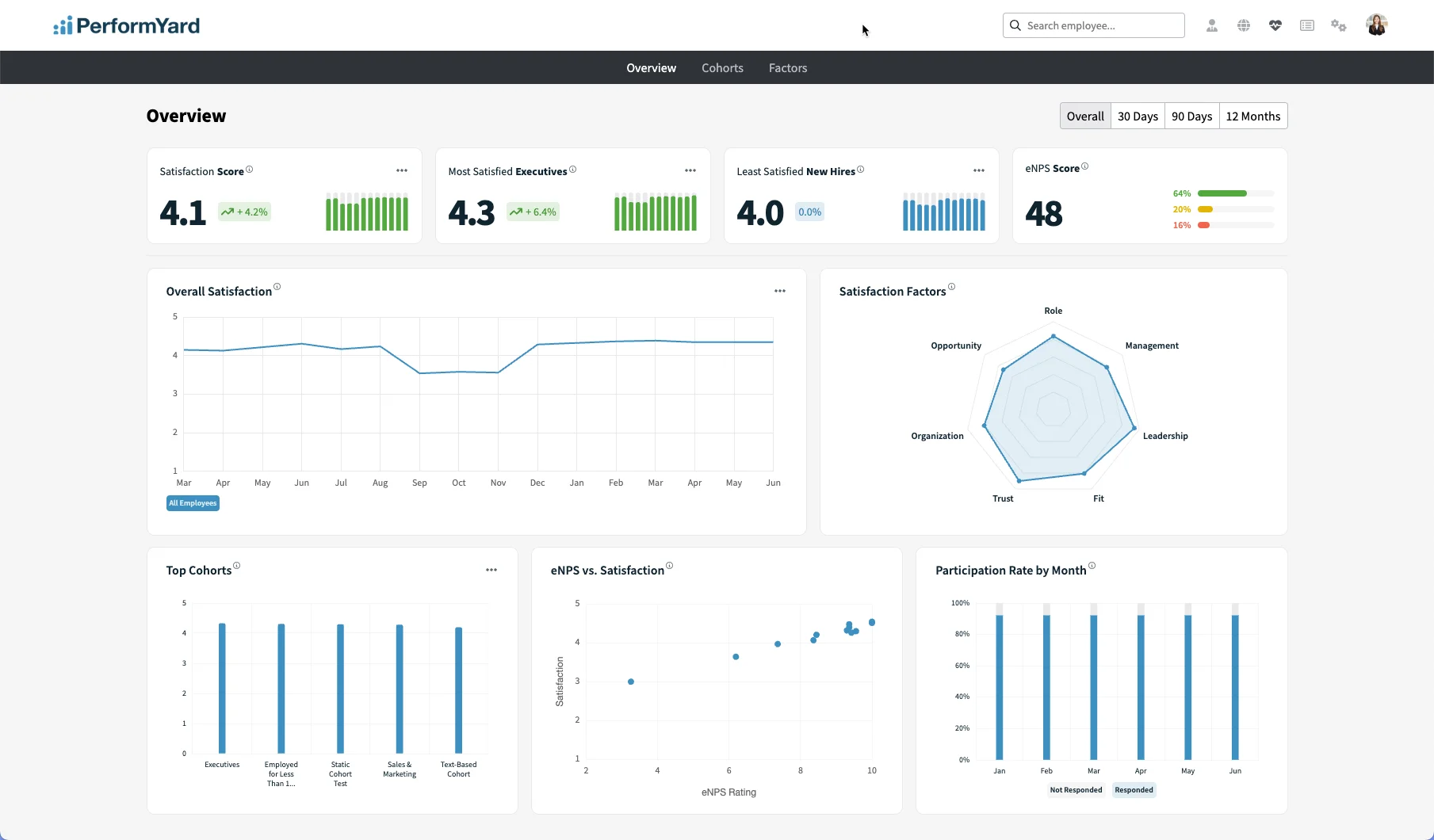
PerformYard's primary differentiator is review template flexibility at a price point that mid-market platforms cannot match. Where Lattice or Culture Amp require professional services to configure non-standard review types, PerformYard customers routinely build project-end reviews, probationary reviews, and 360-degree cycles independently, using the admin interface without IT support.
The platform is specifically not a unified talent suite. It does reviews well. Goal tracking is present but lighter than Lattice or 15Five. Engagement surveys are an add-on. Buyers who want one platform for reviews, goals, and engagement surveys should look higher on this list.
Key Features
- Configurable review templates: annual, quarterly, project-end, probationary, 360-degree, and upward review cycles, all admin-configurable without IT
- Automated reminder and escalation system that keeps review cycles open until completed, rather than auto-closing
- Goal tracking and continuous feedback tools within the review platform
- Dedicated customer success manager, live training, and phone support included in every contract
- Reporting on review completion rates, rating distributions, and goal progress
- HRIS integrations with BambooHR, ADP, Workday, and others
- Engagement survey add-on at $1–$3/user/month above the base plan
Pros and Cons
Pros: "I appreciate that it adapts to different performance cycles, facilitates goal tracking, and has automated reminders." — Capterra reviewer
- Template flexibility is the strongest in this price range. Admin-configurable review types that competitors require professional services to set up can be handled independently in PerformYard. That autonomy matters for HR teams that adjust their review process annually.
- The automated reminder and escalation system is specifically praised in G2 reviews as solving a real problem: review cycles that stay open and continue escalating until completed, rather than auto-closing with incomplete submissions. For HR managers who have spent weeks chasing managers, this is a practical rather than a cosmetic feature.
- Dedicated customer success, live training, and phone support are included in every contract at a price point ($5 to $10/user/month) where most competitors offer only documentation and async support.
Cons: "I may be missing something, but it would be nice if it had a Gantt chart or timeline view to align the checklist to due dates." — G2 reviewer
- Goal tracking is present but lighter than Lattice, 15Five, or Betterworks. Organizations whose review framework places heavy weight on goal achievement data will find PerformYard's goal module less developed than dedicated platforms in that area.
- No native engagement survey module included in the base plan. The add-on structure means organizations wanting reviews and pulse surveys pay for both, which narrows the price advantage against Lattice's all-in pricing at larger team sizes.
- AI review drafting is present but less developed than Lattice or 15Five equivalents. Organizations whose primary selection criterion is AI assistance for managers will find better options higher on this list.
Pricing
PerformYard offers a modular, annual pricing structure starting with its core Performance Management module at $5 to $10 per person, per month, which includes reviews, goal tracking, and full implementation support.
Organizations can customize functionality by layering on add-ons billed per person, per month: PerformYard AI (additional $1 to $3), Employee Engagement (additional $1 to $3), or specialized Meetings and Surveys (additional $2 to $4 each). Enterprise volume discounts are accessible, though minimum contract thresholds apply.
Why Finding the Right Performance Review Software Matters
The review cycle just finished. It took five weeks; most managers submitted on the last day, the calibration meeting ran two hours over, and at least one rating is now sitting in an HR inbox with a legal question attached to it.
That is not just an administrative problem. It is a signal that the process itself is broken, and in many cases, the platform behind it is making things worse.
The wrong tool creates a predictable set of failures:
- Managers avoid the platform because it requires a separate login outside their daily workflow
- Calibration happens in a spreadsheet because the software does not support it properly
- HR spends the final week of every cycle manually chasing completions
- Employees receive feedback that is generic, rushed, and disconnected from anything they actually worked on
The stakes are real. Data from Gallup show that only 14% of workers feel inspired by their reviews, just 26% find them accurate, and only 29% view them as fair. Poorly run review cycles do not just frustrate employees; they actively damage performance in 33% of cases.
The right platform does not just digitize the old process. It restructures it so managers can complete reviews in the tools they already use, calibration is built into the workflow rather than bolted on afterward, and the output is something an employee can actually act on.
How to Choose the Right Performance Review Platform
If you are setting up structured reviews for the first time (50 to 250 employees, currently in Google Docs or spreadsheets): PerformYard or 15Five are the most straightforward entry points. PerformYard if your priority is template flexibility and fast configuration. 15Five if you want to build a continuous feedback cadence from day one rather than running annual reviews as a discrete event.
If you are leaving a generic HRIS review module (250 to 2,000 employees, reviews currently inside Workday, BambooHR, or Rippling): Lattice is the most common destination for this buyer profile. The review architecture flexibility, HRIS integration depth, and continuous performance management capabilities address most of the specific frustrations HRIS-module refugees describe. Culture Amp Perform and Betterworks are credible alternatives depending on whether engagement benchmarking or OKR-first structure matters more.
If you are on Microsoft 365 and manager adoption has been a consistent failure: Teamflect is worth a serious look before any other platform. The absence of a separate login and application switch is not a minor convenience feature; it is the single largest driver of completion rate in Teams-first organizations. Read the full Teamflect review before booking other demos.
If calibration, legal defensibility, and audit trails are the primary requirement (500+ employees, reviews tied to compensation decisions): Culture Amp Perform, Betterworks, and Workday Performance Management all address this at different price points and integration models. For a comparison of engagement tools that feed into performance decisions, see the employee engagement software guide.
Ready to Book Your First Demo?
The tools on this list all offer demos, and most offer a free trial or free tier. Before your first call, prepare one scenario from your last review cycle that caused the most friction: a calibration problem, a late-submission chase, a manager who couldn't find the form, or a rating that couldn't be defended in an exit interview.
Ask the vendor to show you how their platform handles that specific case. The answer tells you more than any feature comparison chart. For a broader look at platforms that combine reviews with goal-setting, 1-on-1 management, and recognition, see the performance management software guide.
Frequently Asked Questions
What is performance review software, and how is it different from performance management software?
Performance review software is a platform where the review cycle is the primary product: configurable templates, calibration tooling, 360-degree feedback, and reporting that holds up after the cycle closes. Performance management software is a broader category that also includes goal-setting, OKR tracking, 1-on-1 management, and recognition as core functions alongside reviews.
Many platforms sit in both categories; the distinction matters when you are evaluating whether a platform's review features are purpose-built or bolted on. The performance management software guide covers the broader category.
How much does performance review software cost?
Publicly disclosed starting prices range from $5/user/month (PerformYard) to $11/user/month (Lattice, 15Five Perform). Enterprise platforms including Workday, SAP SuccessFactors, Culture Amp, Leapsome, and Betterworks use custom pricing. For teams under 10 users, Teamflect offers a free plan with full feature access. Always build your cost estimate from the specific modules you will use on day one, not the base tier alone.
How long does implementation typically take?
Lighter platforms (PerformYard, Teamflect, 15Five) typically reach a first live review cycle in two to four weeks for teams under 500 employees. Mid-market platforms (Lattice, Culture Amp, Leapsome) typically take four to eight weeks for a full configuration. Enterprise platforms (Workday, SAP SuccessFactors) regularly require three to six months or more, particularly when custom calibration workflows and multi-country configurations are involved.
What is 360-degree feedback software, and do I need it?
360-degree feedback collects performance input from peers, direct reports, and skip-level managers alongside the manager assessment and self-assessment. Most platforms on this list include a 360 option within the review cycle. Whether you need it depends on whether your review framework places weight on peer input or whether you are primarily running manager-down assessments. See the 360 feedback software guide for a dedicated comparison.
.avif)