

.svg)
Managing projects without the right software feels like juggling with one hand tied behind your back. You're buried in spreadsheets, chasing updates through endless email threads, and watching deadlines slip past while your team struggles to stay aligned.
Sound familiar? You're not alone. Many project managers face these exact challenges when trying to coordinate tasks, track progress, and keep stakeholders happy without proper project management tools.
The right project management software changes everything. It brings your team together, creates visibility into project status, and automates the busywork that eats up your day.
In this comparison, we'll walk through the top 10 project management software options for 2026, including features, pricing, and real user feedback to help you find the perfect fit for your team.
Here's the video version of this guide, covering the top 5 project management platforms for 2026 in a few minutes:
What to Look for in Project Management Software
Before jumping into specific tools, consider these essential factors when choosing project management software for your team.
1. Core Features Matter Most
Look for task management, team collaboration, progress tracking, and reporting capabilities. These basics should work smoothly without requiring a computer science degree to figure out.
2. Integration Requirements Can Make or Break Your Choice
The best project management software connects with the tools you already use like email, calendars, file storage, and communication platforms. Switching between disconnected apps wastes time and creates information silos.
3. Think About Scalability
Your needs today might be simple, but what happens when your team doubles in size or you take on more complex projects? Choose software that can grow with you without forcing a complete platform migration down the road.
4. Pricing Models Vary Widely
Some charge per user per month, others offer flat rates for unlimited users. Factor in your team size and projected growth to calculate real costs. Free plans can work for small teams, but paid tiers often unlock features you'll actually need.
5. Consider Implementation and Support
How long will the setup take? What training resources are available? Does the vendor offer responsive customer support when issues arise? The smoothest software in the world isn't worth much if your team can't get help when they need it.
Top 10 Project Management Software in 2026
1. Teamflect: Best Project Management Software for Microsoft 365

Teamflect combines task management with performance management features like goal setting, feedback, and recognition. This unique approach helps teams not just complete projects, but also develop skills and stay engaged throughout the process.
The software integrates natively with Microsoft Teams and Outlook, which means your team can manage projects without leaving the platforms they use every day. No separate logins, no context switching, just project management that fits naturally into your existing work environment.
Key Features
- Native Microsoft 365 integration with Teams, Outlook, Planner, and To Do
- Task creation directly from chat messages and emails
- Bidirectional sync between Teamflect, Microsoft To Do, and Outlook Tasks
- Goal and OKR tracking linked to project tasks
- Real-time collaboration in Microsoft Teams meetings
- Project closure review templates for post-project evaluation
- Power BI integration for advanced reporting and dashboards
- AI-powered Teamflect Agent for automated assistance
What Makes Teamflect Stand Out
- Works entirely inside Microsoft 365 without requiring separate accounts or logins
- Connects project tasks to organizational goals and individual development plans
- Offers project management alongside performance reviews, surveys, and recognition
- Syncs organizational chart directly from Entra ID for simplified implementation
Pros & Cons
Pros: “I love how Teamflect has made it so much easier and more intuitive for us to manage our organizational strategy. The ability to customize terminology and timeframes to fit our own language and processes has been a huge plus.” - G2 Review
- Seamless integration creates high adoption rates among Microsoft 365 users
- Free plan includes full functionality for up to 10 users with no time limits
- Combines project management with HR features for holistic team development
- Dedicated Customer Success Manager for every account
- Integration with 200+ HRIS systems for smooth data synchronization
Cons:
- Requires Microsoft 365 environment (not suitable for organizations outside this ecosystem)
Pricing
- Starter: Get started with basic features, FREE for up to 10 users
- Essential: $7/user/month (volume discounts and discount for non-profits available)
- Professional: $11/user/month (volume discounts and discount for non-profits available)
2. Wrike: A Strong Project Management Tool for Enterprise Teams
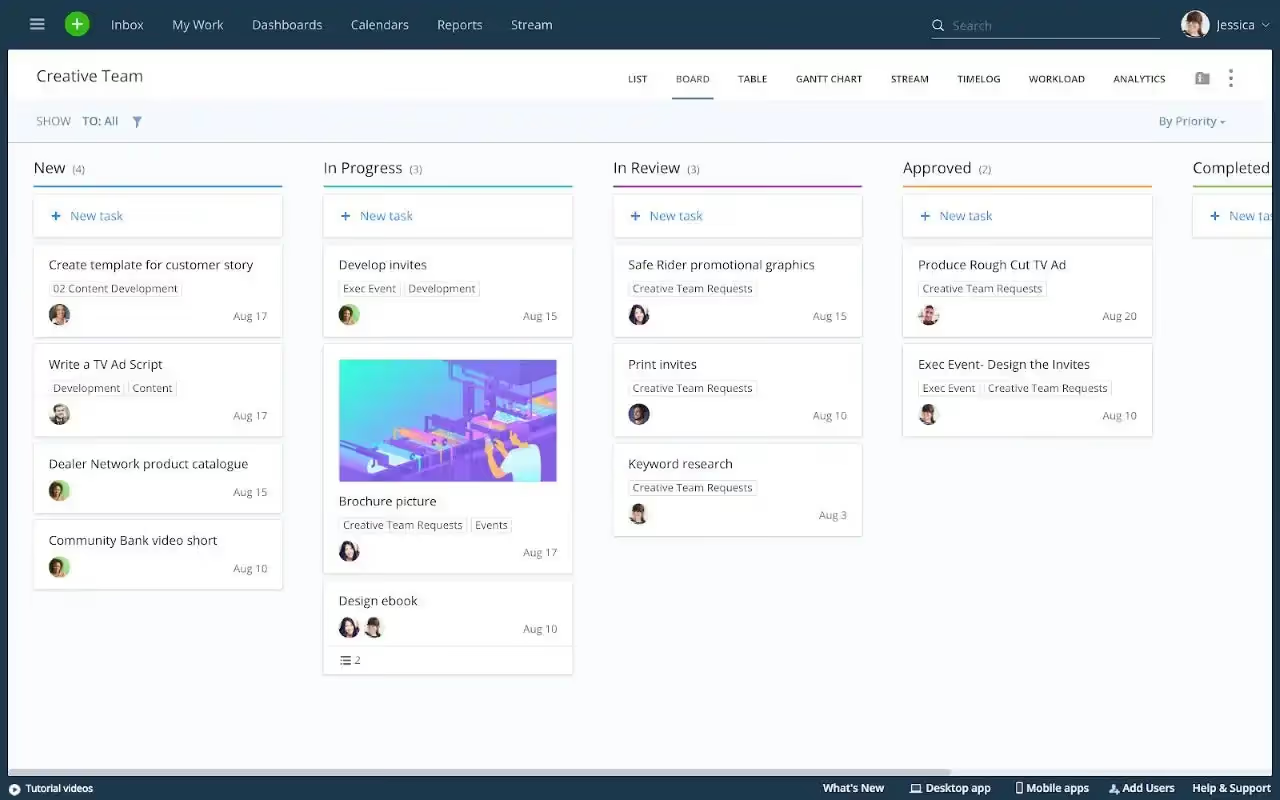
Wrike delivers comprehensive project management capabilities designed for larger organizations managing complex workflows.
The platform provides flexible project tracking, advanced reporting, and automation features that help enterprise teams coordinate work across departments. Wrike's strength lies in its ability to handle multiple portfolios and projects simultaneously while giving leadership the visibility they need.
Key Features
- Custom workflows and automation to reduce manual work
- Dynamic Gantt charts with real-time updates
- Resource management and workload balancing
- Request forms for streamlined project intake
- Advanced reporting and analytics with business intelligence integration
- Time tracking built into tasks
- File proofing and approval workflows
Best For
- Enterprise teams needing advanced workflows and extensive customization
- Marketing and creative agencies managing client work
- Organizations requiring detailed resource allocation and budget tracking
Pros & Cons
Pros: “Wrike is a dependable project management tool. The best [thing] about Wrike is its strong Ease of Use, making it simple for teams to adopt quickly.” - G2 Review
- Robust customization options adapt to different industries and team structures
- Strong integration ecosystem with 400+ applications
- Excellent reporting capabilities with Power BI and Tableau support
- Reliable performance even with complex, multi-project workloads
Cons: "It would be helpful if Wrike could provide recommendations on how to organize my time effectively within a project, using budgets and active items from previous work." - G2 Review
- Steep learning curve for new users unfamiliar with enterprise PM software
- Higher-tier plans required to access many useful features
- Pricing can become expensive for smaller teams
- Limited storage on lower-tier plans may not suit media-heavy projects
Pricing
- Free Plan: Up to 5 users with basic task management
- Team Plan: $10/user/month
- Business Plan: $25/user/month
- Enterprise Plan: Custom pricing
- Pinnacle Plan: Custom pricing (most advanced features)
3. Asana: A Versatile Project Management Platform for Team Collaboration
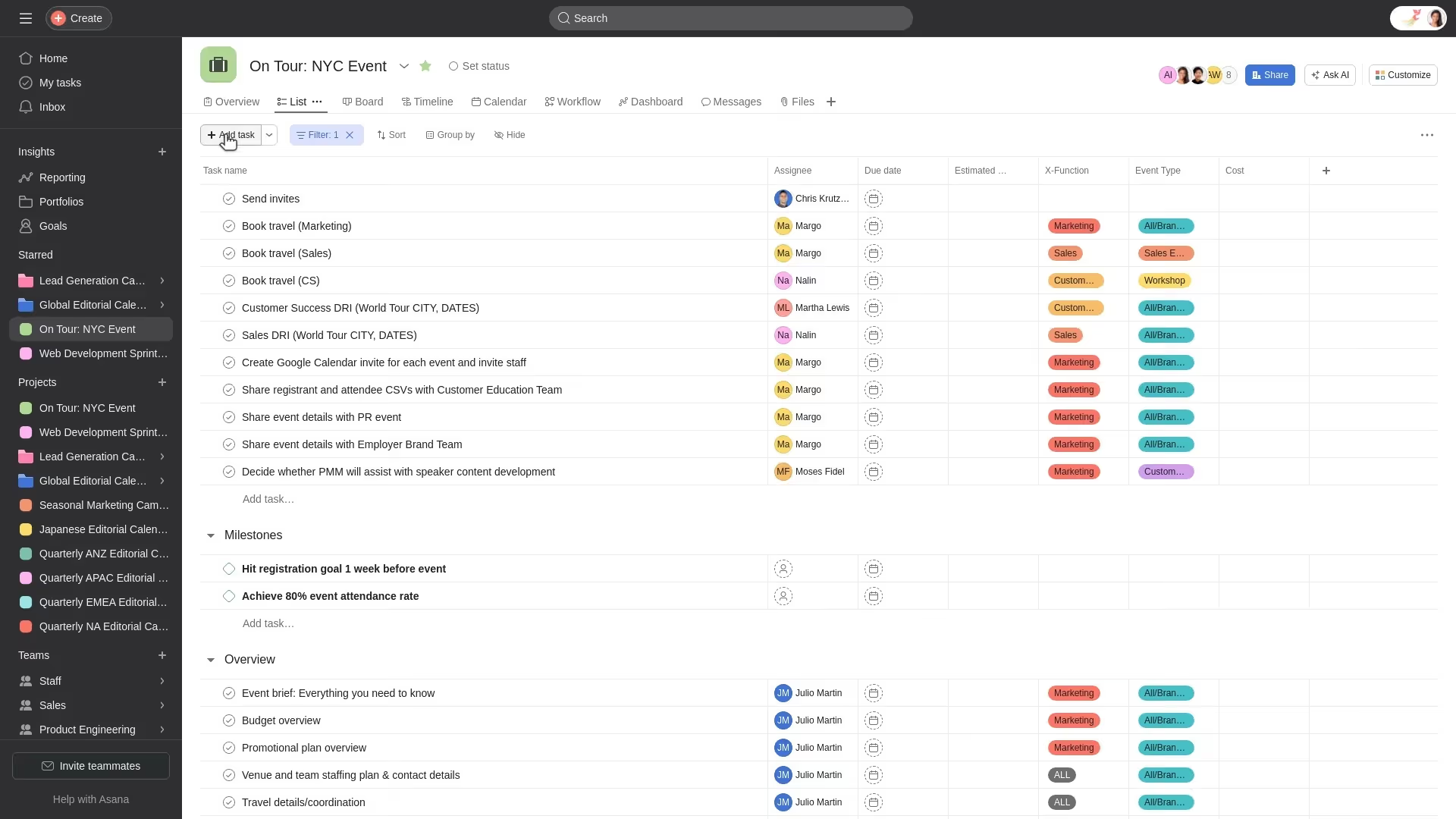
Asana provides intuitive project management with multiple views and collaboration features. Teams appreciate Asana for its clean interface and straightforward approach to project management. The software balances powerful features with ease of use, making it accessible for teams new to structured project management.
Key Features
- Multiple project views including list, board, timeline, and calendar
- Task dependencies and milestones
- Custom fields and templates
- Automation rules called Rules
- Portfolio management for tracking multiple projects
- Real-time activity feed and project updates
Best For
- Cross-functional teams needing clear task ownership and visibility
- Organizations transitioning from spreadsheets to dedicated project management software
- Teams prioritizing collaboration and communication alongside task tracking
Pros & Cons
Pros: "What sets Asana apart for me is its method of assigning responsibility: only one user is marked as accountable for completing a task, while others can be added as collaborators without being the main stakeholder." - G2 Review
- Intuitive interface requires minimal training
- Flexible view options accommodate different working styles
- Strong mobile app for managing work on the go
- Generous free plan suitable for small teams getting started
Cons: "Some of the important features are locked by the premium price level." - Gartner Peer Insights
- Advanced features locked behind higher-priced tiers
- Reporting capabilities less robust than enterprise competitors
- Can become overwhelming with many projects and tasks
- Limited customization compared to tools like Wrike or ClickUp
Pricing
- Basic Plan: Free for up to 2 users
- Premium Plan: $10.99/user/month (billed annually)
- Business Plan: $24.99/user/month (billed annually)
- Enterprise Plan: Custom pricing
6. ClickUp: An All-in-One Productivity Platform
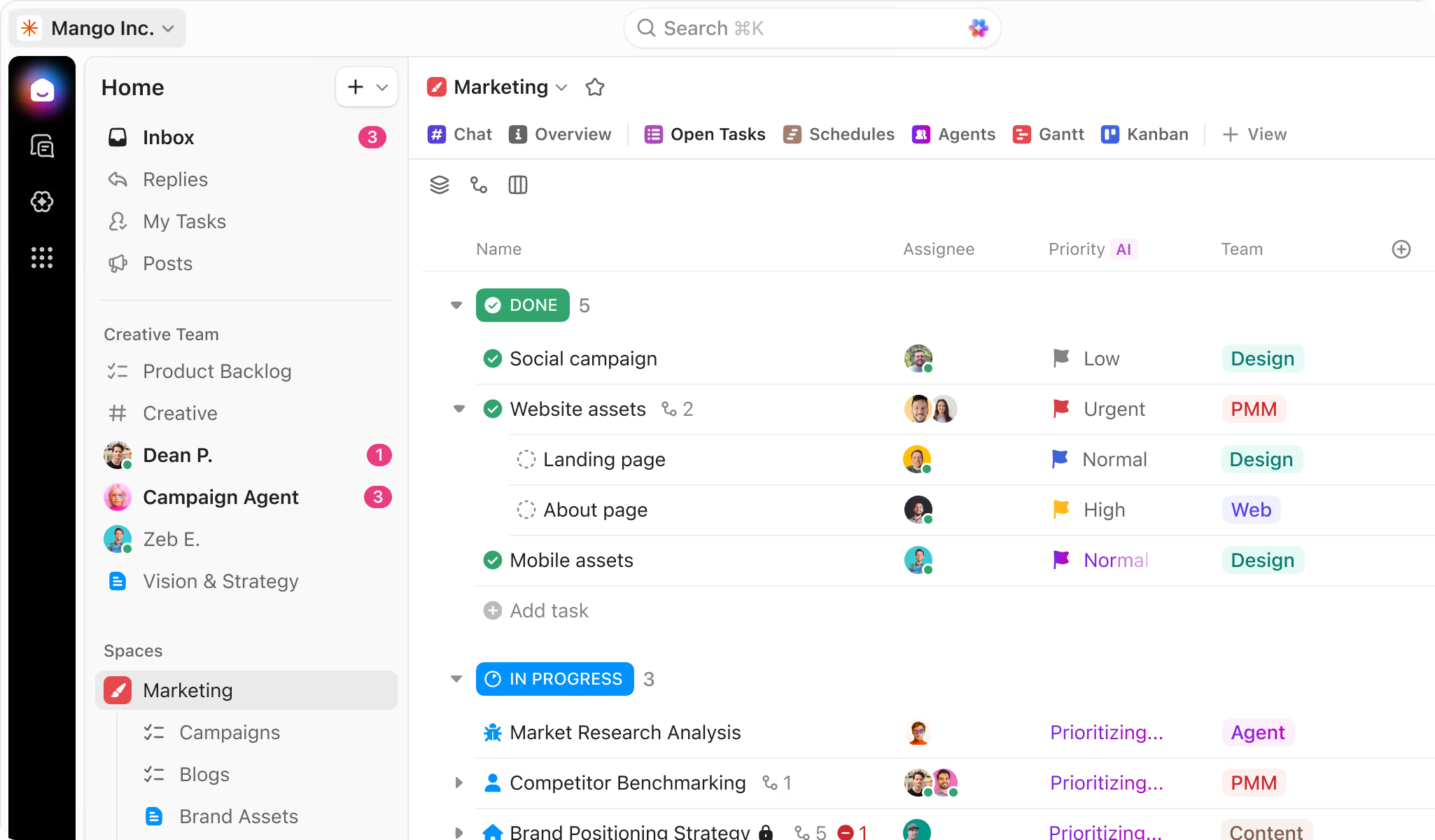
ClickUp packs extensive functionality into a single application, from task management to documents, goals, and even whiteboards. This consolidation appeals to teams tired of switching between multiple tools throughout the day.
Key Features
- Hierarchical organization with spaces, folders, lists, and tasks
- 15+ customizable views including Gantt, board, and mind map
- ClickUp Docs for documentation and wikis
- Built-in time tracking
- Goal tracking with automatic progress updates
- Whiteboards for brainstorming and planning
- ClickUp AI for automated writing and summarization
Best For
- Teams wanting to consolidate multiple tools into one platform
- Organizations needing high flexibility and customization
- Remote teams requiring comprehensive collaboration features
- Product and engineering teams tracking complex projects
Pros & Cons
Pros: "ClickUp has been mostly positive. It helps me keep everything organized in one place and lets me work the way I want with different views and automation but it can sometimes feel a bit busy or slow with big projects." - Gartner Peer Insights
- Extremely feature-rich with regular updates
- Generous free plan with most core features
- Highly customizable to match team workflows
- Excellent value for money compared to competitors
Cons: "The subtask tracking is something I want to like, but I don't, because the subtasks end up with less visibility and some confusion about what's done or not done." - Capterra Review
- Steep learning curve due to extensive features
- Interface can feel cluttered
- Performance can slow with very large workspaces
- Too many options may overwhelm small teams wanting simplicity
Pricing
- Free Plan: Unlimited tasks and members (with limitations)
- Unlimited Plan: $7/user/month (billed annually)
- Business Plan: $12/user/month (billed annually)
- Enterprise Plan: Custom pricing
5. Monday.com: A Customizable Work Operating System
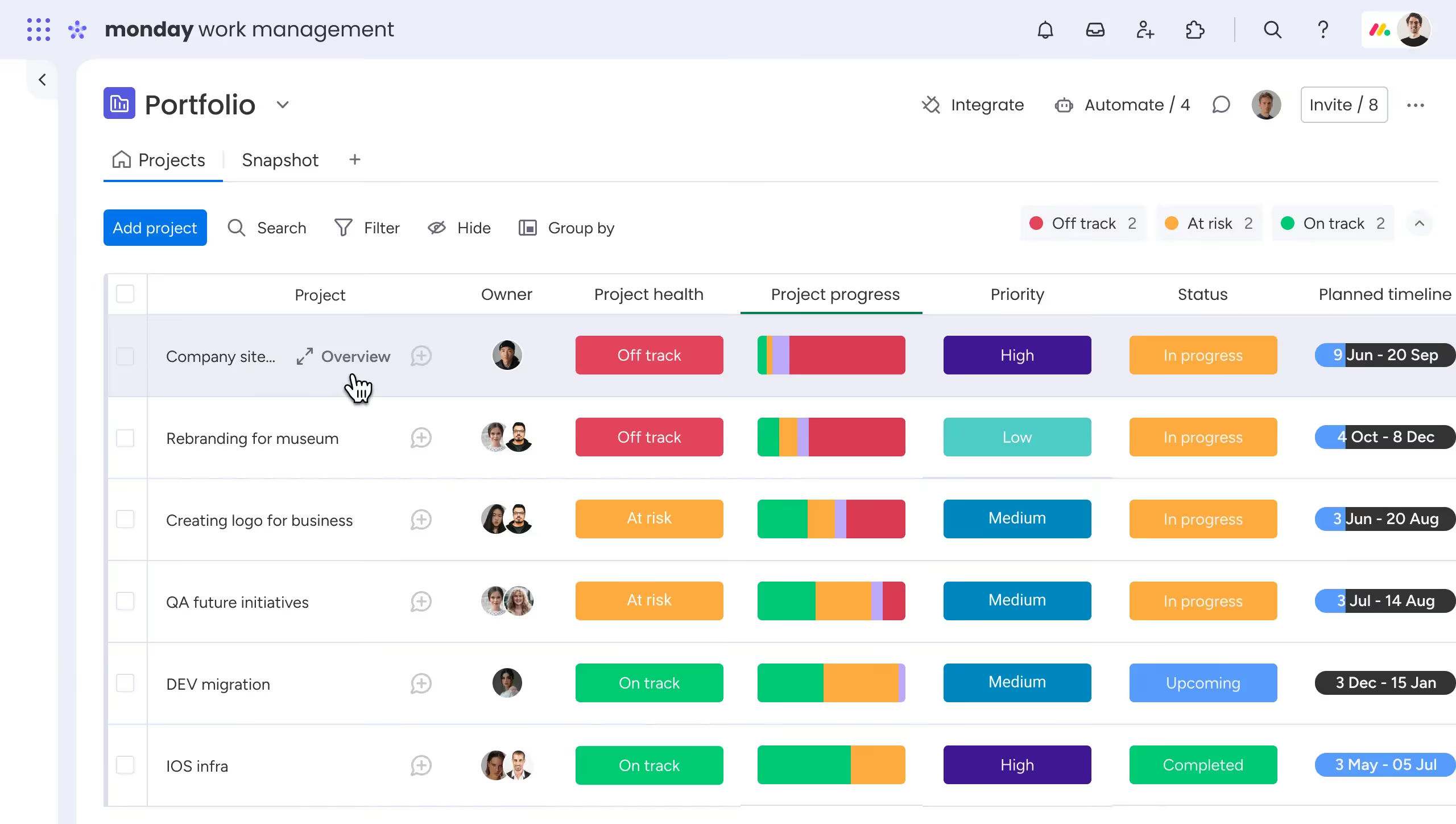
Monday.com positions itself as a complete work operating system rather than just project management software. The platform's strength lies in its visual workflow boards and extensive customization options. Teams can build workflows that match their specific processes without coding or technical expertise.
Key Features
- Highly customizable workflow boards
- Extensive automation capabilities
- Multiple project views including kanban, Gantt, and calendar
- Time tracking and resource management
- Advanced dashboard and reporting
- Integration with 200+ applications
Best For
- Teams needing highly customized workflows
- Organizations managing diverse project types
- Marketing teams coordinating campaigns
- Operations teams tracking multiple processes simultaneously
Pros & Cons
Pros: "The platform's ability to set automations and dashboards is amazing, as it handles tasks so the users don't have to worry—the platform essentially works for them." - G2 Review
- Exceptional customization flexibility
- Beautiful, intuitive interface
- Powerful automation reduces manual work
- Strong customer support and training resources
Cons: "The platform's complexity is a major barrier for users without prior experience. We primarily use it for project management, but achieving a proper configuration would have been nearly impossible without external expertise." - Capterra Review
- Pricing becomes steep for larger teams
- Can be overwhelming with extensive customization options
- Some features require higher-tier plans
Pricing
- Individual Plan: Free (up to 2 seats)
- Basic Plan: $9/user/month (billed annually)
- Standard Plan: $12/user/month (billed annually)
- Pro Plan: $19/user/month (billed annually)
- Enterprise Plan: Custom pricing
6. Trello: A Visual Task Board System for Simple Project Tracking
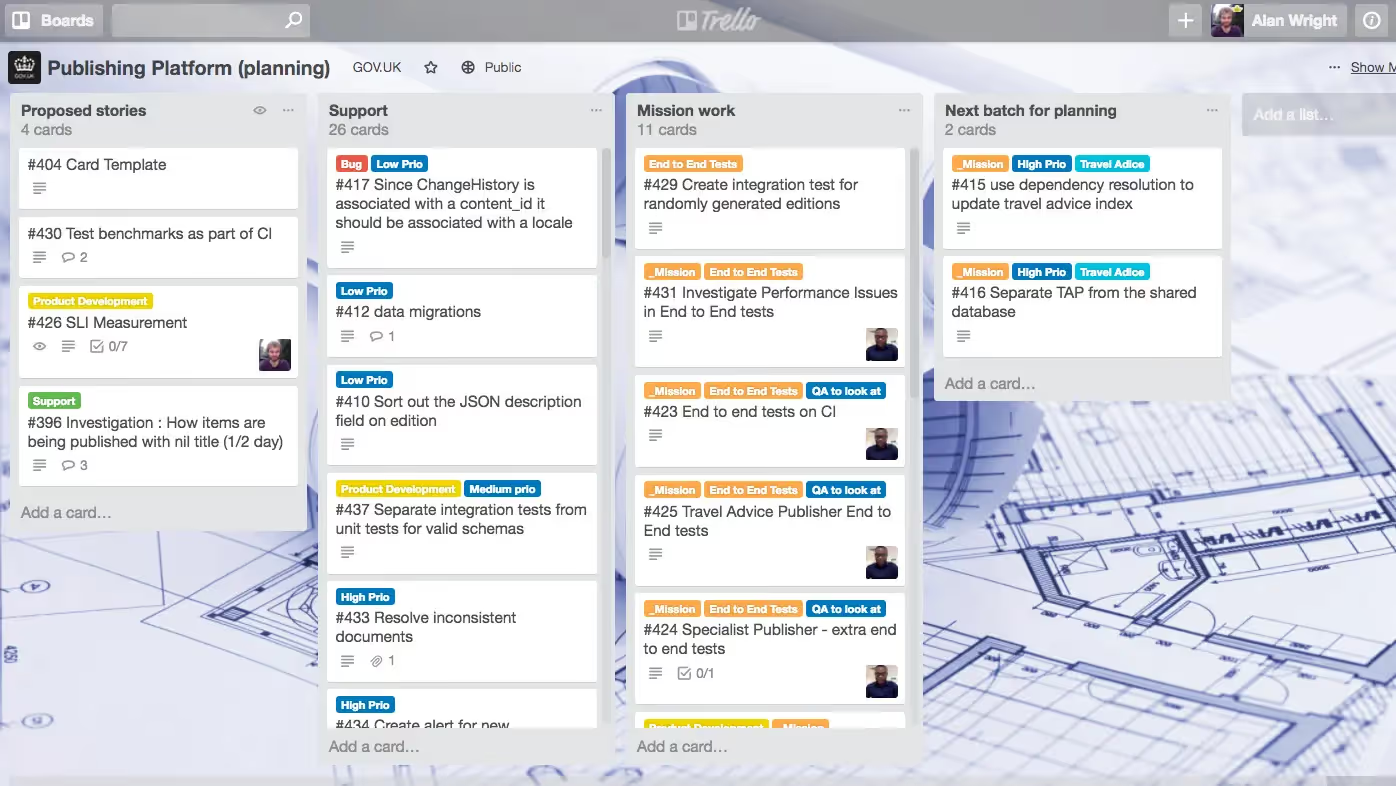
Trello uses a card-based kanban system that makes project management visual and intuitive.
Based on the kanban methodology, Trello organizes work into boards, lists, and cards. This visual approach works well for teams that want to see their work at a glance without complex features getting in the way.
Key Features
- Drag-and-drop kanban boards
- Card checklists and attachments
- Butler automation for repetitive tasks
- Power-Ups for extended functionality
- Multiple board views including calendar and timeline
- Team collaboration with comments and mentions
Best For
- Small teams needing simple, visual task management
- Creative projects and content planning
- Personal productivity and individual task tracking
- Teams preferring visual organization over traditional lists
Pros & Cons
Pros: "The visual boards make it unbelievably easy to understand what’s happening in a project at a glance." - G2 Review
- Extremely user-friendly with minimal learning curve
- Flexible enough for various use cases from marketing to development
- Free plan generously supports small teams
- Visual approach makes project status immediately clear
Cons: "I personally think the permission management is a bit nascent in the trello platform and configuring user access to comment on cards and changing permissions to view them by teams/within organisation is difficult." - Capterra Review
- Limited advanced project management features
- Not ideal for complex projects with dependencies
- Reporting and analytics capabilities basic compared to alternatives
- Can become cluttered with many boards and cards
Pricing
- Free Plan: Unlimited cards and up to 10 boards per workspace
- Standard Plan: $5/user/month (billed annually)
- Premium Plan: $10/user/month (billed annually)
- Enterprise Plan: $17.50/user/month (billed annually)
7. Jira: A Project Management Solution Built for Dev Teams
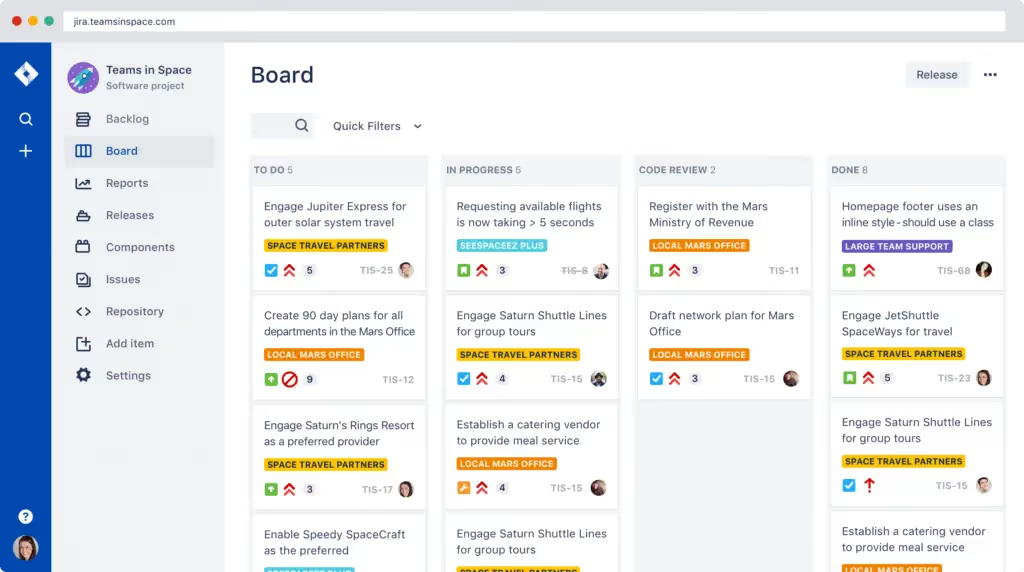
Originally designed for bug tracking, Jira evolved into a comprehensive project management platform for software teams. It excels at managing sprints, tracking development work, and integrating with development tools.
Key Features
- Scrum and kanban boards optimized for development workflows
- Sprint planning and tracking
- Customizable workflows matching development processes
- Advanced issue tracking and bug management
- Release planning and version tracking
- Integration with development tools like GitHub, Bitbucket, and GitLab
- Detailed reporting on velocity, burndown, and sprint progress
Best For
- Software development teams using agile methodologies
- IT teams tracking bugs and technical issues
- Product teams managing feature development
- Organizations already using Atlassian products
Pros & Cons
Pros: "This tool has been extremely helpful for managing tasks within our team and for setting up automated workflows and reminders.." - G2 Review
- Purpose-built for software development workflows
- Exceptional agile project management capabilities
- Deep integration with development ecosystem
- Powerful automation and customization options
Cons: “Jira can sometimes feel overwhelming for people who aren't the superuser or users who are less technical. They've reported being overwhelmed by the tool and it not being the most intuitive." - Capterra Review
- Steep learning curve, especially for non-technical teams
- Interface can feel dated compared to modern alternatives
- Overwhelming for teams not using agile methodologies
- Pricing increases significantly with advanced features
Pricing
- Free Plan: Up to 10 users
- Standard Plan: $7.91/user/month (billed annually)
- Premium Plan: $14.54/user/month (billed annually)
- Enterprise Plan: Custom pricing
8. Teamwork: A Project Management Platform for Client-Facing Work
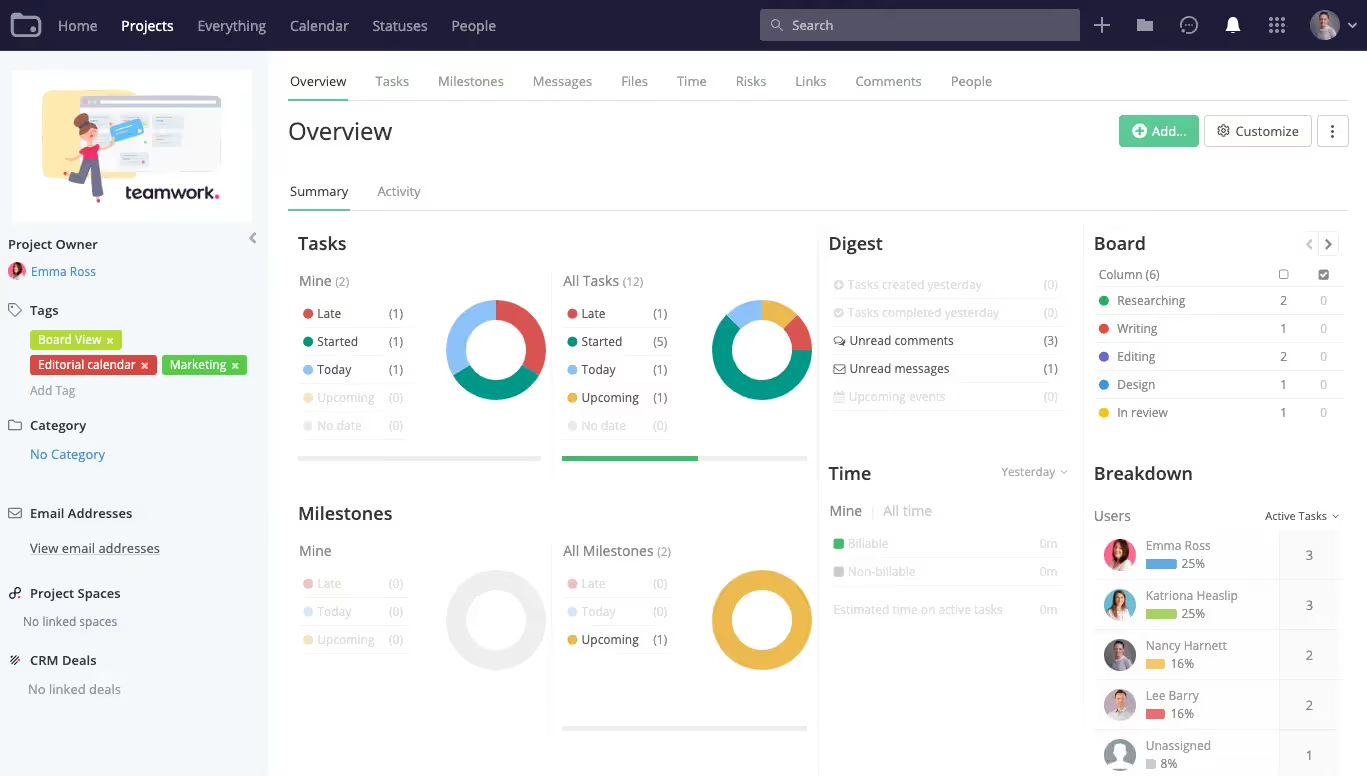
Built specifically for client work, Teamwork includes features for time tracking, billing, and client communication that other project management tools often lack. This makes it particularly valuable for agencies billing hourly or managing multiple client accounts.
Key Features
- Project templates for consistent client onboarding
- Time tracking with billable hours
- Budget tracking and profitability reporting
- Client portal for external collaboration
- Task dependencies and Gantt charts
- Workload management and resource planning
- Invoicing integration
Best For
- Marketing and creative agencies
- Professional services firms billing clients hourly
- Consulting teams managing multiple client engagements
- Organizations needing robust time tracking and profitability analysis
Pros & Cons
Pros: "The program facilitates the collaboration process, where it creates a workspace that allows sharing of files, supports business communication and provides proper access to documents." - G2 Review
- Excellent time tracking and billing features
- Strong focus on profitability and budget management
- Client portal separates internal and external collaboration
- Intuitive interface requires minimal training
Cons: "Some of the filters / settings are a little bit buried and sometimes there are glitches that don't let you upload file attachments in the comments." - Capterra Review
- Higher pricing compared to some alternatives
- Advanced reporting requires premium plans
- Mobile app functionality limited compared to desktop
- Fewer integrations than enterprise-focused competitors
Pricing
- Free Plan: Up to 5 users with basic features
- Deliver Plan: $10.99/user/month (billed annually)
- Grow Plan: $19.99/user/month (billed annually)
- Scale Plan: Custom pricing
- Enterprise Plan: Custom pricing
9. Basecamp: A Simple Communication-Focused Project Platform
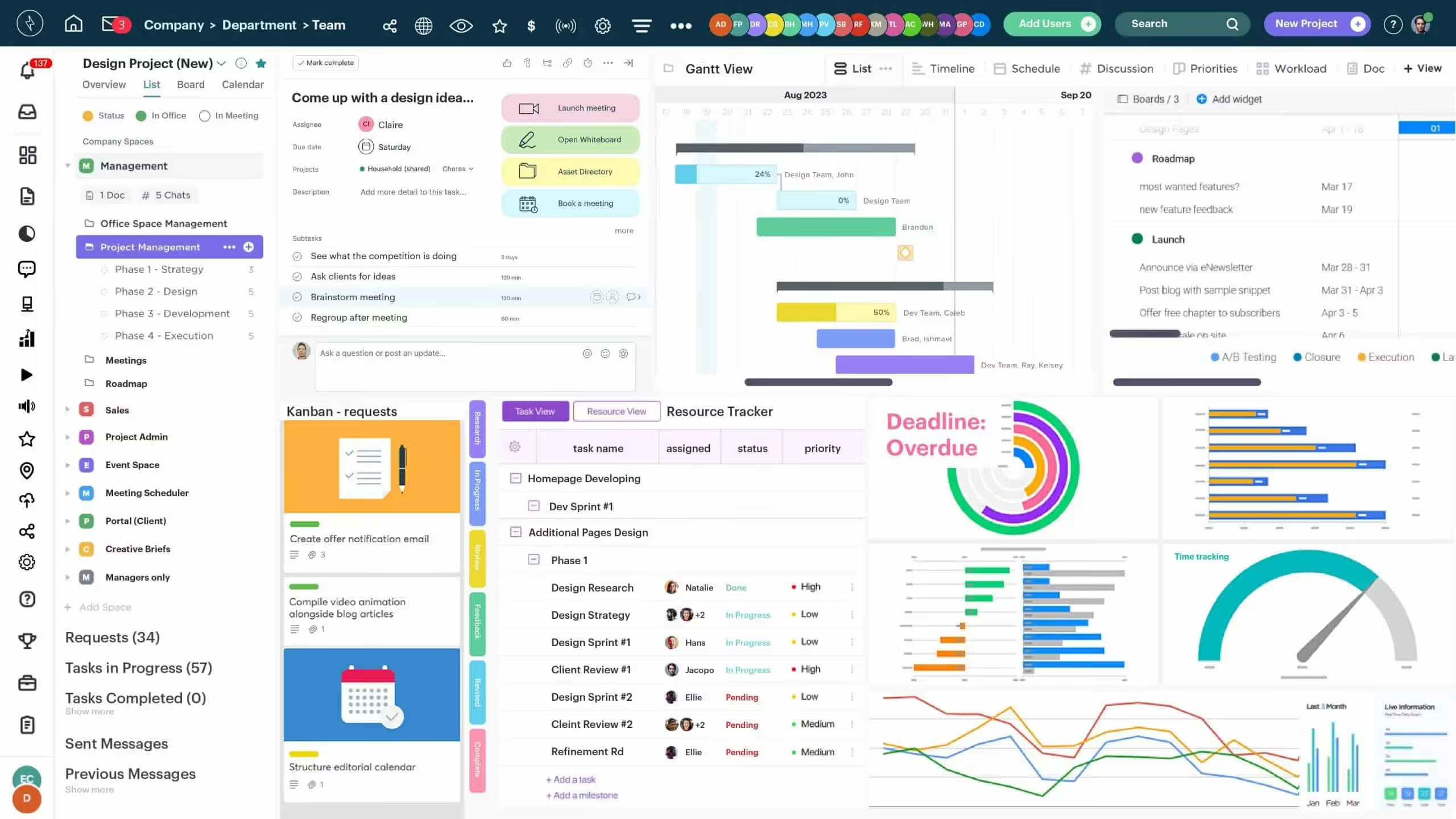
Basecamp provides a streamlined set of tools focused on team communication, file sharing, and basic task management. This simplicity appeals to teams overwhelmed by feature-heavy alternatives.
Key Features
- Message boards for team discussions
- To-do lists with assignments
- Automatic check-ins for status updates
- File and document storage
- Real-time group chat (Campfires)
- Schedule with calendar and milestone tracking
- Client access with limited permissions
Best For
- Small to medium teams wanting simplicity over features
- Organizations prioritizing communication and transparency
- Remote teams needing centralized information sharing
- Teams frustrated by complex project management software
Pros & Cons
Pros: "Basecamp stands out for its "quiet work" philosophy, which emphasizes asynchronous communication and reduces unnecessary interruptions." - G2 Review
- Extremely simple and user-friendly
- Flat pricing model (not per-user) benefits larger teams
- Strong focus on reducing email clutter
- Excellent for remote team communication
Cons: "The only annoying function is that it [sends] too many notifications to my inbox, and it [is] hard to ensure that I do not miss important information." - Capterra Review
- Limited project management features compared to competitors
- No Gantt charts or advanced scheduling tools
- Basic reporting and analytics
- Less suitable for complex projects with many dependencies
Pricing
- Basecamp Free: Free for one project with limited storage
- Basecamp Plan: $15/user/month (unlimited projects, 500 GB storage)
- Basecamp Pro Unlimited: $299/month (unlimited users, advanced features)
10. ZOHO Projects: A Budget-Friendly Project Management Tool
.avif)
ZOHO Projects provides comprehensive project management features without the premium price tag. It works particularly well for teams already using other ZOHO applications.
Key Features
- Task management with dependencies
- Gantt charts and critical path
- Time tracking and timesheets
- Issue tracking and bug management
- Document management
- Project templates
- Resource utilization charts
- Integration with ZOHO suite and external tools
Best For
- Budget-conscious teams needing full-featured project management
- Organizations already using ZOHO productivity suite
- Small to medium businesses wanting affordable project tracking
- Teams requiring both project management and CRM integration
Pros & Cons
Pros: "The Gantt charts and task dependencies give a clear picture of how projects are moving, while the time tracking and reporting tools make it simple to review productivity and progress." - G2 Review
- Affordable pricing makes it accessible for small teams
- Comprehensive feature set rivals more expensive competitors
- Strong integration with ZOHO ecosystem
- Free plan available for small teams
Cons: "While support is available, responses can be slow or generic, which affects troubleshooting during critical project phases." - G2 Review
- User interface less modern than competitors
- Steeper learning curve than expected
- Mobile experience needs improvement
- Customer support response times can be slow
Pricing
- Free Plan: Up to 5 users with basic features
- Premium Plan: $4/user/month (billed annually)
- Enterprise Plan: $9/user/month (billed annually)
- Projects Plus Plan: Custom pricing
How to Choose the Right Project Management Software
Picking the right project management software requires understanding your specific needs and constraints.
1. Start With Team Size and Structure
Small teams under 10 people have different needs than enterprises with hundreds of users. Consider not just current size but expected growth over the next year or two. Some tools scale better than others.
2. Define Your Must-Have Features Clearly
Do you need time tracking and billing? Gantt charts and dependencies? Client portals? Advanced reporting? Make a list of absolute requirements versus nice-to-have features. This prevents paying for functionality you'll never use.
3. Consider Your Existing Software Ecosystem
The best project management tools integrate smoothly with your current stack. If you live in Microsoft 365, Teamflect makes sense. Development teams using GitHub benefit from Jira's native integration. Integration friction slows adoption and creates data silos.
4. Think About Ease of Adoption
The most powerful software is useless if your team won't use it. Consider technical skill levels, willingness to learn new tools, and time available for training. Simpler tools like Trello or Basecamp work when adoption matters more than advanced features.
5. Budget Realistically for Your Team Size
Per-user pricing adds up quickly as teams grow. Calculate costs for your current size plus projected growth. Factor in any required integrations or add-ons. Some platforms offer flat-rate pricing that benefits larger teams, while others provide generous free plans for small groups.
6. Test Before Committing
Take advantage of free trials to actually use the software with your team on real projects. Theory differs from practice. You'll discover interface frustrations, missing features, or unexpected benefits only through hands-on testing.
Final Thoughts
Choosing project management software impacts how your team works together every single day. The right tool creates clarity, reduces busywork, and helps projects succeed. The wrong one adds friction and wastes time.
Whatever you choose, start with your specific needs, test with real projects, and prioritize tools your team will actually use. The best project management software is the one that makes your team more effective, not the one with the most features. Start with the tools in this guide and find the perfect fit for your workflow.
Frequently Asked Questions
What is project management software and why do I need it?
Project management software helps teams plan, organize, and track work from start to finish. You need it when projects become too complex to manage mentally or through basic tools. Signs include missed deadlines, unclear task ownership, poor visibility into progress, and time wasted searching for information. Good project management software reduces these problems significantly.
How much does project management software typically cost?
Pricing varies widely based on features and team size. Calculate total cost by multiplying per-user pricing by team size and factoring in required add-ons or integrations.
Some platforms like Basecamp charge flat rates regardless of team size, which benefits larger teams. Teamflect offers full functionality free for up to 10 users, making it attractive for small teams testing project management software.
What's the best free project management software?
The best choice depends on your workflow and team needs. For example, teams using Microsoft 365 benefit most from Teamflect's native integration. Meanwhile, visual thinkers prefer Trello's kanban boards, whereas software development teams lean toward Jira's agile features.
How long does it take to implement project management software?
Implementation time varies significantly. Plan for configuration time, team training, and a transition period where both old and new systems run simultaneously. Full adoption typically takes 2 to 4 weeks as teams adjust to new workflows.
Notably, Teamflect stands out for Microsoft 365 users because it syncs directly with your existing organizational structure from Entra ID, dramatically reducing setup time. Most teams can start using it within a day since it works inside familiar Microsoft Teams and Outlook interfaces.