.avif)

.avif)
.svg)
Selecting the right HR analytics software is more difficult than a flashy demo suggests. Many tools fall short in daily use, leaving data disconnected and dashboards that fail to provide the specific insights leadership requires. Often, this leads HR teams right back to the manual effort of managing spreadsheets.
Data has become the backbone of modern people operations, which better highlights the importance of having the right software at your arsenal. As early as 2018, an Economist Intelligence Unit report found that 82% of organizations planned to increase their use of big data within HR. Today, the ability to effectively gather and interpret this information is a critical requirement for any competitive HR team.
This guide cuts through the noise. We reviewed ten of the leading HR analytics platforms available in 2026, covering features, real user feedback, pricing, and fit by team size.
What to Look for in HR Analytics Software
Before you start comparing vendors, it helps to know what "good" actually looks like in this category. Not every analytics platform is built the same way, and the differences can have a real impact on how useful the tool is once you're past onboarding.
1. Core Metrics and Visibility
Strong HR analytics software should give you real-time visibility into the metrics that matter most: turnover trends, goal completion, engagement scores, headcount, and performance patterns across teams. It should connect cleanly to your HRIS, so data flows automatically rather than requiring constant manual exports. Lattice and Culture Amp illustrate that split well: Lattice's dashboards lean toward goal completion and performance patterns, while Culture Amp's strength sits more in engagement scores and survey-driven benchmarking.
2. Workflow Integration
Integration matters a great deal. A standalone analytics tool that sits outside your existing workflows will struggle with adoption. Look for platforms that connect to the communication tools and productivity software your team already uses. Microsoft Teams users, in particular, benefit significantly from tools built natively within that ecosystem. Time tracking data is a common gap here too, since hours and attendance often live in a separate system that doesn't feed cleanly into the same analytics dashboard.
3. Role-Based Accessibility
Consider how analytics are structured by role. Dashboards need to be accessible not just for HR admins, but for managers and leadership too.
- HR Directors: Need high-level organizational trends.
- Department Managers: Need team-level visibility.
- Individual Contributors: Need to see their own goals and progress.
Platforms that serve all three without requiring data exports or admin workarounds are worth paying a premium for.
4. Total Cost of Ownership
Think about the long-term investment. The headline per-user price often does not reflect what you will actually spend once advanced reporting, HRIS integrations, or dedicated support are factored in. Ask vendors to walk you through a real pricing breakdown before you sign.
Top 10 HR Analytics Software in 2026
To help you get started in choosing the ideal software for your organization, we summarized the key features of the 10 leading HR analytics software available in the market today. Here’s a clear breakdown of the tools you can check out:
1. HiBob: A Strong HR Analytics Platform for Mid-Market Companies

HiBob, widely known as "Bob," is a modern HRIS built for growing companies that want more than a basic record-keeping system. It puts employee experience at the center of its design, offering analytics, engagement tools, and core HR operations within a single, well-organized interface.
What sets HiBob apart in the analytics space is how usable its reporting actually is. Dashboards are visual and approachable, which means workforce data gets used in real conversations rather than sitting in a system that only HR can access. Managers can see team-level trends, and leadership gets a view across the organization without requesting a custom report each time.
The platform is particularly well-suited for companies operating across multiple countries. It supports localized workflows, multi-currency compensation, multi-language access, and local compliance fields. For fast-growing companies scaling internationally, that breadth is a genuine advantage.
Key Features
- People analytics dashboards with real-time workforce metrics
- Performance management with configurable review cycles and self-assessments
- Engagement tools including pulse surveys, recognition, and employee clubs
- Compensation management with pay equity reporting and salary bands
- Automated onboarding and offboarding workflows
- HRIS integrations with ATS, payroll, and finance tools
- Multi-country compliance and localized HR workflows
Best For
- Mid-market companies with 100 to 1,000 employees
- Organizations with distributed or international teams
- HR teams that want analytics and engagement tools within their core HRIS
Pros
"We use HiBob mostly for HR-related topics and our 1-on-1 meetings with managers, to track our performance and for HR surveys." - Capterra Review
- Highly intuitive interface that drives strong adoption across all levels
- Solid people analytics with customizable KPI dashboards
- Global capabilities make it particularly valuable for international teams
- Strong integration ecosystem across payroll, ATS, and communication tools
Cons
"The AI features are not quite where I would like them to be, but I know the HiBob team is busy working to make improvements in this space." - G2 Review
- Pricing is quote-based and not publicly listed, which adds friction to the evaluation process
- Initial configuration can be complex, particularly for organizations with non-standard processes
- Some advanced analytics features require additional modules at extra cost
Pricing
- Custom quote only; pricing depends on modules selected and contract length
- Contact HiBob directly for a tailored quote
2. Teamflect: Best HR Analytics Software for Microsoft 365 Teams
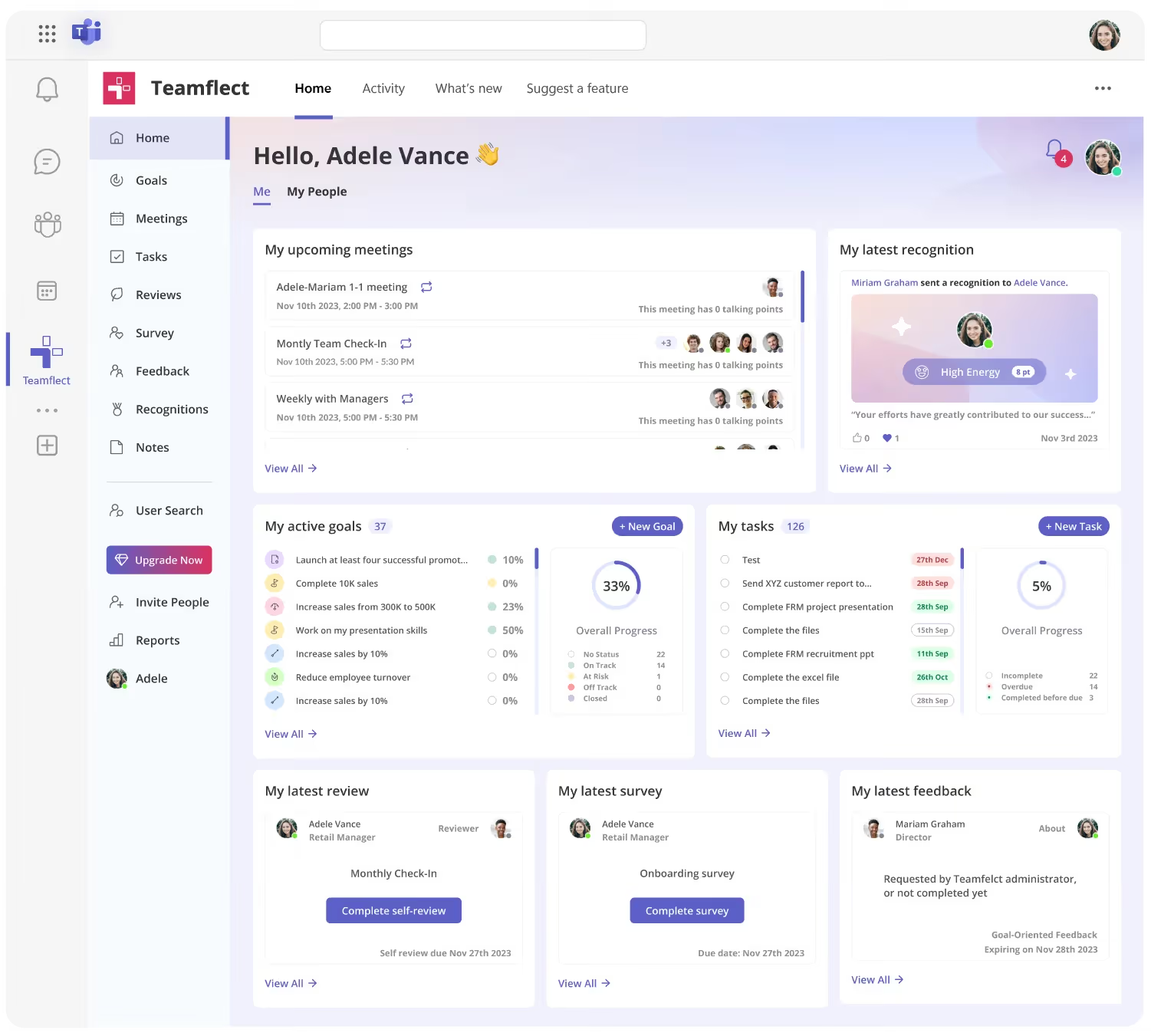
If your organization runs on Microsoft 365, Teamflect is in a category of its own. It is the only performance management and HR analytics platform built entirely inside Microsoft Teams and Outlook. There is no separate login, no browser tab to switch to, and no parallel tool to maintain. Everything lives where your people already work.
That native integration is not just a convenience feature. It is what drives adoption. Because Teamflect operates inside Teams, employees and managers are far more likely to actually use it. Goal updates, 1-on-1 check-ins, performance reviews, and recognition all happen within the same interface people open every morning. For HR leaders tired of chasing adoption, that matters.
Beyond the integration story, Teamflect offers a comprehensive analytics suite. HR admins can access reports on review completion rates, goal progress, meeting frequency, task completion, and employee engagement, all through dashboards powered by Microsoft Power BI. Custom reports are also available on request. The platform connects to over 200 HRIS systems, which means workforce data flows in without manual entry.
Key Features
- Performance reviews with 360-degree feedback, fully built within Microsoft Teams
- Goal and OKR management with cascading objectives and real-time progress tracking
- 1-on-1 meeting tools with structured agendas and shared notes inside Teams meetings
- Engagement surveys with automated scheduling and configurable cadences
- Power BI-powered analytics dashboards for HR, managers, and leadership
- Nine-box talent grid for performance vs. potential mapping
- AI-powered assistant for generating review summaries, goal suggestions, and insights
- Integrations with 200+ HRIS platforms including HiBob, Gusto, UKG, and Workday
What Makes Teamflect Stand Out
- It operates entirely within Microsoft Teams. No new platform to adopt, no parallel system to maintain.
- Adoption rates are significantly higher because the tool is embedded in employees' existing workflows.
- Power BI integration gives HR teams enterprise-grade dashboards without needing a separate analytics license.
- As an official Microsoft partner, Teamflect meets enterprise-grade security and GDPR compliance standards.
Pros
"It integrates well with Microsoft Teams, which makes it convenient to complete reviews, track goals, and give recognition without needing to switch platforms. The layout is clear and straightforward, making the whole process efficient." - G2 Review
- Highly intuitive setup with minimal onboarding friction
- Affordable compared to full-suite HR platforms
- Review data, goals, feedback, and recognition all visible in one place
- Free plan available with no time limit for teams of up to 10 users
- Nonprofit discounts of up to 60% on annual contracts
Cons
- Teamflect works especially well within Microsoft Teams environments. For organizations using a more diverse or different tech stack, this tight integration may feel less central to their workflows.
- Analytics are closely tied to performance management workflows like goals, feedback, and reviews. This makes insights highly practical, though organizations looking for broader, cross-functional HR analytics may need to complement it with additional tools.
Pricing
- Free: Up to 10 users, includes performance reviews, goal tracking, surveys, and Teams integration
- Essential: $7/user/month (billed annually), adds analytics and premium support
- Professional: $11/user/month (billed annually), adds talent management and advanced integrations
- Nonprofits receive up to 60% off annual contracts
- 30-day free trials available for Essential and Professional plans
3. Rippling: An All-in-One Platform with Robust HR Reporting
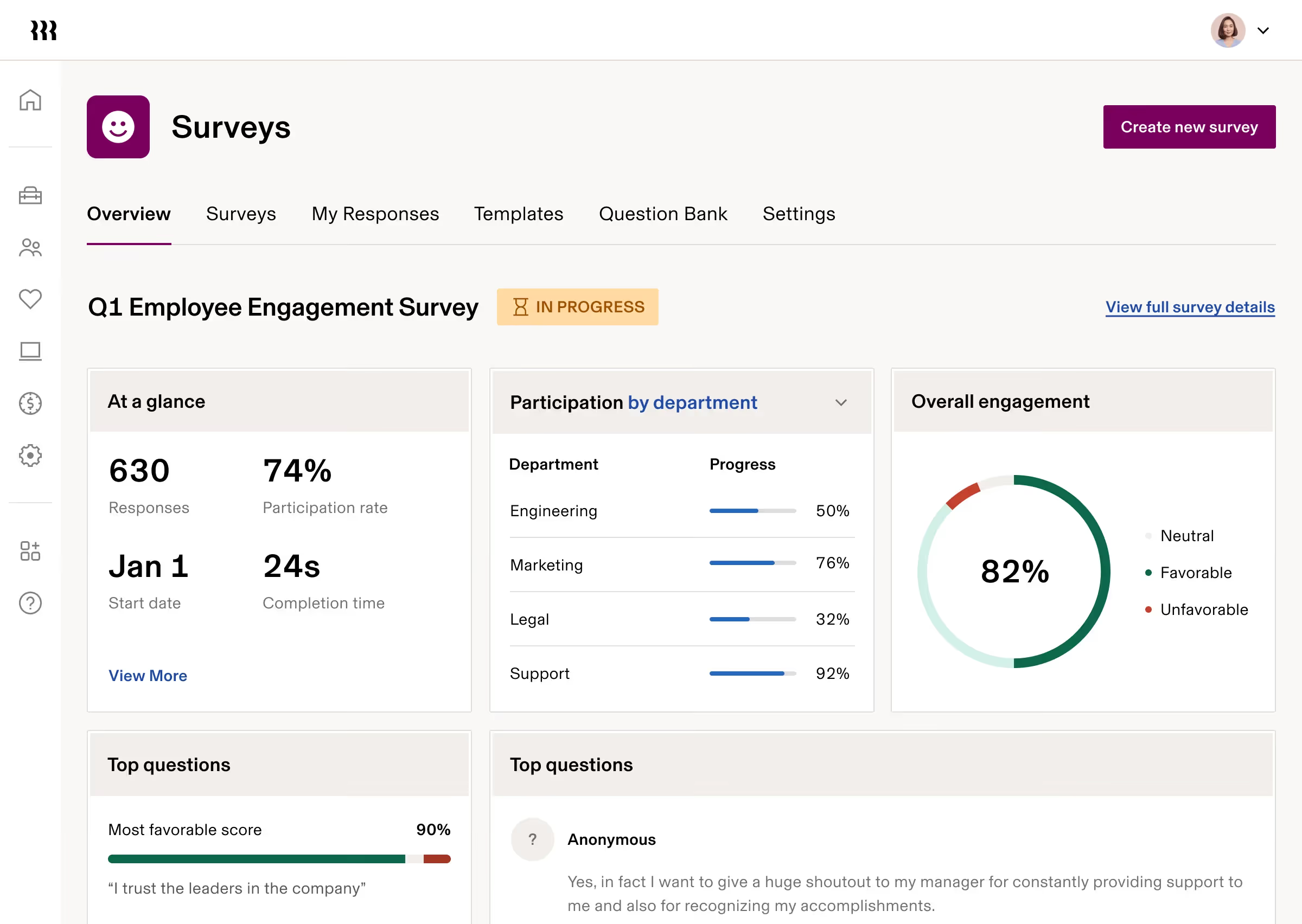
Rippling takes a different approach than most platforms on this list. Rather than building a standalone HR tool, it connects HR, IT, payroll, and finance into a single system. When an employee is hired or leaves, their data updates automatically across every connected module, including payroll, device access, and benefits.
For HR analytics, that unified data model is a real advantage. Because all workforce information sits in one place, reporting is more reliable and comprehensive. HR leaders can track hiring trends, turnover, attendance, performance, and compensation without stitching together exports from separate systems.
Rippling holds a 4.8 out of 5 on G2, one of the highest ratings among platforms in this category. Users consistently cite its automation capabilities and unified approach as key reasons they stay on the platform.
Key Features
- Centralized HR, payroll, IT, and finance data within one platform
- Workforce planning with headcount modeling and budget tracking
- Automated onboarding that triggers payroll, IT access, and benefits in one action
- Performance management with goal-setting and review tools
- Compliance reporting for multi-state and international environments
- Rippling Workflow Studio for automating HR processes without code
- Custom reporting and analytics dashboards
Best For
- Growing companies that want HR, IT, and payroll under one roof
- Mid-market and enterprise organizations managing remote or hybrid teams
- Teams that need strong automation to reduce manual HR administration
Pros
"Easy to use and all-in-one payroll-HR system. It also made it easy to manage PTO or leave management." - Capterra Review
- Outstanding automation that reduces manual work across the HR function
- Strong compliance tools for multi-state and global environments
- Highly scalable as companies add users, markets, and modules
- Modern interface that non-HR users find intuitive
Cons
"It can be hard to find things sometimes and the time off calendar doesn't have a very good way to print." - G2 Review
- Custom pricing requires a sales conversation, which some buyers find frustrating
- Initial setup can feel complex given the breadth of the platform
- Customer support quality is inconsistent, particularly for international payroll
Pricing
- Custom pricing based on modules selected; contact Rippling for a quote
- Free trial not publicly advertised; demo available on request
4. Lattice: A Well-Rounded Option with Strong Analytics for Performance Teams
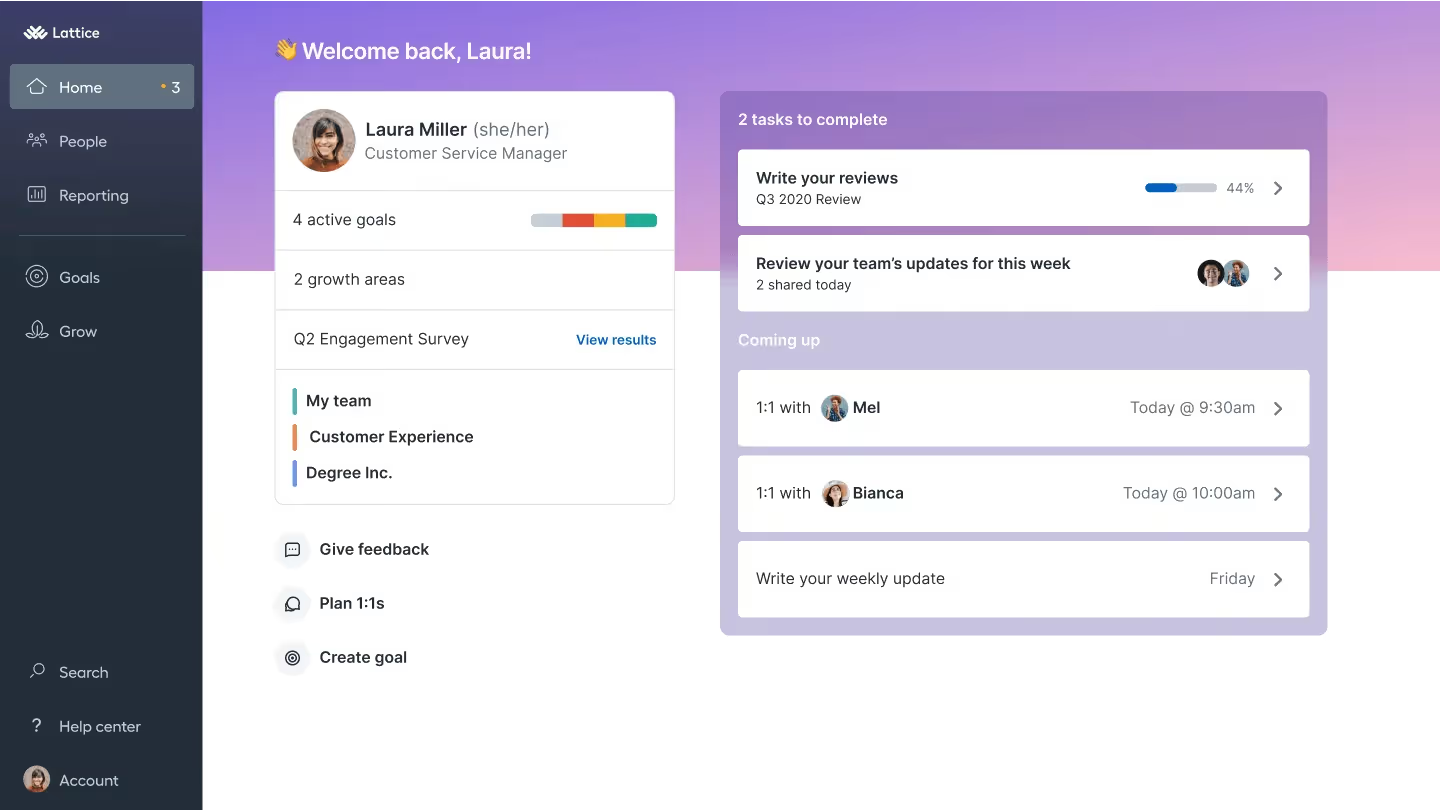
Lattice connects performance reviews, OKR tracking, employee engagement surveys, and compensation planning in one place. It is widely used by mid-market technology companies and growth-stage organizations that want to build a structured performance culture backed by data. OKR software built for mid-size companies generally covers this same goal-tracking layer without the surrounding analytics suite.
The analytics suite inside Lattice gives HR teams trend data on engagement, performance patterns, goal achievement, and manager effectiveness. One of its more useful features is the connection between engagement data and performance data: HR can see whether teams with higher engagement scores also show better performance outcomes, which helps build the case for people programs with leadership.
Key Features
- Highly configurable performance review cycles supporting 360-degree, self, peer, and upward reviews
- OKR and goals module with cascading visibility from company to individual level
- Engagement surveys with industry benchmarking and real-time results
- People analytics dashboards with trend data on performance and engagement
- Calibration tools to normalize ratings across managers and teams
- 1-on-1 meeting tools with suggested talking points and action tracking
- Integrations with Slack, Microsoft Teams, major HRIS platforms, and payroll tools
Best For
- Mid-market companies with 50 to 1,000 employees
- HR teams focused on building structured performance and feedback programs
- Organizations that want OKRs and performance reviews connected in the same system
Pros
"It helped to organize our growth and development within the organization." - G2 Review
- Most configurable review system in its class for mid-market teams
- Goals connect directly into performance reviews, giving evaluations real context
- Strong engagement benchmarking for comparing against similar companies
- Responsive customer support and a dedicated success team
Cons
"I wish it had more features and training offered for their services. Sometimes I stumble upon new things that the service can do and wish I'd known sooner about particular details." - Capterra Review
- Premium pricing puts it out of reach for smaller or budget-constrained teams
- Requires meaningful configuration before value becomes clear; not a plug-and-play experience
- No built-in payroll or core HRIS; a separate system is required
Pricing
- Base price: $11/user/month
- Add-ons: $4 to $6/user/month
Minimum annual agreement: $4,000
5. Culture Amp: A Solid Choice for Engagement-Focused Analytics

Culture Amp has built its reputation on employee engagement. It serves more than 6,500 companies and holds one of the largest employee datasets in the world, which powers its benchmarking tools. When your organization wants to compare engagement, performance, or inclusion metrics against industry peers, Culture Amp's data depth is hard to match.
The platform is modular. You can purchase Engage (surveys and engagement), Perform (performance reviews and goal tracking), and Develop (learning and growth) separately or as a bundle. This works well for organizations that want to start with one area and expand later, though costs can climb quickly when multiple modules are added.
Culture Amp is best suited for companies with at least 200 employees. At that scale, the benchmarking and analytical depth justify the investment.
Key Features
- Engagement surveys with industry benchmarking and real-time dashboards
- Performance review workflows with 360-degree feedback and customizable templates
- OKR and goal tracking with individual and team-level visibility
- Diversity, equity, and inclusion measurement through specialized survey modules
- Action planning tools that assign follow-up tasks based on survey results
- Text analytics and AI-powered insights for identifying themes in open feedback
- Integrations with HRIS, payroll, and communication platforms
Best For
- Mid-size and enterprise organizations with 200 or more employees
- HR teams that prioritize employee engagement data and cultural measurement
- Companies that want to benchmark engagement scores against industry peers
Pros
"I like that with Culture Amp it provides surveys to use, edit, or you can create your own. The functionality is great and I love the AI insights." - Capterra Review
- Industry-leading benchmarking powered by a massive employee dataset
- Strong action planning tools that connect survey results to tangible follow-up
- Well-designed interface with good adoption from employees and managers alike
- Dedicated people science team that helps organizations use data effectively
Cons
"It sometimes felt like there was way too much to fill out, and a lot of it ended up being skipped or never used. Some of the menus and workflows also didn't really match how we work in our industry." - G2 Review
- Pricing is quote-based and can be expensive; smaller teams often find better value elsewhere
- Rigid workflows make customization difficult without vendor involvement
- Not a good fit for teams under 200 employees given the pricing structure
Pricing
- Custom pricing
- Modules include Engage, Perform, Develop (tailored for small, medium-sized, enterprise organizations)
6. IBM Planning Analytics: Enterprise-Grade Workforce Planning and Forecasting
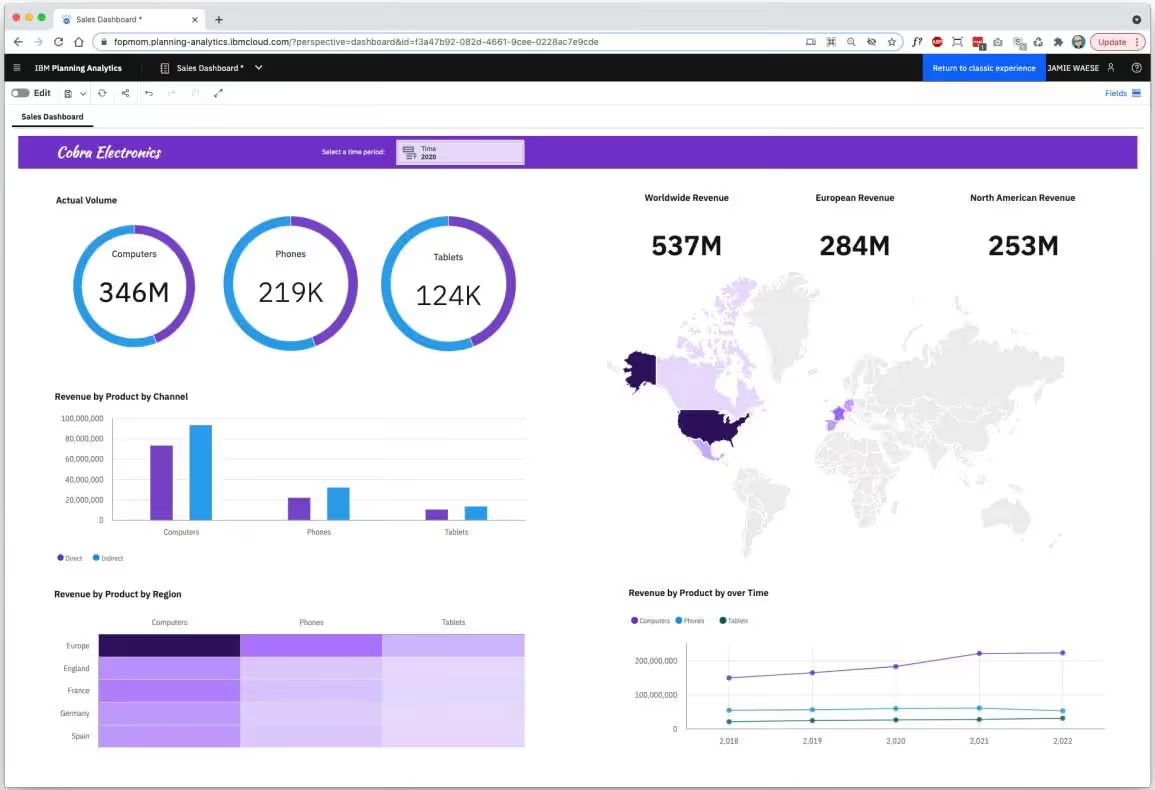
IBM Planning Analytics sits in a different category from most tools on this list. Rather than a general HR platform, it is a powerful enterprise planning and analytics solution that covers financial forecasting, budgeting, workforce planning, and operational analysis within a single governed environment.
For HR analytics specifically, IBM Planning Analytics enables workforce cost modeling, headcount forecasting, scenario analysis, and KPI tracking at an organizational scale that most dedicated HR tools cannot match. Finance and HR teams can work within the same data environment, which eliminates the disconnect that often exists between people plans and financial plans.
The platform integrates with Excel, which many finance and HR leaders find immediately useful. It also connects to ERP, CRM, and HR systems, centralizing planning data across the business.
Key Features
- AI-powered planning, budgeting, and forecasting across business functions
- Workforce planning models for headcount, salary, and benefits cost analysis
- Scenario modeling to assess how organizational changes affect costs and performance
- Real-time dashboards and customizable reporting by department, region, or role
- Excel add-in that allows users to pull live data without leaving familiar tools
- Deployable on-premise, in the cloud, or as a hybrid setup
- Integrations with ERP, CRM, and HR systems
Best For
- Large enterprises with complex financial and workforce planning requirements
- Finance and HR teams that need to work from a shared data environment
- Organizations with multi-country operations requiring centralized planning
Pros
"Ease of use with Excel, Word, and PowerPoint applications." - Capterra Review
- Handles large, multi-dimensional datasets with strong performance
- Excel integration is a meaningful advantage for teams that live in spreadsheets
- Deep scenario modeling for workforce cost and headcount planning
- Enterprise-grade security and governance
Cons
"I wish there were more tutorials to assist users on this platform. I also felt the cost could be a bit lower. I also wish there were better monitoring tools that would allow me to review the whole process with ease." - G2 Review
- High licensing costs put it out of reach for smaller organizations
- Implementation complexity typically requires technical expertise or consultant support
- The web interface, while improved, can feel more technical than modern HR platforms
Pricing
- Modular pricing with four tiers (Essentials, Starter, Advanced, and Enterprise-level)
- Contact IBM for a full pricing quote based on team size and modules needed
7. Hireology: A Recruiting-Focused Platform with Hiring Analytics
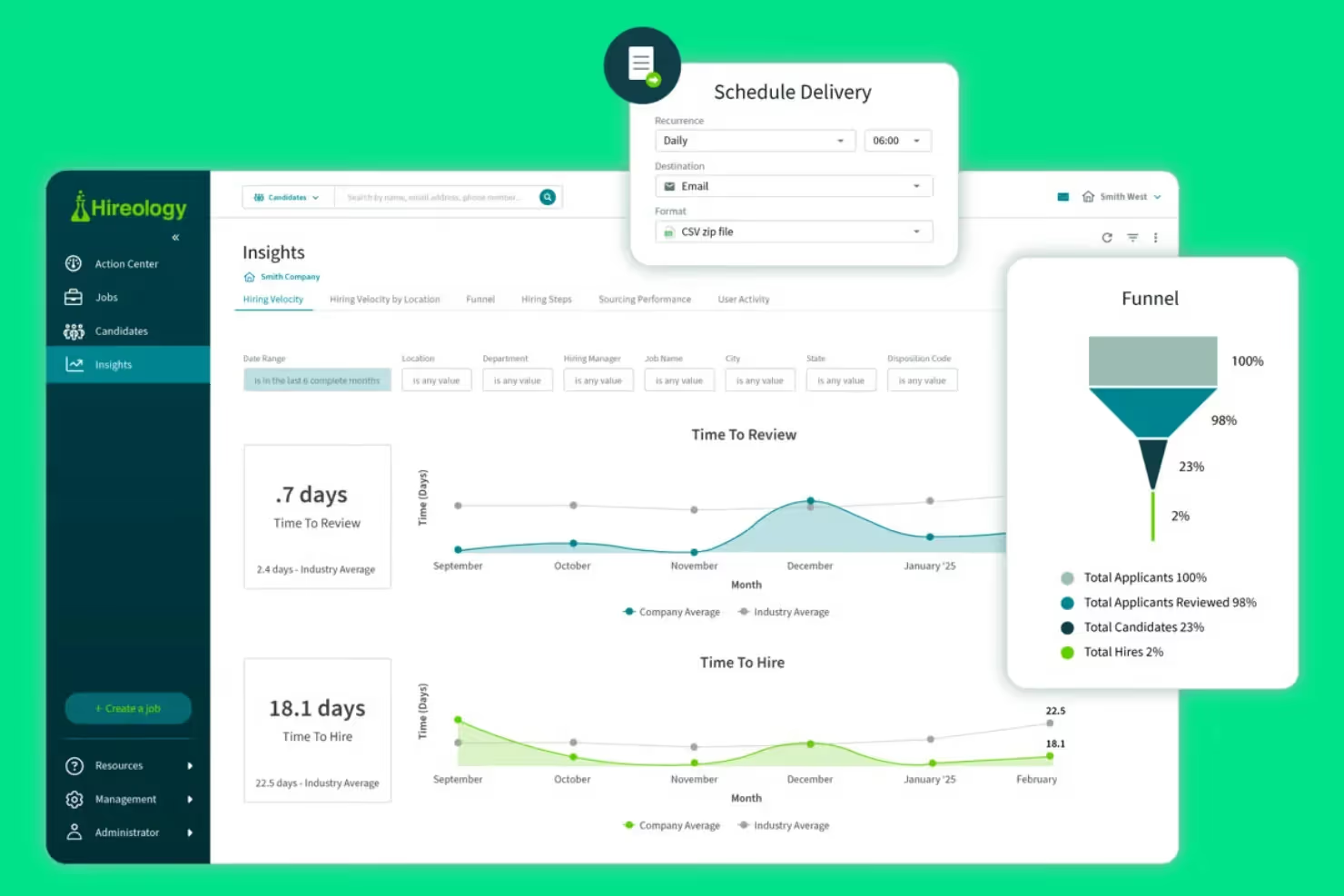
Hireology is built for multi-location businesses that need to hire consistently and at scale. It is not a broad HR analytics platform; it is a recruitment system with analytics tools designed specifically for tracking hiring performance, candidate pipelines, and source effectiveness across multiple sites or locations.
The platform is particularly popular in automotive, healthcare, hospitality, fitness, and professional services industries, where location-level hiring is a regular operational challenge. Its Action Center dashboard gives HR teams and hiring managers a single view of all active recruiting activity across locations, which significantly reduces the back-and-forth that often slows multi-site hiring down.
Key Features
- Applicant tracking across multiple locations with centralized candidate management
- Job distribution to 50-plus job boards including Indeed and ZipRecruiter
- Automated pre-screen surveys and role-specific interview guides
- Two-way SMS and email communication with candidates built into the platform
- Background check and skills assessment integrations within the hiring workflow
- Location-level hiring analytics tracking time-to-fill, cost-per-hire, and source quality
- Digital onboarding with e-signature support and payroll system integrations
Best For
- Multi-location businesses in industries like automotive, retail, healthcare, and hospitality
- HR teams managing high-volume, location-specific hiring across regions
- Organizations that want to standardize their hiring process across decentralized sites
Pros
"It's easy to post jobs, track applicants, and communicate with candidates in one place." - Capterra Review
- Centralized multi-location hiring in one platform is a standout feature
- Automated candidate communication saves significant recruiter time
- Hiring analytics help identify what's working and where pipelines stall
- Strong integrations with payroll systems like ADP Workforce Now and Netchex
Cons
"Customer service has been updated to chat with AI, and that is not always helpful." - G2 Review
- Analytics customization is limited compared to broader HR analytics platforms
- Mobile app has reliability issues with candidate notifications
- Not a fit for organizations needing broad HR analytics beyond recruiting
Pricing
- Custom pricing (modules and add-on: Essentials, Professional, Background Check Upgrade)
- Contact ADP directly for demo and enterprise quotes.
8. Personio: A Reliable All-in-One HR Platform for European SMBs
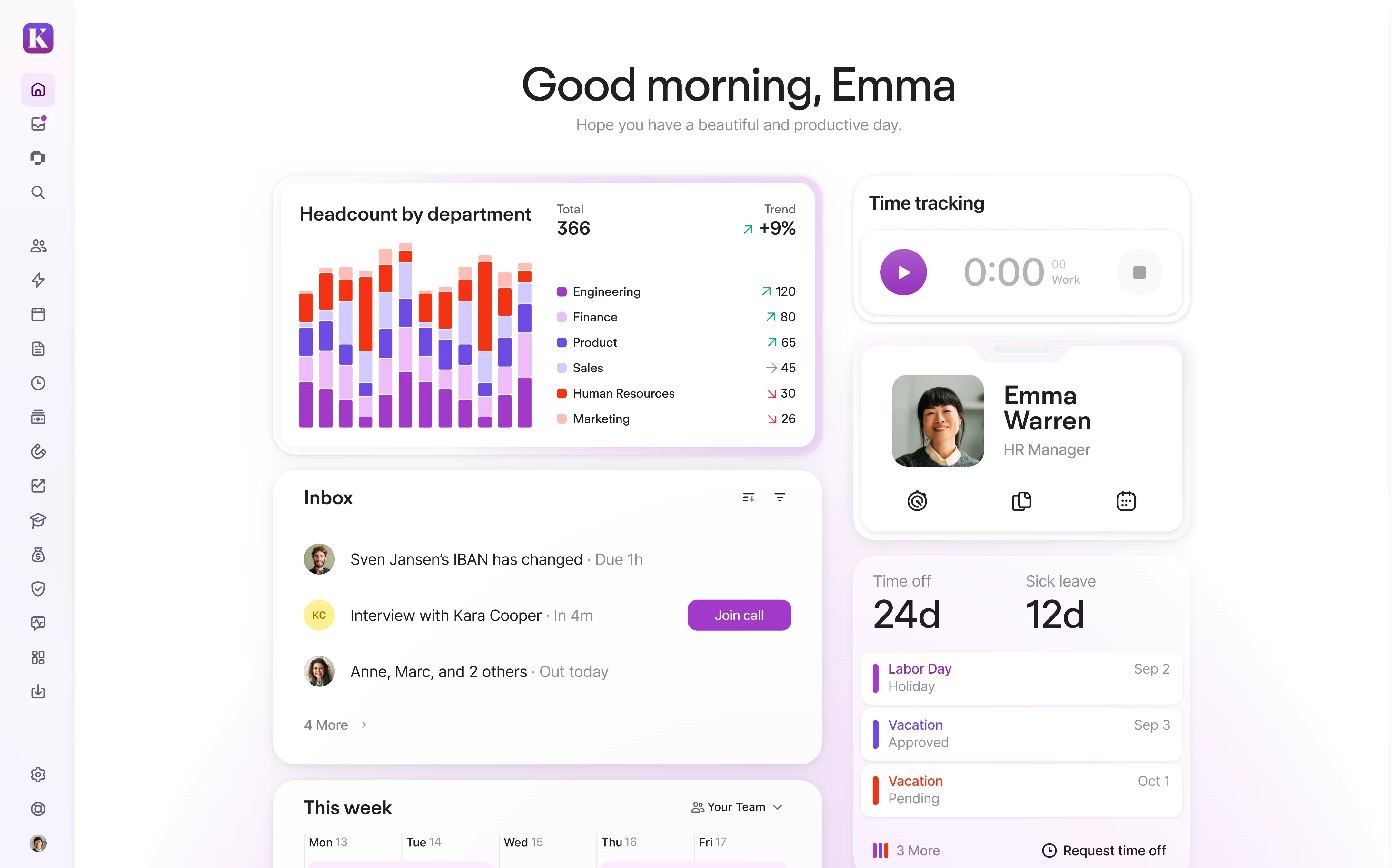
Personio is one of Europe's most established HR platforms, built specifically for small and mid-sized businesses. It covers core HR, payroll, recruiting, time tracking, performance management, and document handling within a single system. For companies in Europe, particularly those with GDPR compliance requirements, Personio's regional expertise is a meaningful advantage.
The platform holds a 4.4 on G2 and earns consistently positive marks for its ease of use and the speed at which teams can get up and running. HR processes that used to require multiple tools or manual workarounds can typically be consolidated into Personio without a long implementation timeline.
Key Features
- Core HR with employee database, document management, and approval workflows
- Time tracking, absence management, and shift scheduling
- Recruiting module with applicant tracking, candidate pipelines, and interview scheduling
- Performance management with review cycles, continuous feedback, and goal tracking
- Payroll integration and e-signature capabilities
- People analytics with ready-made and customizable reports
- GDPR compliance tools and ISO 27001 certification
Best For
- European SMBs with 10 to 2,000 employees
- Companies looking to consolidate multiple HR tools into one platform
- Organizations that need strong compliance support for European employment regulations
Pros
"Personio is great value for money and the customer support is fantastic. I can manage payroll and employee management, and the learning curve is very quick." - Capterra Review
- Covers the full employee lifecycle in one system
- Fast onboarding relative to comparable platforms
- Responsive customer support with strong self-service resources
- Solid value for SMBs that do not need enterprise-level complexity
Cons
"I previously had an issue where some reports didn't load as fast as I'd wished, but that's now resolved. I'd also love for device management to be added." - G2 Review
- Reporting capabilities are functional but not deep; advanced analytics require workarounds
- Some features feel rigid and do not accommodate highly customized workflows well
- Primarily designed for European markets; U.S.-based companies may find it a less natural fit
Pricing
- Quote-based subscription; monthly fee depends on plan and add-ons
- Free trial available; contact Personio for a tailored quote
9. PeopleForce: A Modular HR Platform Built for Growing SMBs
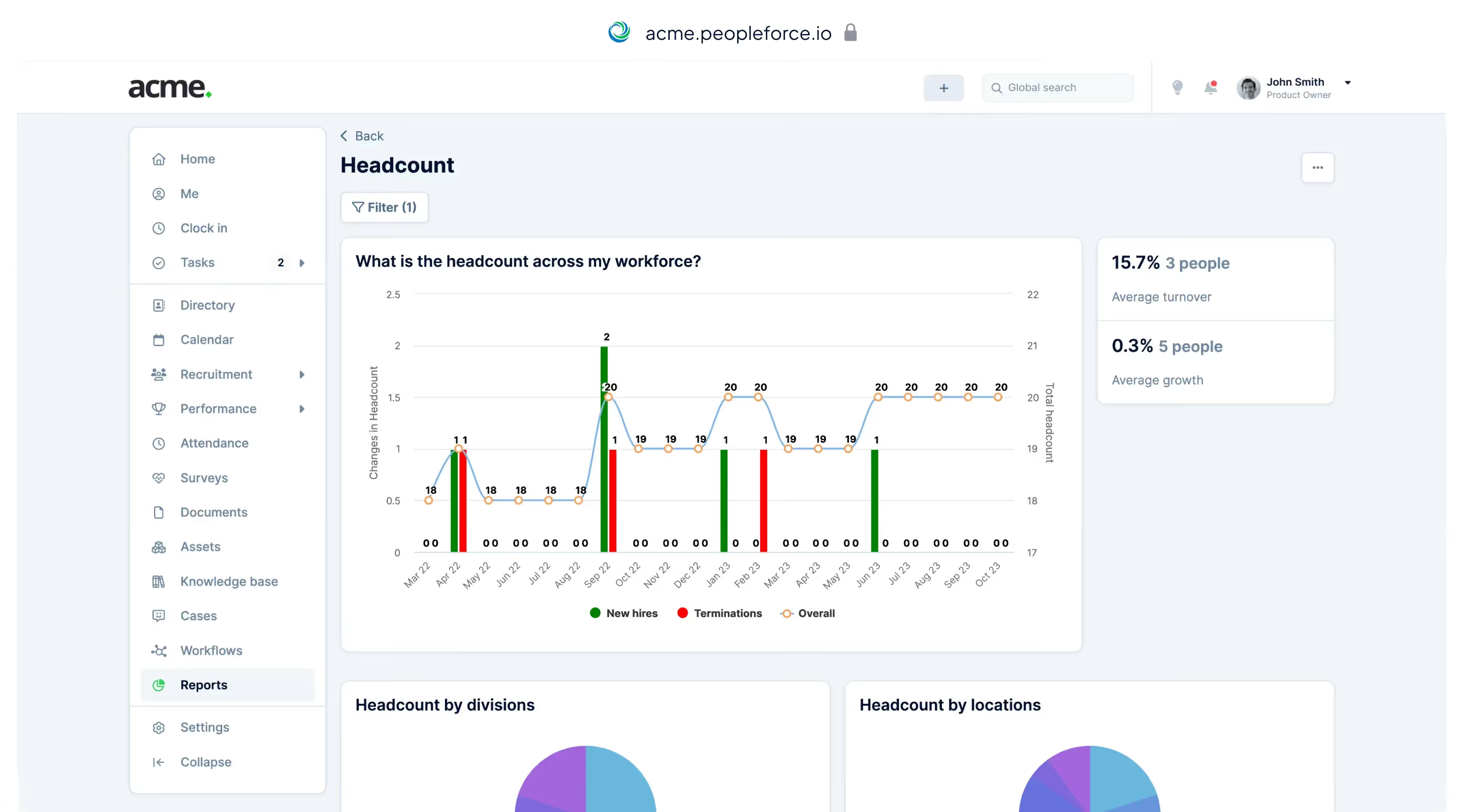
PeopleForce takes a practical, modular approach to HR management. You pay only for the modules you actually use, which makes it accessible for small and mid-sized teams that want to automate
HR processes without committing to an expensive all-in-one suite from day one.
The platform covers the full employee lifecycle: recruiting, onboarding, performance management, time tracking, employee engagement surveys, and HR case management. Its analytics tools give HR teams real-time access to turnover rates, eNPS scores, attendance data, and performance metrics without needing to export anything manually.
PeopleForce holds a strong 4.8 on G2 and is particularly well-regarded for its customer support team, which users consistently describe as accessible and responsive.
Key Features
- Core HR with centralized employee database, leave tracking, and automated workflows
- OKR and KPI tracking with 360-degree feedback and structured 1-on-1 meeting tools
- Recruiting module with applicant tracking, resume parsing, and candidate pipeline management
- Pulse surveys for measuring employee engagement with anonymous response options
- Time tracking and attendance management with project-level allocation
- HR case management for tracking and resolving employee requests
- Real-time analytics on turnover, performance, and engagement metrics
Best For
- Small and mid-sized businesses that want modular pricing and flexible adoption
- IT and technology companies managing distributed teams
- HR teams that want to automate core processes without a large implementation project
Pros
"From start to finish, PeopleForce enhanced our HR processes remarkably." - Capterra Review
- Pay-per-module pricing makes it accessible for smaller teams
- Real-time analytics on turnover and eNPS available at no extra configuration
- Fast implementation with a dedicated onboarding manager included
- Strong and consistently available customer support
Cons
"The only thing I noticed is that the attendance policy is based on locations, not projects, which I think would be more useful for IT companies, but that's not critical for us." - G2 Review
- Mobile app features lag behind the desktop experience
- Automation is limited to straightforward HR workflows; complex processes require workarounds
- Org structure customization is not fully flexible for non-standard company hierarchies
Pricing
- Core HR - Standard: $2.5/user/month (minimum billing starts at $125, around 50 employees)
- Core HR - Professional: $3/user/month (minimum billing starts at $150, around 50 employees)
- Additional modules (Recruit, Perform, Pulse, Time, Desk) priced separately
- 14-day free trial available with access to all features
- Custom pricing available for larger organizations
10. ADP Workforce Now: An Enterprise Standard for Payroll-Linked Analytics

ADP Workforce Now is one of the most widely used HR and payroll platforms for established mid-size and large organizations. It is not primarily an HR analytics tool in the modern sense, but its reporting capabilities are substantial when you consider that payroll, benefits, time tracking, and workforce data all sit within a single system.
For HR analytics tied to compensation, compliance, and labor costs, ADP Workforce Now is difficult to beat. Payroll accuracy is consistently praised in user reviews, and the compliance reporting tools are particularly valuable for organizations operating across multiple states or regulated industries.
Key Features
- Unified HR, payroll, and benefits data on a single database
- Compliance reporting for multi-state and federal requirements
- Workforce cost analytics linking compensation to headcount and productivity data
- Time and attendance tracking with visual pay and hours dashboards
- Performance management with goal-setting and review workflows
- Benefits administration with enrollment tracking and reporting
- Structured dashboards for executive-level workforce visibility
Best For
- Mid-size and large organizations with established HR and payroll operations
- Companies in regulated industries like healthcare, financial services, and nonprofits
- HR teams that need reliable payroll analytics and audit-ready compliance reporting
Pros
"The working hours and payment is shown with a visual graph." - G2 Review
- Comprehensive payroll and compliance reporting is reliable and well-structured
- Wide breadth of modules covering the full HR and workforce lifecycle
- Strong integration ecosystem with industry-standard HR and ERP tools
- Trusted by large organizations for payroll accuracy in multi-state environments
Cons
"You do not have a dedicated support person to call and speak to. No one has a dedicated email to resolve your issue; it just goes to a general mailbox, which is sometimes frustrating." - Capterra Review
- Customer support is a consistent pain point, particularly for complex issues
- The interface, while functional, feels dated compared to newer platforms
- Advanced analytics features may require additional licensing or configuration
Pricing
- Custom pricing based on organization size and modules selected
- Contact ADP for a tailored quote; no publicly listed pricing
How to Choose the Right HR Analytics Software
With so many platforms available, the best choice is rarely the one with the most features. It is usually the one that fits your team's actual situation.
1. Start With Your Tech Environment
Look at the tools your organization already uses every day. HR analytics software should integrate smoothly with your existing systems (like your HRIS, collaboration tools, and payroll platforms). When employees don’t need to switch between multiple systems or remember new logins, adoption tends to be much higher. Prioritize solutions that fit naturally into your current ecosystem.
2. Match the Platform to Your Team’s Size and Complexity
Small businesses under 100 employees rarely need enterprise-level analytics. A modular, affordable platform like PeopleForce or a straightforward tool like Personio will deliver faster value with less overhead. Mid-market teams benefit from more robust analytics and HRIS integration, which platforms like HiBob, Lattice, or Rippling address well. Enterprise organizations with 1,000 or more employees need granular permissions, advanced workflow customization, and dedicated support.
3. Define What You Actually Need to Measure
Engagement trends? Goal completion rates? Recruiting effectiveness? Workforce cost by department? Different platforms are optimized for different questions. Culture Amp is exceptional at engagement benchmarking. Hireology is built for recruiting analytics. IBM Planning Analytics excels at workforce cost modeling. Know your priority use case before comparing features.
4. Consider Integration Depth
The most useful HR analytics data is connected data. A platform that pulls automatically from your HRIS, payroll system, and communication tools will give you far more reliable reports than one that requires manual imports or CSV uploads.
5. Factor in Total Cost, Not Just the Per-User Price
Ask vendors to walk through what is included at your specific pricing tier. Advanced reporting, HRIS integrations, and dedicated support are often gated behind higher tiers. A tool priced at $6 per user that requires an upgrade to access analytics is not cheaper than one priced at $10 that includes it.
Final Thoughts
Choosing the right HR analytics software takes more than comparing features on a spreadsheet. The best platform is the one your team will actually use. That means considering how well it fits into your existing workflows, how quickly it can deliver meaningful data, and whether your employees will engage with it consistently.
Whatever your situation, use the criteria in this guide to pressure-test any vendor before you commit. Ask to see real customer dashboards. Request a detailed breakdown of what's included at your pricing tier. And ask about implementation timelines from customers your size, not just the best-case scenario from a sales demo.
Frequently Asked Questions
What is HR analytics software and why do you need it?
HR analytics software collects, organizes, and reports on workforce data to help HR teams and leadership make more informed decisions. It covers metrics like employee turnover, engagement scores, goal completion rates, hiring effectiveness, and workforce costs.
Without dedicated analytics, HR teams typically manage this information through spreadsheets and manual reports. That approach is slow, error-prone, and makes it difficult to spot trends before they become problems. A proper HR analytics platform centralizes the data, keeps it current, and makes it accessible to managers and leadership without requiring constant manual effort from the HR team.
How much does HR analytics software typically cost?
Pricing varies considerably depending on the platform and what is included. Entry-level or modular tools like PeopleForce start as low as $2 per user per month. Dedicated performance and analytics platforms like Teamflect start at $7 per user per month. More comprehensive platforms like Lattice start around $11 per user per month. Enterprise platforms like ADP Workforce Now, HiBob, Rippling, and Culture Amp all use custom pricing based on headcount, modules, and contract terms.
The headline price often does not reflect the true cost. Implementation fees, advanced reporting access, HRIS integration support, and customer success management are frequently priced separately. Always ask for a full breakdown before comparing options.
How long does it take to implement HR analytics software?
Implementation timelines vary based on platform complexity and the size of your organization. Simpler platforms like PeopleForce and Teamflect can be up and running within a few days to a few weeks, particularly when native integrations reduce manual setup.
Mid-market platforms like HiBob and Lattice typically take four to eight weeks to fully configure. Enterprise platforms like ADP Workforce Now and IBM Planning Analytics may require several months, especially when data migration, custom workflows, and compliance requirements are involved.
A useful question to ask any vendor: what is the average time to a first meaningful analytics report for a company your size? That answer tells you more about real-world setup expectations than any general estimate.
.avif)