
.avif)


.svg)
Growth in a company depends on the soil you provide for your people to sharpen their skills. According to Gallup, doubling the number of employees who feel they have room to learn can lead to an 18% jump in profit and a 14% boost in productivity.
To help you capture those gains, the software you choose must handle everything from compliance to peer-to-peer learning without creating extra work for HR.
This guide breaks down the 10 best employee development platforms for 2026. We analyzed features, pricing, and user reviews to help you select the ideal fit for your company.
What to Look for in Employee Development Software
Not every platform will suit every organization, but there are a few qualities worth prioritizing as you evaluate your options.
1. Content Creation and Delivery
Strong course creation and delivery tools let HR teams build structured learning programs without needing technical expertise. Look for platforms that support multimedia content, self-paced learning, and automated assignments based on role or department. Beyond just hosting videos, the best tools allow for interactive modules and social learning where teammates can share insights directly with one another.
2. Tracking and Visibility
Progress tracking and reporting should give managers clear visibility into where employees stand, whether that means completion rates, skills acquired, or development goals met. Data should be easy to pull and simple to read so that leadership can see the direct link between training hours and performance outcomes.
3. Long-Term Growth and Alignment
Career pathing features, goal alignment, and integrations with your existing HR tools round out the essentials. It is vital that the software helps staff see a future within the company by mapping out the skills they need for their next promotion.
4. Practical Implementation
When making a final choice, focus on these core questions:
- Does this platform work alongside your HRIS?
- Will employees actually use it?
- Can it grow with your team?
The goal is to find a solution that fits your current culture while providing the flexibility to scale as your headcount increases.
Top 10 Employee Development Software in 2025
Here are our picks for the best employee development software in 2025, selected based on user ratings, pricing transparency, and how well each tool handles real-world development needs.
1. Teamflect
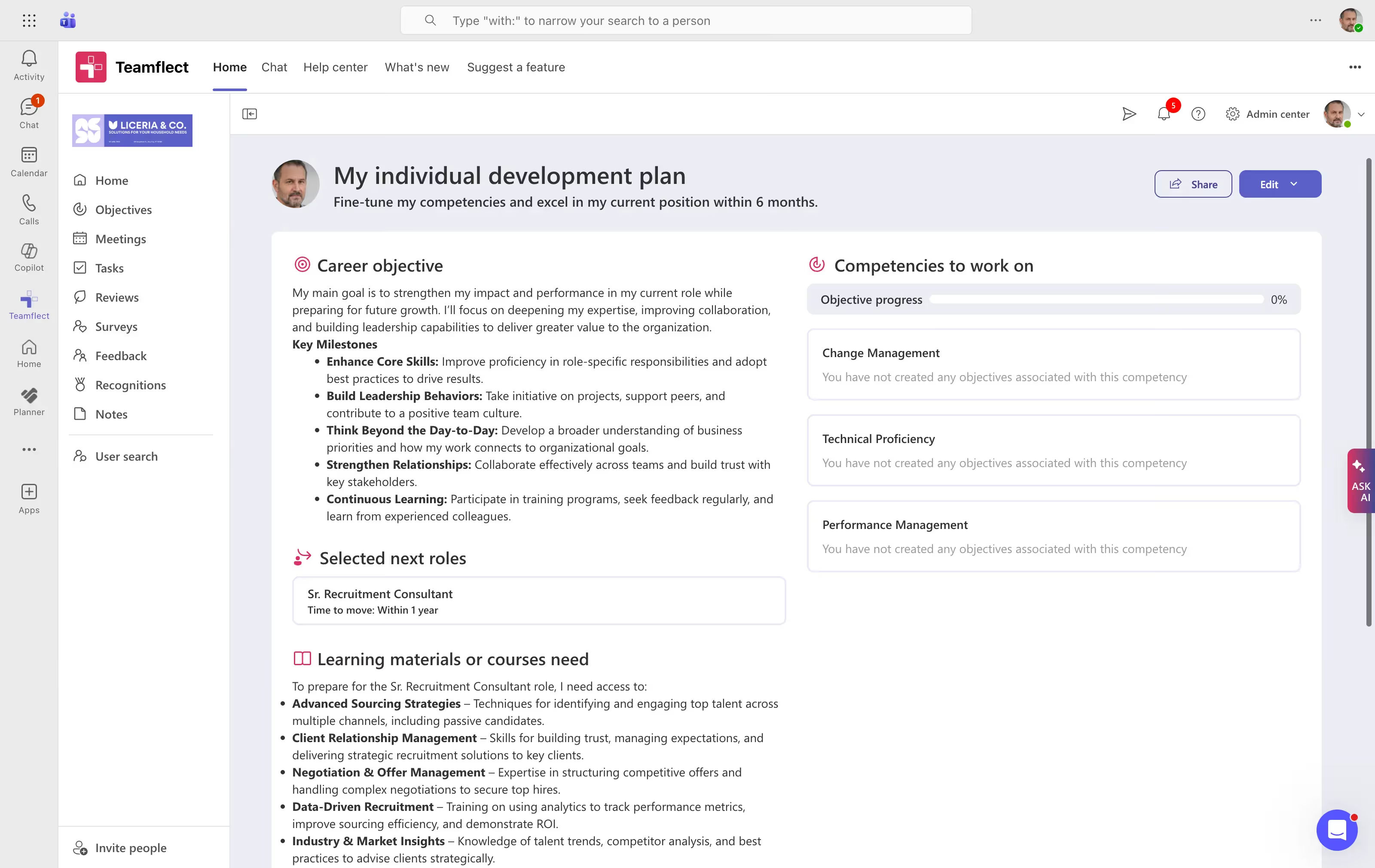
Teamflect earns the top spot for organizations that run on Microsoft 365. Rather than asking employees to log into yet another platform, Teamflect sits directly inside Microsoft Teams and Outlook, making development conversations and goal tracking a natural part of how people already work.
Teamflect connects employee development and growth into every facet of performance management, allowing users to build extensive individual development plans without ever having to leave Microsoft Teams. These development plans can be enhanced with AI-powered development goals and role-based competency libraries.
IDP's inside Teamflect can also be connected to performance reviews, ensuring each review is a catalyst for employee development.
For organizations where Teams adoption is already high, Teamflect removes the biggest barrier to effective development programs: actually getting people to use the tool.
Key Features
- Native Microsoft 365 Integration: Runs directly inside Teams and Outlook, no separate login required
- Individual Development Plans: IDP's with role-related competencies, learning materials, and career paths.
- AI-Powered Development Goals: Development goals suggested by AI based on role, 360 feedback, and review scores.
- Customizable Review Templates: Build reviews with custom scoring, question types, and automated cycles
- 360-Degree Feedback: Collect input from peers, managers, and direct reports
- 1-on-1 Meetings: Structured agendas with talking points, and check-in forms.
- 9-Box Talent Grid: Visualize performance and potential with the 9-box grid inside reviews.
- Succession Planning: Identify succession candidates and build strong leadership pipelines.
What Makes Teamflect Stand Out
- Featured by Microsoft as one of the best 1-on-1 meeting tools for Teams
- Free plan available for teams of up to 10 users, with no time limit
- Dedicated Customer Success Manager included with the Essential plan
- Free implementation support and personalized onboarding sessions
- Among the highest adoption rates in its category due to familiar interface
Pros & Cons
Pros: "What I have liked best about Teamflect is how seamlessly it integrates performance management into our team’s daily workflow. Because it lives directly within Microsoft Teams, it doesn’t feel like “another system” to log into." - G2 Review
- Exceptional Microsoft 365 integration eliminates platform-switching
- User-friendly setup that managers and employees pick up quickly
- Competitive pricing with a genuine free tier for smaller teams
- Strong customer support with fast response times
- AI tools reduce the time spent on routine HR tasks
Cons:
- Requires a Microsoft 365 environment to function; not suitable for organizations on Google Workspace or other platforms.
Pricing
- Starter: Free for up to 10 users
- Essential: $7/user/month (volume and non-profit discounts available)
- Professional: $11/user/month (volume and non-profit discounts available)
2. Lattice
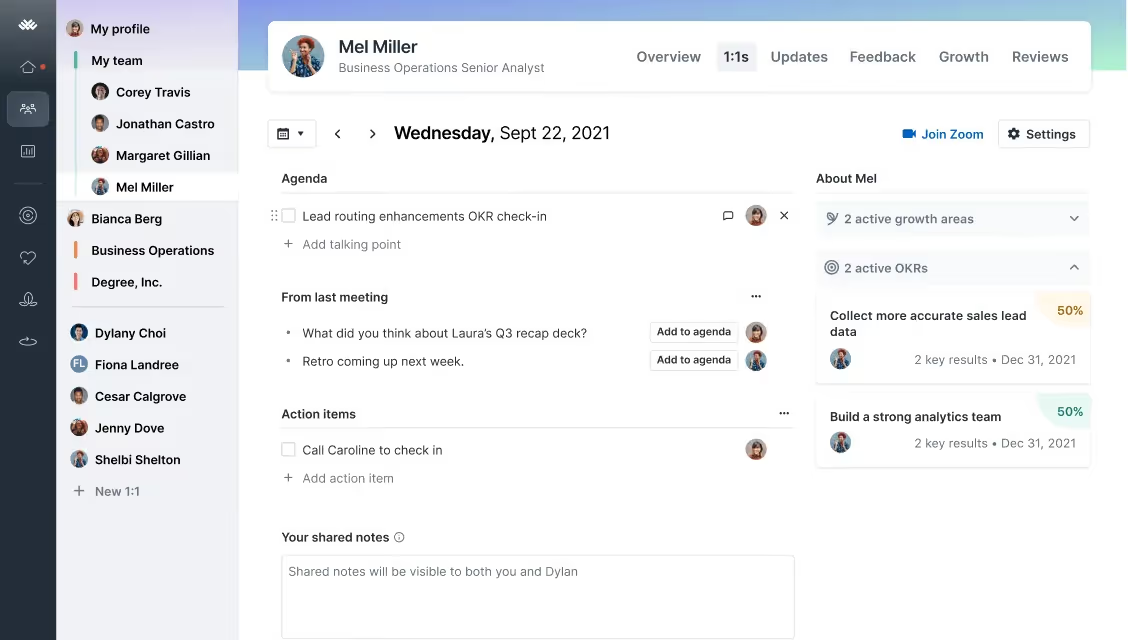
Lattice has built a well-deserved reputation as one of the more complete people management platforms on the market. It started as a goal-tracking tool and has expanded into a full suite that covers performance reviews, career development, engagement surveys, and compensation planning.
The platform is particularly well suited for mid-size and growing companies that want everything connected: performance data linked to development goals, feedback tied to career frameworks, and manager coaching tools built into the same system employees use for their day-to-day work. Its modular structure means you can start with what you need and layer in more over time.
Key Features
- Customizable performance review cycles and templates
- OKR and goal management with visual progress tracking
- Career pathing and growth frameworks (Lattice Grow module)
- Employee engagement surveys with benchmarking
- Compensation management and planning tools
- 1-on-1 meeting tools with agenda tracking
- AI-powered review writing assistance and analytics
Pros & Cons
Pros: "It does a ton - employee reviews, 1:1 meeting tracking, employee org chart, employee feedback, performance summaries." - Capterra Review
- Broad feature set covering performance, engagement, and development
- Clean, modern interface that tends to drive employee adoption
- Strong OKR capabilities with company-to-individual alignment
- Regular product updates and improving AI functionality
Cons: "The main thing would be for one-off Outlook calendar events to sync to Lattice 1:1's. It can be frustrating instructing employees that they have to create a 'recurring' event in Outlook first for Lattice to recognize a meeting." - G2 Review
- Modular pricing means costs can climb quickly as you add features
- Some review template customization has limitations compared to dedicated platforms
- Full value requires strong adoption across the organization
Pricing
- Talent Management plan: starts at $11/user/month
- Add-ons (Engagement, Grow, Compensation): $4 to $6/user/month each
- No traditional free trial; demo and self-guided tours available
3. Fuel50
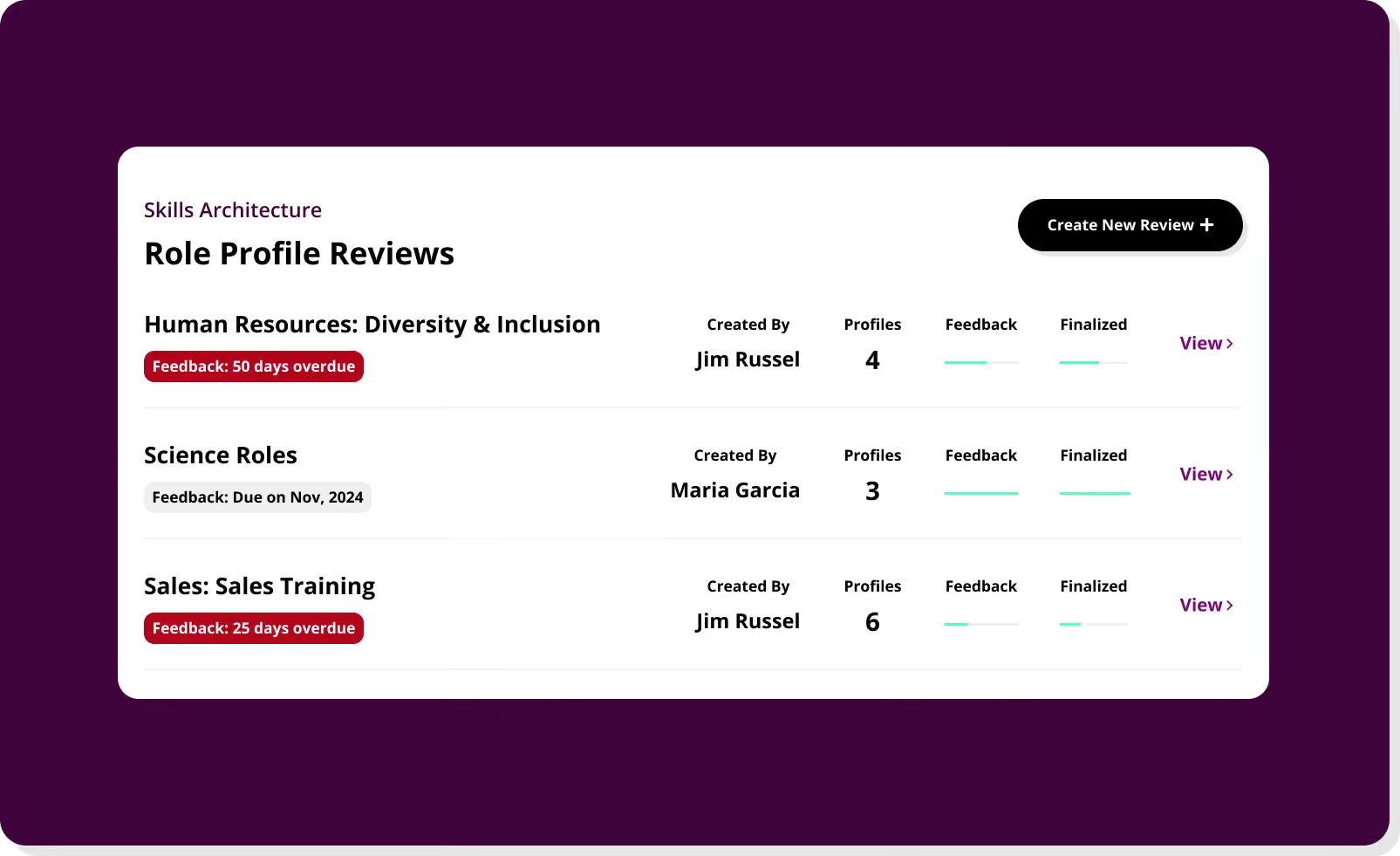
Fuel50 takes a different approach to employee development by focusing on what many platforms overlook: helping employees find their next opportunity inside your organization before they start looking outside it.
Built around an AI-powered talent marketplace, Fuel50 maps employees to internal roles, gigs, and development opportunities based on their skills, values, and career interests. Its expert-driven skills ontology helps organizations build accurate skills libraries without the manual work, making it a strong choice for companies prioritizing workforce agility, skills-based hiring, and retention.
Key Features
- AI-powered career pathway mapping and gap analysis
- Internal talent marketplace connecting employees to roles, gigs, and projects
- Skills library with AI-driven mapping to organizational roles
- Mentorship and coaching program management
- Workforce analytics for talent planning and succession
- Personalized learning recommendations tied to career goals
- Ethical AI framework prioritizing diversity and inclusion
Pros & Cons
Pros: "Fuel50 has Friendly design that puts career growth front and center. It feels like the platform was built with people in mind—its personalized career pathing and tailored development plans make it easy to spot opportunities within the company." - Capterra Review
- Strong career pathing tools that employees engage with naturally
- Ethical AI design with built-in diversity considerations
- Highly configurable to different organizational structures
- Proven measurable results in internal mobility and employee retention
Cons: "I find the talents and skills tools the least valuable ones. I'm not sure how that could be improved, but that is the one that I get the least value from with people." - G2 Review
- Requires strong foundational job architecture for best results
- Manager visibility into employee development data is limited in some configurations
- Initial setup can be time-consuming depending on configuration complexity
Pricing
- Three tiers available: FuelGrowth (Standard), FuelMarketplace (Premium), FuelMobility (Enterprise)
- Two standalone packages: FuelArchitecture and FuelMentor
- Custom pricing based on organization size; contact Fuel50 for a quote
4. Rippling
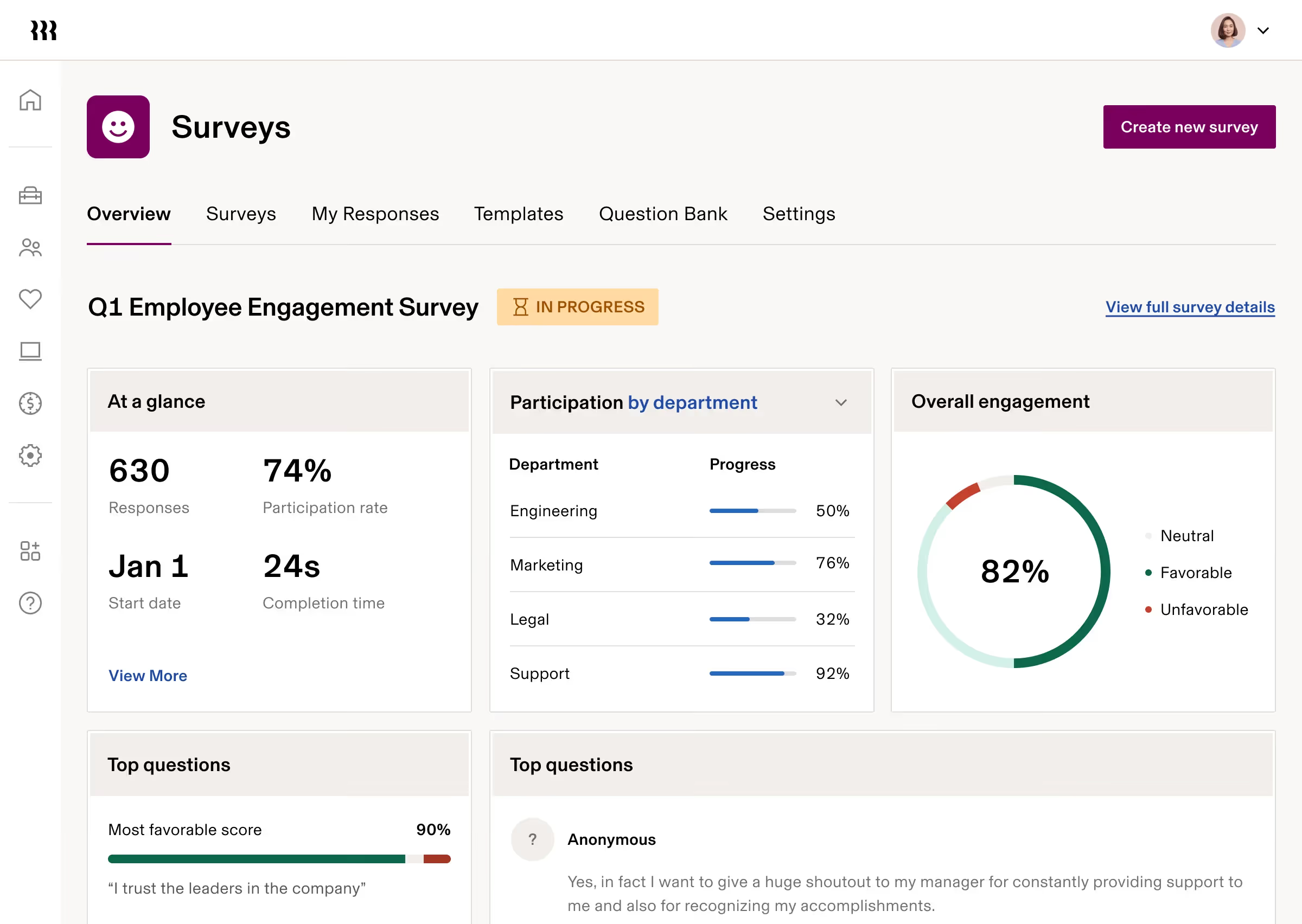
Rippling is the platform for organizations that want to stop juggling separate tools for HR, payroll, IT, and employee training. Its built-in learning management system (LMS) plugs directly into the rest of the Rippling platform, which means training assignments can be triggered automatically when someone joins the company, changes roles, or hits a compliance deadline.
Where Rippling stands out for employee development is in its automation: role-based course assignments, real-time progress tracking, certification management, and the ability to restrict system access until certain training is completed. It is a more operationally focused development tool than a career-growth platform, but for compliance-heavy environments, that focus is exactly what HR teams need.
Key Features
- Built-in LMS with automated course assignment based on role and department
- Integration with 600+ third-party tools including dedicated learning platforms
- Compliance training tracking with certification management
- Real-time progress monitoring and detailed reporting
- Conditional access controls tied to training completion
- Unified HR, payroll, IT, and learning data in one platform
- Custom workflow automation across the entire employee lifecycle
Pros & Cons
Pros: "I use Rippling for contractor payment hours, and I like how it makes keeping track of paychecks easier. It's very user-friendly, simple to understand, and streamlined. The system is pleasing to the eye, and the main dashboard makes everything simple right from the start." - G2 Review
- Exceptional all-in-one consolidation reduces tool sprawl significantly
- Strong automation for onboarding and compliance training
- Highly rated interface that employees find intuitive and accessible
- Deep integration ecosystem with 600+ apps
Cons: "Some of the benefits pages are very different on the website vs the app. On the website I can navigate to the HSA account and on the app I can't." - Capterra Review
- LMS functionality is narrower than dedicated learning platforms
- Pricing is modular and requires a custom quote
- Some users note rigidity in learning path customization
Pricing
- Modular pricing based on selected products; starts around $8/user/month for core HR
- LMS is an add-on to the core platform
- No public pricing; contact Rippling for a custom quote
5. EasyLlama

EasyLlama keeps things straightforward: it is a compliance-focused training platform that makes it easy to assign, track, and prove completion of required workplace courses. Its course library covers sexual harassment prevention, HIPAA, DEI, cybersecurity awareness, and more, with content that meets state-specific and federal requirements.
For HR teams that primarily need to manage mandatory training across a distributed workforce, EasyLlama removes a lot of the administrative friction. Employees can start and stop courses at their own pace from any device, and integration with common HRIS tools means user management is largely automated.
Key Features
- Pre-built compliance course library covering harassment, HIPAA, DEI, and more
- Mobile-friendly, interactive content with real-life scenarios and quizzes
- "Llama Bites" micro-courses for 5-10 minute learning bursts
- HRIS integrations with BambooHR, Rippling, Workday, Gusto, and more
- Automated course assignments, reminders, and completion tracking
- Multi-language support across 100+ languages
- Custom branding options for white-labeling training content
Pros & Cons
Pros: "The program was very engaging and forces you to interact in a variety of ways which does not allow the user to skip or skim through the training course. These methods ensure that the user reads all of the content and does their best to answer the questions asked." - G2 Review
- Consistently rated among the easiest platforms to use
- Fast implementation with no lengthy onboarding process
- Flexible scheduling lets employees complete training at their own pace
- Useful for organizations with diverse, multilingual workforces
Cons: "For a company that specializes in training, they really need to work on improving their own customer service and support!" - Capterra Review
- Some users report inconsistent customer support response times
- Course catalog is focused on compliance; limited for broader skill development
- No mobile app; browser-based only
Pricing
- Single Course Access: $19.95/seat/year (1 assigned course per learner)
- Flex Course Access: $39.95/seat/year (3 assigned course per learner)
- Unlimited Course Access: $49.95/seat/year (unlimited assigned course per learner)
- Security Awareness Training: $19.95/seat/year
- Learning Management System (LMS): $39.95/seat/year
- Unlimited + LMS Bundle: $79.95/seat/year
- Unlimited + LMS + Security Awareness Training Bundle: $89.95/seat/year
- Contact EasyLlama team for volume-based pricing
6. ProProfs Training Maker

ProProfs Training Maker is a good fit for organizations that need to build their own training courses without a large budget or a dedicated L&D team. Its course builder supports video, PDF, PowerPoint, audio, quizzes, and certificates, all packaged in a platform that can be up and running the same day you sign up.
It handles a wide range of use cases: onboarding, compliance training, product knowledge, safety certification, and ongoing professional development. The breadth of supported content types and its accessible pricing make it particularly popular with small and mid-size businesses looking for a practical, no-frills LMS.
Key Features
- Drag-and-drop course builder with multimedia content support (video, PDFs, PPTs)
- 100+ ready-to-use course templates and a built-in course library
- Quizzes, surveys, and knowledge checks with automated grading
- Certificate issuance with custom branding
- Real-time reporting on course progress, completion rates, and engagement
- SCORM and Tin Can compliance for external integration
- 15+ question types including multiple choice, fill-in-the-blank, and video response
Pros & Cons
Pros: "The simplicity. I don’t need a tech degree to create and manage training sessions." - G2 Review
- Very easy to get started with minimal technical knowledge
- Responsive customer support team with strong satisfaction ratings
- Supports self-paced, remote, and blended learning formats
- Trusted by over 15 million users across 150+ countries
Cons: "The cap on a maximum of 10 learners in the free plan is restrictive for many users who want to opt for that plan." - Capterra Review
- Branding customization options are limited compared to enterprise platforms
- Some users report an initial learning curve for advanced features
- Advanced automation requires additional configuration effort
Pricing
- Free plan available for up to 10 users with limited features
- Essentials: $1.99/user/month (billed annually)
- Business: $3.99/user/month (billed annually)
- Business Complete Elite: $2.38–$4.98/user/month (depending on number of users; billed annually); $2499 for unlimited users
- Free trial available upon request
- Optional white label to remove “Powered By”: $300/year
- Custom courses available upon request
7. Leapsome

Leapsome is built for HR teams that want to connect learning directly to performance management, rather than treating the two as separate systems. Courses and learning paths are tied to the same goals, competencies, and review cycles employees are already working within, creating a development experience that is structured rather than ad hoc.
The platform covers a lot of ground: performance reviews, 360-degree feedback, goal setting, engagement surveys, learning modules, compensation management, time tracking, and an HRIS. Its modular structure lets organizations start with the pieces they need most and build out over time.
Key Features
- Performance reviews, 360-degree feedback, and continuous feedback tools
- Goal setting and OKR tracking with team and company alignment
- Personalized learning paths tied to competencies and review data
- Employee engagement surveys with AI-driven analytics
- Compensation management with pay transparency tools
- HRIS with onboarding, absence management, and time tracking
- Manager 1-on-1 tools with meeting notes and action items
Pros & Cons
Pros: "Leapsome is well designed and genuinely supports meaningful performance conversations. Goal-setting, feedback and review cycles are intuitive and encourage continuous development rather than one-off evaluations." - Capterra Review
- One of the most well-reviewed platforms on G2 for ease of use
- Tight integration between learning, goals, and reviews
- AI tools that surface actionable insights from survey and feedback data
- Regular product development with a responsive support team
Cons: "Sometimes they don't allow the other managers to edit certain things like deleting some objectives. Likewise, the surveys don't have some options like cycles." - G2 Review
- Per-module pricing can add up for teams that need the full feature set
- Some users report complexity when setting up and managing review cycles
- Mobile experience has fewer features than the desktop version
Pricing
- Custom pricing
8. 380Learning
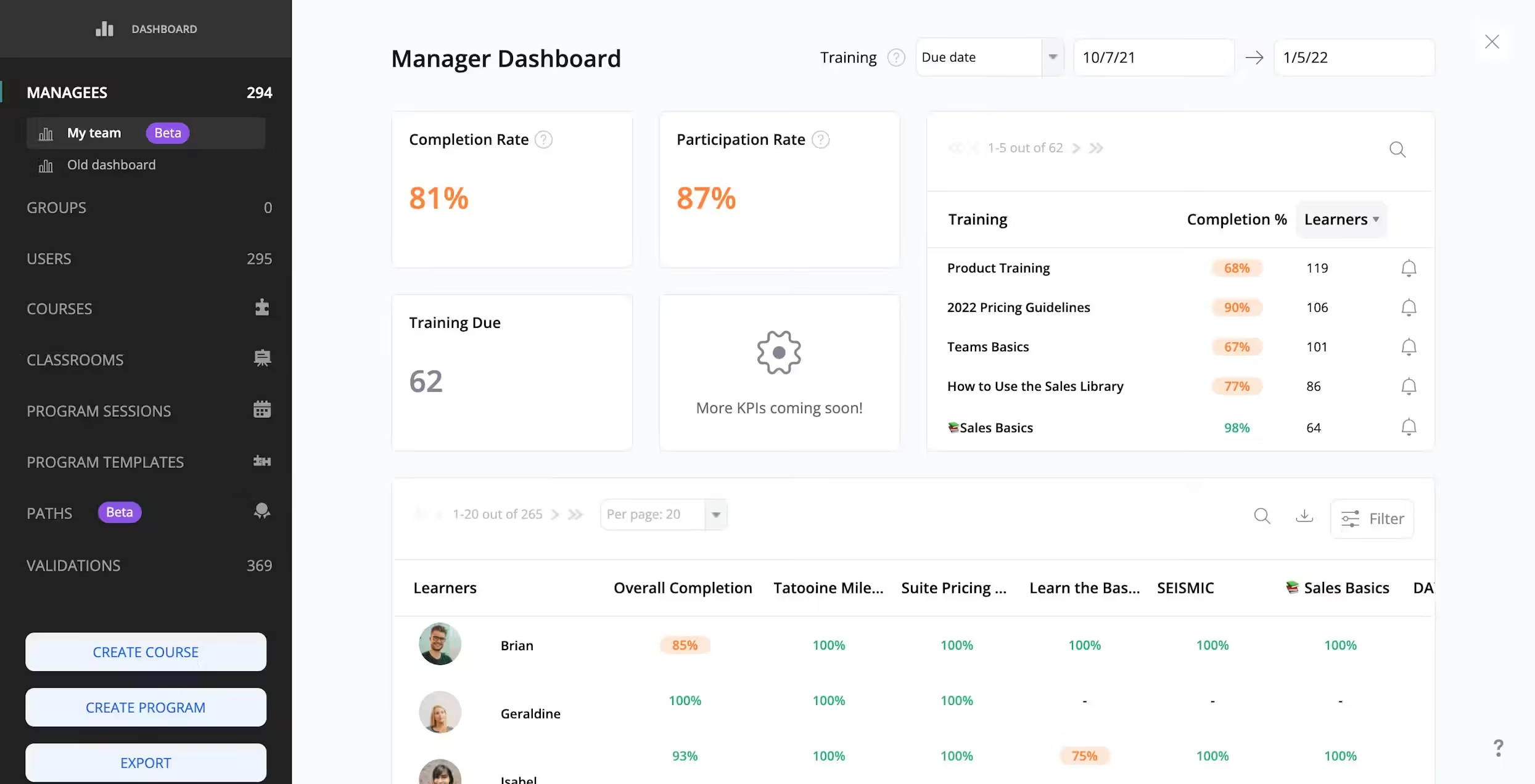
360Learning takes a different philosophy from most LMS platforms. Rather than relying on top-down content delivery from L&D teams, it gives subject-matter experts inside your organization the tools to build and share their own courses, with peer feedback built into the learning loop.
This approach works well for companies where internal knowledge is one of the most valuable training assets: sales teams sharing deal-winning techniques, support teams documenting solutions, or operations teams standardizing best practices. Its AI tools help L&D teams identify skills gaps and curate learning recommendations at scale.
Key Features
- Collaborative course creation tools for internal subject-matter experts
- AI-powered skills gap identification and course recommendations
- Gamification elements including reactions, questions, and social learning tools
- Automated onboarding journeys for new hires by department or role
- Integration with Workday, Salesforce, Slack, LinkedIn Learning, Udemy, and more
- Detailed analytics on learner engagement, completion, and skills progression
- Mobile app with full end-to-end functionality
Pros & Cons
Pros: "360Learning is one of the tools we use for newcomers onboarding and new training for all the employees." - Capterra Review
- Genuinely differentiated approach to peer-based learning
- Fast course creation; experts can build new modules in minutes
- Strong integration ecosystem with major HR and business platforms
- Encourages continuous learning culture with social and feedback features
Cons: "The only small criticism we have made is the proportion of the different parts that make up the screen, for example, the training screen is too small compared to the comments column, which we consider less important than the training content, and it is not yet possible to adjust the width of this column." - G2 Review
- Best suited for organizations with active internal expertise to share
- Pre-built course catalog is more limited than content-focused competitors
- Some users report occasional UI changes that require adjustment
Pricing
- Team plan: $8/user/month (up to 100 users; no setup fees)
- Business: Custom pricing with dedicated support
- Free trial available
9. Udemy Business
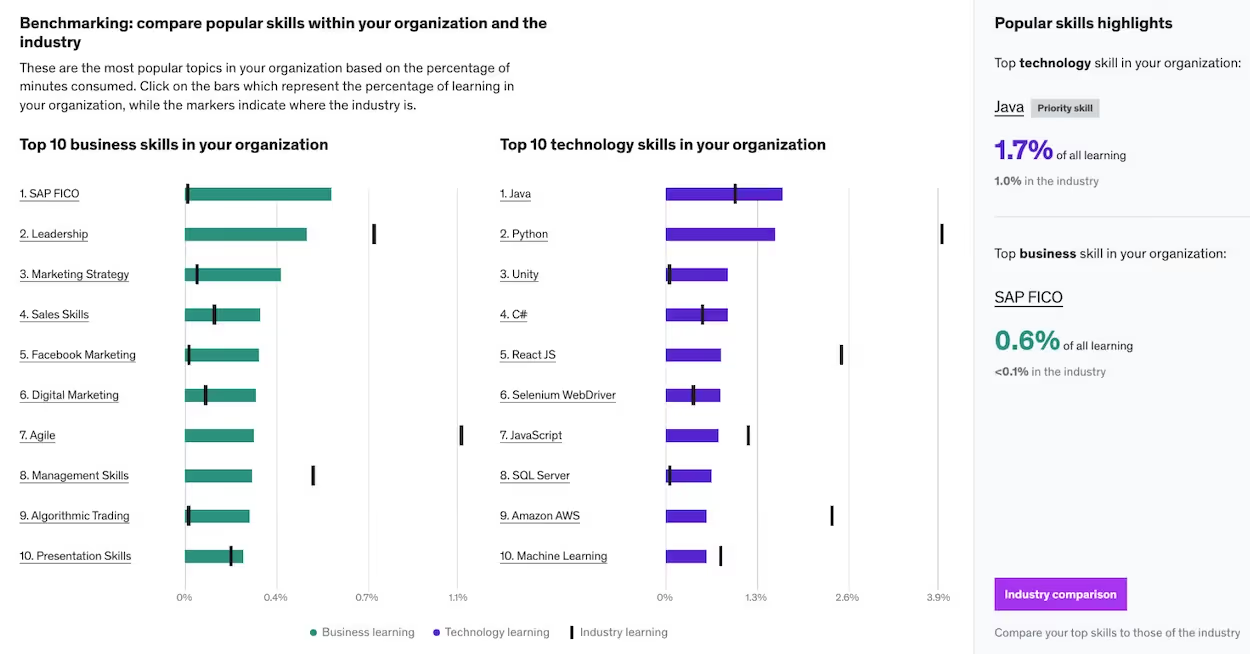
Udemy Business gives organizations access to a library of more than 24,000 courses covering technology, leadership, finance, wellness, data science, and more. Content is created by independent instructors, which means the catalog is extensive but variable in quality. The Trade-off is variety: for teams that need technical and industry-specific skills training at an affordable per-seat cost, it is hard to beat.
Udemy Business includes learning analytics, SSO support, and API integration for enterprise plans. Its team plan works well for smaller groups looking for flexible, self-directed learning without a significant administrative overhead.
Key Features
- 24,000+ on-demand courses across business, technology, and soft skills
- AI-powered course recommendations based on role and learning history
- Learning path creation and team assignments
- Analytics dashboard with completion tracking and engagement metrics
- SSO and API integration for enterprise deployments
- Offline learning via the mobile app
- Udemy Business Pro for hands-on technical projects and labs
Pros & Cons
Pros: "I find the rating and reviews feature really useful as it gives me an insight into the course before I commit fully. The ability to download the Udemy Business app on my mobile and sync my progress across all devices is incredibly convenient." - G2 Review
- One of the most cost-effective options for technical training at scale
- Massive and regularly updated course library
- Employees can learn at their own pace with lifetime course access on individual purchases
- Trusted by over 80% of Fortune 100 companies
Cons: "Some courses vary in quality, and the vast selection can feel overwhelming when choosing what to learn next." - Capterra Review
- Course quality is inconsistent given the independent instructor model
- Not a full LMS; stronger as a content library than a complete development platform
- Limited gamification features compared to some competitors
Pricing
- Team Plan (2 to 50 users): $22.50/user/month (billed annually)
- Enterprise Plan (20+ users): Custom pricing
- AI Fluency: Custom pricing
- No free trial for the business plan
10. Coursera for Business
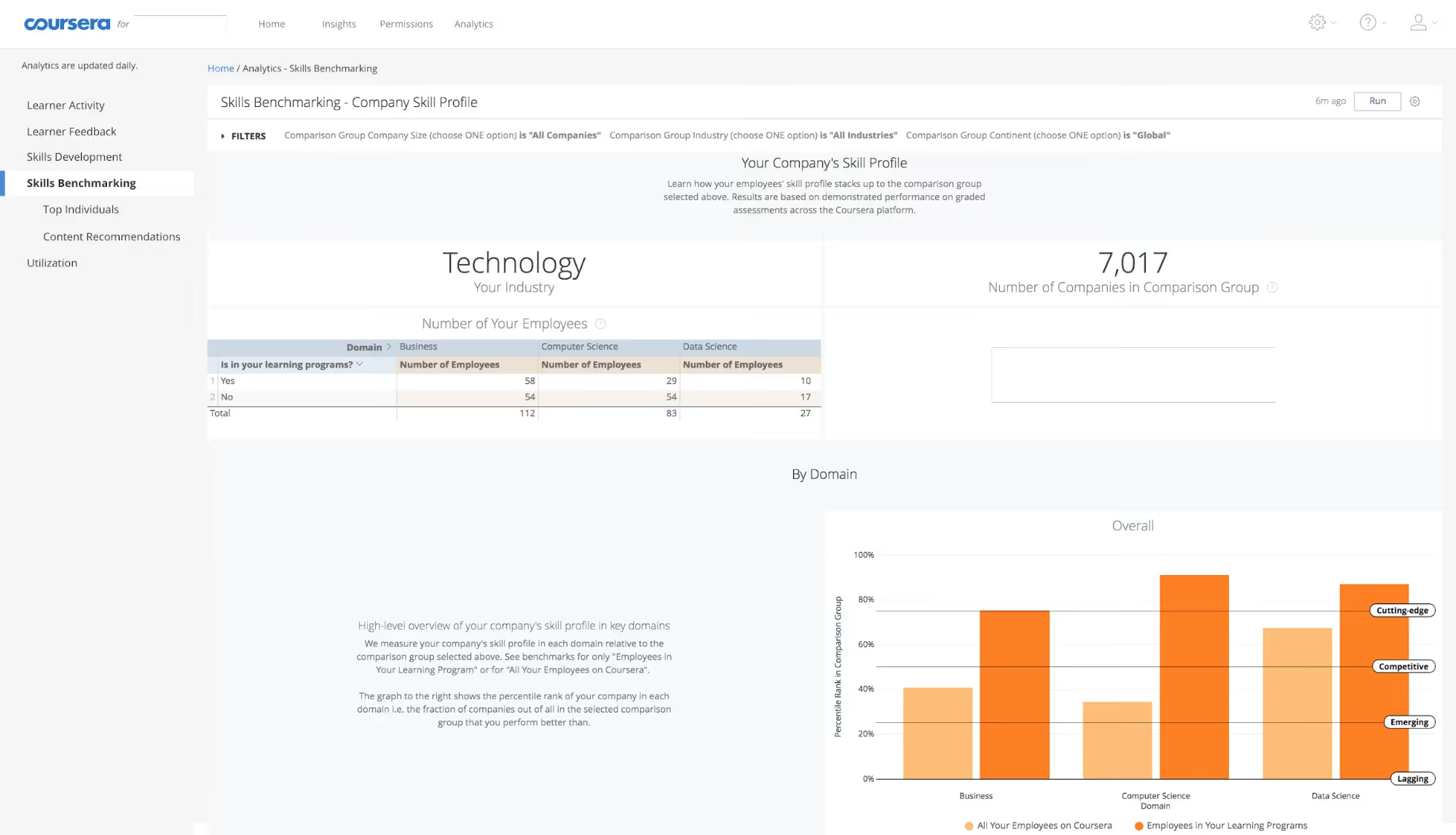
Coursera for Business partners with over 325 universities and companies, including Google, IBM, Meta, and Salesforce, to offer structured courses, professional certificates, and guided projects. For organizations whose employees need recognized credentials, that academic and industry backing is a meaningful differentiator.
The platform is strong for formal learning: structured courses with assessments, deadlines, and certificates that carry real weight with employers. It works well for leadership development, technical upskilling, and any context where credentials matter. Where it is less strong is in informal learning, internal knowledge sharing, or the kind of quick on-demand training that faster-paced teams often need.
Key Features
- 7,000+ courses from 325+ leading universities and companies
- AI-guided learning paths and personalized content recommendations
- Skill tracking with proficiency testing and progress analytics
- Admin dashboard for assigning courses, tracking completion, and measuring ROI
- Guided projects and hands-on labs for practical application
- Multi-language support across 54+ languages and 4,000+ translated courses
- AI-assisted custom course building (Enterprise plan)
Pros & Cons
Pros: "Useful learning platform with varying degrees of rigour on a myriad of topics both functional and technical." - Capterra Review
- University-backed content carries strong credibility with employees and employers
- Broad course catalog spanning data science, leadership, AI, finance, and more
- Certificates integrate directly with LinkedIn profiles
- Strong for organizations building formal learning pathways
Cons: "Course depth varies; some topics feel introductory and may not be sufficient for advanced learners." - G2 Review
- Pricing is higher than many competitors, particularly at scale
- Passive, lecture-based format may not engage all learner types
- Reporting features have been flagged as less robust than dedicated HR analytics platforms
Pricing
- Coursera for Teams (5 to 125 users): $399/user/year
- Enterprise (125+ users): Custom pricing with dedicated CSM
- 14-day money-back guarantee
- 25% discount available for registered nonprofits
How to Find the Right Employee Development Software for Your Team
Choosing employee development software is a long-term decision, not just a software purchase. Here is a practical framework to guide your selection.
1. Start with Your Team's Biggest Gap
Before comparing features, get honest about where your current development efforts fall short. Are employees leaving because they cannot see a career path? Are compliance deadlines being missed? Is your onboarding inconsistent across departments? The answer should point directly to the type of platform you need.
2. Factor in Your Existing Tech Stack
The best employee development software is the one your team will actually use, and adoption often comes down to how well the tool fits into existing workflows.
If your organization runs on Microsoft 365, Teamflect's native Teams integration reduces adoption friction considerably. If you need payroll and HR in the same place as learning, Rippling handles both. If you rely on Slack, platforms like 360Learning and Leapsome offer direct integrations.
Check which performance management tools you already have in place, since many development platforms work best alongside a connected performance review cycle.
3. Match the Platform to Your Learning Philosophy
Some organizations want top-down structured training; others want to surface expertise from within. Udemy Business and Coursera lean toward external content and formal credentials. Fuel50 and 360Learning are built around internal knowledge and career mobility. Leapsome connects learning directly to performance conversations. Knowing which model fits your culture will narrow your options quickly.
4. Set a Realistic Budget
Per-seat pricing can add up fast, especially as teams grow. Calculate your true cost across the features you actually need, not the full list price. Platforms like ProProfs Training Maker and 360Learning offer transparent, affordable starting tiers. Others, like Lattice and Fuel50, are priced for organizations with dedicated HR budgets.
5. Run a Real Pilot Before Committing
Most platforms on this list offer a free trial or demo. Use it with actual managers and employees on a real development scenario. The feedback you collect in two weeks of testing is worth more than any feature comparison chart.
Final Thoughts
Investing in the right platform is more than a technical upgrade; it is a commitment to the people who power your business. When employees feel their growth is a priority, they are more engaged, more productive, and more likely to stay for the long term.
The software market in 2026 offers a solution for every organizational style. Whether you need the deep integration of Teamflect within Microsoft 365, the AI-driven career mapping of Fuel50, or the academic rigor of Coursera, the "best" tool is the one that your team will actually use.
Frequently Asked Questions
What is employee development software and why do organizations need it?
Employee development software helps organizations plan, deliver, and track the learning and growth of their workforce. Good development software reduces turnover by giving employees clear paths forward, improves performance by closing skills gaps proactively, and reduces administrative work for HR teams through automation and reporting. Organizations that invest in structured development consistently see stronger retention and higher productivity than those that rely on informal or inconsistent training.
How much does employee development software typically cost?
Pricing varies widely depending on the platform's feature depth and the size of your team. Entry-level platforms like ProProfs Training Maker start under $1.25/user/month.
Mid-range platforms like 360Learning and Leapsome start around $8/user/month. More comprehensive platforms like Lattice start at $11/user/month and can increase significantly with add-on modules.
Content-focused platforms like Udemy Business and LinkedIn Learning are typically priced annually per seat in the $360 to $399.99/user/year range. Enterprise platforms like Fuel50 and Coursera Business use custom pricing based on organization size and contract terms.
What is the best free employee development software?
Teamflect offers a free plan for up to 10 users, making it the most accessible free option, particularly for Microsoft 365 teams. It includes core goal tracking, meeting tools, and feedback features without a time limit. ProProfs Training Maker also has a limited free tier.
For teams that need only content access rather than a full development platform, Coursera offers free course audits and LinkedIn Learning provides a 30-day free trial. Teamflect's free plan is the strongest option for teams that want a structured, long-term development tool at no cost.
How long does it take to implement employee development software?
Simple platforms like ProProfs Training Maker and EasyLlama can be up and running in a day or two with basic configuration. Mid-range platforms like 360Learning and Leapsome typically require one to two weeks, including template setup, integration with your HRIS, and initial user onboarding.
More comprehensive platforms like Lattice or Rippling can take two to four weeks for a proper implementation, particularly when performance management, compensation, and learning modules are all being set up.
Enterprise platforms like Fuel50 often require six to eight weeks given the complexity of building out job architectures and skills libraries. Most vendors offer implementation support, and it is worth taking full advantage of it to avoid common setup mistakes.
.png)