
.svg)
Effective management is more than just organization; it is about connection. Data from Gallup’s meta-analysis of over 200,000 manager-led teams shows that managers who are deeply committed to their roles lead teams with significantly higher engagement. The right software reduces the administrative burden, allowing leaders to focus on those critical team relationships.
This guide covers the 10 best workforce management software options in 2026, evaluated on real user feedback, feature depth, integration quality, and pricing transparency.
What to Look for in Workforce Management Software
Before diving into the list, it helps to know what actually separates a solid workforce management platform from one you will be replacing in 18 months.
1. Core Feature Coverage
At minimum, the tool should handle scheduling, time and attendance, leave management, and payroll integration. Performance management and employee engagement are strong additions. If a platform covers four of these well instead of eight poorly, that is worth more.
2. Integration With Your Existing Stack
A workforce management tool that does not talk to your HRIS, payroll system, or communication platforms creates more administrative work, not less. Check whether integrations are native or reliant on third-party connectors like Zapier.
3.Scalability
The right tool for a 50-person team often does not work well at 500. Think about where your organization will be in two to three years before shortlisting. Namely is a reasonable reference point for that middle stage, built for companies past the early growth phase but not yet at the complexity enterprise platforms are designed for.
4. Pricing Transparency
Many vendors do not publish pricing, which makes it hard to budget accurately. Always ask for a full breakdown of what is included in each tier and what requires an add-on.
5. Adoption Potential
The best-featured platform fails if managers and employees avoid using it. Look for tools with high ease-of-use ratings on G2 and Capterra, and ask vendors about their typical time-to-adoption.
10 Best Workforce Management Software in 2026
We rounded up the best workforce management software for 2026. Whether you’re building out your HR tech stack for the first time or looking to replace a tool that is no longer pulling its weight, there’s something here for every team size and budget.
1. Connecteam: Built for Frontline and Deskless Teams

Connecteam is specifically designed for businesses with hourly, shift-based, or deskless workforces. Retail stores, cleaning crews, logistics companies, healthcare clinics, and event teams make up the bulk of its customer base, and the platform reflects that.
Its mobile-first design, GPS time tracking, and drag-and-drop scheduling make daily operations manageable for teams that are rarely sitting in front of a desktop computer.
It is not the right tool for a knowledge worker-focused organization that needs deep performance management. But for operations-heavy teams that need scheduling, time tracking, and communication in one mobile app, Connecteam is one of the better options at its price point.
Key Features
- GPS-enabled mobile time clock with geofencing and facial recognition
- Drag-and-drop employee scheduling with shift bidding
- Team communication including announcements, group chat, and task updates
- Digital checklists, forms, and document management
- Employee onboarding, training courses, and knowledge library
- PTO tracking, leave management, and payroll integrations (Gusto, QuickBooks, Paychex)
- AI-assisted scheduling features
Best For
- Retail, hospitality, cleaning, and field service companies with shift-based workforces
- Small businesses with fewer than 10 employees that want a free, full-featured option
- Operations managers who need real-time visibility across multiple locations
Pros
"I like being able to see all my employees in one spot, what they're doing, and sending them tasks. Time tracking and payroll is so great with the system. Customer service has been phenomenal." - Capterra Review
- Free plan for up to 10 users with solid core features
- Highly rated mobile experience for non-desk employees
- Transparent, fixed pricing for the first 30 users makes budgeting predictable
- 14-day free trial on all paid plans
Cons
"While there is a free option, after 10 staff join, the cost is very high (to gain access to all features) for small organizations with limited budgets."- G2 Review
- Hub-based pricing means accessing Operations, Communications, and HR features requires separate subscriptions
- Feature-gating across tiers can feel restrictive for mid-sized teams
- Not suited for knowledge work or performance management use cases
Pricing
- Basic: $29/month for the first 30 users per hub ($0.8/month for each additional user)
- Advanced: $49/month for the first 30 users per hub ($2.5/month for each additional user)
- Expert: $99/month for the first 30 users per hub ($4.2//month for each additional user)
- Enterprise plan available on request
- Free trial and demo available
2. BambooHR: A Well-Rounded HRIS for Small and Midsize Businesses

BambooHR is one of the most widely adopted HR platforms for small and midsize businesses, and its staying power comes down to one thing: it covers a lot of ground without making things unnecessarily complicated. Employee records, time-off tracking, onboarding workflows, performance reviews, and an applicant tracking system all live in one place, and most users find they can start getting value out of it within a week.
It is not the deepest tool on this list in any single category. Its performance management features are solid but not as configurable as dedicated platforms. That said, for an HR team that needs a reliable core system without a steep learning curve, BambooHR consistently delivers.
Key Features
- Centralized employee database with org chart and document storage
- Time-off management with customizable policies and a shared team calendar
- Onboarding workflows with task checklists and e-forms
- Performance reviews and 360-degree feedback with pre-built templates
- ATS with connections to 30+ job boards
- eNPS surveys and employee wellbeing tools
- Over 100 native integrations including Slack, Microsoft 365, and Greenhouse
- AI-powered HR assistant for answering common employee questions
Best For
- US-based SMBs transitioning from spreadsheet-based HR processes
- HR teams that need broad coverage across the employee lifecycle without heavy configuration
- Companies with 25 to 500 employees that want a dependable, all-in-one foundation
Pros
"I find that BambooHR really helps us connect with people in the organization, being a good portal to connect with my managers and peers. The leave management system is the best feature for me because it's so easy to apply for a leave." - G2 Review
- Clean, intuitive interface with short onboarding timelines for new users
- Strong mobile apps for iOS and Android
- A 7-day free trial allows hands-on evaluation before committing
- Payroll, benefits, and time tracking available as add-ons for US teams
Cons
"Love it, but it lacks the customization and data architecture that would better support us as we scale and integrate with more and more systems." - Capterra Review
- Pricing is quote-based and not publicly listed, making budget planning harder
- Per-employee costs can climb fast once add-ons like payroll and benefits are included
- Performance management customization is limited compared to dedicated tools
Pricing
- Core: $10/user/month
- Pro: $17/user/month
- Elite: $25/user/month
- Three plans available with volume and nonprofit discounts
- Free trial available; no permanent free plan
3. Rippling: A Powerful All-in-One Platform for HR, IT, and Payroll
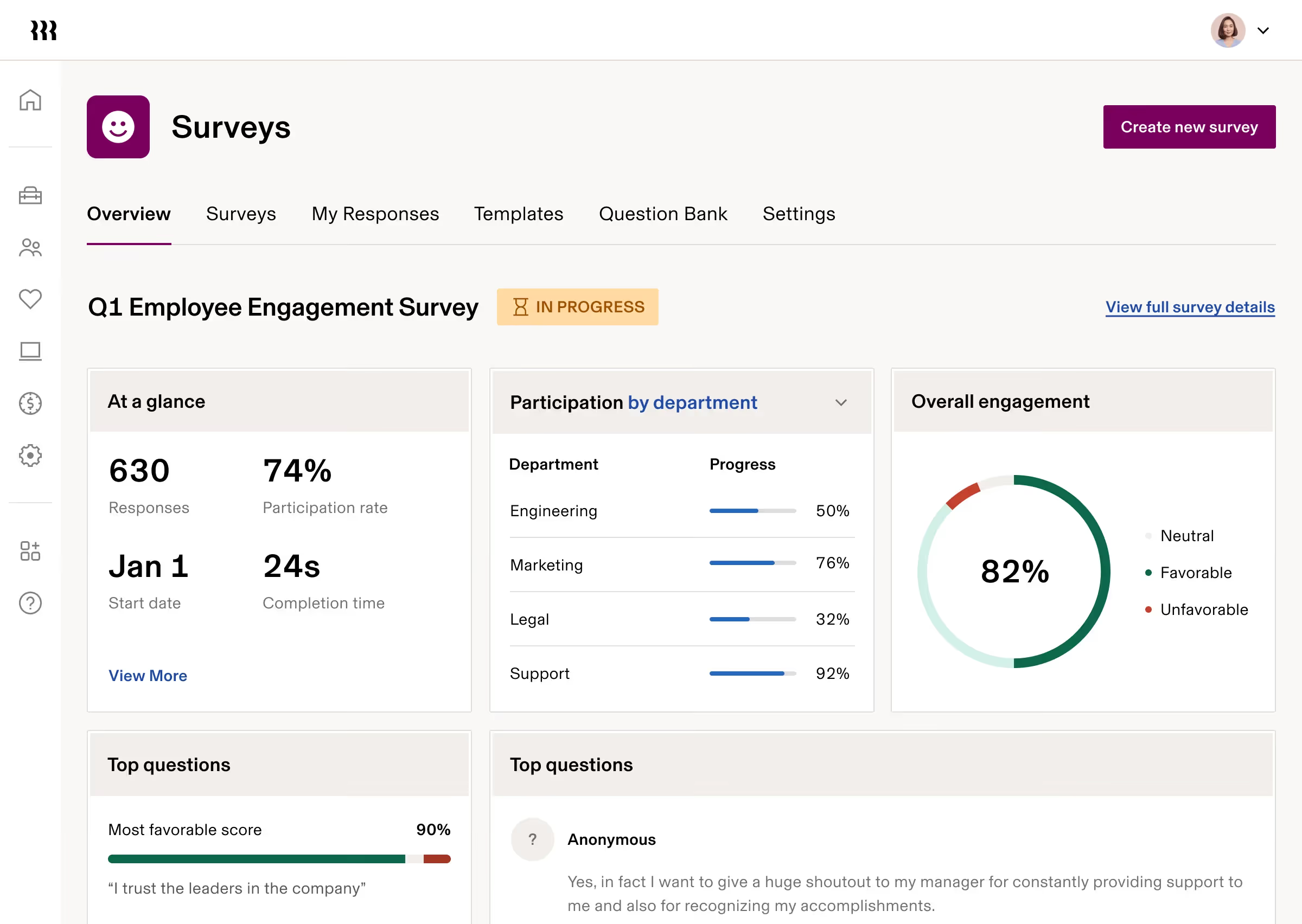
Rippling takes a fundamentally different approach to workforce management. Where most HR platforms stop at people operations, Rippling combines HR, payroll, IT management, and spend management into a single modular system. That breadth makes it attractive for fast-scaling companies that want to consolidate tools and reduce the number of vendor relationships they manage.
The trade-off is complexity. Rippling has a lot to offer, and organizations just looking for core HR functions may find the scope more than they need. For tech-savvy teams managing both people and devices, though, it is hard to find a more complete option at this price range.
Key Features
- Unified HR and payroll platform with automated onboarding and offboarding
- IT management including device provisioning, software access, and compliance monitoring
- Workflow Studio for building custom automations across departments
- Time and attendance tracking with payroll sync
- Global payroll and Employer of Record services
- 650+ third-party integrations
- Custom report builder with pre-built and configurable reports
- Employee scheduling, leave management, and self-service portal
Best For
- Fast-growing companies that want HR, IT, and payroll under one roof
- Organizations with distributed or global teams needing compliance support
- Tech-forward HR teams comfortable with a modular, configuration-heavy platform
Pros
"I am enjoying it and it has lots of features we have yet to explore. I like the ease of adding time or requesting partial days off." - Capterra Review
- Onboarding automation significantly reduces time spent on new hire setup
- Extensive integration library covers nearly any HR tech stack
- Strong compliance support for multi-state and global workforces
- Mobile-friendly with a modern, well-organized interface
Cons
"It's a bit like drinking from a fire hydrant with all the tools it offers. This will take some time to learn." - G2 Review
- Pricing is modular and not publicly listed; costs can accumulate quickly across modules
- Some features like custom reporting and advanced workflows require add-ons
- Best suited to teams with technical bandwidth to configure and manage the system
Pricing
- Custom quote for different products, including Platform, HCM, IT, Spend
- No free trial; demo available through sales
4. Keka: A Payroll-First HR Platform for Growing Businesses
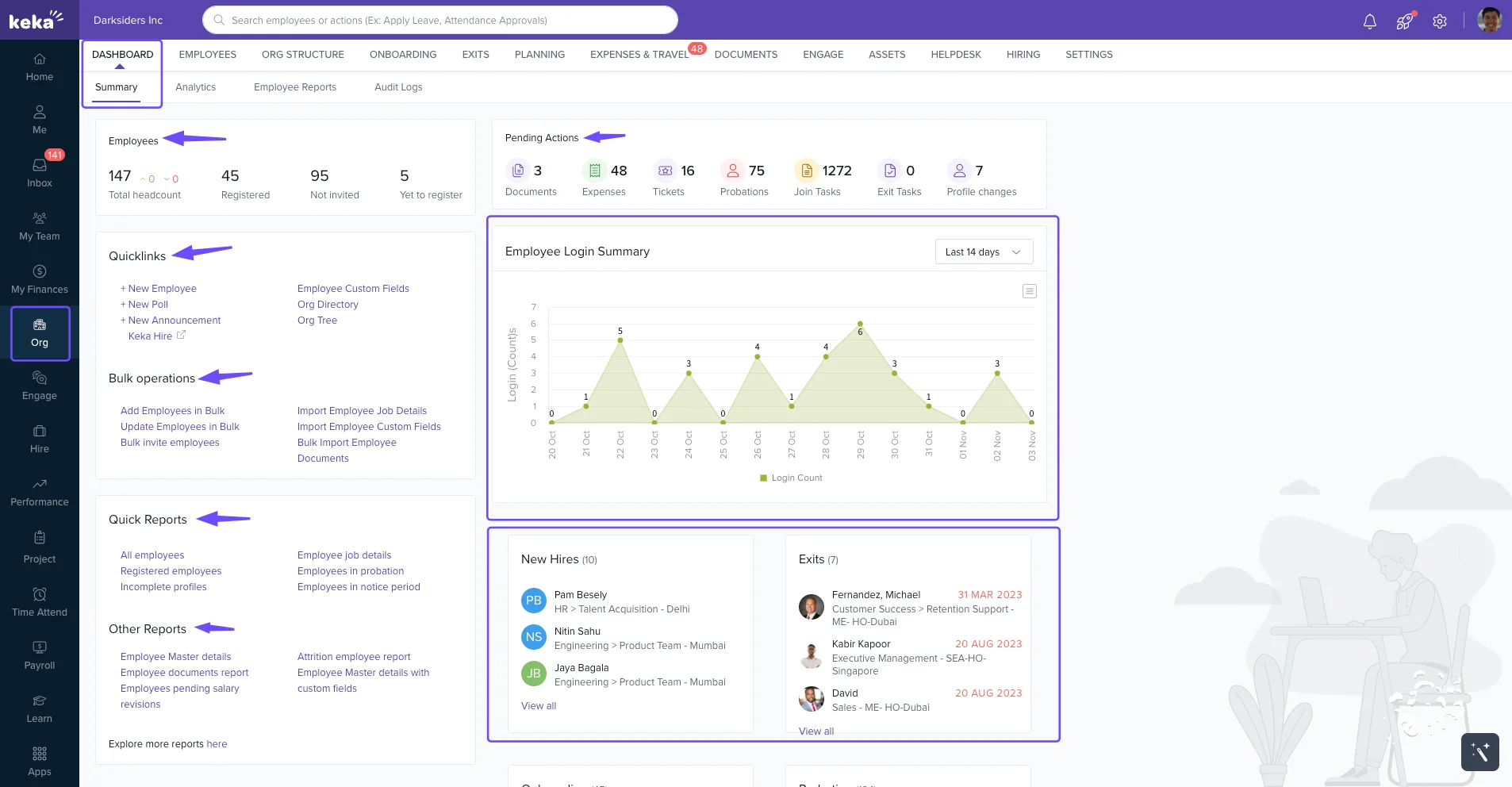
Keka is a people operations platform that takes payroll seriously from the start. Unlike tools that treat payroll as a bolt-on, Keka builds its system around payroll accuracy and compliance, with HR, attendance, leave, performance, and hiring layered on top. That makes it a particularly good fit for businesses in India and Asia-Pacific that need localized payroll compliance alongside broader HR functionality.
Its clean interface and straightforward onboarding have earned it strong reviews from HR managers who do not want to spend weeks configuring a system before they can use it.
Key Features
- Automated payroll with tax compliance and bulk salary processing
- Attendance tracking via biometric, GPS punch, facial recognition, and mobile
- Leave management with customizable policies and self-service access
- Performance reviews with OKR tracking, 360-degree feedback, and 1:1 support
- Applicant tracking system with resume parsing and onboarding workflows
- Employee self-service portal for payslips, leave requests, and personal data
- Shift scheduling and project time tracking
- Real-time HR analytics and workforce dashboards
Best For
- Small to mid-sized businesses (50 to 500 employees) that want payroll and HR in one system
- Organizations in India or Asia-Pacific that need region-specific payroll compliance
- Growing companies that want structured performance management alongside core HR
Pros
"Overall, Keka is a really good product. We use it every day to monitor and manage various aspects of employee records. At a very competitive price, it offers plenty of features to work with." - G2 Review
- Payroll is included in every plan, not sold as an add-on
- Clean, easy-to-use interface with low onboarding overhead
- Strong leave and attendance management workflows
- Dedicated implementation support and responsive customer success teams
Cons
"I have noticed there are lagging issues with the software and it is hard to get help when this occurs." - Capterra Review
- Mobile app performance has received mixed reviews compared to the desktop experience
- Customer support responsiveness has been inconsistent for some users
- Advanced features require configuration, which can feel complex for newer HR teams
- Free trial requires a sales demo rather than self-service access
Pricing
- Price available upon request; available modules for HRMS & Payroll: Foundation, Strength, Growth
- Custom quotes for enterprise; free trial gated behind a demo
5. HROne: Solid Lifecycle Management for Growing Organizations
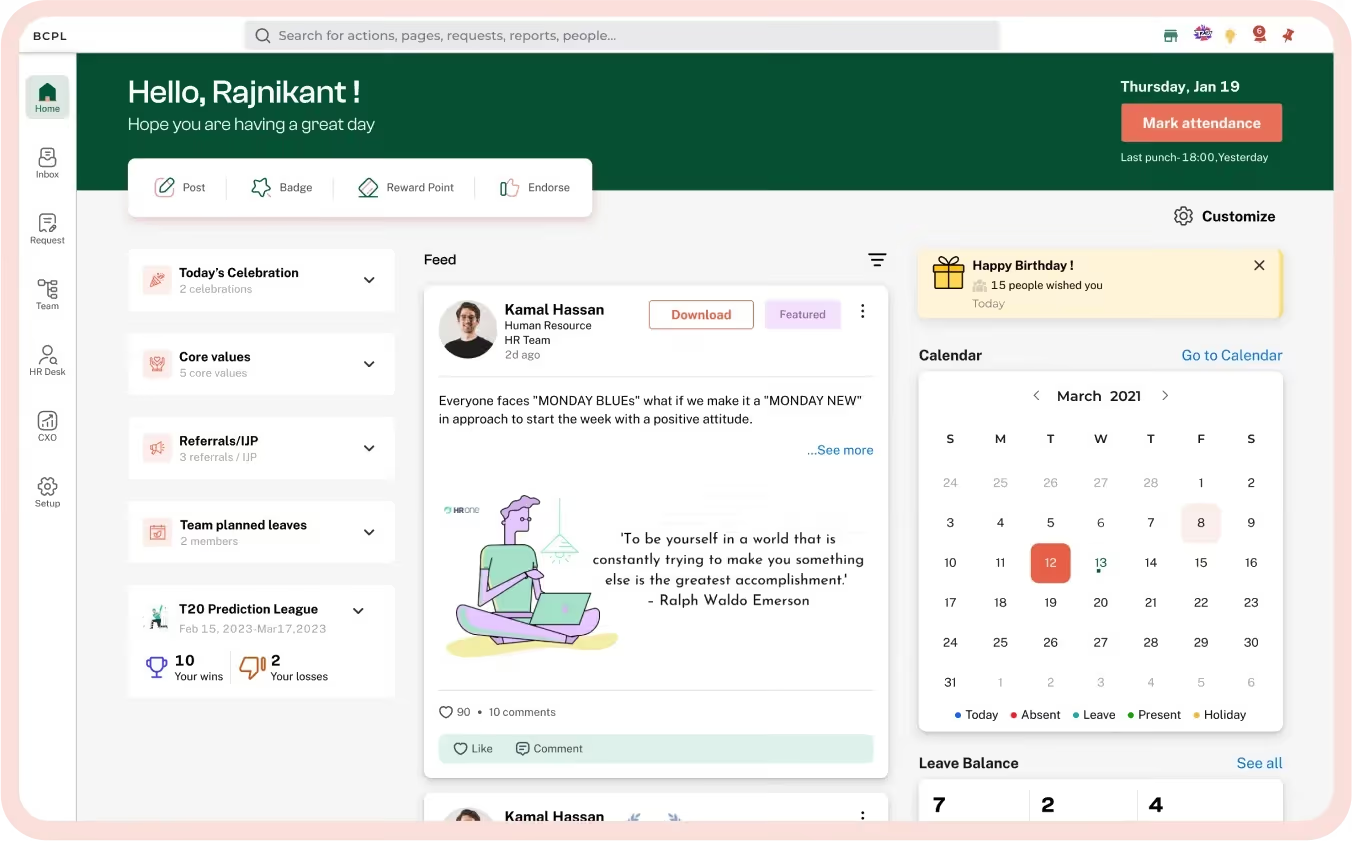
HROne covers the full employee lifecycle in one platform: recruitment, onboarding, attendance, payroll, leave, performance, and exit management. It is most commonly used by mid-sized organizations that want to replace multiple disconnected tools with a centralized system that handles both routine HR tasks and more complex compliance requirements.
One standout is its InboxForHR feature, which lets HR teams handle tasks across multiple modules from a single view without switching between screens. For lean HR teams managing high volumes of employee requests, that kind of workflow consolidation adds up.
Key Features
- End-to-end recruitment with candidate tracking, interview scheduling, and offer workflows
- Automated payroll with tax compliance and salary slip generation
- Attendance management with mobile and biometric clock-in options
- Leave management with configurable policies and calendars
- 360-degree performance appraisals and goal tracking
- InboxForHR: single-window view of tasks across all HR modules
- AI-powered voice commands for common employee self-service requests
- Integrations with Microsoft Teams, LinkedIn, SAP Business One, and others
Best For
- Mid-sized organizations in Asia-Pacific or India looking for a cost-effective all-in-one HRMS
- HR teams managing high volumes of daily requests who want task consolidation
- Companies replacing manual spreadsheet-based HR workflows
Pros
"Our overall experience with HROne is great as it really helped us to streamline and automate our HR processes."- Capterra Review
- Broad feature coverage at a competitive price point
- Strong attendance and leave management workflows
- 24/7 customer support with unlimited product training
- Zero contractual lock-in on standard plans
Cons
"Sometimes I face issues with third-party tool integrations. For example, Google Meet and the calendar don't work properly at times." - G2 Review
- Third-party integration reliability can be inconsistent
- Mobile app experience lags behind the desktop version
- Report customization has limitations compared to more enterprise-grade tools
Pricing
- Contact HROne directly for enterprise pricing details.
6. ADP Workforce Now: Enterprise-Grade Payroll and HR for Mid-Market Teams

ADP Workforce Now is one of the most established workforce management platforms in the market, with a particular strength in payroll compliance. If your organization operates across multiple states or countries and payroll accuracy is non-negotiable, ADP's depth of regulatory knowledge and compliance tooling is difficult to match.
It is worth being clear about the fit, though. ADP Workforce Now is built for mid-market and enterprise companies, generally organizations with 50 to several hundred employees.
Smaller teams will find the platform more complex than necessary, and its interface has received consistent feedback as functional but not particularly modern.
Key Features
- Automated payroll processing with tax filing across all US states
- Benefits administration and open enrollment management
- Time and attendance tracking with mobile clock-in
- Talent acquisition module with 25,000+ job board connections
- Performance management including goal tracking, 1:1s, and review templates
- ADP DataCloud: workforce benchmarking against industry and regional data
- ADP Assist: AI tools for payroll anomaly detection and compliance validation
- 350+ certified third-party integrations
Best For
- US-based mid-market companies with 50 to 750 employees that prioritize payroll compliance
- Organizations expanding globally and needing a payroll pathway in 140+ countries
- HR teams that want outsourced payroll and HR services alongside the software
Pros
"Overall experience was great, quick and easy to use, really useful for people who are not texting savvy." - Capterra Review
- Industry-leading payroll accuracy and compliance depth
- ADP DataCloud benchmarking data gives HR teams a genuine strategic edge
- Broad integration library for connecting existing HR tech stacks
- Scalable across business sizes with modular add-ons
Cons
"It would be better to add a functionality like downloading all pay stubs together in a spreadsheet CSV format." - G2 Review
- Interface is functional but dated compared to more modern competitors
- Custom reporting is limited and can be frustrating for non-technical users
- Pricing is opaque; add-on modules can significantly increase total cost
- Customer support quality is inconsistent at lower account tiers
Pricing
- Custom pricing.
- Contact ADP directly for enterprise quotes.
7. Paylocity: A Strong Mid-Market Option with Modern Employee Engagement Tools
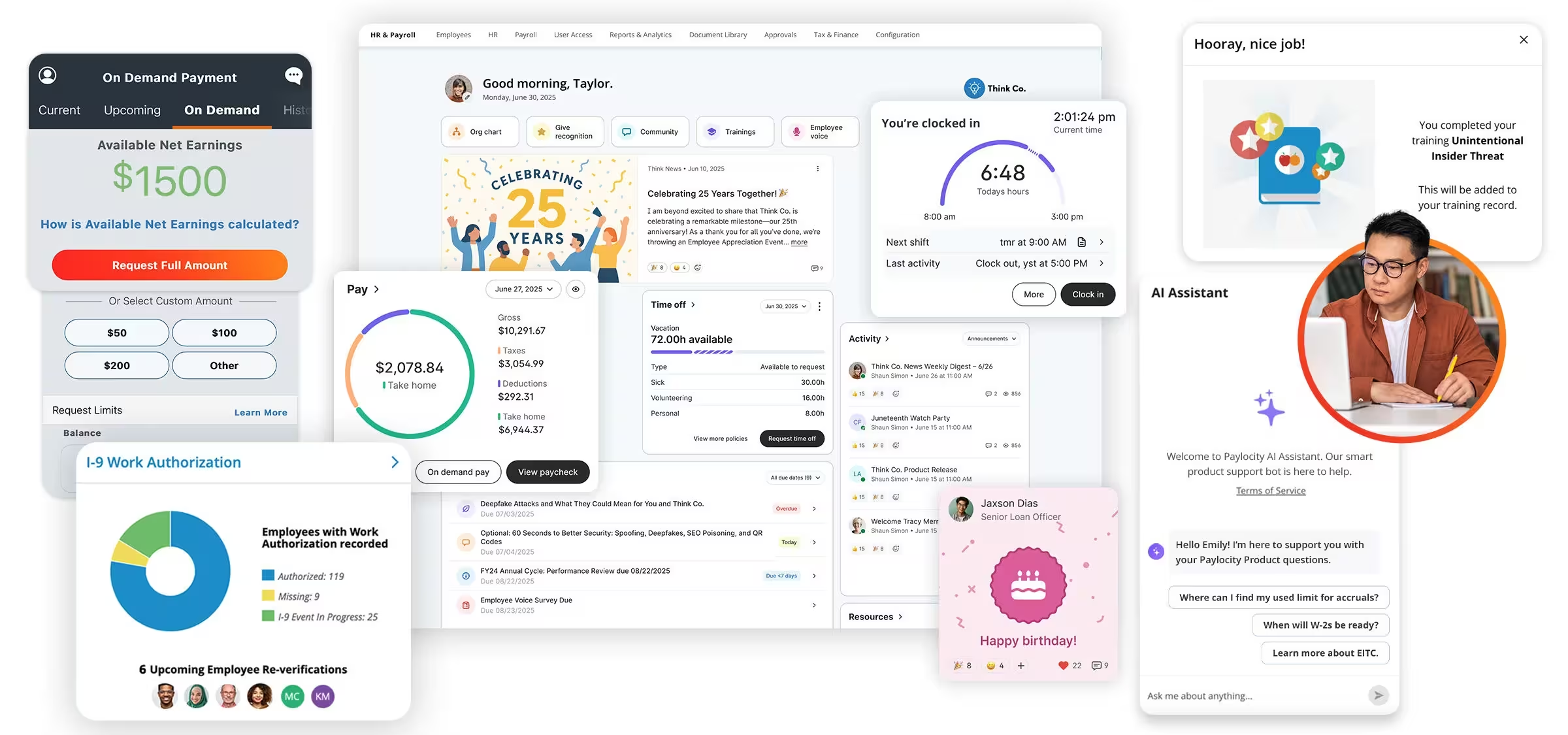
Paylocity is a cloud-based HCM platform designed for mid-sized organizations that need payroll, HR, and talent management in one place. Its standout feature among comparable tools is a built-in social collaboration layer called Community, which functions as an internal social network. For organizations trying to improve cross-team communication and employee connectedness, it is a differentiator that pure HRIS tools do not offer.
Paylocity's payroll processing is consistently praised for accuracy and ease of use, and its compliance tooling is well-regarded among HR managers in regulated industries.
Key Features
- Full-cycle payroll processing with automated tax filing and compliance support
- Benefits administration and open enrollment management
- Time and attendance tracking with labor forecasting
- Performance management with review templates and goal tracking
- Community: internal social collaboration and peer recognition
- On-demand pay access for employees
- Expense management and learning management tools
- Modern mobile app for both managers and employees
Best For
- Mid-market companies (roughly 100 to 1,000 employees) that want payroll and engagement tools combined
- HR teams in industries like healthcare, education, retail, and manufacturing
- Organizations that value employee experience features alongside core HR functions
Pros
"I like that Paylocity is easy to use and user-friendly. Even though I've only been using it for a little over a year, I find it really easy to navigate."- G2 Review
- Intuitive payroll processing rated among the best in its class on G2
- Strong compliance support for multi-state US workforces
- Community social features support internal communication in a way few HR platforms do
- Responsive customer support, especially for payroll-related issues
Cons
"While Paylocity offers a wide range of features, some areas of the platform can feel less intuitive and require additional training to fully utilize." - Capterra Review
- Pricing is not publicly listed; requires a custom quote
- Onboarding and implementation can be complex for teams without HR tech experience
- Some features require additional training before they deliver full value
Pricing
- Custom pricing; contact Paylocity for a quote for HR, Finance, or IT modules
- No public starting price, free trial, or free plan available
8. UKG Pro: Enterprise HCM for Large and Complex Organizations

UKG Pro is a comprehensive Human Capital Management suite designed for larger organizations that need deep workforce analytics, granular compliance controls, and a platform that scales across tens of thousands of employees. It combines payroll, time and attendance, talent management, learning, and workforce planning in a single system.
The depth of UKG Pro's analytics and reporting capabilities is one of its most consistently praised qualities among enterprise HR leaders. It handles complex payroll scenarios across multiple jurisdictions and offers a level of workforce data visibility that most mid-market tools cannot match.
Key Features
- Enterprise payroll processing with multi-jurisdiction tax compliance
- Time and attendance management with automated labor law enforcement
- Talent acquisition, onboarding, and succession planning tools
- Performance management with 360-degree feedback and goal tracking
- People analytics and workforce planning dashboards
- Learning management system with adaptive content delivery
- Compensation management and pay equity analysis
- Role-based access control with granular permissions
Best For
- Large enterprises (500+ employees) with complex payroll and compliance requirements
- Organizations operating across multiple states or countries
- HR teams that need enterprise-grade workforce analytics and reporting
Pros
"The ease of reviewing payroll data, employee information, vacation accruals, and how easy it is to submit vacation/sick days."- G2 Review
- Industry-leading compliance tooling for complex regulatory environments
- Strong analytics with visibility into labor costs, turnover trends, and team performance
- Highly scalable for organizations with thousands of employees across multiple locations
- Solid employee self-service portal for time-off, schedules, and personal data management
Cons
"The mobile app tends to go down about once a month. It's a bummer because when I rely on it for tasks and updates, suddenly losing access makes things a bit chaotic." - Capterra Review
- Mobile app reliability has been flagged in user reviews
- Implementation is complex and typically requires dedicated project management resources
- Steeper learning curve compared to more modern HR platforms
- Custom reporting can take significant time to learn and configure
Pricing
- Subscription-based pricing, per employee per month; pricing not publicly listed
- Custom quotes required based on headcount, modules, and contract length
- No free plan or free trial; enterprise implementations typically involve extended onboarding timelines
9. Deputy: A Sharp Scheduling Tool for Shift-Based Operations
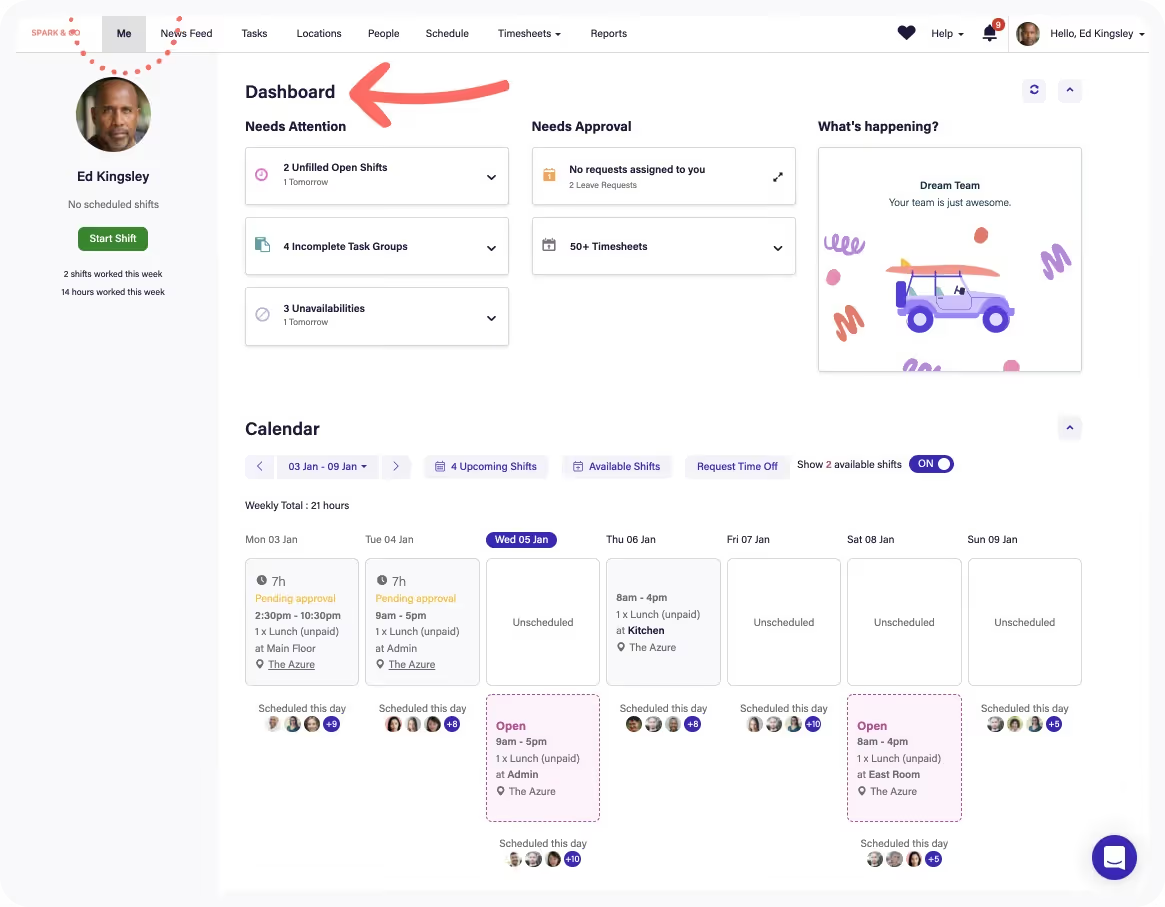
Deputy is purpose-built for shift-based businesses. Its core use case is straightforward: help managers create better schedules faster, track time accurately, and stay compliant with labor laws. Over 375,000 workplaces across more than 100 countries use it, primarily in retail, hospitality, healthcare, food service, and logistics.
Where Deputy excels is in the speed and clarity of its scheduling experience. Drag-and-drop shift creation, AI-powered auto-scheduling, demand forecasting, and real-time compliance alerts are all designed to reduce the time it takes to get a compliant roster out the door.
Key Features
- Drag-and-drop employee scheduling with AI-assisted optimization
- Demand forecasting based on historical data and sales trends
- Time and attendance tracking with mobile clock-in, kiosk, and facial recognition options
- Labor compliance management with built-in break and overtime rules
- Shift Pulse: employee sentiment collection tied to shifts
- Job posting, onboarding, and HR document management
- Payroll integrations with leading providers
- Real-time schedule updates with instant employee notifications
Best For
- Retail, hospitality, and food service businesses with complex shift patterns
- Multi-location operations that need centralized scheduling visibility
- Organizations with hourly workers where labor compliance is a top priority
Pros
"I like how easy it is to use and understand the Deputy platform. I used Deputy with previous companies which I have worked for." - Capterra Review
- One of the strongest scheduling and time tracking tools in its class
- Strong labor compliance features for US and international labor laws
- 31-day free trial gives meaningful time to evaluate the platform
- Mobile apps are well-rated for frontline use cases
Cons
"Deputy has complexities in price management, where costs keep rising to unmanageable heights. The mobile app version demonstrates login and syncing issues." - G2 Review
- Not a full HR system; limited on performance management and talent development
- Pricing can increase significantly as headcount grows
- Some user frustration with mobile app reliability and login issues reported independently
Pricing
- Lite: $5/user/month (billed annually, upfront or in monthly installments)
- Core: $6.50/user/month (billed annually, upfront or in monthly installments)
- Pro: $9/user/month (billed annually, upfront or in monthly installments)
- Enterprise plan: custom pricing
- Add-ons: $1.50 to $8/month (billed monthly, price added on top of base fee)
- Free trial available; no free plan
10. Teamflect: Workforce Management Software for Microsoft 365 Teams
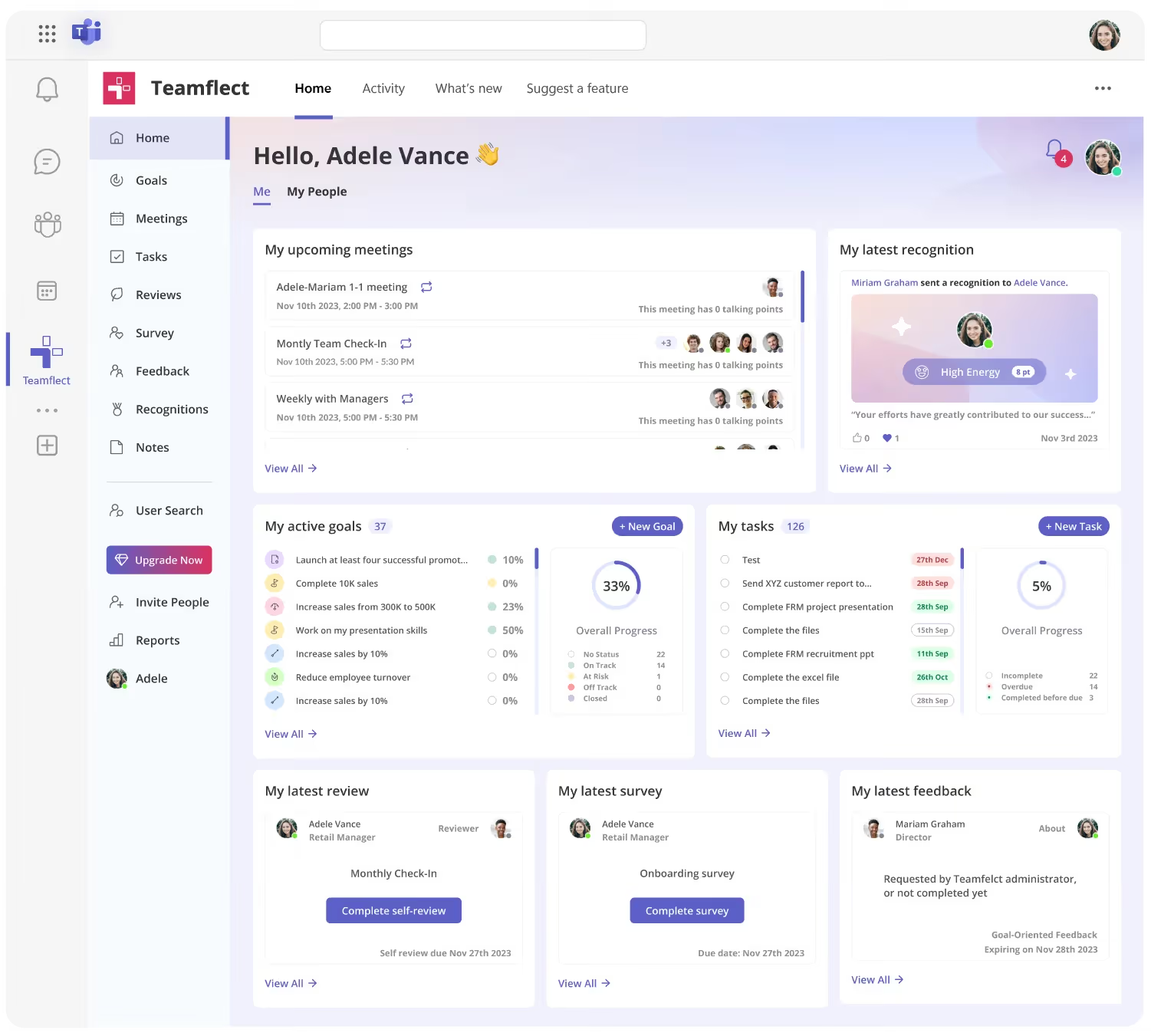
If your organization runs on Microsoft 365, Teamflect is built differently from everything else on this list. Most workforce management tools treat Teams as one of many possible integrations. Teamflect was architected from the ground up to live inside Teams and Outlook, which means employees never need to log into a separate platform, create a new password, or context-switch mid-day to complete a performance check-in or update a goal.
That single design decision has a real downstream effect on adoption. Teams in Microsoft 365 environments are already in the app daily. When performance reviews, 1-on-1 agendas, OKRs, and recognition all appear in the same place people are already working, response rates go up and administrative overhead goes down.
It covers the full performance management cycle: goal-setting with OKR support, continuous feedback, structured 1-on-1 meetings, 360-degree reviews, engagement surveys, employee recognition, and task management. All of it is accessible without leaving Teams. For HR directors who have watched previous tools get ignored six months after rollout, that is a meaningful structural advantage.
Key Features
- Native Microsoft Teams and Outlook integration: All performance management activity happens inside Teams with no separate logins required
- OKR and goal tracking: Cascading goals from company to individual, with real-time progress updates
- Customizable performance reviews: Templates for annual, mid-year, onboarding, and project reviews, configurable without vendor assistance
- 360-degree feedback: Peer, manager, and direct report feedback collected within Teams chat
- 1-on-1 meeting module: Structured agendas with talking points, shared notes, goal visibility, and action items
- Employee recognition and engagement surveys: Pulse surveys with AI-assisted response summaries
- AI-powered assistance: Helps managers and employees generate goal suggestions, review summaries, and coaching insights
- Nine-box talent grid: Maps performance against potential for talent planning conversations
What Makes Teamflect Stand Out
- Dedicated customer success manager and free implementation support included on all paid plans, including unlimited training sessions
- Single Sign-On via Microsoft, which removes one of the most common barriers to adoption in enterprise tools
- Power BI connector for enterprise-grade workforce analytics
Pros
"Overall, it has many dimensions that support completing tasks and daily work, in addition to the major strategic goals. It’s very easy to use, and the tutorials help a lot in finalizing many activities and making implementation easier. I also liked its integration with Microsoft Office and how easily it links to emails. It supports frequent, daily use." - G2 Review
- No separate app or login means employees actually use it
- Free for teams up to 10 users with no feature restrictions
- Included CSM and onboarding support keeps rollout risk low
- Covers goal-setting, reviews, feedback, and recognition in one place
- High adoption rates compared to standalone HR platforms, per vendor data
Cons
- Requires a Microsoft 365 environment. Teams that are not in the Microsoft ecosystem cannot use the platform
Pricing
- Free: Up to 10 users, includes performance reviews, goal tracking, surveys, and Teams integration
- Essential: $7/user/month (billed annually), adds analytics and premium support
- Professional: $11/user/month (billed annually), adds talent management and advanced integrations
- Nonprofits receive up to 60% off annual contracts
- 30-day free trials available for Essential and Professional plans
How to Find the Right Workforce Management Software for Your Team
Picking a workforce management platform is not just about features. It is about finding a tool that fits how your team actually works, and that your people will continue to use six months after the initial rollout.
Here are five questions worth working through before you finalize your shortlist.
What does your day-to-day operation actually look like?
If your workforce is shift-based, frontline, or distributed, you need strong scheduling and mobile access above everything else. If you are managing desk-based employees across departments, performance management and goal alignment matter more. Match the tool to the work, not the other way around.
How big is your team, and how fast is it growing?
A platform that works well for 30 employees may not handle 300. Check whether the pricing scales reasonably, whether features stay available as you grow, and whether the vendor has customers at your projected size running the tool successfully.
What is your real budget, including add-ons?
Several platforms on this list have attractive headline prices that climb once you add payroll, compliance tools, advanced reporting, or implementation support. Build the quote to reflect what you actually need, not just the base tier.
How much implementation support do you have internally?
Some tools require significant configuration before they are usable. Others are ready to run within days. If your HR team is small and time-stretched, the implementation burden should weigh heavily in your evaluation.
Final Thoughts
The tools on this list cover a wide range of needs, from lean scheduling apps for frontline teams to enterprise HCM suites for complex, multi-jurisdiction organizations. The best one for your team comes down to your workforce structure, your existing tech environment, and how much adoption work you are realistically prepared to do.
Start with a clear sense of what your team actually needs on day one versus six months in, and use that as your filter. The right platform is the one your managers and employees will still be using when the novelty wears off.
Frequently Asked Questions
What is workforce management software, and why does it matter?
Workforce management software helps organizations plan, coordinate, and track how their people work. That covers scheduling, time and attendance, leave management, payroll integration, and increasingly, performance management and employee engagement.
Without a centralized tool, these functions tend to live in spreadsheets, separate apps, or email chains, which creates errors, compliance risk, and administrative overhead.
The right platform brings them together so HR managers and operations teams can make informed decisions without spending hours chasing data.
How much does workforce management software typically cost?
Costs vary widely depending on team size and the features included. Entry-level tools for small businesses start around $2 to $5/user/month. Mid-market platforms with broader HCM capabilities generally run $10 to $30/user/month. Enterprise solutions are typically quote-based, with per-employee costs ranging from $23 to well above $30 depending on modules selected.
Implementation fees, add-ons for payroll or analytics, and annual versus monthly billing all affect the final number. Always ask for an itemized breakdown before signing.
How long does it take to implement workforce management software?
Implementation timelines depend heavily on team size, data complexity, and the platform chosen.
Simpler tools like Connecteam can be up and running within a few days for smaller teams. Mid-market platforms like BambooHR or Paylocity typically take two to six weeks for a full rollout, particularly if data migration is involved. Enterprise platforms like ADP Workforce Now or UKG Pro often require several months of dedicated implementation work. If speed-to-value matters to your team, ask vendors directly for their average time-to-first-use-cycle for organizations at your size.
.avif)