
.webp)
.avif)
.svg)
Starting a new job is already a lot. The last thing a new hire needs is a disorganized first week of missing credentials and unanswered questions, which is the common result of managing onboarding through scattered emails and spreadsheets.
Research from Gallup shows that a manager’s active involvement is the true engine of an effective program. While software can automate paperwork, the right tool must go further by facilitating a genuine connection between leadership and new hires to ensure long-term retention.
This guide breaks down the best onboarding tools available in 2026, covering features, pricing, and real user feedback so you can make a confident decision for your team.
What to Look for in Onboarding Software
Selecting the right onboarding platform is a high-stakes decision that impacts your company culture and operational efficiency. Before comparing specific tools, it helps to know what actually matters when evaluating your options.
1. Core Automation and Workflows
Automated workflows are the foundation of any solid onboarding platform. The software should handle task assignments, document collection, and reminders without requiring HR to manually follow up at every step. This ensures that no critical step is missed, regardless of how many hires are joining simultaneously. Getting a new hire correctly set up on time tracking from day one is one of the more common gaps in onboarding automation, since it often lives in a separate system that isn't part of the initial setup flow.
2. Ecosystem Integration
Integration with your existing tools matters more than people expect. An onboarding platform that connects with your HRIS, payroll system, and communication tools eliminates duplicate data entry and keeps everyone informed. For Microsoft 365 organizations, native integration with Teams and Outlook removes the friction of switching between apps entirely.
3. Scalability for Growth
A tool that works well at 50 employees should still be practical at 500. Check whether pricing scales reasonably and whether the platform can handle role-specific workflows as your team grows. The ability to create custom paths for different departments ensures the software remains relevant as your organizational structure becomes more complex.
4. Ease of Adoption
User experience often separates tools that thrive from those that are abandoned. Look for platforms with clean interfaces, high-quality support, and minimal setup time. The smoother the rollout, the more likely managers and new hires are to actually use the features provided.
5. Compliance and Document Security
Reliable document management and compliance tools are essential for risk mitigation. Features like e-signatures, secure audit trails, and automated reminders for required forms keep your organization covered. This allows HR to focus on the human side of the welcome process rather than chasing down missing signatures.
Top 10 Onboarding Software in 2026
Here are our top picks for the best onboarding software in 2026, selected based on user ratings, feature depth, pricing clarity, and suitability across different team sizes and industries.
1. Teamflect

For organizations already working inside Microsoft Teams and Outlook, Teamflect is the most practical choice for managing onboarding and the broader employee lifecycle. It operates entirely within Microsoft 365, meaning new hires complete tasks, access materials, and connect with their managers without ever opening a separate application.
Most onboarding tools struggle with adoption because employees see them as extra work. Teamflect sidesteps that problem entirely. Because it lives inside the tools people use every day, engagement happens naturally. HR teams also benefit from automatic organizational data sync through Microsoft Entra ID, which significantly reduces the manual setup required when a new hire joins.
Beyond onboarding, Teamflect connects performance reviews, goal tracking, one-on-one meetings, surveys, and recognition in a single platform. New hires can move from their first week into an ongoing development structure without any change in environment or workflow.
Key Features
- Native Microsoft 365 integration: Runs inside Teams, Outlook, and the wider 365 ecosystem with no separate logins
- Microsoft Entra ID sync: Automatically pulls organizational data to reduce onboarding setup time
- Customizable onboarding workflows: Build task sequences and checklists tailored by role, department, or location
- Goal and OKR management: Set and track individual and team objectives from within Teams meetings
- 360-degree feedback software: Gather structured input from peers, managers, and direct reports
- Performance review automation: Schedule and run review cycles with customizable templates
- AI-powered Teamflect Agent: Helps managers generate feedback summaries, prepare one-on-ones, and surface goal insights
- Power BI integration: Provides advanced reporting and workforce analytics for HR leaders
What Makes Teamflect Stand Out
- Featured by Microsoft as one of the top tools for Microsoft Teams, with the highest adoption rate among comparable platforms
- Free plan available for teams of up to 10 users with full feature access
- Dedicated Customer Success Manager included with every paid plan, along with free implementation support and unlimited training sessions
- Connects with 200+ HRIS systems, making data synchronization practical for organizations with existing HR infrastructure
Pros & Cons
Pros: "It fully supports our end-to-end performance management cycle, including reviews, goal setting and engagement surveys. … The MS Teams integration made adoption very easy, and the admin side is user friendly." — G2 Review
- Exceptional adoption rates because employees never leave Microsoft Teams
- Fast implementation, with most organizations up and running in a day
- Combines onboarding with performance management, goal setting, and engagement in one place
- Strong customer support with a dedicated success manager on every paid account
- GDPR compliant and hosted on Microsoft infrastructure
Cons: Requires a Microsoft 365 environment to function
Pricing
- Starter: Free for up to 10 users
- Essential: $7/user/month
- Professional: $11/user/month
2. Gusto
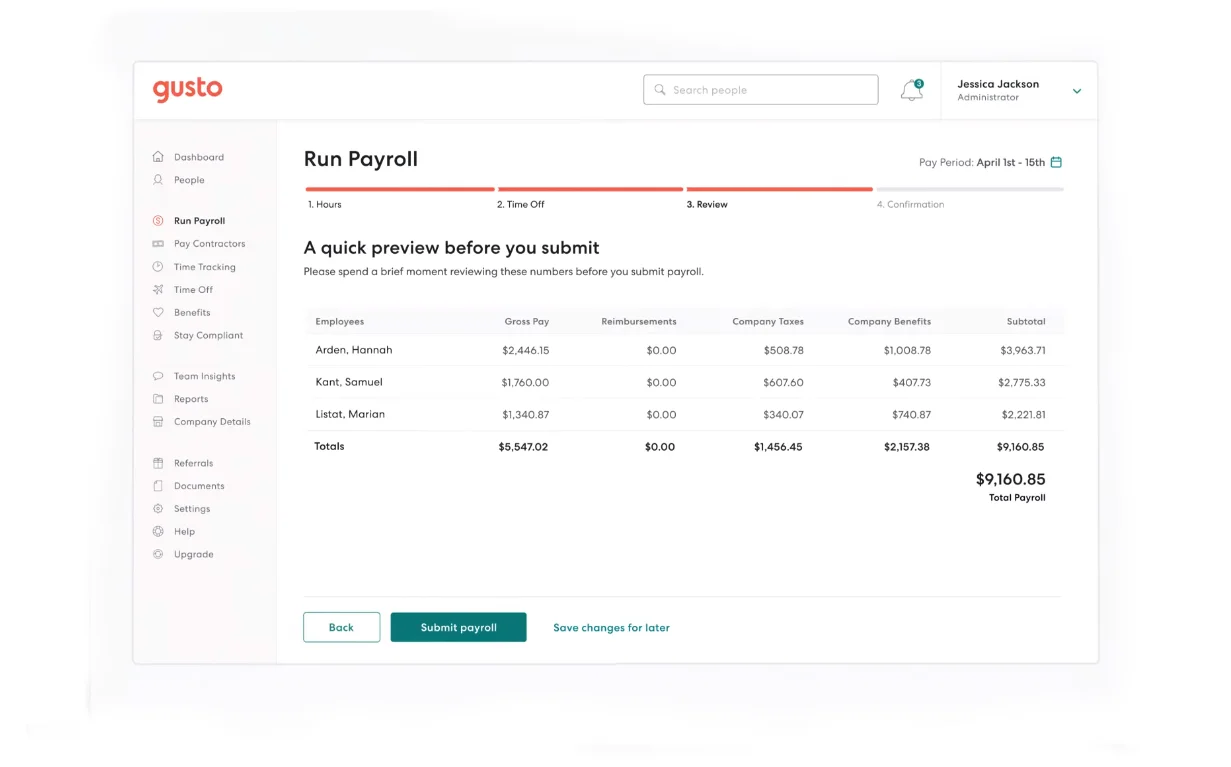
Gusto built its reputation on payroll, and that foundation shows in how naturally onboarding connects to its broader HR functions. New hires can complete tax forms, enroll in benefits, and set up direct deposit all from their phone before their first day, and because Gusto is payroll-native, there is no data handoff required between systems.
New hire payroll setup is one of the highest-risk points in the process, which is exactly what payroll best practices is built to help teams get right the first time. For small businesses that want onboarding without the overhead of a dedicated HR platform, Gusto strikes a practical balance between simplicity and functionality.
Key Features
- Self-service new hire onboarding with e-signatures and document collection
- Direct payroll integration that automatically sets up compensation and tax withholding
- Benefits enrollment built into the onboarding flow
- Automated contractor vs. W-2 distinction for compliance purposes
- Mobile-friendly portal accessible via iOS and Android
- Onboarding checklists and task tracking for HR administrators
- Over 100,000 U.S. businesses served with strong customer review scores
Best For
- Small businesses prioritizing payroll accuracy alongside onboarding
- Organizations that want to eliminate duplicate data entry between HR and payroll
- Teams without a dedicated HR department that need a platform easy enough for anyone to manage
Pros & Cons
Pros: "Very easy to use app that allows all employees the ease of time tracking and time off requests. Great customer support for small business management and value for your money!" — Capterra Review
- Genuinely simple to set up and maintain
- Strong payroll and compliance coverage for U.S.-based businesses
- Transparent pricing with all core features included in the base plan
Cons: "The only thing that annoys me about Gusto is that it takes two clicks to go on break. It's super minor, but it trips me up having to select what kind of break I'm taking when I only have one option to select from." — G2 Review
- Limited functionality for large companies or those outside the U.S.
- Basic reporting compared to enterprise-focused alternatives
- Some advanced features require higher-tier plans
Pricing
- Simple: $49/month base + $6/user/month
- Plus: $80/month base + $12/user/month
- Premium: $180/month base + $22/user/month
- Contractor Only: $0/month base + $6/user/month (limited time offer for organizations with no W-2 employees; $35/month base with notice)
3. Rippling
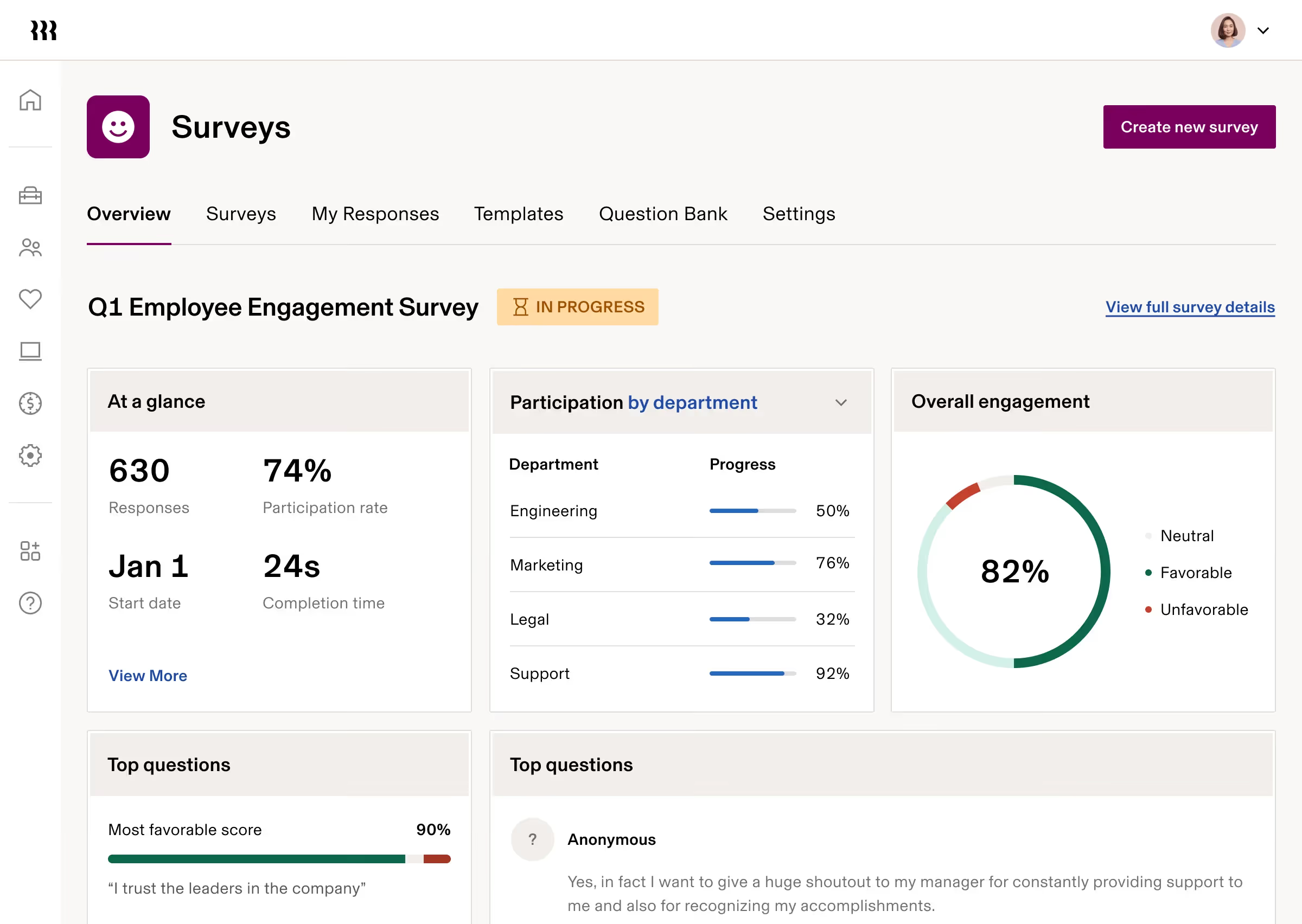
Rippling takes a unified approach to workforce management, bringing HR, IT, and payroll into one system. For onboarding specifically, that means a new hire can have their payroll set up, benefits enrolled, devices provisioned, and app access granted all from a single automated workflow tied to their employee record.
This level of coordination is especially valuable for distributed teams and organizations with remote hires who need to be fully operational without any in-person IT setup. Rippling's zero-touch device deployment ships hardware directly to employees pre-configured with their accounts, VPN, and security settings already in place.
Key Features
- Unified HR, IT, and payroll onboarding from one employee record
- Automated app and device provisioning at the point of hire
- Self-service portal for new hires to complete forms and track progress
- Workflow builder with custom approval chains and compliance rules
- Integration with 500+ third-party applications including Slack, Google Workspace, and Zoom
- Built-in compliance training for onboarding employees and managers
- Mobile-friendly experience for on-the-go access
Best For
- Tech-forward companies with distributed or remote teams
- Mid-sized organizations that want to consolidate HR and IT tools
- Growing businesses that need a platform capable of scaling internationally
Pros & Cons
Pros: "It is very easy to use and navigate both the app and the website. It is easy to find all documents I need to reference from HR including Tax forms, employee handbooks, offers, etc." — Capterra Review
- Exceptional automation that reduces manual onboarding work significantly
- Strong integration ecosystem for connecting to tools teams already use
- High customer support ratings with fast response times
Cons: "Rippling’s set up is time consuming and doesn't always seem intuitive." — G2 Review
- Setup can take time, particularly when configuring multiple modules
- Steeper learning curve for users unfamiliar with the platform's scope
- Can feel over-engineered for small businesses with simple needs
Pricing
- Custom pricing; contact Rippling for a full quote
4. HiBob

HiBob is a people-first HRIS built for modern, fast-growing teams. Its onboarding module automates the administrative side of bringing new hires in while keeping the experience personal. Managers receive automated notifications and structured guidance throughout the process, and new hires get a clear path from offer acceptance through their first 90 days.
HiBob's strength lies in connecting onboarding to the broader employee lifecycle. Once a new hire completes onboarding, their data flows directly into performance management, attendance, and payroll without any manual re-entry.
Key Features
- Automated onboarding workflows with manager notifications and task assignments
- Applicant tracking integration that connects hiring data to the onboarding flow
- Time and attendance tracking built into the same platform
- People analytics with workforce insights, attrition data, and proactive reporting
- 360-degree feedback and performance review tools
- Built-in LMS for assigning learning paths during and after onboarding
- Integrations with LinkedIn, Indeed, Slack, Microsoft Teams, and Google Workspace
Best For
- Mid-sized organizations looking for an HRIS that includes strong onboarding capabilities
- Companies that want onboarding connected to performance and payroll in one system
- HR teams that value people analytics alongside core HR functions
Pros & Cons
Pros: "It's a good tool for all the HR-related topics, such as requesting time off, uploading/reviewing/signing all the necessary documents, conducting performance reviews and 1-on-1 meetings." — Capterra Review
- Modern, intuitive interface that employees and HR teams both find easy to navigate
- Strong automated onboarding workflows reduce manual coordination
- Connects hiring, onboarding, and performance management in a single flow
Cons: "Sometimes, it requires too much clicking around to get places, the documents section is not intuitive." — G2 Review
- Pricing is not transparent; requires a direct quote from sales
- May offer more complexity than small businesses need
- Some advanced features are limited compared to dedicated performance platforms
Pricing
- Custom pricing; contact HiBob for a quote
- Free trial available
5. Deel

Deel was built for the specific challenges of international hiring. It handles contracts, compliance, and payments across more than 150 countries, making it the go-to choice for organizations bringing on employees or contractors in multiple regions simultaneously.
Onboarding through Deel HR is paperless and mobile-friendly, with self-service options that allow new hires in remote locations to complete their onboarding independently. The platform automatically adjusts for local labor laws, contract types, and currency requirements, which significantly reduces the compliance risk that comes with global expansion.
Key Features
- Onboarding and payroll for employees and contractors in 150+ countries
- Automated compliance adjustments based on local labor laws
- Centralized dashboard for managing all global employee data
- Customizable contracts for different roles, locations, and employment types
- Mobile-friendly self-onboarding portal with e-signature support
- Integrations with BambooHR, Workday, Greenhouse, Rippling, Gusto, and QuickBooks
- Document management with secure storage and audit trails
Best For
- Companies with international hiring needs or fully remote, distributed teams
- Organizations managing a mix of full-time employees and contractors across regions
- HR leaders who need compliance handled automatically rather than manually
Pros & Cons
Pros: "I loved Deel’s seamless payment and contract management, making global payouts and agreements simple and reliable." — Capterra Review
- Extensive global coverage with built-in compliance management
- Strong document handling and contract customization
- Practical for companies that hire across borders regularly
Cons: "The only aspect I don't completely appreciate is the fee that's applied when you want to instantly withdraw your money." — G2 Review
- Pricing requires a custom quote
- Implementation can take longer for complex global setups
- Domestic-only teams may find the feature set broader than necessary
Pricing
- Core HR: $5/user/month
- Recruit: $14/user/month
- Develop: $22/user/month
- Recruit & Develop: $30/user/month
- Full HR Solution: $56/user month
- Contact Deel for custom pricing on additional HR modules
6. Workday

Workday is the enterprise standard for human capital management. Its onboarding module sits within a broader HCM platform that handles everything from hiring and compensation to succession planning and workforce analytics. For large organizations with complex compliance needs and global operations, Workday offers a level of depth and integration that few platforms can match.
The tradeoff is implementation complexity. Workday typically requires dedicated IT resources and a longer rollout period compared to mid-market alternatives. Organizations that need enterprise-grade configuration and control, however, will find the investment worthwhile.
Key Features
- End-to-end HCM covering onboarding through offboarding
- Sophisticated onboarding workflows configurable by role, location, and department
- Compliance management with support for global regulatory requirements
- Workforce analytics and real-time reporting across the employee lifecycle
- Integration with payroll, benefits, learning management, and performance tools
- Mobile app for managers and employees
- Succession planning and career development tools built into the same system
Best For
- Large enterprises (1,000+ employees) with global operations
- Organizations that need onboarding tightly integrated with financial planning and analytics
- HR teams requiring advanced compliance management across multiple jurisdictions
Pros & Cons
Pros: "Overall, Workday HCM is powerful and comprehensive, offering robust HR solutions, though it can be complex for newcomers." — Capterra Review
- Comprehensive feature set covering the full employee lifecycle
- Strong global compliance capabilities
- Highly scalable for large, complex organizations
Cons: "Some UI interfaces and bugs need to be improved." — G2 Review
- Expensive and complex to implement
- Significant IT involvement required for setup and maintenance
- Not practical for small or mid-sized organizations
Pricing
- Custom pricing; contact Workday for a quote
- Free trial available
7. Monday Service

Monday Service is a service operations platform that brings HR, IT, and operational workflows together in one place. For employee onboarding, that means access requests, equipment provisioning, approvals, and task tracking all happen inside a single, visible system rather than across disconnected inboxes and tools.
The platform's no-code customization and built-in AI capabilities make it accessible for teams without dedicated IT support. Organizations that have struggled with HR and IT working from separate tools will find Monday Service particularly useful for coordinating first-day readiness at scale.
Key Features
- No-code workflow customization for building onboarding processes without technical support
- SLA tracking and automated alerts to keep provisioning tasks on schedule
- AI-powered ticket classification and routing
- Employee self-service portal for common requests and onboarding tasks
- Knowledge management to reduce repeated questions from new hires
- Multi-channel request intake including email and collaboration tools
- Service analytics dashboards to identify bottlenecks
Best For
- Organizations where HR and IT coordination is a recurring onboarding challenge
- Mid-to-large companies managing high-volume hiring with structured service workflows
- Teams that already use monday.com and want onboarding within the same ecosystem
Pros & Cons
Pros: "It's visually appealing, easy to navigate, and is one of the few CRM & Task Manager combinations that I've found that actually work well on both sides. I've used many other CRMs with task managers, but those aspects of the tool are often very basic, have limited capabilities, or are too sales-focused." — Capterra Review
- Highly flexible and configurable without requiring developer resources
- Strong visibility into task ownership and onboarding progress
- Integrates well within the broader monday.com ecosystem
Cons: "I think Monday Service needs better timestamps for task management. Also, the initial setup has been an ongoing process as we've been building on it over time." — G2 Review
- Advanced automations and reporting require higher-tier plans
- Can become disorganized at scale without clear governance in place
- Deeper customization may require workarounds
Pricing
- Standard: $31/user/month (billed annually)
- Pro: $45/user/month (billed annually)
- Enterprise: Custom pricing
- Free trial available
8. Greenhouse

Greenhouse connects the hiring process directly to onboarding, creating a continuous experience from candidate to contributing team member. Rather than treating onboarding as a separate system, Greenhouse keeps all relevant data, approvals, and workflows in one pipeline, which reduces the handoff errors that often create friction when a candidate transitions to new hire status.
Its structured approach to compliance and documentation also makes it popular with organizations that hire frequently and need consistency across every new hire experience.
Key Features
- Applicant tracking integrated directly with the onboarding workflow
- Offer letter generation and e-signature collection within the same platform
- Customizable onboarding checklists by role, department, and location
- Background check initiation within the platform
- Compliance documentation and audit trails
- Integrations with BambooHR, Workday, Rippling, Slack, and Google Workspace
- Reporting on time-to-hire and onboarding completion rates
Best For
- Companies that hire in high volume and need consistent onboarding at scale
- HR teams that want recruiting and onboarding data in one system
- Organizations where compliance documentation and audit readiness are priorities
Pros & Cons
Pros: "Greenhouse offers one of the most intuitive platforms for applicant tracking and referrals to hire top talent." — Capterra Review
- Strong connection between recruiting and onboarding reduces data re-entry
- Highly customizable for different roles and hiring scenarios
- Good compliance documentation and reporting capabilities
Cons: "It was a tough process getting it set up to work with our process, but now that it is fully implemented it is great!" — G2 Review
- Custom pricing only; no self-serve plan
- Implementation requires time and internal coordination
- May be more than small teams need if recruiting volume is low
Pricing
- Custom pricing; contact Greenhouse for a quote
9. ClearCompany

ClearCompany approaches onboarding with compliance at its center. The platform manages background checks, document archiving, EEOC reporting, and audit trails alongside the standard onboarding workflow, making it a practical choice for industries where regulatory requirements are a constant concern.
HR teams that have dealt with compliance gaps during onboarding will appreciate how ClearCompany structures its workflows to catch missing documentation and flag incomplete steps before they become a problem.
Key Features
- Paperless onboarding with e-signatures and automated document collection
- Compliance management including background checks and EEOC reporting
- Bulk onboarding tools for high-volume hiring situations
- Equipment and access request tracking
- Automated task notifications for managers and new hires
- Integration with existing HR systems
- Audit trail and record management for compliance reviews
Best For
- Medium-to-large businesses in compliance-sensitive industries such as healthcare, finance, and government contracting
- Organizations that run high-volume hiring and need consistent, auditable onboarding
- HR teams looking for a platform that handles compliance documentation without additional third-party tools
Pros & Cons
Pros: "I’d say overall it is worth the money, even though it is on the pricier side compared to other platforms. I would recommend it to others to use." — Capterra Review
- Strong compliance and documentation capabilities
- Good adoption across HR teams and hiring managers
- Responsive customer support frequently noted in reviews
Cons: "ClearCompany feels clunky due to the many required clicks for basic functionalities. The app lacks deep analytics, which includes deep filtering and this reduces productivity." — G2 Review
- Pricing requires a custom quote
- Less suitable for smaller organizations without dedicated HR staff
- Some users find the interface dated compared to newer platforms
Pricing
- Custom pricing across three plans: ClearRecruit, ClearTalent, and TotalTalent
- Contact ClearCompany for accurate pricing
10. Connecteam

Connecteam is built for teams where employees rarely sit at a desk. Its mobile-first design means onboarding happens on a phone, with training courses, compliance documents, and checklists accessible from anywhere at any time. This makes it particularly effective for industries like retail, construction, logistics, and healthcare.
The platform's structured course creation tools allow managers to build onboarding programs without technical expertise, and its compliance tracking ensures that required training is completed and documented.
Key Features
- Mobile onboarding with training courses, quizzes, and progress tracking
- Document management and compliance tracking built into the onboarding flow
- Customizable course creation for role-specific training without IT support
- Centralized communication, scheduling, and task management for field teams
- Free forever plan for teams of up to 10 users
- Micro-training modules designed for frontline workers with limited screen time
- Transparent pricing across all plan tiers
Best For
- Frontline and deskless teams in retail, healthcare, construction, and hospitality
- Small businesses that need mobile-friendly onboarding without enterprise pricing
- Organizations that want onboarding, communication, and scheduling in one mobile app
Pros & Cons
Pros: "It’s been highly easy for me to educate and train older staff members on, it’s easy for me in management to see everyone on the same rota, so overall has been a pleasant experience." — Capterra Review
- Purpose-built for teams that work away from a computer
- Affordable pricing with a genuinely useful free plan
- Strong course creation tools that require no technical background
Cons: "One thing I have noticed is that sometimes notifications come in groups instead of one by one. If multiple tasks are updated close to each other, the alerts show together, and it is easy to miss a small detail unless I open the app and check properly." — G2 Review
- Some advanced features are restricted to higher-tier plans
- GPS tracking and certain HR tools are only available on premium plans
- Customization options are more limited than desktop-first platforms
Pricing
- Small Business Plan: Free forever for up to 10 users
- Basic: $29/month for the first 30 users ($0.80/user/month after that; billed annually)
- Advanced: $49/month for the first 30 users ($2.50/user/month after that; billed annually)
- Expert: $99/month for the first 30 users ($4.2/user/month after that; billed annually)
- Enterprise: Custom pricing available
How to Find the Right Onboarding Software for Your Team
With so many strong options available, the decision comes down to a few key factors specific to your organization.
1. Team Size and Structure
Your organization’s scale is a primary driver of your software needs. A small business with 20 employees and a company with 2,000 have entirely different requirements. Larger organizations need sophisticated reporting, role-based permissions, and scalable workflows to manage complexity. Conversely, smaller teams usually benefit from platforms that are fast to set up and easy to manage without a dedicated IT department.
2. Tech Stack Compatibility
Your existing tools should shape your decision. If your team already works inside Microsoft 365, a solution like Teamflect, which operates natively within Teams and Outlook, dramatically reduces friction. If you use Rippling or Workday as your HRIS, ensure any platform you consider connects to those systems without technical hurdles.
3. Defining Your Onboarding Scope
Clarify what onboarding means for your business before evaluating features. For some, it focuses on forms, compliance documentation, and access provisioning. For others, it is a broader process including training, cultural integration, and a structured 90-day plan. Knowing which problems you are actually trying to solve prevents paying for unnecessary features.
4. Total Cost of Ownership
Budget honestly by including potential hidden costs. Per-user pricing adds up quickly as teams grow. Additionally, some platforms charge separately for compliance modules, advanced reporting, or specific integrations. Request a full cost breakdown based on your projected team size and required features before committing to a contract.
5. Real-World Testing
The best way to evaluate a platform is to test it with your actual workflow. Free trials and sandboxes exist for a reason. Run a realistic onboarding scenario through any platform you are seriously considering. This process often reveals interface issues, missing features, or unexpected strengths that a standard demo call might miss.
Final Thoughts
Selecting an onboarding platform is an investment in your company’s first impression. In 2026, the market has moved away from simple digital filing cabinets toward tools that emphasize manager engagement and cultural integration.
As you finalize your decision, keep these three final considerations in mind:
- Prioritize Adoption Over Features: A platform with a hundred features is worthless if your managers find it too cumbersome to use. Choose the tool that fits naturally into your team's existing workflow. For Microsoft-centric teams, that often means Teamflect; for mobile teams, Connecteam.
- Focus on the Human Element: Software should handle the "administrative noise,” such as paperwork, tax forms, and hardware requests, so that managers can focus on the human connection. The best tool is the one that gives your leaders more time to mentor their new hires.
- Think Long-Term: Onboarding shouldn't end after the first week. Look for a solution that bridges the gap between the initial welcome and ongoing performance management. Whether you choose an all-in-one HRIS like HiBob or a specialized integration like Teamflect, ensure the data and relationships built during week one continue to grow throughout the employee's first year.
By centering your choice on your specific tech stack, your team's size, and the need for manager involvement, you can turn a chaotic first week into a competitive advantage for your organization.
Frequently Asked Questions
What is onboarding software and why do you need it?
Employee onboarding software is a platform that automates and organizes the process of bringing new hires into your organization. It handles tasks like document collection, e-signatures, task assignments, compliance checks, and new hire introductions, replacing the manual coordination that typically falls to HR and managers.
You need it when the current process is inconsistent, time-consuming, or causing new hires to start their roles without the information and access they need. Good onboarding software standardizes the experience across every hire, reduces administrative burden, and helps new employees become productive faster.
How much does onboarding software typically cost?
Pricing varies widely. Per-user pricing models typically range from around $4 to $16 per user per month, depending on features and platform. Enterprise-focused tools like Workday and Greenhouse require custom quotes. Platforms with payroll integration, like Gusto, charge a monthly base fee plus a per-employee cost. Some tools, including Teamflect and Connecteam, offer free plans for small teams.
The key is calculating total cost based on your team size and the specific features you need. Implementation fees, training costs, and add-on modules can add up quickly, so always ask for a full picture before signing a contract.
What is the best free onboarding software?
Teamflect offers the most complete free plan for teams already using Microsoft 365, covering performance management, goal tracking, one-on-ones, and feedback for up to 10 users with no time limit. Connecteam also offers a free plan for teams of up to 10 users, with strong mobile onboarding tools well suited to frontline workers. For basic HR and payroll onboarding, Gusto offers a free trial before committing to a paid plan.
How long does it take to implement onboarding software?
Implementation time depends on platform complexity and team size. Simple tools like Connecteam can be up and running within a day or two. Teamflect, built for Microsoft 365, typically allows organizations to start using it the same day since it connects automatically to existing Teams and Entra ID data.
Mid-market platforms like Rippling and HiBob generally take two to four weeks to fully configure, including workflow setup, integrations, and user training. Enterprise implementations of platforms like Workday can take significantly longer, sometimes two to three months, depending on customization requirements and data migration complexity.ˆ