.svg)
ChatGPT has become one of the most-used tools in HR, and most teams are still figuring out how to get useful output from it. SHRM’s State of AI in HR 2026 report (1,722 HR professionals surveyed) found that 92% of CHROs expect greater AI integration this year, and 20% of HR professionals in AI-enabled organizations already use it daily. Workers report saving 40 to 60 minutes per day. The gap between those numbers and most teams’ reality is usually the prompt, not the tool.
This is a library of 52 copy-paste prompts across ten HR functions, each with a structure that produces usable output rather than generic filler. By the end of this guide, you should be able to write and adapt prompts for any HR task, know what data to keep out of consumer AI tools, and have a ready-to-use template library your team can build on.
How to Write a Good HR Prompt
Output quality is roughly 80% prompt quality. The same SHRM State of AI in HR 2026 report found that even among organizations that have adopted AI, about 3 in 10 HR professionals use it at least daily (20% daily and 9% several times a day). This is a gap that often comes down to not knowing how to write prompts that return useful output.
The 6 Components of a Strong HR Prompt
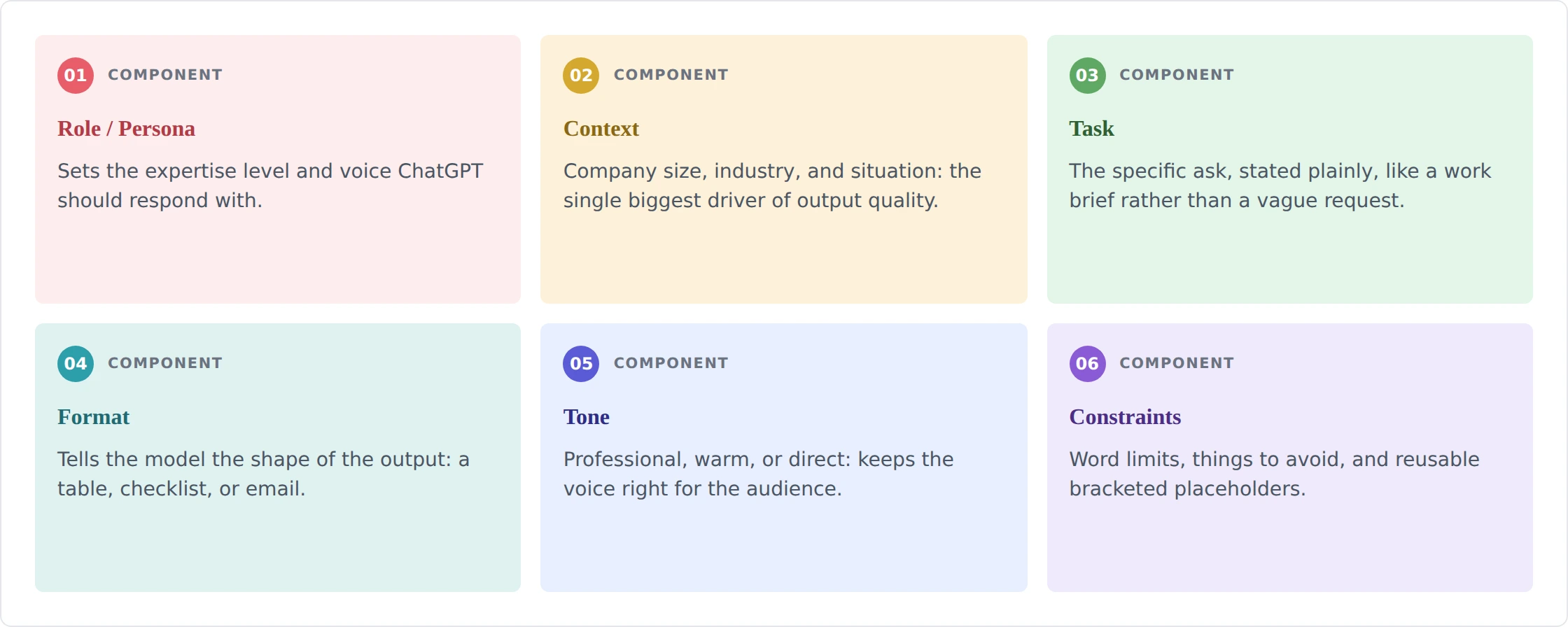
Think of a prompt the way you would a work brief. The more context you give, the less the model has to guess. Here are the six components that make the difference between a usable first draft and something you have to rewrite from scratch.
- Role/Persona: 'Act as an experienced HR manager' or 'Act as a seasoned technical recruiter' sets the expertise level and voice. Without this, you get generic responses. With it, you get responses calibrated to a practitioner's judgment.
- Context: Company size, industry, stage, and the specific situation. 'A 150-person SaaS company at Series B' produces different output than 'a 2,000-person manufacturing firm.' Context is the single biggest driver of output quality. Paste your actual situation.
- Task: The specific ask, stated plainly. Not 'help me with onboarding' but 'create a 30-60-90-day onboarding plan for a new Head of Sales.'
- Format: Tell the model what shape the output should take: a table, a bulleted checklist, a five-paragraph email, a ten-item interview question bank. Without format instructions, you get whatever the model defaults to, which is usually walls of prose.
- Tone: 'Professional and direct,' 'warm and supportive,' 'energetic and brief.' Tone instructions are especially useful for communications and recognition messages, where the wrong voice undercuts the content.
- Constraints: Word limits, things to avoid, and bracketed placeholders. 'Keep the email under 200 words' and 'do not reference compensation' are examples. Placeholders like [job title] and [company name] keep prompts reusable across your team.
Best Practices
Getting the structure right is the foundation. How you work with the output matters just as much. Here are the habits that separate teams getting real value from ChatGPT from those still frustrated by generic responses.
- Paste Your Own Documents: If you have an existing job description, policy, or email template, paste it with 'rewrite this in the same structure, improving X.' Outputs will match your voice far better than prompts from scratch.
- Ask for Artifacts, Not Information: 'Draft a script for a difficult performance conversation' produces something usable. 'Tell me about difficult conversations' produces a Wikipedia entry.
- Iterate: Treat the first output as a rough draft. Follow up: 'Make the tone warmer,' 'add a section on first-week logistics,' 'cut this to under 150 words.' ChatGPT responds well to specific revision instructions.
- Review Before You Use: Every output needs a human read. Accuracy, tone, legal risk, and company voice are all things ChatGPT can get wrong with high confidence.
- Save the Prompts That Work: Build a shared team prompt library in Notion, a shared Google Doc, or any tool you already use. What works for your company's voice and context is worth keeping.
⚠️ Before you start: what never to paste into ChatGPT
- Employee names, salaries, Social Security numbers, or any personally identifiable information
- Health or medical details, leave specifics, or disability accommodations
- Active disciplinary case details or litigation-adjacent facts
- Confidential compensation data or equity information
- Trade secrets, unreleased product plans, or M&A-related content
- Use placeholders ([employee role], [department]) instead of real identifiers. The responsible-use section below covers this in full.
52 HR Prompts, Organized by Function
Fifty-two prompts organized by HR function. Each prompt uses bracketed placeholders for the details specific to your situation. Copy, replace the brackets, and refine the output before use.
ChatGPT Prompts for Recruiters
Recruiting is where ChatGPT earns its keep fastest. Job descriptions, screening questions, outreach messages, and offer letters are all drafting tasks where the model produces solid first drafts. LinkedIn data shows that job posts emphasizing responsibilities over requirements receive 14% more applications per view. Every recruiting prompt below applies that principle, using inclusive language and skills-based criteria in place of unnecessary degree requirements.
1. Job description
What it does: Produces a full job description ready for posting, with inclusive language baked in rather than retrofitted.
Pro tip: Paste your last job description for this role and say 'rewrite this version to improve inclusive language and cut the qualification list to genuine requirements.' The output will match your structure.
2. Job ad (shorter, for job boards)
What it does: A short, candidate-facing version of the JD optimized for attention on crowded job boards.
Pro tip: Ask for two versions with different opening hooks, then pick the one that better matches your employer brand voice.
3. Sourcing strategy
What it does: Generates a specific sourcing plan rather than generic advice, including a usable Boolean string.
Pro tip: Run the Boolean string as-is first, then ask ChatGPT to refine it based on what's too broad or too narrow.
4. Candidate outreach message (cold)
What it does: A short cold outreach message that references the candidate's actual background rather than sending a mass template.
Pro tip: Ask for three subject line options for the email version.
5. Screening interview questions
What it does: A phone/video screen question bank calibrated to the specific competencies the role requires.
Pro tip: Add 'include one question that reveals whether the candidate has done any research on our company' to catch genuine interest.
6. Behavioral interview questions (in-depth)
What it does: A structured interview guide with evaluation criteria baked in, so interviewers can score consistently across candidates.
Pro tip: Share the output with the hiring manager before interviews and ask them to add one question they personally care about. It increases buy-in.
7. Candidate rejection email
What it does: A rejection email that is clear and respectful without vague corporate filler.
Pro tip: If you are willing to give feedback, add 'include an optional one-sentence specific reason' and review before sending.
8. Offer letter draft
What it does: A complete offer letter draft with required elements flagged, ready for attorney review.
Pro tip: Always have employment counsel review before sending, especially for offers in states with specific requirements (California, New York, Illinois).
9. Structured debrief agenda
What it does: A debrief meeting structure that reduces bias by surfacing individual assessments before group discussion.
Pro tip: Set the rule that no one shares their rating until everyone has submitted it in writing. The agenda can reinforce this.
10. Interview scorecard
What it does: A calibrated scorecard with behavioral anchors so different interviewers are applying the same standard.
Pro tip: Pilot it on one candidate before the full panel to check whether the anchors match your bar.
ChatGPT Prompts for Onboarding
Onboarding prompts work best when you give ChatGPT the specific role context. A generic 30-60-90 day plan for 'a marketing manager' is less useful than one for 'a Head of Demand Generation joining a 120-person B2B SaaS company that has never had a dedicated demand function.'
11. Welcome email from the manager
What it does: A first-day welcome email that reads like it was written by a real manager, not generated from a template.
Pro tip: Have the actual manager add one specific sentence referencing a conversation from the interview process. It makes the email feel genuine.
12. 30-60-90 day onboarding plan
What it does: A phased onboarding roadmap that balances ramp time with early wins.
Pro tip: Share the draft with the hiring manager before the new hire's first day and ask them to add two or three activities specific to current team priorities.
13. First-week checklist
What it does: A day-by-day first week that HR and the manager can divide between them, with pre-start tasks flagged.
Pro tip: Send this to the new hire a week before their start date so they are not overwhelmed on day one.
14. New hire training schedule
Create a two-week training schedule for a new [job title] at [company name]. The role requires proficiency in [list 3-5 systems or skills]. Format as a calendar with: session name, length, owner (HR / manager / team lead / self-directed), and the learning objective for each session. Flag which sessions can be async and which need to be live.
What it does: A structured training calendar that assigns ownership and distinguishes async from live sessions.
Pro tip: Ask 'which of these sessions can be converted to a Loom video or written guide?' to identify where documentation would save recurring training time.
15. Role quick-start guide
What it does: A single-page reference that answers the questions new hires spend their first weeks figuring out on their own.
Pro tip: Have the outgoing person in the role or a tenured peer review and add one thing that is not in the formal process.
ChatGPT Prompts for Performance Management
Performance management prompts require more care than most. Never paste an actual employee’s name, specific salary, or case details. Use role descriptions and anonymized notes. The output is a first draft: every review and feedback message needs a human read before it is shared. If you are evaluating performance management software to run these cycles, that is a separate decision worth making deliberately.
16. Performance review draft
What it does: A structured performance review draft built from your own notes rather than from scratch.
Pro tip: Keep your notes factual and output-focused before pasting. 'Missed three deadlines in Q2 on the Acme project' is better input than 'seems disorganized.'
17. Balanced feedback message
What it does: Structured feedback that follows the behavior-impact-next step model without softening or vagueness.
Pro tip: Ask for two versions: one framed as written feedback and one as talking points for a conversation. Use the one that fits the channel.
18. SMART goal drafting
What it does: Three goals that follow the SMART framework and connect to team priorities rather than floating as generic objectives.
Pro tip: Review the goals with the employee before finalizing. Goals they helped shape get completed at higher rates.
19. OKR drafting
What it does: A single OKR set with rationale, ready for a team planning session.
Pro tip: Ask for a second version with more aggressive Key Results to use as a stretch target scenario for discussion. If you are evaluating OKR software to track these at scale, the criteria are different from what makes a good prompt.
20. Self-assessment template
What it does: A self-assessment template employees can actually fill in thoughtfully rather than with one-liners.
Pro tip: Pilot with one team before rolling out. Managers will tell you quickly which questions produce useful answers.
21. Performance improvement plan (PIP) structure
What it does: A PIP framework with the required elements, flagged clearly as needing legal review.
Pro tip: Have employment counsel review every PIP before it is presented, especially in California, New York, and the UK.
22. 1-on-1 meeting agenda
What it does: A reusable 1-on-1 template that makes the conversation predictable (in a good way) and ensures nothing slips.
Pro tip: Ask employees to fill in their half before the meeting. Managers who receive it in advance have better conversations.
ChatGPT Prompts for Learning and Development
L&D prompts are most useful for outlines, agendas, and course descriptions. ChatGPT cannot replace subject-matter expertise, but it can structure content you already have faster than doing it from scratch. The prompts below pair well with dedicated career growth tools that track development progress over time.
23. Training outline
What it does: A session outline with timing and one interactive element, ready to hand to a facilitator.
Pro tip: Ask for a version that can be converted to a self-paced module if a live session is not possible.
24. Individual development plan (IDP)
What it does: A six-month IDP template with a mix of formal, informal, and social learning activities.
Pro tip: Have the employee draft it first, then use ChatGPT to add activities they might have missed.
25. Learning path for a new role
What it does: A transition learning map that combines external resources with internal experience-building.
Pro tip: Have the employee's potential manager review the internal activities for feasibility before sharing.
26. Lunch-and-learn session agenda
What it does: A structured lunch-and-learn agenda that keeps the session moving and includes participation.
Pro tip: Send the agenda to attendees 24 hours in advance with one pre-read or question to think about.
27. Course description
What it does: An LMS-ready course description with learning outcomes stated as what participants will do, not what they will know.
Pro tip: Learning outcomes starting with action verbs (apply, draft, evaluate, distinguish) are more credible than 'understand' or 'learn.'
ChatGPT Prompts for HR Policies and Documents
Important: All policy, handbook, and procedure drafts produced by ChatGPT require review by an employment attorney before they are shared with employees or used officially. Employment law varies significantly by country, state, and city. The prompts below produce starting drafts, not final documents.
28. HR policy section draft
What it does: A plain-English policy section structured for an employee handbook, with legal review flagged.
Pro tip: Run the draft by one employee in the affected group before legal review. Plain-English clarity issues are cheaper to fix early.
29. Standard operating procedure (SOP)
What it does: A step-by-step SOP formatted for someone doing the process for the first time, with roles clarified.
Pro tip: Have the person who currently runs the process review the draft for missing steps before finalizing.
30. Process checklist
What it does: An ownership-assigned process checklist that makes it clear who does what and by when.
Pro tip: Build this once, then use it as the standing checklist in your HRIS or project management tool.
31. Manager FAQ on a new policy
What it does: A manager-facing FAQ that surfaces the hard questions before they arrive in your inbox.
Pro tip: Distribute the FAQ to managers 48 hours before the all-hands or company-wide announcement.
32. Job architecture framework overview
What it does: A job architecture overview that gives HR a starting structure to refine with compensation and leadership.
Pro tip: This is a starting frame for facilitated discussion, not a finished output. Present it to leadership as a straw-man proposal.
ChatGPT Prompts for Engagement and Recognition
Engagement prompts are most useful for survey design and recognition programs. Survey questions are where bias creeps in most easily, and the pro tips focus on neutral wording. Teams using a dedicated employee engagement platform can use these prompts to draft survey content before importing it into their tool.
33. Engagement survey questions
What it does: A 12-question engagement survey with mixed formats and a built-in bias check.
Pro tip: Pilot the survey with 3-5 employees before full rollout and ask them which questions felt uncomfortable to answer honestly. Remove or reword those.
34. Pulse survey (short version)
What it does: A five-question pulse survey deployable in any survey tool, with consistent scale and one qualitative question.
Pro tip: Keep pulse surveys to five questions maximum. Response rates drop sharply above that threshold.
35. Recognition program framework
What it does: A complete recognition program framework with budget and free components separated.
Pro tip: Start with the free elements to test adoption before committing budget. If peer nominations are low, the program design may be the issue, not the rewards.
36. Recognition message
What it does: A specific recognition message that names the behavior and its impact rather than generic praise.
Pro tip: Generic recognition ('great work on the project!') has almost no motivating effect. Behavioral specificity is what makes recognition stick.
37. eNPS survey and follow-up plan
What it does: An eNPS survey plus a results-action framework so the data leads somewhere rather than sitting in a report.
Pro tip: eNPS is only useful if you share the results with employees and visibly act on at least one piece of feedback. Commit to that before you run the survey.
ChatGPT Prompts for Employee Communications
Communications prompts are where tone instructions matter most. The same announcement written with 'professional and warm' vs. 'direct and brief' will read very differently. Specify the tone you want.
38. Company-wide announcement
What it does: A company announcement that leads with the change, not the background.
Pro tip: Lead with the decision, not the rationale. Employees stop reading after the first paragraph.
39. Benefits open enrollment email
What it does: An open enrollment email with all the required dates, a change summary, and a clear action step.
Pro tip: Send a reminder three days before the deadline. Enrollment deadlines are the most commonly missed HR deadline.
40. Change management communication
What it does: A change communication that names the change plainly rather than softening it into vagueness.
Pro tip: Review the draft with a trusted employee before sending. If they cannot summarize what is changing in one sentence, the message is not clear enough.
41. HR newsletter section
What it does: A newsletter section written for skimmers who read the first two sentences and nothing else.
Pro tip: Newsletter sections over 150 words rarely get read in full. When in doubt, cut.
ChatGPT Prompts for Employee Relations
Important note: Employee relations prompts involve sensitive situations. Use placeholders for all parties. Every script and document from these prompts is a draft: HR and, where appropriate, legal counsel should review before use in real situations.
42. Difficult conversation script
What it does: A conversation script with behavioral language and prompts for the employee's response built in.
Pro tip: Practice the opening two sentences aloud before the conversation. The first 30 seconds set the tone.
43. Conflict resolution framework
What it does: A structured mediation process HR can follow for peer conflicts without needing external mediation.
Pro tip: Document the agreed outcomes in writing and have both employees confirm. Verbal agreements in conflict situations are unreliable.
44. Workplace investigation outline
What it does: An investigation process outline with key sequencing decisions and escalation triggers flagged.
Pro tip: Involve employment counsel before the first interview in complex or high-risk cases. The order of interviews matters legally.
45. Documentation template for a verbal warning
Create a documentation template for a verbal warning given to an employee about [performance or conduct category, generic]. The template should capture: date and time of conversation, who was present, what was discussed (space for notes), what improvement is expected and by when, how follow-up will be handled, and the employee's response (space for notes). Note that this requires HR review before use and should not include the employee's full name in the template itself.
What it does: A structured documentation form for verbal warnings that creates a defensible paper trail.
Pro tip: Document the conversation the same day. Memory fades and documentation created later is less credible.
ChatGPT Prompts for HR Analytics and Operations
Analytics prompts are useful for structuring reports and writing formulas. ChatGPT does not have access to your data. These prompts help you structure the analysis and build the formulas; you apply them to your own data. The discipline of people analytics goes well beyond what prompts can do alone.
46. Spreadsheet formula help
What it does: A formula with explanation and data assumptions flagged, so you understand what it is calculating.
Pro tip: Paste a sample of your column headers when asking. The formula will be more accurate if ChatGPT knows your actual structure.
47. HR dashboard structure
What it does: A dashboard structure with alert thresholds defined, so the dashboard tells you when to act rather than just describing the past.
Pro tip: Start with fewer metrics, not more. A dashboard with 20 metrics is looked at; a dashboard with 6 well-chosen ones is acted on.
48. Exit interview analysis framework
What it does: An analysis framework for qualitative exit interview data, with a leadership summary template included.
Pro tip: Exit interview data is only useful if leadership sees it and acts on at least one insight. Build the one-page summary before the full analysis.
ChatGPT Prompts for Offboarding and Exit
Offboarding prompts help standardize a process that is often handled inconsistently. Good offboarding protects the company, supports the departing employee, and transfers knowledge before it walks out the door.
49. Exit interview questions
What it does: A 12-question exit interview that surfaces retention insights and manager feedback without being leading.
Pro tip: Exit interviews conducted by someone other than the direct manager produce more honest answers. HR or a third-party tool is better.
50. Offboarding checklist
What it does: An ownership-assigned offboarding checklist that nothing falls through on.
Pro tip: Send the checklist to all parties the day the resignation is accepted, not the week before the last day.
51. Knowledge transfer plan
What it does: A structured knowledge transfer plan with format recommendations and a timeline.
Pro tip: Start with the highest-risk knowledge first, not the easiest to document. What keeps you up at night if it walks out the door?
52. Departure announcement
What it does: A departure announcement that handles transition logistics while maintaining warmth.
Pro tip: Get the departing employee's approval on the message before sending. It avoids surprises and maintains goodwill.
Responsible Use of ChatGPT in HR
.webp)
HR handles the most sensitive data in the company: compensation, performance ratings, disciplinary records, health information, and immigration status. The responsible-use guidelines below are not optional reading, and they apply whether you are using ChatGPT, a purpose-built AI agent for HR, or any other AI-assisted workflow.
What Never to Paste into ChatGPT
The standard consumer ChatGPT interface is not a secured or enterprise environment. Assume anything you paste may be used to train future models or visible to others. Keep the following out of your prompts:
- Employee names, Social Security numbers, employee IDs, or any personally identifiable information
- Salaries, equity grants, or bonus specifics linked to identifiable individuals
- Medical details, disability accommodations, leave specifics, or FMLA-related information
- Active disciplinary case details, litigation-adjacent facts, or HR investigation specifics
- Trade secrets, M&A details, unreleased product plans, or board-level decisions
Use placeholders. Replace actual names with [employee role]. Replace actual numbers with approximate ranges. The prompts in this library are written this way by design.
ChatGPT is Not a Compliance Tool
ChatGPT cannot access your company's data retention policies, your jurisdiction's employment laws, your HRIS system, or your current employee handbook. It will produce confident answers to questions it does not have enough information to answer correctly. Specific risks:
- Employment law changes frequently and varies significantly by state and country. Any policy, handbook section, or PIP structure generated here is a first draft requiring attorney review.
- ChatGPT does not know whether your specific situation triggers WARN Act requirements, FMLA eligibility, ADA accommodation obligations, or EEOC filing deadlines. Do not use it as a compliance check.
- For sensitive workflows, use an enterprise AI environment (ChatGPT Enterprise, Microsoft Copilot for M365, or an equivalent with data governance controls), not the consumer product.
Do Not Automate People Decisions
The EEOC has issued guidance making clear that AI-assisted hiring and performance decisions carry the same legal risk as any other method that produces discriminatory outcomes, regardless of whether a human reviewed the output. Do not use ChatGPT to:
- Score, rank, or shortlist candidates based on prompt-generated criteria
- Generate promotion or termination decisions
- Automate performance ratings or calibration
- Generate compensation recommendations tied to individual employees
Use it to prepare, structure, and draft. The judgment call stays with a human.
Review Every Output for Bias
ChatGPT's training data reflects existing biases in the language it was trained on. Job descriptions, performance review language, and feedback prompts are all areas where bias can surface in the output. Before using any generated content:
- Read job descriptions for gendered language, credential inflation, or terms that exclude candidates with non-linear career paths
- Review performance review language for differential standards (e.g., assertive described positively in one context, negatively in another)
- Check feedback for language that would read differently if the recipient had a different background
Verify Facts and Legal Claims
ChatGPT produces incorrect information with high confidence. In HR, specific risks include outdated employment law citations, incorrect benefit rules, and inaccurate statistics.
For example, it may cite a state leave law that has since been amended, or state a COBRA notice deadline that does not match current federal rules. Check any specific legal claim against a primary source before using it in a document.
A Final Word
The value of a prompt library is the hours you don't spend starting from a blank page. Every prompt here is a first draft: usable, specific, and faster than the alternative. None of them are final without a human read.
The best HR teams using AI are not the ones trying to automate the most. Rather, they're the ones who figured out which parts of their work are drafting tasks, handed those to the tool, and spent the freed-up time on the conversations and decisions that require a person in the room.
Save the prompts that work, share them with your team, and review them quarterly as the tools and your needs change. And if you're evaluating AI-powered HR software that has these capabilities built into the workflow, the top performance management software and top HR software guides on our site are a good starting point.
FAQs
Is it safe to use ChatGPT for HR tasks that involve employee data?
The consumer ChatGPT interface is not designed for processing personal employee data. For HR use, keep personally identifiable information out of prompts: use placeholders instead of real names, descriptions instead of specific identifiers. For teams that need to work with actual employee data, ChatGPT Enterprise or an equivalent enterprise AI environment with proper data governance is the appropriate tool.
Are ChatGPT-generated HR policies legally compliant?
No, ChatGPT does not know your jurisdiction's employment laws, your company's specific risk profile, or current case law. Treat any policy draft it produces as a structured starting point and have an employment attorney review it before it is shared with employees or made official. This applies to any policy, PIP structure, handbook section, or termination documentation.
Can ChatGPT replace HR professionals?
No, ChatGPT can produce drafts faster than writing from scratch, suggest structures, and handle high-volume repetitive tasks like formatting job descriptions or generating survey questions. It cannot exercise judgment in complex employee situations, navigate the human dynamics of a difficult conversation, interpret legal risk in a specific context, or substitute for the relationships that make HR effective. The best use of these prompts is as a first-draft accelerator, not a replacement.
How do I make ChatGPT outputs match our company tone and policies?
It’s important that you paste examples. If you have an existing job description, policy, or communication that reflects your voice, paste it into the prompt and say 'match this tone and structure.' The more specific context you give, including company size, industry, and existing documents, the closer the output will be to what you would write yourself. Build a team prompt library with the prompts that already match your voice.
What are the biggest mistakes HR teams make when using ChatGPT?
Three stand out. First, vague prompts. 'Write a job description' returns generic output; 'write a job description for a Head of Customer Success at a 250-person B2B SaaS company with a specific salary range and inclusive language' returns a usable draft. Second, not reviewing the output. ChatGPT is confident and fast, which makes its errors easy to miss. Read every output before using it. Third, pasting sensitive data. Using real employee names, salaries, or case details in a consumer AI tool is a privacy risk. Use placeholders.
Which HR tasks should I not use ChatGPT for?
Keep people decisions in human hands. Hiring, promotion, and termination calls should never be driven or supported by AI output. Real employee data stays out of the consumer interface. Any policy draft, PIP, or termination document needs an attorney to review it before it is used. Disciplinary and investigation processes should not be automated at any step. And when a situation calls for a real conversation, a scripted output is not a substitute for it.
.avif)