.svg)

.svg)
.svg)
.svg)
Quick Verdict
| What it is | A web and mobile work management platform designed to help teams plan, track, and manage projects. Asana organizes work through tasks, projects, timelines, and portfolios, with built-in workflow automation and AI features. |
| Best for | Marketing teams, operations leads, and cross-functional teams at mid-size companies who need strong task management, project visibility, and workflow automation without heavy technical setup. |
| Not for | Teams needing built-in time tracking on the Starter plan, developers who prefer code-native tools like Jira, or budget-conscious small teams that find per-seat pricing adds up quickly at scale. |
| Starting price | Free (Personal, up to 2 users). Starter: $10.99/user/month billed annually. Advanced: $24.99/user/month billed annually. Enterprise: custom pricing. |
| G2 / Capterra | Around 4.4/5 on G2 and around 4.5/5 on Capterra as of July 2026 (ratings and review counts change over time). |
| Our overall rating | 4.3/5 |
Asana is one of the top-rated work management platforms in the category, but the market has caught up. Competitors like ClickUp and monday.com have closed the feature gap, and Asana's per-seat pricing adds up fast as teams grow. Whether it is still the right choice depends on what your team actually needs.
This review covers features, pricing, and where Asana falls short, based on hands-on testing and verified reviewer data as of July 2026. For a broader look at the category, our best project management software roundup compares Asana against its closest competitors.
What Is Asana?
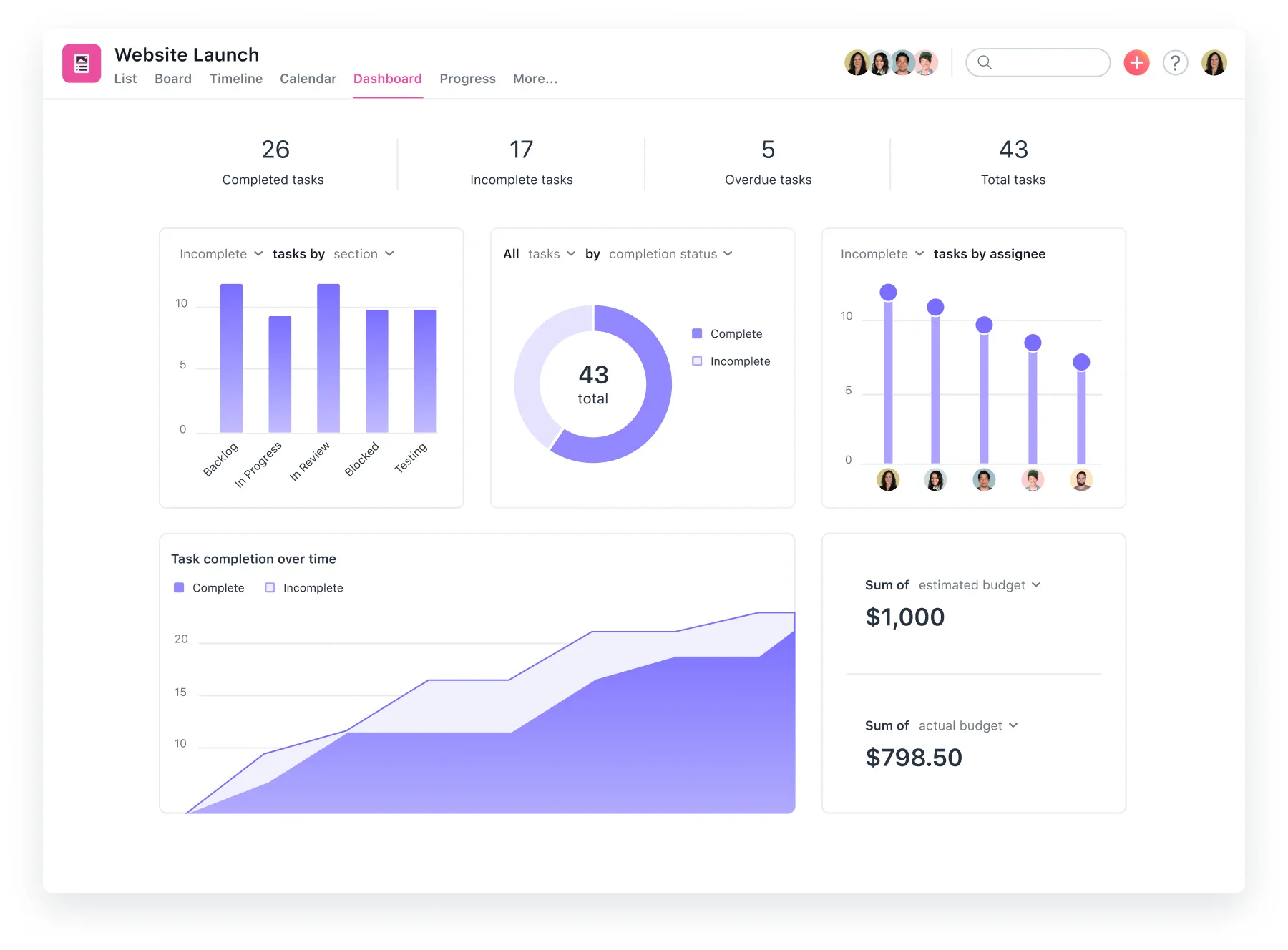
Asana is a work management platform founded in 2008 by Dustin Moskovitz and Justin Rosenstein, both former Facebook employees. Headquartered in San Francisco, the company went public in 2020 and now serves more than 180,000 organizations worldwide.
Asana connects tasks, projects, people, goals, and automations in one system. Unlike basic task management tools, it is built for cross-functional work, with features for dependencies, shared projects, and portfolio-level visibility. Its newer AI tools also support workflow automation, project summaries, and task routing.
The platform is widely used by marketing, product, and operations teams. It competes with tools such as monday.com, ClickUp, and Smartsheet, while offering more advanced project coordination than lighter options like Trello.
Key Features
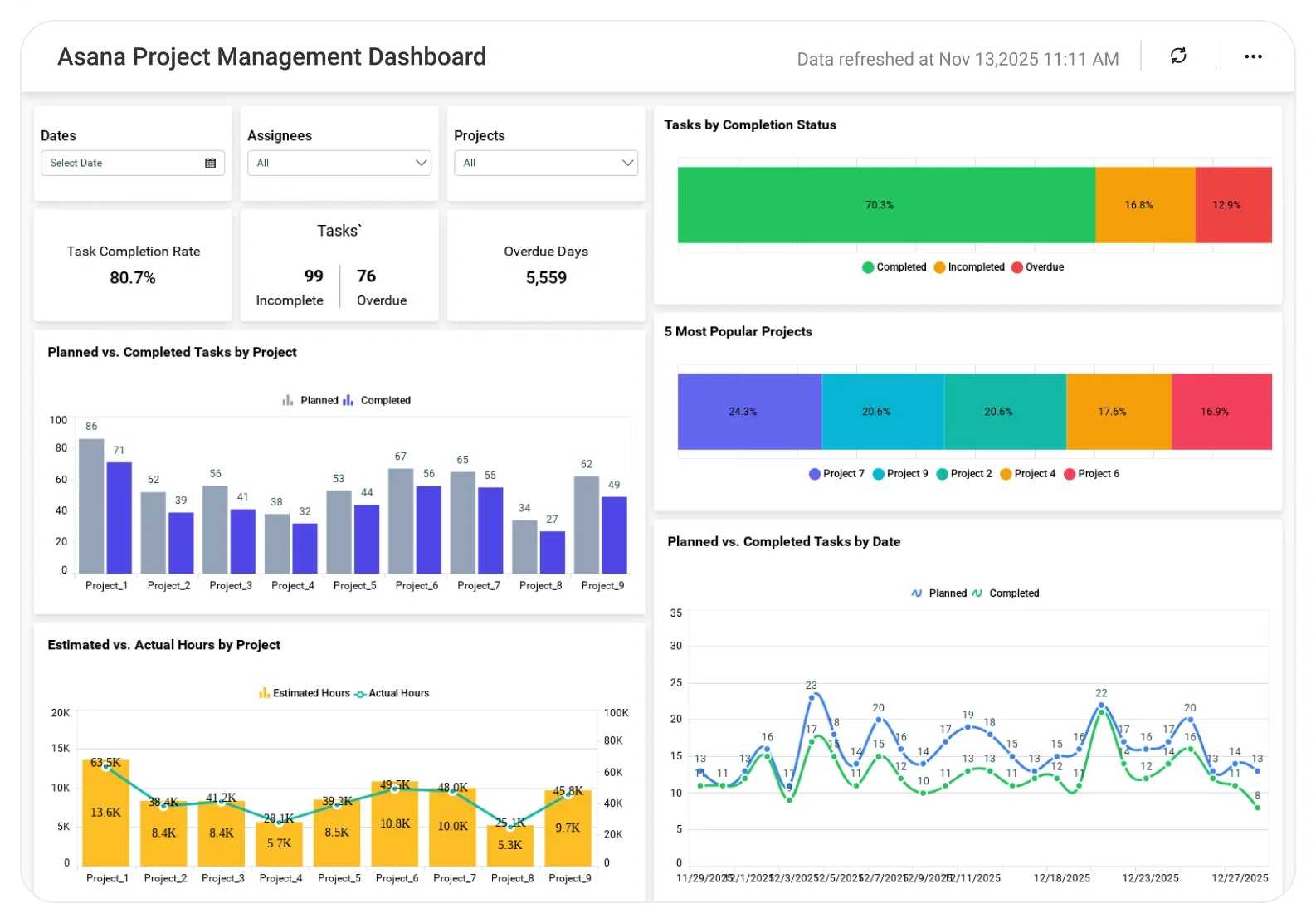
Asana covers a broad range of work management needs. The depth of each feature varies by plan, with several capabilities gated to Advanced and above.
1. Task and Project Management
The foundation of Asana is its task and project structure. Tasks can carry assignees, due dates, subtasks, dependencies, custom fields, attachments, and comments. Projects can be viewed as a list, board (Kanban), timeline (Gantt), calendar, or spreadsheet-style grid.
Multiple views are available simultaneously, so different team members can work in the format that suits them. Tasks can belong to multiple projects without duplicating the work, which is one of Asana's cleaner structural advantages over simpler tools.
“The process of planning projects and managing tasks in Asana feels smooth and intuitive. Creating projects, creating tasks, setting their dependencies and tracking milestones is easy enough, and having five views available allows to choose the most suitable for the team option.” – G2 reviewer
2. Timeline and Gantt
The Timeline view is Asana's Gantt-style feature, available from the Starter plan. It lets teams map tasks and milestones across a visual schedule, set task dependencies, and see how schedule changes ripple through a project.
For teams managing campaigns, product launches, or multi-phase projects with hard deadlines, Timeline is one of the more practical reasons to upgrade from the free Personal plan. On paid plans, Asana separates its Timeline view (a simplified scheduling view) from a more detailed Gantt view with task hierarchy and progress tracking.
3. Workflow Builder and Automation
Workflow Builder is Asana's no-code automation tool, available on the Starter plan and above. Teams can create rules that trigger automatically: when a task is moved to a certain column, assign it to a teammate; when a due date approaches, send a notification; when a form is submitted, create a task in the right project with the right fields pre-filled.
Automations cover assignments, status updates, notifications, task creation, and integrations with external tools. In 2026, Asana added AI-powered rule suggestions that propose automations based on how a team is already working.
“The automations are genuinely useful, not just a feature that sounds good in a demo. I use them to move tasks along based on status changes and it has cut down on a lot of back and forth.” – G2 reviewer
4. Goals and OKRs
Goals is one of Asana's more distinctive features and is only available on the Advanced plan and above. Teams can set company-wide or team-level goals, link projects and tasks directly to those goals, and track progress as work moves forward.
The connection between day-to-day tasks and strategic objectives is designed to give leadership a clear answer to the question: is the work we are doing moving us toward our goals? This feature is particularly valued by operations and strategy teams running formal OKR cycles. It is a meaningful reason to choose Advanced over Starter for goal-driven organizations.
5. Portfolios
Portfolios, also available on Advanced and above, provide a dashboard view across multiple projects. Program managers and ops leads can see the status, owners, priorities, and timelines of many projects at once without clicking into each one individually.
Workload management sits within Portfolios as well, showing how tasks are distributed across team members and flagging overallocation. For teams running multiple simultaneous initiatives, Portfolios is the feature that separates Asana from simpler task management tools.
6. AI Studio
AI Studio is Asana's AI workflow builder, launched in 2025 and expanded in 2026. It lets teams create AI-powered automations that go beyond simple rule triggers: AI can summarize a project's status, route intake requests based on content, draft task descriptions, and take actions inside connected tools like Slack and Gmail.
AI Studio is available on paid plans with an included pool of credits per billing account; additional AI usage requires purchasing more credits. For teams with high-volume, repeatable workflows, AI Studio offers meaningful time savings. For lighter users, the value is less clear-cut.
“I like that Asana can use AI to create reports about previous work as well as upcoming weekly tasks. The integration with Google Calendar and Slack helps keep my team on track and improves communication.” – G2 reviewer
7. Integrations
Asana supports more than 300 native integrations, including Slack, Microsoft Teams, Google Workspace, Salesforce, Zoom, Jira, GitHub, and Tableau. The Asana API allows custom integrations for teams with specific technical requirements.
For most teams, Asana sits in the middle of a broader tool stack rather than replacing everything, and the depth of the integration library is one of its structural strengths in that role.
Pros
“I like the ability to upload documents and files to Asana, which is especially useful for tasks like new onboarding for sponsors where they can upload logos and videos. I also appreciate using forms to start projects and automate the work process by receiving notifications and keeping my team on track.” – G2 reviewer
- Intuitive interface that teams actually adopt. Asana consistently scores high on ease of use in independent reviews. The interface is clean, the learning curve for core features is low, and new team members can get productive quickly. This translates to real adoption rates, which is often the hidden variable that determines whether a project management tool delivers value.
- Multiple project views without extra configuration. List, board, timeline, calendar, and grid views are all available in the same project without duplication. Teams can choose the view that suits their workflow, and managers can switch between views to get the context they need. The flexibility here is genuinely useful, not just a checklist feature.
- Workflow automation that is practical without being technical. The Workflow Builder is one of the more accessible automation tools in the category. Non-technical users can build meaningful automations without involving an IT team, and the range of triggers and actions covers the most common project management pain points.
- Strong cross-functional coordination. The ability for tasks to live in multiple projects simultaneously, combined with portfolio views and dependencies, makes Asana well-suited to teams that need to coordinate across functions. This is where Asana pulls ahead of simpler tools like Trello.
- Reliable platform with strong enterprise credentials. Asana is a publicly traded company with a large customer base and a track record of platform stability. For enterprise buyers evaluating vendor risk, that is a meaningful consideration alongside the feature set.
Cons
“One area where Asana could be improved is in handling very complex projects with a large number of tasks and dependencies. As projects grow, it can sometimes take extra effort to maintain organization and get a complete overview.” – G2 reviewer
- Pricing adds up quickly at scale. Asana's per-seat model is transparent but the cost multiplies fast. A 50-person team on Starter pays around $6,600 per year; the same team on Advanced pays roughly $15,000. Competitors like ClickUp offer more features at lower price points, though Asana's reliability and polish are part of what buyers are paying for.
- Key features gated behind Advanced. Goals, OKRs, and Portfolios are only available on the Advanced plan at $24.99 per user per month. For growing teams that want these capabilities, the jump from Starter represents a 127% price increase per seat. Teams that start on Starter sometimes find themselves needing to upgrade earlier than budgeted.
- Time tracking requires third-party integration on Starter. Native time tracking and more advanced reporting are not available on the Personal and Starter plans. Teams that need built-in time logging typically have to upgrade to Advanced or use third-party tools like Harvest or Toggl on Starter.
- Can become complex without good workspace governance. Asana's flexibility is also its risk. Without clear naming conventions, project structures, and team standards, workspaces can become cluttered and hard to navigate. Several reviewers note that the tool performs poorly when it is not well-organized, which places the burden of governance on the team rather than the tool.
- Customer support quality varies by plan. Standard and free plan users access support through documentation and community forums rather than direct channels. Enterprise customers get priority support, but teams on Starter and Advanced may find response times slower than expected for a product at this price point.
First-Hand Evaluation
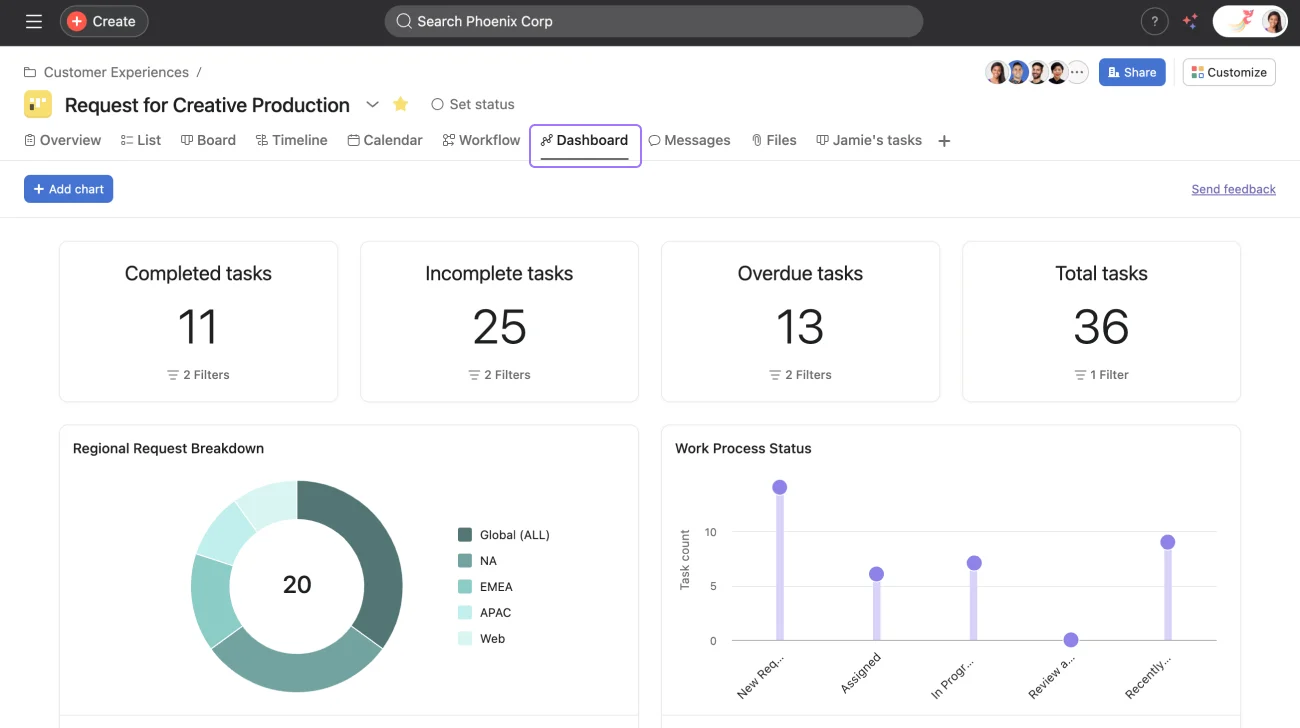
Our team evaluated Asana through hands-on testing of the Starter plan, product documentation, and verified reviewer data from G2, Capterra, and Gartner Peer Insights as of July 2026.
Getting a project up and running is fast. Tasks, assignees, due dates, and dependencies can be added without much documentation. The Timeline view is especially useful for campaign planning and product roadmaps, making it easy to adjust dates and see how changes affect dependent tasks.
The Workflow Builder also works well for common automations. Setting rules to assign tasks, add due dates, or send Slack notifications requires no technical knowledge. More complex workflows may take some trial and error, but the tools are flexible enough for most marketing and operations teams.
The biggest limitation is the Advanced feature gate. Goals are not included in Starter, making it harder to connect day-to-day project work with broader objectives. Teams that need OKRs or strategic goal tracking should factor Advanced into their budget from the start.
Pricing and Plans
Asana uses per-seat, per-month pricing across four tiers. Paid plans are designed for teams rather than individuals; pricing is per user per month.
| Plan | Price (Annual) | Price (Monthly) | What's Included |
|---|---|---|---|
| Personal | Free | Free | Up to 2 users. Unlimited tasks and projects, list and board views, calendar, basic integrations. |
| Starter | $10.99/user/month | $13.49/user/month | Everything in Personal, plus Timeline/Gantt, Workflow Builder, custom fields, forms, unlimited automations, dashboards, Asana AI and AI Studio Basic (50K credits per billing account per month), 300+ integrations. |
| Advanced | $24.99/user/month | $30.49/user/month | Everything in Starter, plus Goals and OKRs, unlimited Portfolios, Portfolio Workload, native time tracking and advanced reporting (availability may vary by region and contract), BI and CRM integrations, AI Studio Basic (75K credits per billing account per month). |
| Enterprise | Custom (contact sales) | Custom | Everything in Advanced, plus SSO, SCIM provisioning, admin console, HIPAA compliance, priority support, and advanced security controls. |
| Enterprise+ | Custom (contact sales) | Custom | Everything in Enterprise, plus data residency, advanced compliance controls, and audit logs. |
Pricing is verified against Asana's official pricing page as of July 2026. Annual billing saves approximately 18% versus monthly. Non-profit discounts are available on Starter and Advanced annual plans.
Our Rating
Ratings reflect our independent assessment based on hands-on testing, verified review data, and market positioning as of July 2026.
| Dimension | Score | Notes |
|---|---|---|
| User Ratings | Around 4.4/5 on G2 and around 4.5/5 on Capterra as of July 2026 (ratings and review counts change over time) | |
| Ease of Use | 4.6/5 | One of the strongest in the category. New users get productive quickly. |
| Task and Project Management | 4.5/5 | Multiple views, dependencies, subtasks, and custom fields are all well-executed. |
| Workflow Automation | 4.4/5 | Workflow Builder is accessible and powerful for standard use cases. |
| Goal Tracking and OKRs | 3.8/5 | Strong when available (Advanced+), but gating behind a higher tier limits accessibility. |
| Reporting and Analytics | 3.9/5 | Dashboards cover the basics. Deeper analytics require Advanced and BI integrations. |
| Integrations | 4.5/5 | 300+ native integrations. API available for custom connections. |
| Pricing Value | 3.7/5 | Competitive on features per dollar, but the Starter-to-Advanced jump is steep for growing teams. |
| Overall | 4.3/5 | A polished, reliable work management platform that earns its position in the category. |
Best Use Cases
Asana is a strong platform for a specific type of buyer. Knowing where it fits well and where it does not saves evaluation time.
Asana Is a Strong Fit For:
- Marketing and creative teams managing campaign workflows. Asana was built for exactly this: multi-step campaigns with clear ownership, deadlines, dependencies, and handoffs. The Workflow Builder and Timeline view are particularly well-matched to how marketing projects run.
- Operations and program managers running cross-functional initiatives. Portfolio management, cross-project dependencies, and workload views give operations leads the visibility they need across many moving pieces simultaneously.
- Mid-size companies that need enterprise structure without full enterprise complexity. Asana scales well from 10 to several hundred users and offers enough governance features to keep large teams organized without requiring a dedicated administrator.
- Teams implementing formal goal-setting frameworks. The Goals and OKR feature on Advanced is one of the more complete implementations in the non-enterprise project management space. Teams running quarterly OKR cycles will find Asana a natural fit if they budget for the Advanced plan.
Consider Looking Elsewhere If:
- Your team is primarily developers who prefer code-native tools. Jira or Linear are better fits for engineering teams that want sprint planning, issue tracking, and deep code integration. Asana can connect to these tools via integration, but it is not a developer-native environment.
- Budget is a primary constraint and you need advanced features. ClickUp offers a broader feature set at a lower price point. If pricing is the deciding factor and you need Goals or Portfolios without paying $24.99 per seat, evaluate ClickUp or Smartsheet before committing to Asana Advanced.
- You need heavy customization of data structures and workflows. Asana is a standardized platform. Teams that need highly custom fields, relational databases, or complex conditional workflow logic may find it limiting compared to tools like monday.com or Airtable.
- Your team is very small and cost-sensitive. The free Personal plan is genuinely useful for individuals and very small teams. However, the jump to Starter at $10.99 per seat per month may not be justified for teams of two or three people who only need basic task tracking.
Alternatives and Competitors
If Asana is not the right fit, these are the platforms buyers most frequently evaluate alongside it.
- monday.com: More customizable for non-standard workflows and data structures. monday.com tends to suit ops and project teams that want to build highly tailored boards and automations, though it can require more setup to get right.
- ClickUp: A broader feature set at a lower price point. ClickUp includes time tracking, goals, and docs on its free plan, and is a strong alternative for budget-conscious teams who need more features per dollar.
- Smartsheet: Better suited to teams that think in spreadsheets. Smartsheet is particularly strong for project portfolios, resource management, and reporting, and has a stronger footprint in enterprise and construction.
- Jira: The standard for engineering and product teams running agile workflows. Jira's issue tracking, sprint planning, and developer tool integrations go deeper than Asana's, but it is not designed for non-technical teams.
Final Verdict
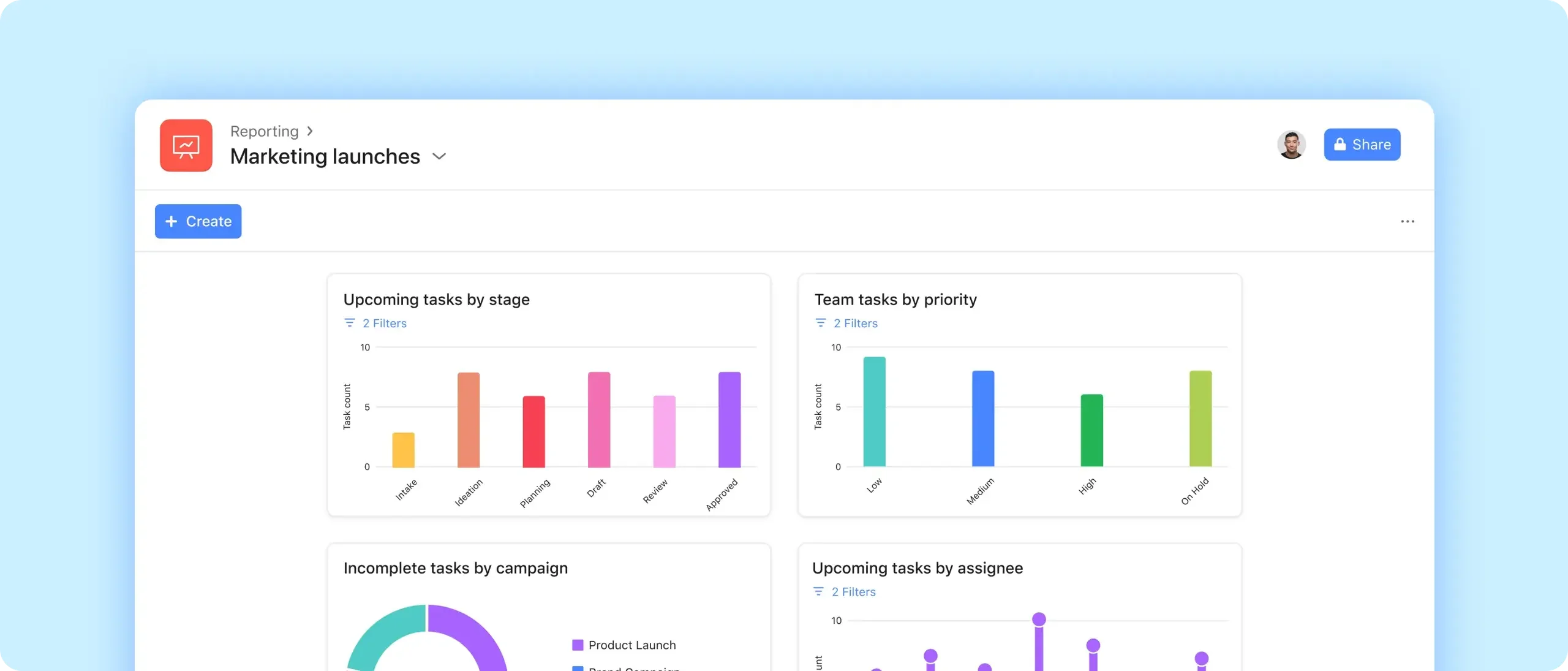
Asana earns its position as one of the leading work management platforms through a combination of interface quality, workflow depth, and platform reliability that few competitors match at this price point.
For marketing teams, operations leads, and cross-functional program managers, it is a strong default choice that is genuinely pleasant to use daily. The Workflow Builder, Timeline view, and cross-project task management all deliver real value and are accessible enough for non-technical teams to adopt without heavy onboarding.
The limitations are real and worth planning around. The Starter-to-Advanced pricing jump is steep, and teams that discover they need Goals or Portfolios after signing an annual Starter contract face an uncomfortable budget conversation. Time tracking is absent from Starter, which is a gap for agencies and services teams.
And for buyers who want deep customization or lower per-seat costs, competitors like ClickUp and monday.com deserve evaluation. For the buyer Asana is built for, though, it is a reliable, polished platform that most teams do not leave because it fails them, but because they have outgrown what it offers or found a cheaper alternative that meets a narrower set of needs.
Our project management software roundup covers additional options if you are still evaluating the category.
.png)
.avif)