
.svg)
Most HR and L&D leaders can easily name their top performers, but few can pinpoint which exact skills exist across their departments or where critical gaps are forming. But leaving these gaps unmonitored compromises long-term growth.
A Harvard Business Review study tracking 70 million job transitions found that foundational skills, such as teamwork and basic comprehension, are what actually drive career progression, rapid specialization, and adaptability.
To build a resilient workforce, organizations must track both these core capabilities and advanced technical skills. Skills management software solves this visibility problem, helping you identify and fix vulnerabilities before they impact organizational performance.
What Is Skills Management Software?
Skills management software is a system that captures, organizes, and analyzes the actual capabilities of a workforce. Unlike an HRIS platform, which tracks administrative employment data like roles and tenure, a skills platform builds a live inventory of employee proficiencies verified by assessments, manager reviews, and performance metrics. It maps these capabilities against business requirements to instantly surface critical talent gaps and identify who is qualified for specific projects.
It also differs fundamentally from a Learning Management System (LMS). While an LMS focuses on delivering training content and tracking course completion, skills management software focuses on actual competency. It answers whether an employee possesses a specific capability, rather than just whether they finished a course.
10 Best Skills Management Software in 2026: Tool Reviews
The skills gap is widening faster than ever. Data from the World Economic Forum (WEF) highlights the urgency: nearly half (44%) of an individual worker's core skills will need to be updated within the next few years just to keep pace with technological disruption.
Relying on outdated spreadsheets and static resumes to track team capabilities is no longer cutting it. To build agile, future-ready teams, companies are turning to skills management software to map current talent, identify critical blind spots, and make data-driven decisions about hiring and training.
Here’s a breakdown of the top platforms dominating the market this year, starting with a powerful solution built for deep technical evaluation.
1. iMocha
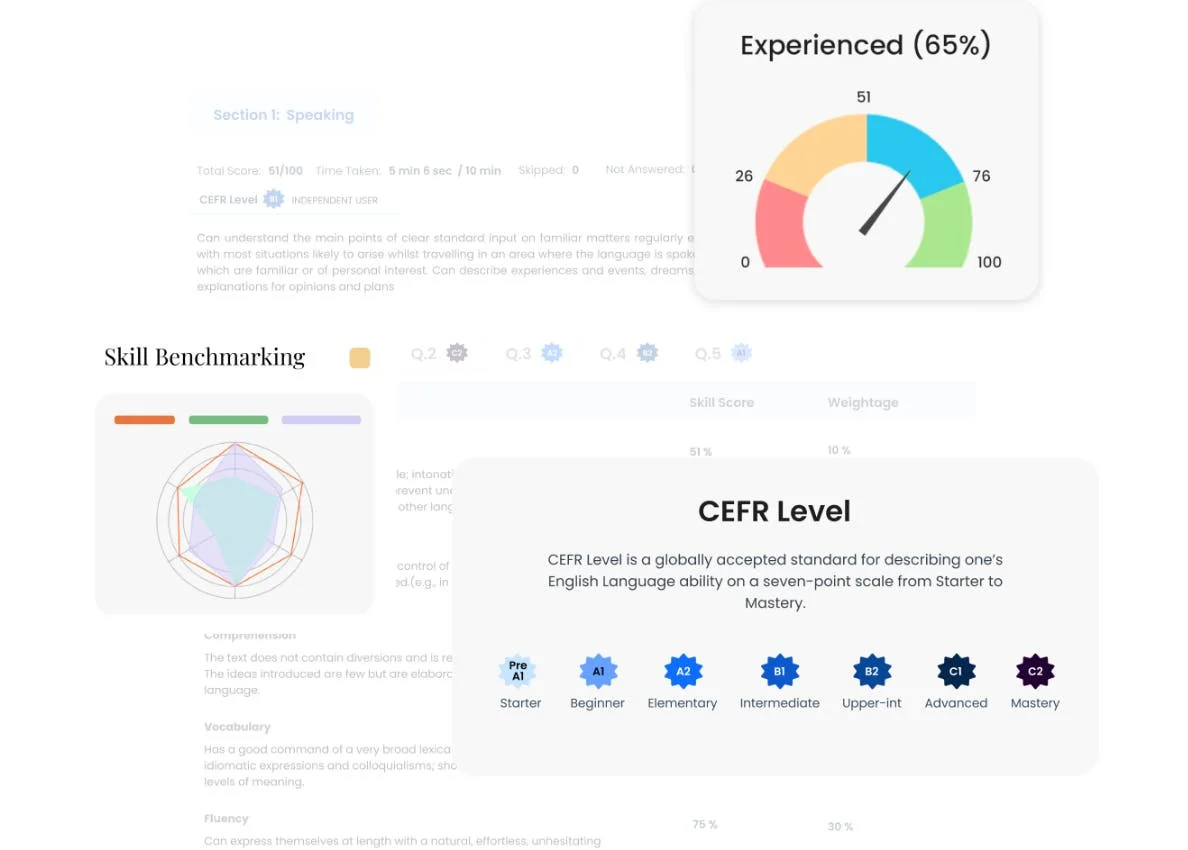
iMocha is a skills assessment platform used primarily by large organizations running structured technical and functional skills validation programs. Its library covers thousands of pre-built assessments across technology, finance, and operations roles.
Where many skills management tools rely on self-ratings and manager endorsements, iMocha validates skills through scored assessments, which gives HR and L&D teams higher-confidence data for workforce planning decisions.
Key Features
- Pre-built assessment library covering technical, functional, and cognitive skills across hundreds of categories
- Video conferencing integration for live and asynchronous interview-style assessments
- Proctoring options for high-stakes validation programs
- Skills benchmarking reports comparing individual scores against role benchmarks
- Custom assessment builder for organization-specific or niche skill areas
Pros and Cons
Pros: “Video Conferencing is really good, provided good quality of questions in assessments.” - Capterra review
- The depth of the pre-built library means most organizations can deploy relevant assessments without building from scratch, which shortens time-to-value.
- Assessment data integrates into skills profiles, creating a validated record rather than a self-reported claim.
Cons: “One thing I think iMocha could improve is the variety of question types in some assessments.” - G2 review
- The platform leans toward assessment and validation rather than ongoing skills management or career pathing. Teams that need both will likely require a second tool.
- Pricing is enterprise-only in practice, with no public starting figure and no self-serve option.
Pricing
iMocha provides custom-priced, AI-powered skills intelligence to improve talent decisions. The platform maps employee capabilities, validates proficiencies, and analyzes skill gaps to optimize hiring and upskilling. Organizations can contact sales directly to build a custom package tailored to their basic needs
2. Gloat
Gloat is an AI-powered talent marketplace platform designed for large organizations that want to match employees to internal projects, roles, and development opportunities based on skills rather than job title or tenure. It was one of the first platforms to bring the talent marketplace model to enterprise scale, and its skills intelligence layer is built specifically for workforce redeployment rather than for skills cataloging as an end in itself.
Key Features
- AI-powered talent marketplace connecting employees to internal roles, projects, mentors, and learning opportunities
- Skills inference engine that builds profiles from existing HR data and employee input
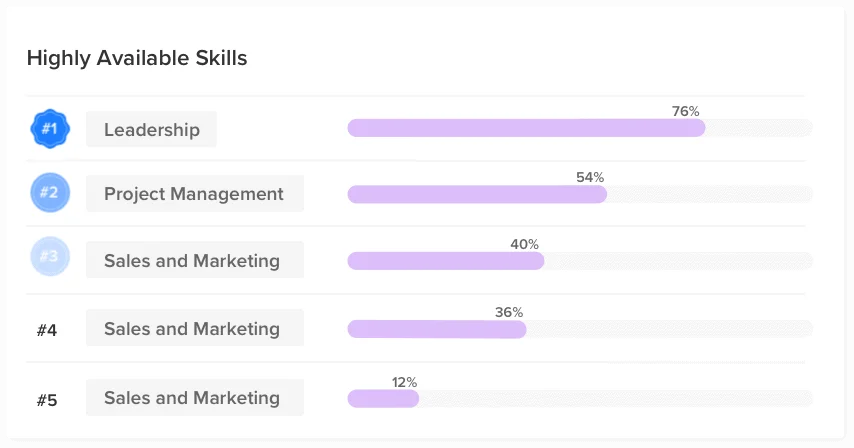
- Workforce planning dashboards showing skills supply and demand across the organization
- Internal gig and project marketplace for targeted skills development
- Succession and bench-strength analytics tied to skills data
Pros and Cons
Pros: “Gloat's talent marketplace tool was one of the first on the market. It was designed with the employee in mind.” - G2 review
- Skills inference from existing HR data reduces the cold-start problem that plagues most skills platforms, where employees must manually populate their own profiles before the system generates any value.
- Workforce redeployment analytics give HR leaders a concrete tool for making the case to avoid external hiring when internal capability exists.
Cons: “As true for any growing company, there is a need to standardize certain processes and improve certain TATs.” - G2 review
- Pricing is fully undisclosed and enterprise-only in practice. Budget planning requires a sales conversation, and implementation costs at this scale are significant.
- Gloat's value is highest at large organizational scale. Below 1,000–2,000 employees, the internal opportunity volume may not justify the platform's complexity and cost.
Pricing
Gloat provides an agentic HR platform designed to optimize workforce mobility and business agility. Interested organizations can fill out an online request form to schedule a live demo and connect with their team.
3. AG5
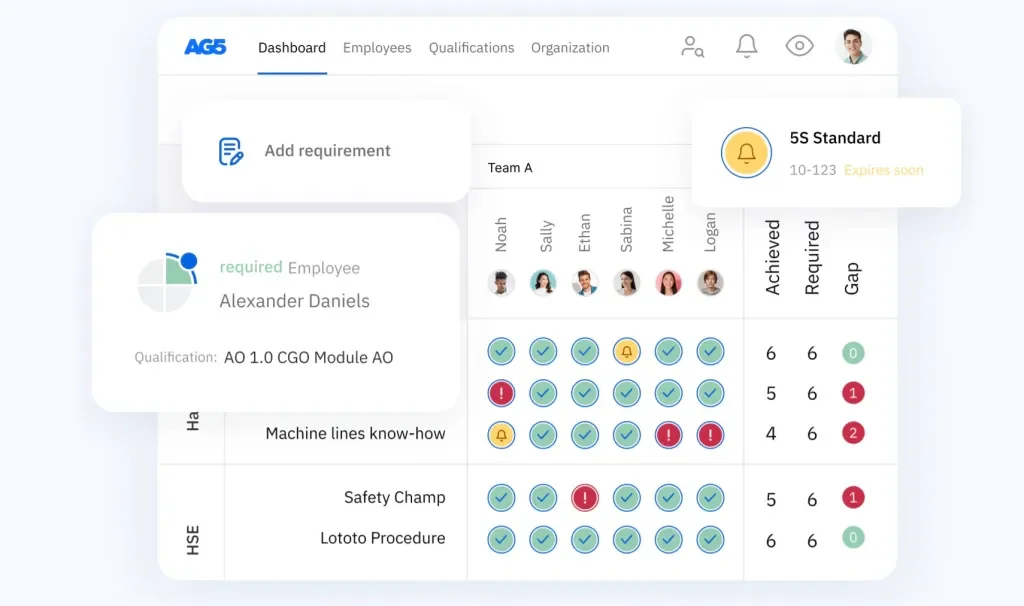
AG5 is a skills matrix and competency management platform built specifically for organizations in regulated industries where certification tracking, compliance audits, and skills sign-off processes are not optional.
Manufacturing, logistics, healthcare, and energy companies make up a significant portion of its customer base. The platform digitizes what most regulated organizations manage in spreadsheets or paper-based qualification registers.
Key Features
- Skills matrix builder with certification, expiry date, and qualification sign-off tracking
- Compliance audit trails with printable documentation for regulatory inspections
- Gap analysis reports showing which employees need recertification or are missing required qualifications
- Automated alerts for approaching expiry dates
- Integration with training records to connect qualification completion to matrix updates
Pros and Cons
Pros: “Works well with our other software we use for training.” - Capterra review
- The compliance audit trail reduces the manual effort of preparing documentation for ISO audits or regulatory inspections, which is a concrete time saving for operations managers.
Cons: “The only drawback I've noticed is that there are occasional issues with some aspects of the workflows functionality. However, the regular monthly updates have been steadily addressing these concerns.” - G2 review
- AG5 is purpose-built for compliance and operations. Organizations looking for career pathing, internal mobility, or learning content will need a separate tool.
- Pricing is not disclosed, which makes budget planning harder than with transparency-first competitors.
Pricing
AG5 offers flexible skills tracking software across three main tiers: Core for essential matrices and HRIS integrations, Accelerate for automated workflows and API access, and Enterprise for advanced analytics and regulatory compliance. Organizations can schedule a live demo to choose the right package.
4. Skills Base
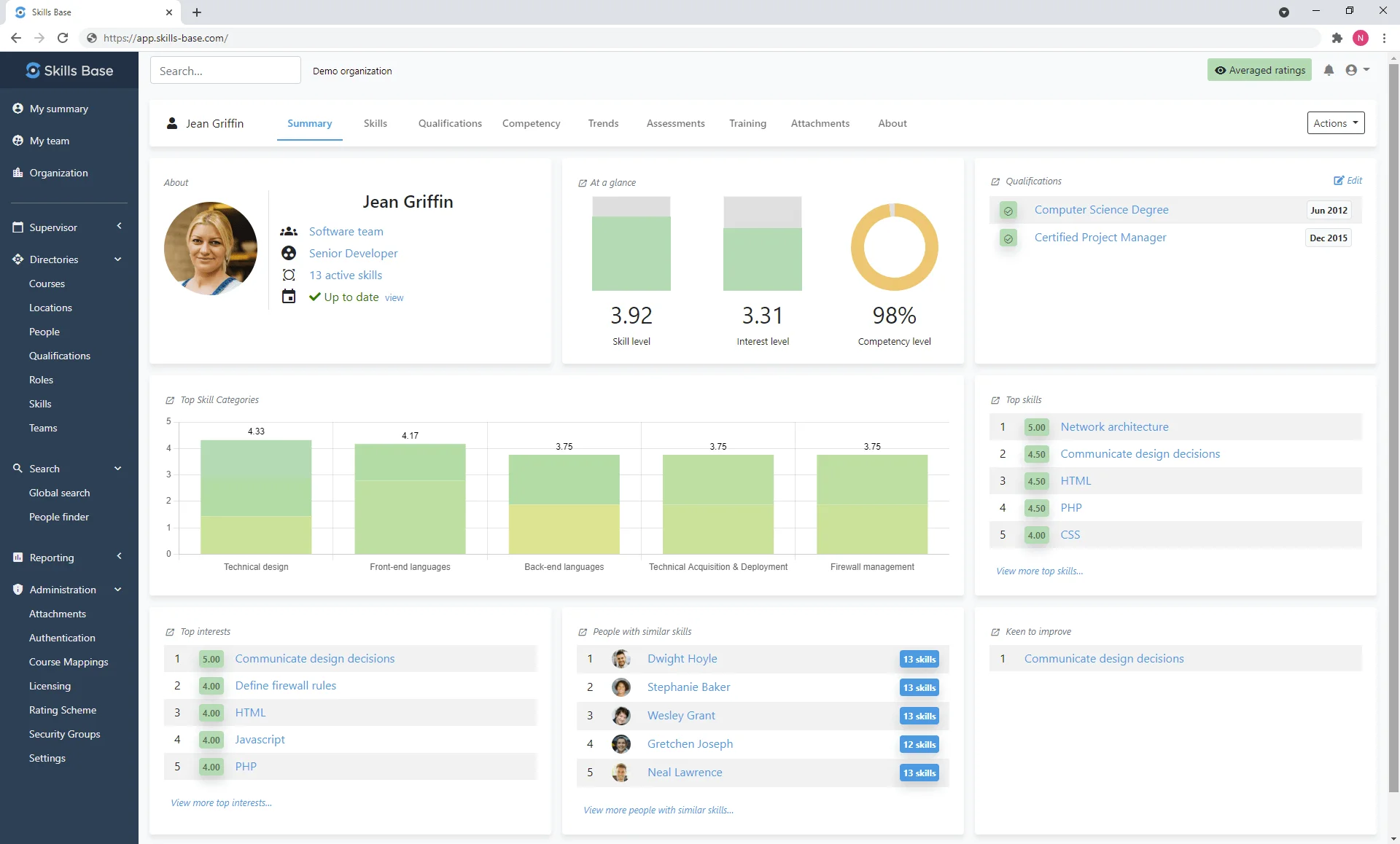
Skills Base is a dedicated skills management platform built around flexible framework construction and visual skills analysis. It gives HR and L&D teams the tools to build custom skills taxonomies, run gap analyses, and produce team-level visibility into capability, at a price point that is accessible for mid-market organizations.
Key Features
- Custom skills framework builder with proficiency level definitions and role mapping
- Visual skills matrix showing individual and team capability against role requirements
- Skills gap analysis at the individual, team, and organizational level
- Self-assessment and manager assessment workflows
- Exportable reports for team planning and board-level skills presentations
Pros and Cons
Pros: “There are two things I like the most one is the visual analysis of skills categories which enables me to easily see my teams training needs and the other is how skills base empowers all team members to see and develop their skills and career.” - G2 review
- The framework customization depth allows organizations to build role-specific competency models rather than relying on a generic library, which matters for industries with non-standard skill requirements.
- The free trial is genuinely functional, allowing teams to evaluate the platform with real data before committing.
Cons: “One functional problem that I experienced was the issue with the update sync where once in a while the skills across the different categories were not in harmony. The platform could be improved with better synchronization of data where it appears in all sets of skills.” - Capterra review
- Assessment depth is limited compared to tools like iMocha. Skills Base supports self and manager ratings but does not include scored technical assessments.
- Learning content integration depends on the organization's existing LMS; there is no built-in content library.
Pricing
This platform offers tiered skills management software, from a basic Free plan to paid options starting at $2.25/user/month for advanced reporting and API access. Custom-priced packages add training tools and automated AI intelligence. Users can sign up for free or book a demo.
5. Nestor
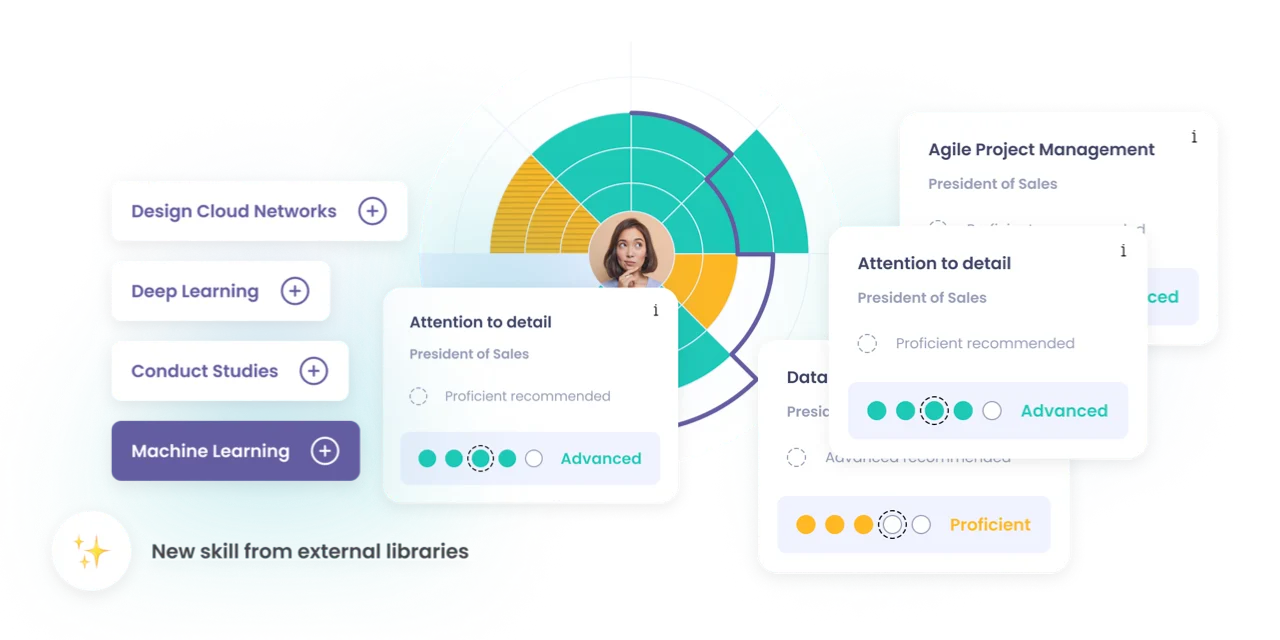
Nestor is a skills and talent management platform focused on connecting an employee's current skill profile to internal career opportunities. Its AI layer maps skills to roles and suggests career paths and development actions, making it a reasonable fit for organizations investing in internal mobility as a retention strategy. The platform covers performance assessments as part of the same workflow, which reduces handoffs between systems.
Key Features
- AI-driven career path recommendations based on current skill profiles and role requirements
- Skills assessments embedded within performance review cycles
- Role-based competency frameworks with gap identification per employee
- Internal opportunity matching, connecting open roles to employees with adjacent skills
- Development action plans generated from identified skill gaps
Pros and Cons
Pros: “They are understanding, kind and explain everything patiently so you can understand this program. This platform facilitates performance assessments.” - G2 review
- The platform links performance assessment results directly to suggested career paths, reducing the gap between review and action that most tools leave unaddressed.
Cons: “While Nestor's can be a great solution to fill roles, the success of talent management initiatives relies on having a clear and well-structured approach for mapping and assessing skills.” - G2 review
- Pricing is not disclosed, making budget planning harder than with tools like Skills Base or MuchSkills.
- Standalone skills-matrix visualization is lighter than dedicated matrix tools.
- Integration documentation is limited publicly; buyers should press for specifics in the sales process.
Pricing
Nestor offers three scalable plans based on company size: Essentials (up to 150 users) for core skills mapping, Premium (150 to 500 users) for performance integration and AI tools, and Enterprise (500+ users) for advanced analytics and automation. Contact their team to book a demo and request a custom quotation.
6. MuchSkills
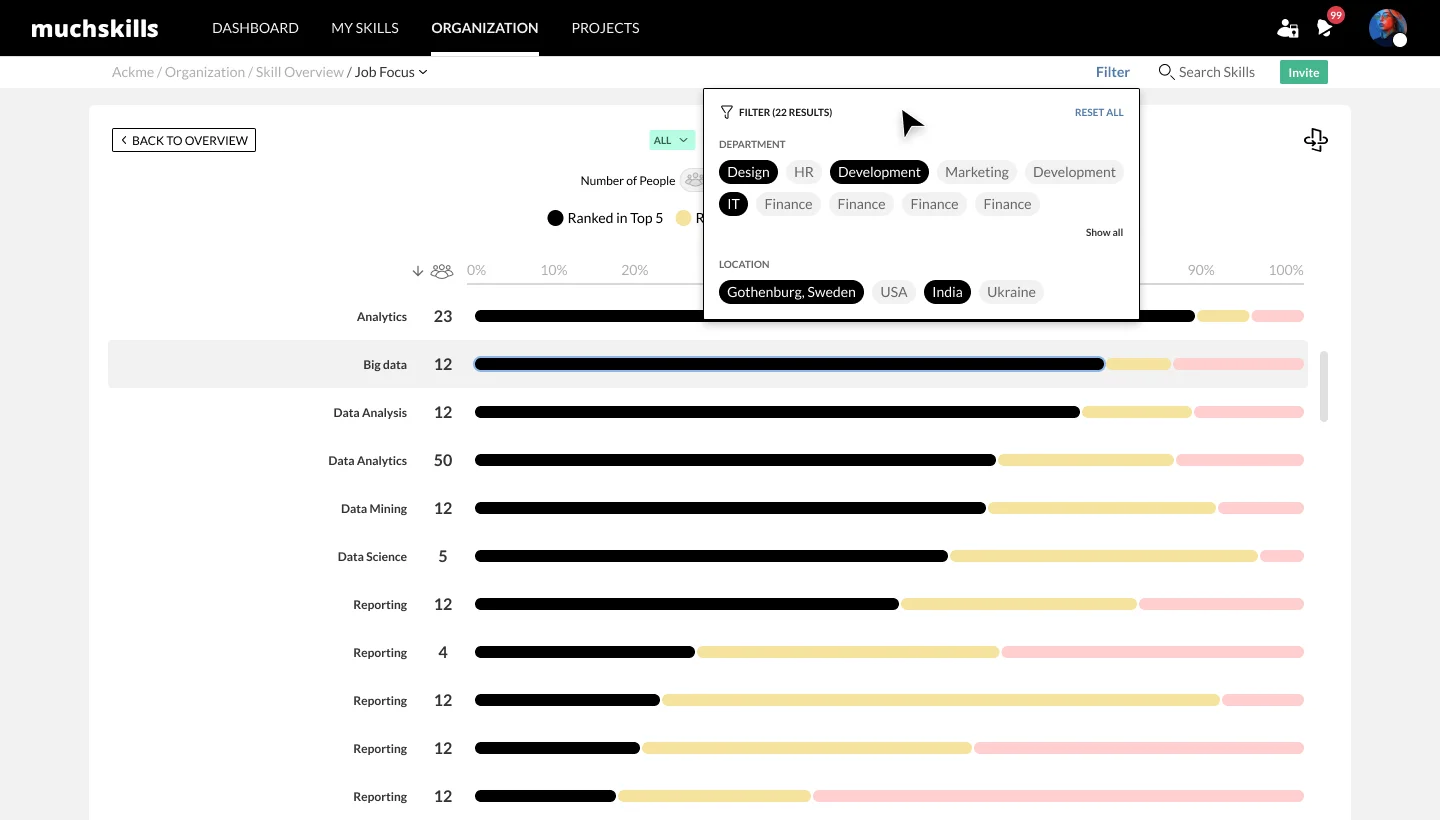
MuchSkills is a lightweight skills visualization tool built for teams that want a clear, visual picture of who knows what, without the configuration overhead of a full skills management platform. It maps individual skill profiles into team-level views, making it easier for managers to spot coverage gaps, plan projects, and have more grounded development conversations. The platform is direct to get started with and priced for smaller organizations.
Key Features
- Individual skill profiles visualized as radar charts, making strengths and gaps visible at a glance
- Team-level skill maps that aggregate individual profiles into a view of collective capability
- Skills gap identification against project or role requirements
- Simple skill endorsement and self-rating workflows
- Manager and team dashboards without requiring HR admin involvement
Pros and Cons
Pros: “MuchSkills has a pretty straightforward sign up process. The website is simple and intuitive. It helps to visualize each individual's skills, identify weaknesses and work on improvement to increase productivity and efficiency.” - G2 review
- The visual format makes skills conversations accessible for managers who are not HR practitioners. This matters in smaller organizations where the people manager is often running skills conversations without HR support.
- Free plan lowers the barrier for teams that want to test skills visibility before committing to a paid platform.
Cons: “The platform is not yet integrated with our Learning Management System, but we will hopefully get there within short!” - Capterra review
- MuchSkills is not a fit for organizations that need formal competency frameworks, proficiency-level definitions, or workforce-wide analytics. The visualization is strong; the framework depth is not.
- Skills data relies heavily on self-rating, which limits the confidence level for high-stakes decisions like succession or role changes.
Pricing
MuchSkills offers flexible, tiered pricing starting at $5.50 per user/month, with a 50% discount for non-profits. The platform scales from basic competency mapping and AI gap analysis to advanced compliance tracking and enterprise security. Teams can start for free or book a meeting for advanced tiers.
7. Bridge
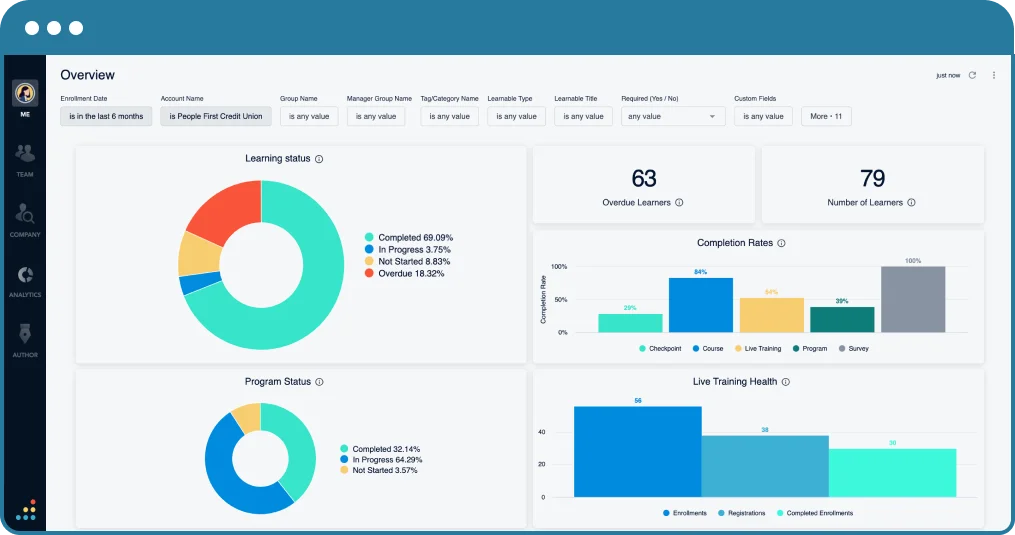
Bridge is a learning management and skills tracking platform built for organizations that want employee development and skills visibility in one place. Its integration with Lightcast's labor-market taxonomy gives HR teams a skills library tied to real workforce data rather than an internally built list. The platform sits at the intersection of LMS and skills management, which is its main strength and, depending on your needs, its main limitation.
Key Features
- Skills library powered by Lightcast labor-market data, covering thousands of tagged skills across industries
- Skills gap reports at the individual, team, and organization level
- Learning paths that connect directly to identified skill gaps
- Performance and skills review workflows in a single interface
- Manager dashboards showing team skill coverage and development progress
Price and Cons
Pros: “It was user friendly for the most part. It was helpful to have training at individualized pace.” - Capterra review
- The Lightcast integration means organizations do not need to build a skills taxonomy from scratch. For teams without a dedicated skills architect, this alone saves weeks of setup.
- Manager-facing dashboards are practical for weekly team check-ins without requiring HR to run reports on their behalf.
Cons: “Sometimes it could take a while to load, but I am unsure if that is due to network connection or website. I also wish there were more options for the front cover of the course building.” - G2 review
- Front-end course design customization is limited. One reviewer specifically noted fewer visual options for course building than expected at this price point.
- Not a fit for organizations that want dedicated skills-matrix heat maps or workforce-wide gap analytics without the LMS wrapper.
Pricing
Bridge LMS offers three annual tiers starting at $15,000: Learn (core training), Talent Suite (skills and AI career pathing), and Full Suite (performance management), plus optional add-ons for advanced authoring and surveys. Contact their team directly to request a customized price quotation.
8. SkillsDB
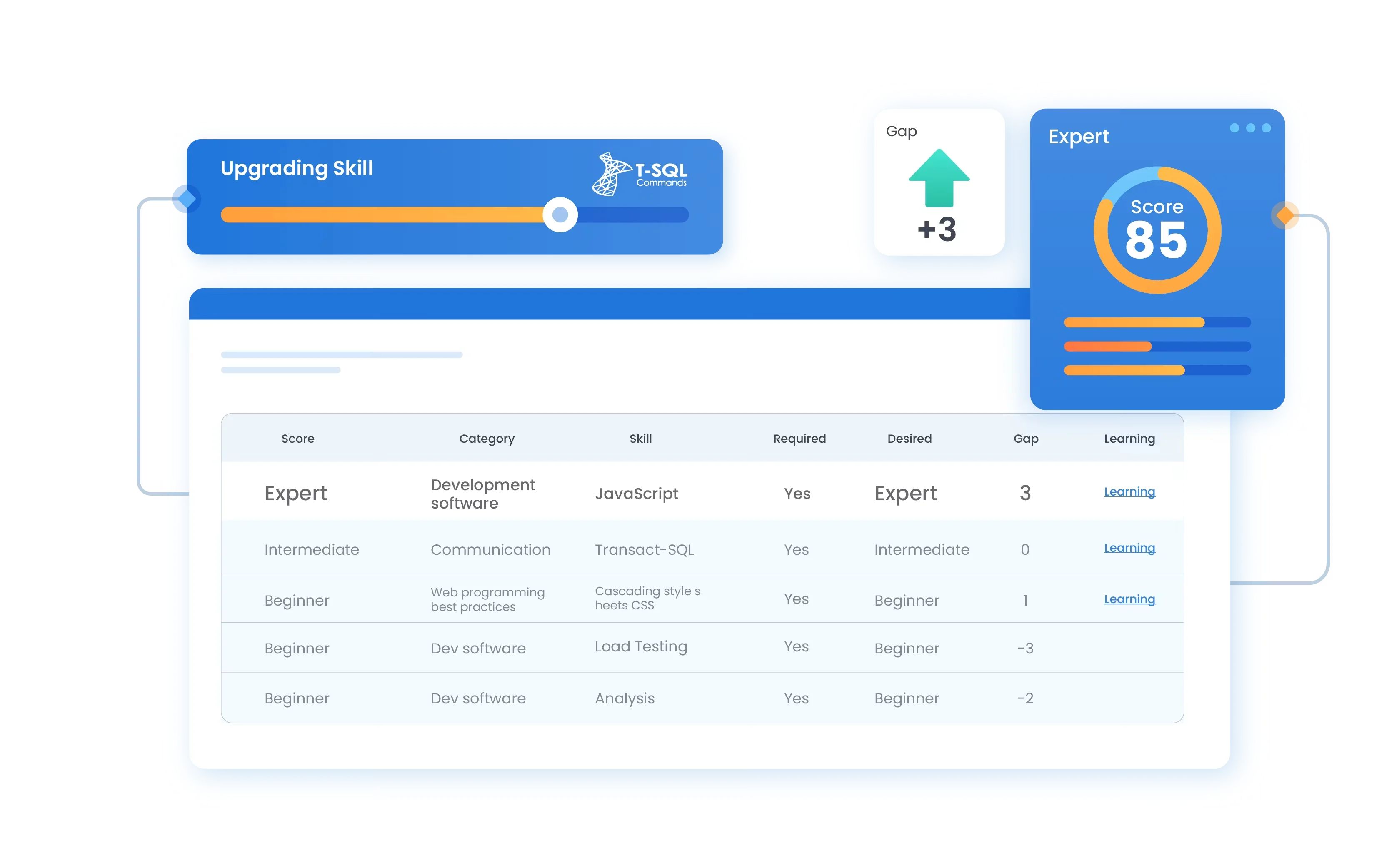
SkillsDB is a mid-market skills management platform that combines a skills database with succession planning features, making it one of the few tools in this set that explicitly connects current employee skills to future role readiness. The platform is designed to be manageable for HR teams without dedicated HRIS administrators, with a customer support reputation that consistently draws positive mention in user reviews.
Key Features
- Skills database with customizable skill categories and proficiency definitions
- Succession planning workflows connecting skills profiles to role-readiness ratings
- Search functionality for finding employees with specific skills or qualifications
- Skills gap reporting at the individual and team level
- Self-service profile management for employees to update and manage their own skill records
Pros and Cons
Pros: “I'm using skill DB pro almost for a year, Customer support service is great and the team is very much talented. Easy to use functionality.” - Capterra review
- Succession planning integration within the skills management workflow reduces the need for a separate tool for bench-strength analysis.
Cons: “Cleaner searches-- results are sometimes difficult to find.” - Capterra review
- Assessment functionality is limited. SkillsDB relies primarily on self-rating and manager input rather than scored technical assessments.
- Feature depth is lighter than enterprise tools like Gloat or iMocha. Organizations planning to scale past 1,000 to 2,000 employees should confirm the platform's capacity before committing.
Pricing
SkillDB provides a centralized hub for skills intelligence, structured training, and workforce planning to build high-performing teams. Interested organizations can book a demo to see the system in action.
9. Skillsoft
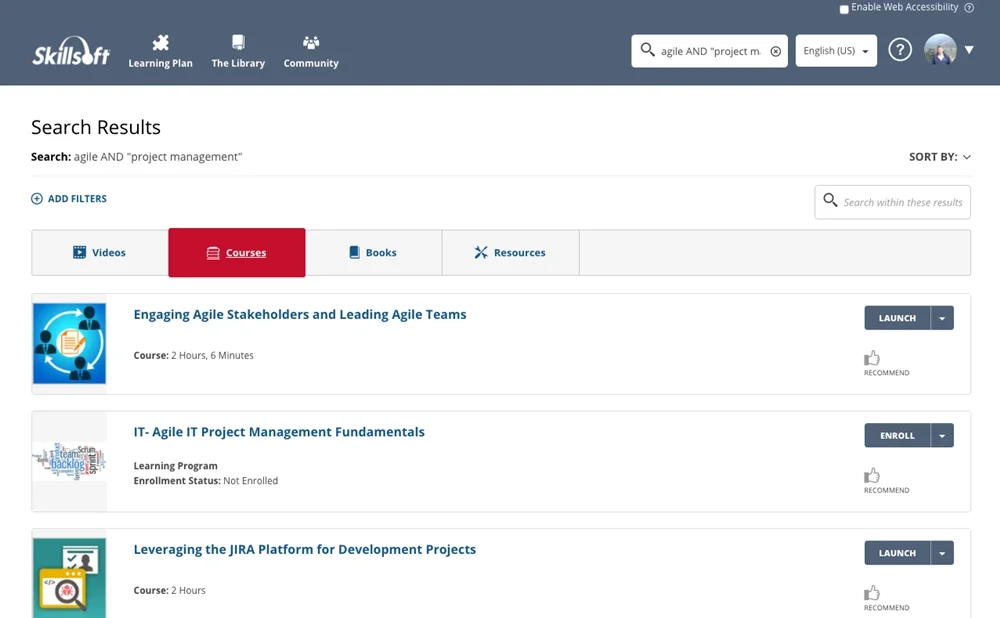
Skillsoft is one of the largest corporate learning platforms on the market, and its Percipio interface brings skills tracking alongside its content catalog. For organizations whose primary concern is connecting identified skill gaps to available learning content at scale, Skillsoft's library depth is unmatched in this set. The skills management layer is real but secondary to the content library, which is worth understanding
before evaluating.
Key Features
- Percipio skills-based learning experience platform with a library covering thousands of courses, books, and labs
- Skill benchmarking against role-based competency targets
- AI-driven content recommendations tied to individual skill profiles
- Compliance and certification tracking with expiry management
- Reporting on learning completion, skills progress, and engagement metrics
Pros and Cons
Pros: “It's user friendly interface and the flexibility it offers for individuals and organizations.” - Capterra review
- Content library breadth means organizations rarely need to build or source external learning content for common skill gaps.
- Compliance and certification tracking is mature and reliable for regulated industries.
Cons: “In all honesty, I find sometimes the reporting there could be more visualizations. So I think the admin panel could probably be a little bit more user-friendly, more intuitive. More visualizations, that would be more helpful.” - G2 review
- Skills management is a feature within a learning platform, not the core product. Organizations that need dedicated skills-gap analytics will find Skillsoft's capabilities limited outside the learning context.
- Pricing at enterprise scale can be significant; budget-conscious mid-market teams should confirm total cost early.
Pricing
Skillsoft offers a multimodal training platform to assess talent, close skill gaps, and accelerate AI expertise across business and technology sectors. By consolidating learning vendors and integrating with existing enterprise tools, it reduces costs and simplifies employee development. Interested organizations can submit an online form to get started.
10. Eightfold AI
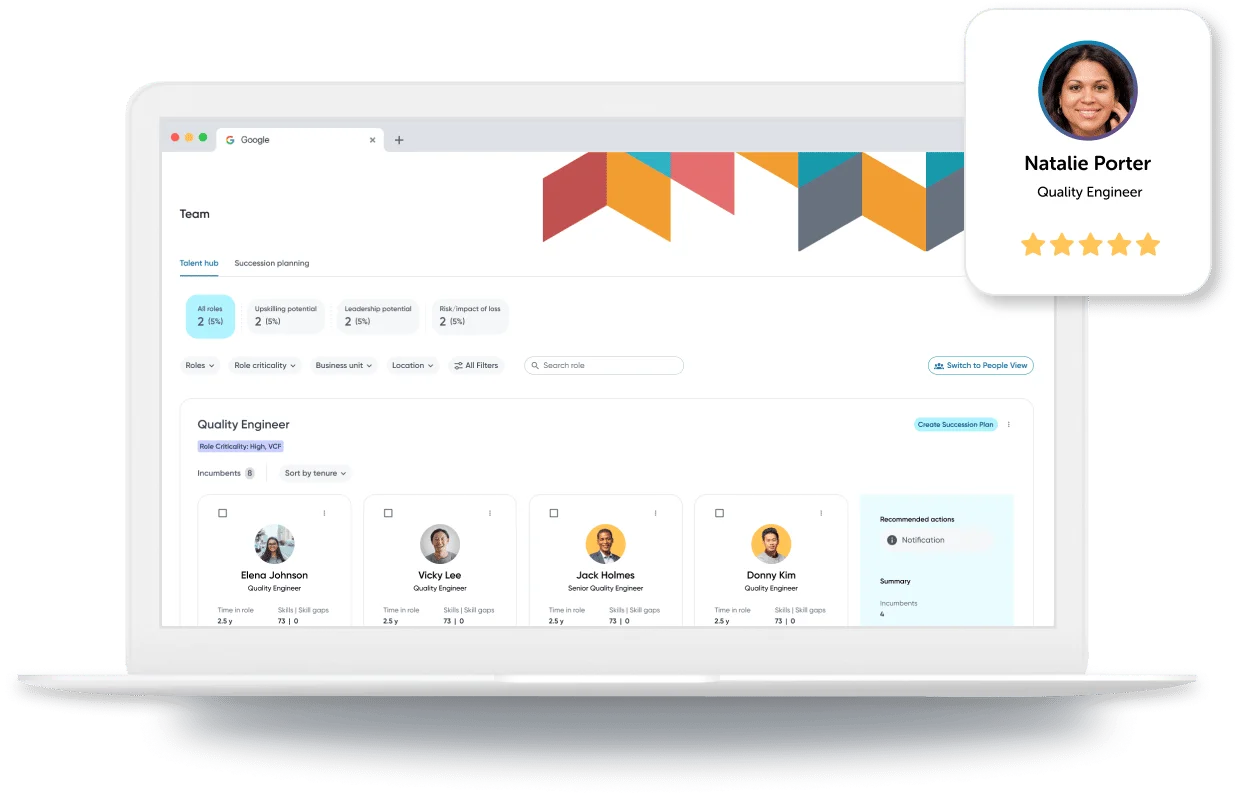
Eightfold AI is a heavy-duty talent intelligence platform that functions as an overlay layer across an enterprise’s entire talent infrastructure.
While traditional platforms rely on what an employee explicitly types into a skills profile, Eightfold's deep-learning engine analyzes over a billion global career trajectories to infer skills, adjacent capabilities, and long-term potential.
For large organizations looking to build an active internal talent marketplace and move toward a pure skills-based operating architecture, Eightfold offers unparalleled predictive depth.
Key Features
- Deep-learning talent intelligence engine mapping over 1.6 million distinct skills and career trajectories
- AI-driven internal talent marketplace matching current employees to projects, mentors, and open internal roles
- Autonomous agentic screening and recruitment copilots that rank candidate profiles on a multi-attribute scale
- Diversity bias reduction tools including automated profile masking and funnel equity analytics
- Skill gap forecasting and predictive workforce planning built on public market trends and internal performance data
Integrations: Bi-directional sync with major enterprise ATS and HRIS suites including SAP SuccessFactors, Workday HCM, Oracle Recruiting, Greenhouse, iCIMS, and Lever; features a Chrome extension for external sourcing platforms.
Pros and Cons
Pros: “Ease of applying to Jobs using Eightfold Smart Apply.” - G2 review
- Predictive skill inference eliminates the friction of forcing employees to manually update their skills profiles.
- Comprehensive lifecycle coverage links external talent acquisition seamlessly with internal mobility and upskilling pathways.
Cons: “Although it is a great overall too, I found that it is not very versatile when it comes to customization and setup.” - Capterra review
- The reliance on inferred skills can occasionally generate false positives or mismatch profiles if a resume lacks standard structural indicators.
- Implementation is an intensive, multi-week enterprise commitment that requires significant configuration to align with legacy data architectures.
Pricing
Eightfold AI uses a sales-led enterprise pricing model where total costs depend on your organization's size, required modules, and integration complexity. Because the company does not publish fixed rates publicly, you will need to contact Eightfold AI directly to request a custom quote tailored to your workforce needs.
How to Choose Skills Management Software
The right platform depends on what problem you're actually trying to solve. Before booking demos, work through these six questions.
What is the source of your skills taxonomy?
Some platforms come with pre-built libraries (Lightcast-tagged in Bridge, Skillsoft's catalog, iMocha's 2,500+ assessments). Others expect you to build your own framework. Neither approach is universally better. Pre-built taxonomies accelerate deployment and provide market benchmarking. Custom frameworks fit organizations with proprietary role architectures or regulated certification requirements. Know which you need before evaluating.
Who validates skills: employees, managers, or an assessment?
Self-reported skills data is fast but unreliable for high-stakes decisions. If your workforce planning, succession decisions, or compliance audits depend on skills data, you need validation from managers, peers, or objective assessments. If skills data is mainly for development conversations, self-reporting may be sufficient. iMocha and AG5 offer the strongest validation options. Skills Base and MuchSkills are primarily self- and manager-rated.
Does this replace your LMS or feed it?
Skills management software is not an LMS. Some tools (Bridge, Skillsoft) blur this line by bundling content delivery with skills tracking. Others output a development plan that you're expected to action through a separate LMS. Get clear on whether you need the learning layer built in or whether your existing LMS is staying in place.
How does it integrate with your HRIS?
Skills data that lives in a silo is skills data your HR team will stop trusting within six months. Before shortlisting any tool, confirm the integration path with your current HRIS, whether that's Workday, BambooHR, HiBob, or something else. Ask specifically: how does the skills profile update when a role changes in the HRIS? How often does the sync run?
What is the pricing model, and what does scale cost?
Per-user pricing (Skills Base at $2.25/user, MuchSkills at $5.50/user) is predictable at 100 to 200 employees and can become expensive at 1,000+. Enterprise license models (Gloat, iMocha, Nestor) are opaque at the research stage but may compare favorably at large headcount. Get a full-platform cost estimate, including implementation, before comparing sticker prices.
What is realistic time-to-value?
A competency framework that takes six months to build before it generates any useful data is a liability, not an investment. Ask vendors for customer evidence on time from contract to first actionable skills report. Tools with pre-built taxonomies (Bridge, iMocha) typically reach first value faster. Highly customizable tools (Skills Base, AG5) depend heavily on how much framework work the buyer is willing to do upfront.
Key Features to Look for in a Skills Management System
Skills taxonomy and framework The foundation of any skills tracking software is the taxonomy it uses to define and categorize skills. Look for pre-built frameworks that align to your industry, proficiency level descriptors (not just yes/no skill flags), and the ability to customize or extend the taxonomy without a professional services engagement.
Skills Gap Analysis
Gap analysis is where skills data becomes useful. The tool should compare each employee's current skill profile against the requirements of their role (or a target role), produce a clear view of where the gaps sit, and make that view filterable by team, department, and skill category. This is the core of skills gap analysis software functionality.
Matrix Visualization
A well-designed skills matrix view lets a manager see team capability coverage at a glance: who has what, who is approaching competency, and where the single points of failure are. AG5 and MuchSkills are the most developed in this dimension. Most other tools on this list include some version of it.
Assessment and Validation
Self-rated skills data degrades over time and loses credibility in high-stakes decisions. The best platforms offer manager validation, peer input, and objective technical assessments. iMocha is the strongest here. Skills Base and Nestor offer manager and peer review layers without a deep assessment library.
Career Pathing and Internal Mobility
Role-based career paths, tied to the skills profile, are the bridge between workforce inventory and workforce development. The best tools show employees what they would need to close the gap between their current skills and a target role. Nestor and Gloat are the strongest in this dimension.
Reporting and Analytics
The skills inventory is only as valuable as the decisions it informs. Look for reporting that can answer: which skills are overrepresented or underrepresented at the team or organization level? Which roles have succession risk based on skills coverage? Which training programs are producing measurable skills development? Generic dashboards that can't answer these questions are not decision-grade reporting.
Benefits of Skills Management Software
Relying on job titles and tenure to make talent decisions leaves too much to chance. Here’s how specialized software changes the equation:
Redeployment Over External Hiring
Skills-based talent matching reduces the reflex to hire externally for every new capability requirement. Organizations using Gloat's internal marketplace, for example, have documented reductions in external hiring costs by surfacing internal candidates who already have the relevant skills.
Targeted L&D Spend
Generic training programs are expensive and easy to cut. Skills gap data gives L&D teams a specific, defensible case for where training investment will produce measurable capability improvement. This shifts the conversation from "we need more training budget" to "here are the three skill gaps that will cost us in Q3 if we don't close them."
Succession Readiness
Succession planning that runs on job titles alone is guesswork. Skills-based succession identifies who actually has the capabilities to step into a critical role, not just who has the longest tenure. SkillsDB and Nestor both make this connection between skills data and succession planning explicit.
Compliance Confidence
For regulated industries, skills certification is not optional. AG5's certification
tracking and expiry alert functionality turns a manual compliance process into an automated one, with an audit trail that survives regulatory scrutiny.
Final Thoughts
The tools on this list cover the full range of the market, from entry-level visualization tools for small teams to enterprise talent intelligence platforms for workforce redeployment at scale. Most offer demos rather than self-serve trials, so book time with the two or three that fit your buyer profile and test the workflows that matter most: framework setup, a skills gap report, and how the tool connects to your HRIS. How each platform handles those three things will tell you more than any feature comparison.
Frequently Asked Questions
What is skills management software, and how is it different from an LMS?
Skills management software tracks what employees know and can do. It captures skills profiles, identifies gaps against role requirements, and surfaces where development is needed. An LMS delivers training content and tracks course completion.
The two categories overlap (Bridge and Skillsoft combine both), but they answer different questions. The LMS tells you what training was completed; skills management software tells you whether the skills are actually there.
Do we need skills management software if we already have an HRIS?
Most HRIS platforms record employment data, not capability data. Job titles, compensation, and tenure live in your HRIS. Skills profiles, proficiency levels, competency assessments, and skills gap analysis typically do not, unless you're on Workday with its Skills Cloud module enabled, or a similar enterprise HCM with deep skills features. For most organizations, the HRIS and a dedicated skills management platform serve different functions and are used together, not instead of each other.
How much does skills management software cost?
Entry-level tools start around $2.25 per user per month (Skills Base). Mid-market platforms run from $8 to $20 per user per month. Enterprise platforms, including Gloat, Nestor, and iMocha, are custom-quoted and typically start at $20,000 per year for mid-sized enterprise accounts. Implementation costs can add significantly to the total; always request a separate line item for implementation services when comparing quotes.
What is the difference between a skills matrix and a competency framework?
A skills matrix is a visual tool, typically a grid showing which employees have which skills and at what proficiency level. A competency framework is a structured model that defines the knowledge, behaviors, and capabilities expected in each role.
The matrix is often used to display the data produced by the competency framework. Most platforms on this list support both; AG5 and Skills Base are particularly strong on matrix visualization, while Nestor is stronger on competency framework depth.
How long does implementation typically take?
Implementation time varies considerably by platform and organizational complexity. Entry-level tools like Skills Base and MuchSkills can be functional within days for a small team. Mid-market platforms with HRIS integration typically take four to eight weeks.
Enterprise platforms like Gloat or iMocha at 1,000+ employees often run 8 to 16 weeks, particularly when a custom skills taxonomy is being built from scratch. Ask vendors for customer case studies at your approximate headcount and complexity level before committing to a timeline.
Can skills data feed succession planning and internal mobility?
Yes, and this is one of the strongest arguments for investing in a dedicated skills platform rather than relying on HRIS job title data. SkillsDB makes the succession planning connection explicit in its product design.
Gloat's talent marketplace is built around exactly this use case at enterprise scale. Nestor connects skills profiles to career path recommendations. The key is ensuring your skills data is clean and validated before relying on it for succession decisions. Inferred or self-reported skills data is a weak foundation for high-stakes people's decisions.
Who should own skills management: HR, L&D, or department managers?
In practice, it tends to be a shared responsibility that works best when one team owns the taxonomy and governance. HR typically owns the framework design and compliance layer. L&D owns the connection between identified gaps and learning interventions.
Department managers own the day-to-day skills validation and proficiency ratings for their teams. The platforms that work best in this structure, including AG5, Skills Base, and iMocha, have clear role separation built into their permission and workflow design.
.png)