.avif)

.webp)
.svg)
Handling recruitment, payroll, and compliance is difficult when data sits in spreadsheets and relies on manual follow-up. The best HRIS software you can find in the market today are the ones that centralize these tasks, providing HR teams with organized workflows and clear insights into the organization.
This efficiency is vital as leadership roles expand. Gallup data shows the average number of direct reports reached 12.1 in 2025, a nearly 50% increase in team size since 2013.
This guide reviews ten leading of the top HRIS platforms for 2026, based on verified user feedback from G2 and Capterra. Whether you are implementing your first system or upgrading a tool you have outgrown, these options provide a solid foundation for your search.
What to Look for in HRIS Software
Picking the right HRIS platform is less about finding the most feature-packed option and more about finding the one that fits how your team actually works. Here are the key factors worth evaluating before you commit.
Core functionality
A solid HRIS should cover the basics well: employee records, payroll processing, time and attendance, benefits administration, and onboarding. Some platforms also include performance management and recruiting tools, which can reduce the number of separate systems you need.
Integration compatibility
Your HRIS needs to connect with the tools your team already uses, whether that is your accounting software, communication platforms, or applicant tracking system. Poor integration means manual data entry, which creates more work and more room for error.
Scalability
A platform that works well for a 30-person team may struggle once you reach 300. Look at how pricing scales, what features unlock at higher tiers, and whether the platform supports multi-state or international operations if that is part of your growth plan. Namely tends to fit well in that middle stretch, past the point where a lightweight small-business tool holds up but before the complexity of a full enterprise suite is actually needed.
Pricing structure
Many HRIS platforms use modular pricing, where advanced reporting, additional integrations, or specific HR functions cost extra. Request an itemized quote based on your actual headcount and the features you need, not just the base rate.
Implementation and support
Setup complexity varies widely across platforms. Some can be running within a day or two; others require weeks of configuration. Make sure your vendor offers dedicated onboarding support, and check how responsive their team is after go-live.
10 Best HRIS Software in 2026
The shift toward hybrid work and distributed teams has made HR infrastructure more critical than ever. The platforms below were selected for their ability to handle core HR functions reliably, support different team sizes and structures, and reduce the manual work that slows HR teams down.
1. HiBob: A Modern HRIS Built for Mid-Sized Teams

HiBob, often referred to simply as Bob, is a people management platform built with mid-sized, fast-growing organizations in mind. It covers core HRIS functions like employee records, onboarding, time off, and compensation management, while layering in engagement and culture tools that most traditional HR systems do not include.
What sets HiBob apart is how it presents the employee experience. The interface is clean and approachable, which helps with adoption across the organization, not just among HR administrators. It also offers strong workflow automation and integrates well with popular tools like Slack, making approvals and notifications a natural part of daily work rather than a separate task.
HiBob is a solid fit for people-first companies that want an HRIS that employees will actually use, not just HR teams.
Key Features
- Employee records and org management: Centralized people data with customizable fields and org chart views
- Onboarding workflows: Automated task lists and document collection for new hires
- Time and attendance: Leave tracking, shift management, and overtime rules
- Compensation management: Salary benchmarking, pay equity analysis, and compensation cycle tools
- Performance tools: Goal setting, feedback, and review cycles built into the platform
- Integrations: Connects with Slack, Workday, LinkedIn, and 100+ other tools
- Engagement surveys: Pulse surveys and sentiment tracking to monitor team health
Best For
- Mid-sized organizations with 50 to 500 employees looking for a modern, people-centered HRIS
- HR teams that want engagement and core HR managed in one platform
- Companies with distributed or international teams needing multi-currency and localization support
Pros
"I find it simple and intuitive to navigate. Integrations with Slack and the approval process are great additions and make things more efficient." - Capterra Review
- Approachable interface that encourages adoption beyond just the HR team
- Slack integration makes approvals and HR tasks part of the natural workflow
- Strong onboarding automation reduces manual coordination during new hire setup
- Compensation and performance tools sit inside the same system as core HR data
Cons
"Sometimes I find it difficult to create custom reports. With the column picker, it can be hard to tell which column I actually need, since there are so many options available." - G2 Review
- Custom reporting can be unintuitive, particularly for users who need specific data cuts
- Pricing is not publicly listed, which makes early budget planning harder
- Advanced features may require higher-tier plans or additional configuration
Pricing
- Custom pricing; contact HiBob for a quote
- Pricing varies based on company size and modules selected
- Free demo available on request
2. RUN Powered by ADP: A Reliable Payroll-First HRIS for Small Businesses
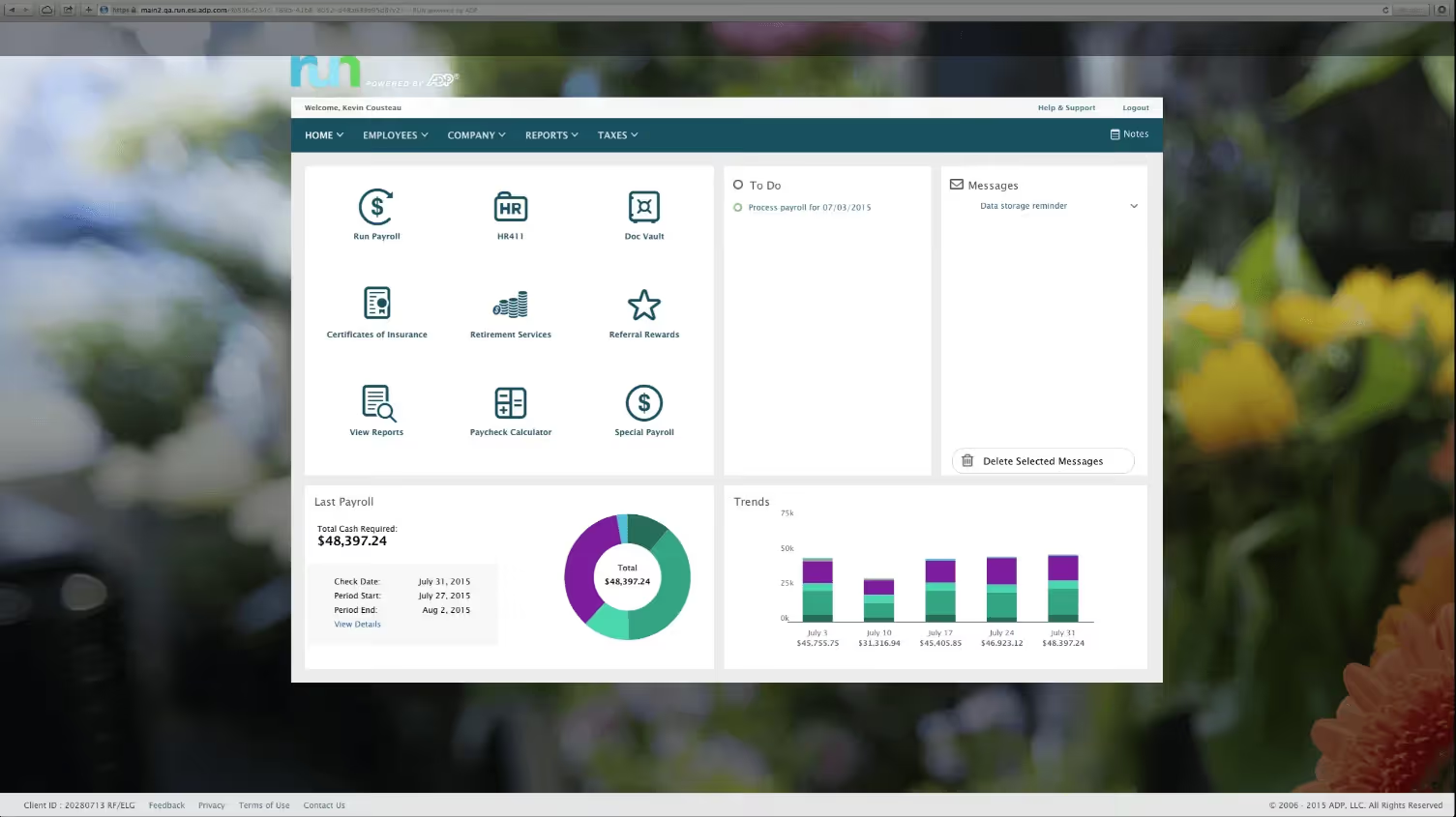
RUN Powered by ADP has built a strong reputation among small businesses for one reason: it handles payroll and tax compliance with a level of reliability that gives business owners real confidence. With more than 900,000 small business clients, it is one of the most widely used payroll-focused HR platforms on the market.
The platform covers federal, state, and local tax filings automatically, and its AI-powered error detection flags common mistakes before a payroll run goes through. For teams without a dedicated HR department, that kind of built-in guidance makes a meaningful difference.
RUN is purpose-built for small businesses with fewer than 50 employees. It is not the most expansive HRIS on this list, but for teams that want dependable payroll with solid compliance support, it delivers.
Key Features
- Automated payroll processing: Handles federal, state, and local tax filings on schedule
- AI-powered anomaly detection: Flags payroll errors before submission
- Direct deposit and flexible pay options: Including Wisely debit card
- Benefits administration: Health insurance and retirement plan support
- Employee self-service portal: Staff can access pay stubs, tax forms, and personal info
- Time tracking: Automated timecard integration with payroll sync
- 24/7 customer support: Available via phone and live chat
Best For
- Small businesses with 1 to 49 employees that need reliable, straightforward payroll
- Teams without dedicated HR staff who want guided compliance support
- Business owners who want payroll to run with minimal manual oversight
Pros
"The couple of times I have needed help, I received assistance right away. Great customer service and I hope it continues." - Capterra Review
- Clean, well-organized interface with a manageable learning curve
- Strong track record on tax compliance and error resolution
- 24/7 live support is a genuine advantage for time-sensitive payroll issues
- AI error detection reduces the risk of costly payroll mistakes
Cons
"I guess the only downfall is that their chat is not open 24 hours. I do not personally work late, but I know some folks do." - G2 Review
- Live chat support hours are limited, which can be a problem for teams working non-standard hours
- Advanced HR functionality is limited compared to more comprehensive HRIS platforms
- Pricing requires a custom quote; no publicly listed rates
Pricing
- Four tiers: Essential, Enhanced, Complete, and HR Pro
- Custom pricing; contact ADP for a quote
- No free plan or free trial available
3. BambooHR: A Well-Rounded HRIS for Small to Mid-Sized Businesses

BambooHR has earned a strong following among small and mid-sized businesses for putting together a wide set of HR tools in one clean, easy-to-use package. From applicant tracking and onboarding to time-off management and performance reviews, it covers the core HR lifecycle without overwhelming new users with complexity.
The interface is one of BambooHR's most consistently praised qualities. HR administrators and employees alike tend to find it intuitive from the start, which helps with adoption. For teams moving off spreadsheets or a basic HR tool for the first time, the transition is typically straightforward.
It is a practical, dependable choice for organizations that want a full-featured HRIS without a steep learning curve or enterprise-level overhead.
Key Features
- Applicant tracking system (ATS): Job postings, candidate pipelines, and offer management
- Onboarding tools: New hire task checklists, e-signatures, and document collection
- Time-off tracking: Accrual policies, approval workflows, and calendar visibility
- Performance management: Self-assessments, manager reviews, and goal tracking
- Employee self-service: Staff can update personal info, view pay stubs, and request time off
- Reporting and analytics: Pre-built and customizable HR reports
- Payroll add-on: Available for US-based teams as an additional module
Best For
- Small to mid-sized US businesses wanting a broad, user-friendly HRIS
- HR teams moving away from manual processes for the first time
- Organizations that want recruiting and core HR in a single platform
Pros
"BambooHR excels at employee onboarding, time-off tracking, applicant tracking, performance reviews, and self-service HR, all in one clean, intuitive interface built for small to mid-sized businesses." - Capterra Review
- Intuitive interface that requires minimal training for both HR admins and employees
- Covers the full HR lifecycle from recruiting through offboarding
- Strong onboarding tools reduce the time it takes to get new hires up to speed
- Good reporting capabilities for a platform aimed at smaller organizations
Cons
"I wish there was an option so I do not have to enter my password multiple times a day. Every time I navigate away from the window, it automatically closes and I have to log back in." - G2 Review
- Repeated session timeouts have been a friction point for some users
- Payroll is an add-on rather than a core feature, which adds to the total cost
- Some advanced customization options are limited compared to enterprise-grade platforms
Pricing
- Core: $10/user/month
- Pro: $17/user/month
- Elite: $25/user/month
- Three plans available with volume and nonprofit discounts
- Free trial available; no permanent free plan
4. Gusto: A Straightforward Payroll and HR Platform for US Teams

Gusto has built a solid reputation among small and mid-sized US businesses for making payroll simple, transparent, and predictable. Its pricing is publicly listed, its core features are included without hidden add-ons, and the experience of running payroll is straightforward enough that most users complete it in under ten minutes.
Beyond payroll, Gusto handles benefits administration, contractor payments, and basic HR tools in one place. Its AutoPilot feature lets recurring payroll run automatically, which is a practical option for teams with consistent pay schedules. For US-based businesses that want payroll and HR in one system without a complicated setup, Gusto is a strong option.
It is worth noting that Gusto is designed specifically for US operations. Teams with international employees will need a separate solution for those hires.
Key Features
- Automated payroll: Tax filing across all 50 states with W-2 and 1099 handling
- Benefits administration: Medical, dental, vision, and 401(k) management
- AutoPilot: Fully automated recurring payroll runs
- Contractor payments: 1099 generation and contractor payment management
- Employee self-service app: Pay stubs, time-off requests, and benefits access
- Gusto Global: Employer of Record services for international hires in select countries
- Accountant dashboard: Multi-client payroll management for accounting firms
Best For
- US-based small businesses wanting clear, predictable payroll pricing
- Teams that pay a mix of W-2 employees and 1099 contractors
- HR and finance leaders who want payroll and benefits in a single platform
Pros
"I like that Gusto is easy to use and very user-friendly. The initial setup was very easy, which I appreciate." - G2 Review
- Transparent, publicly listed pricing with no surprise fees on core features
- Fast payroll runs that most users complete in well under ten minutes
- Strong benefits marketplace with thousands of health insurance plan options
- Straightforward setup that does not require a long implementation process
Cons
"The cost is very high for a small business. We ended up leaving due to the cost of it. Having to do repeated searches to find things was also frustrating." - Capterra Review
- Pricing can become costly for small businesses as headcount grows
- Navigation within the platform has been flagged by some users as less intuitive than expected
- Multi-state payroll requires an upgraded plan, adding to the total cost
Pricing
- Simple: $49/month base + $6/user/month
- Plus: $80/month base + $12/user/month
- Premium: $180/month base + $22/user/month
- Free trial available; no permanent free plan
5. Greenhouse: A Structured ATS with Strong Hiring Workflows

Greenhouse sits at the more specialized end of this list. It is primarily an applicant tracking system rather than a full HRIS, but its depth on the recruiting side makes it worth including for organizations where hiring is a core operational priority.
The platform offers structured interview kits, scorecard-based evaluations, and detailed pipeline reporting that give hiring teams a consistent, repeatable process. Greenhouse is designed to reduce bias in hiring decisions and make it easier for multiple stakeholders, from recruiters to department heads, to stay aligned throughout the process.
It works best as part of a broader HR tech stack, paired with a separate HRIS for core people management functions.
Key Features
- Structured interview kits: Standardized questions and evaluation criteria per role
- Scorecard-based candidate evaluations: Consistent, comparable feedback from interviewers
- Job board integrations: Posts to hundreds of job boards from one place
- Pipeline reporting: Detailed data on hiring stages, time-to-fill, and source effectiveness
- Onboarding tools: New hire task management and document collection
- DEI reporting: Demographic data and pipeline diversity tracking
- Integrations: Connects with BambooHR, Workday, Slack, LinkedIn, and many others
Best For
- Mid-sized to large organizations with high hiring volume and structured recruiting processes
- HR teams that want detailed pipeline data and consistent interview evaluation
- Companies building a dedicated recruiting function alongside a separate HRIS
Pros
"This is a wonderful ATS and as software goes, it is so easy to use. Customer service is wonderful also!" - G2 Review
- Well-designed for structured, repeatable hiring processes
- Strong customer support track record based on verified reviews
- Detailed pipeline analytics help identify where candidates drop off
- Integration library connects well with major HRIS and communication platforms
Cons
"Sometimes quite rigid with how it can be used and can take some time to make changes when needed." - Capterra Review
- Limited flexibility in customizing workflows; some configurations require vendor involvement
- Not a full HRIS, so it needs to be paired with a separate platform for payroll and core HR
- Pricing is custom and not publicly listed, which complicates early budget planning
Pricing
- Custom pricing based on company size and modules selected (available plans: Core, Plus, Pro)
- No free plan or free trial publicly available
- Demo available on request
6. Papaya Global: A Global Payroll and Workforce Management Platform
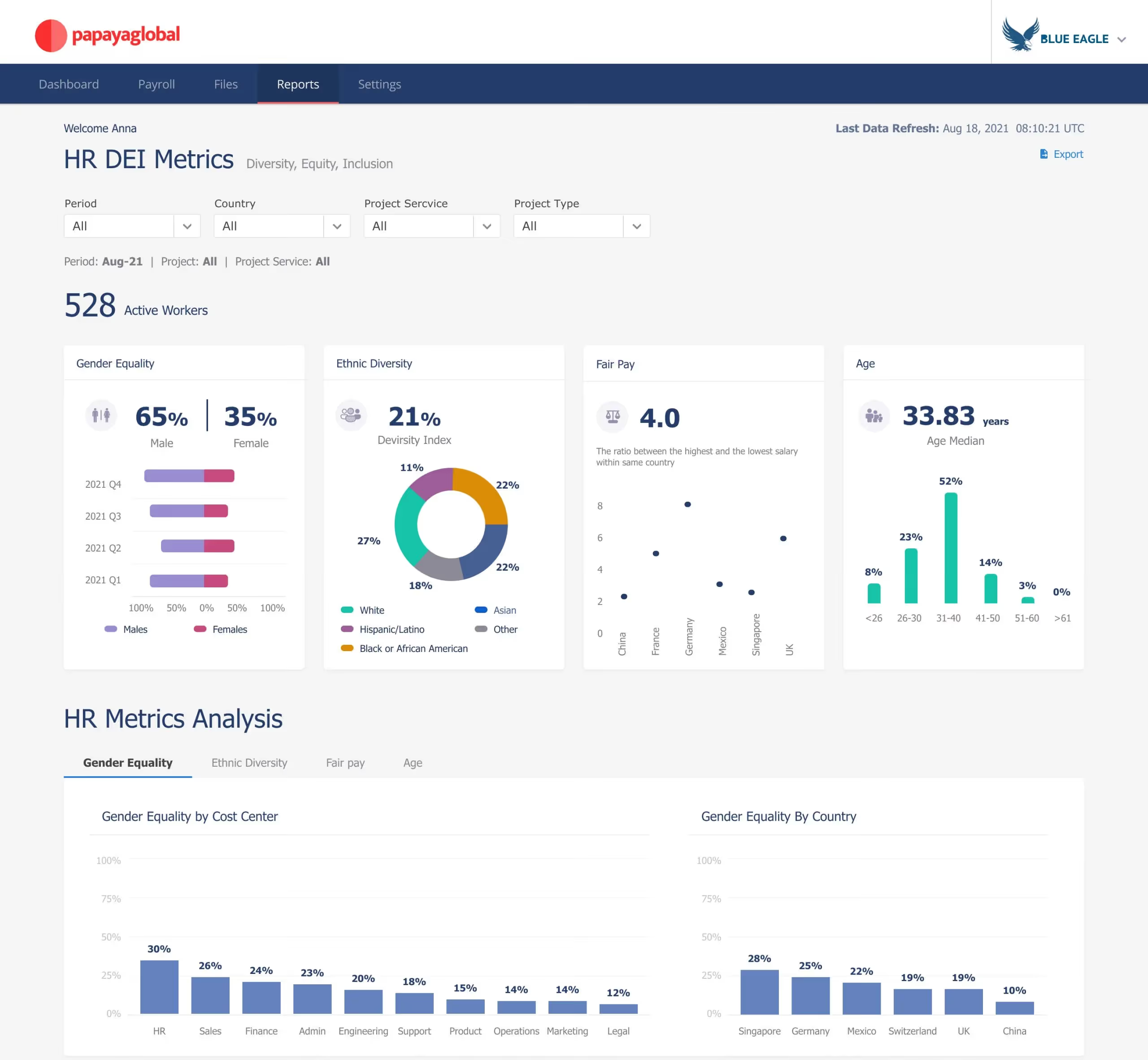
Papaya Global is built for companies that hire across borders. It covers global payroll, Employer of Record services, and contractor management across more than 160 countries, making it one of the more comprehensive international workforce platforms available. For organizations expanding into new markets without the infrastructure to manage local compliance on their own, Papaya Global removes much of that complexity.
The platform provides a single point of contact for managing payroll across multiple regions, which helps keep timelines and processes consistent regardless of where employees are located. That kind of coordination is difficult to replicate when managing international hiring through separate local vendors.
It is best suited for organizations with existing international operations or those actively scaling across multiple countries.
Key Features
- Global payroll processing: Payroll management across 160+ countries with local compliance built in
- Employer of Record services: Hire full-time employees abroad without setting up local legal entities
- Contractor management: Localized agreements, automated invoicing, and contractor payments
- Workforce analytics: Payroll spend reporting and headcount data across regions
- Employee self-service portal: Pay stubs, tax documents, and personal information management
- Integrations: Connects with Workday, BambooHR, NetSuite, and major HRIS platforms
- Compliance monitoring: Automatic updates to reflect changes in local labor laws
Best For
- Companies managing employees or contractors across multiple countries
- Organizations that need Employer of Record services without establishing foreign legal entities
- HR teams that want a single platform to coordinate payroll across regions
Pros
"I like having a single point of contact with Papaya Global, which ensures an aligned process across multiple regions to the same timeline." - G2 Review
- Centralized management of global payroll reduces coordination across separate local vendors
- Strong compliance coverage across a large number of countries
- Employer of Record services make international hiring accessible without local entity setup
- Workforce analytics give HR teams clear visibility into global payroll spend
Cons
"No proper contact with anyone at this company. Needed a salesperson to assist with a Canadian hire and never received a call back or email." - Capterra Review
- Customer support responsiveness has been a recurring concern in user reviews
- Pricing is not publicly listed, making early budget comparisons difficult
- Better suited to organizations with existing international operations than those just starting out
Pricing
- Employer of Record (EOR): starting from $499/user/month
- Contractor of Record (COR): starting from $295/user/month
- Contractor Solution: starting from $5/user/month
- Payroll Plus: starting from $29/user/month
- Payments OS: starting from $3.5/user/month
- No free plan or free trial publicly available
- Contact Papaya Global for a tailored quote
7. Rippling: A Unified Platform for HR, IT, and Payroll
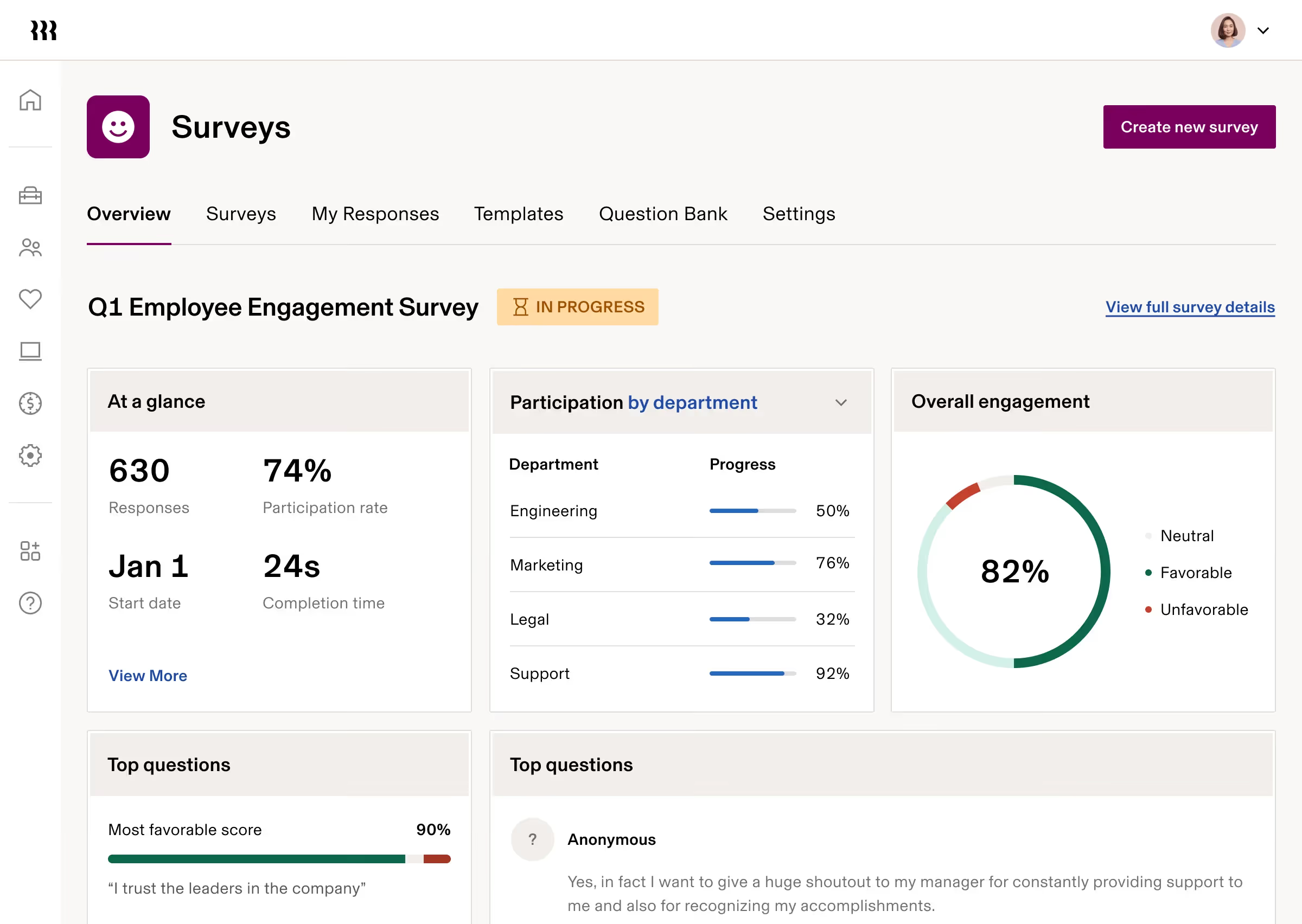
Rippling takes a different approach from most HRIS platforms. Rather than focusing on HR in isolation, it connects payroll, HR, and IT management in a single system. When a new employee is added, Rippling can automatically trigger device provisioning, software access, benefits enrollment, and payroll setup at the same time. For companies managing remote or hybrid teams across multiple states or countries, that level of automation removes a significant amount of back-and-forth.
The platform holds one of the highest ease-of-use ratings in the payroll and HR category on G2, and it covers global payroll across more than 185 countries. Its modular pricing means you pay for the features you actually use, though costs can add up as you bring in more modules.
Rippling is a strong fit for tech-forward teams that want their HR and IT infrastructure managed from one place.
Key Features
- Unified payroll and HR: Employee data flows across payroll, benefits, and HR without manual re-entry
- IT management: Device provisioning, software access, and offboarding handled from the same platform
- Global payroll: Coverage across 185+ countries with local compliance support
- Workflow automation: Cross-module automation for onboarding, offboarding, and role changes
- Time and attendance: Automated timecard sync with payroll processing
- Benefits administration: Health, dental, vision, and 401(k) management
- 650+ integrations: Connects with accounting, productivity, and HR tools
Best For
- Mid-sized companies that want HR and IT managed from a single platform
- Fast-growing teams hiring across multiple states or internationally
- Organizations that spend significant time on manual onboarding and offboarding processes
Pros
"It is easy to use for requesting time off and looking at pay stubs." - G2 Review
- Among the highest ease-of-use scores in the HRIS category on G2
- Cross-module automation significantly reduces manual work during onboarding and offboarding
- Modular pricing lets organizations start with what they need and expand over time
- Global payroll coverage is broader than most platforms on this list
Cons
"Sometimes it is difficult to find features. Where you would expect a feature to be, it is not, and it ends up being deeper within another section. A better search function would help." - Capterra Review
- Feature navigation can require more clicks than expected, particularly for newer users
- Pricing is modular and can grow significantly as more modules are added
- Initial setup and permission mapping can be time-consuming for complex organizations
Pricing
- Custom pricing based on modules selected; contact Rippling for a quote
- Free trial not publicly advertised; demo available on request
8. Zoho People: An Affordable HR Suite for Growing Teams
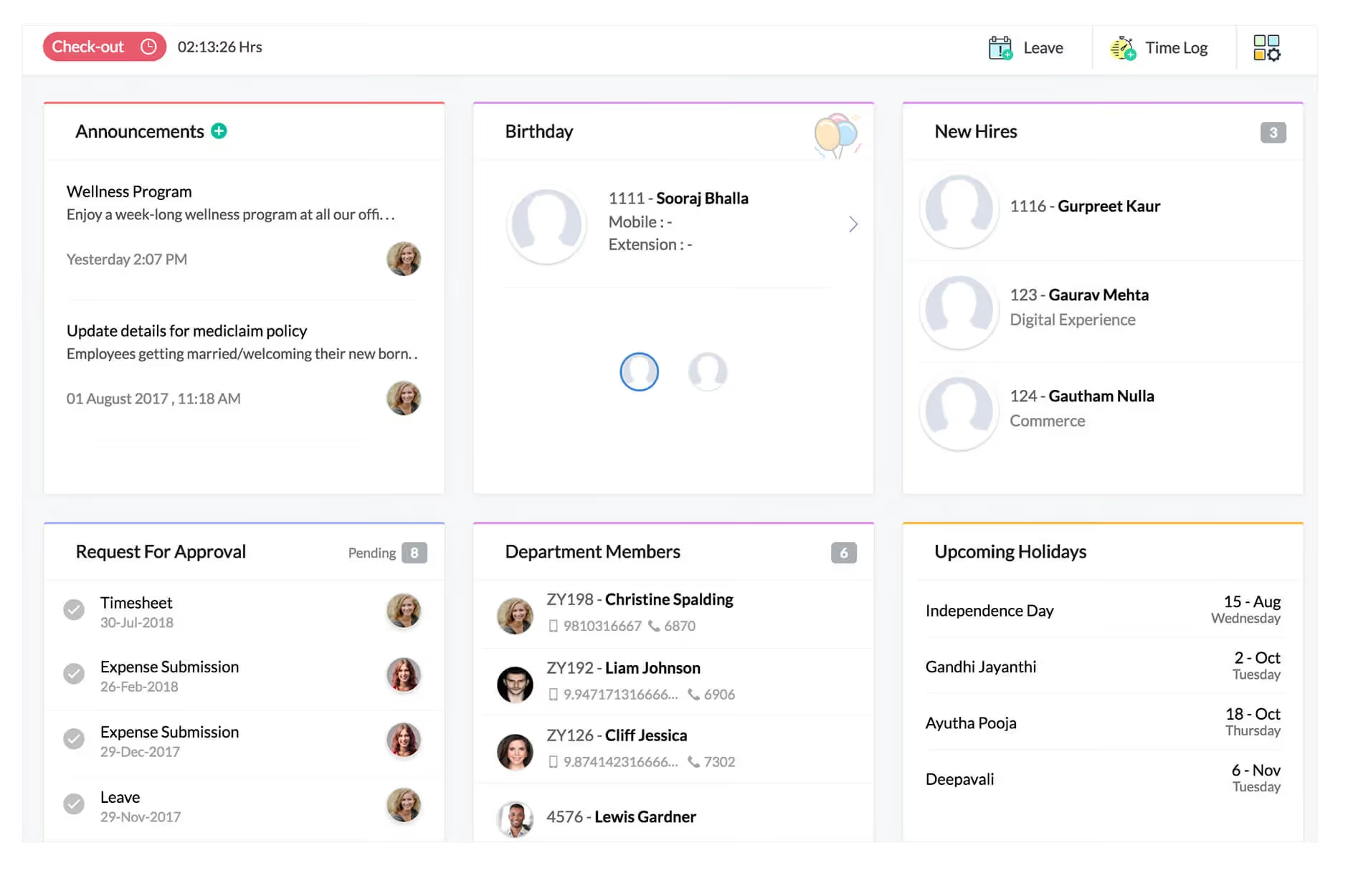
Zoho People is one of the more budget-accessible HRIS platforms on this list, making it a practical option for small and growing teams that need broad HR coverage without a large upfront investment. It handles attendance tracking, leave management, performance appraisals, and employee self-service within a single platform, and it connects well with the broader Zoho ecosystem for teams already using Zoho CRM, Books, or other Zoho products.
The platform has improved meaningfully in recent years, adding mobile HR capabilities and expanding its automation features. It is not the most polished interface on the market, but for teams that prioritize affordability and functional breadth, it covers a lot of ground at a competitive price point.
Key Features
- Attendance tracking: Mobile check-in and check-out, biometric support, and shift management
- Leave management: Customizable accrual policies and multi-level approval workflows
- Performance appraisals: Goal setting, self-assessments, and manager reviews
- Employee self-service: Staff can manage their own records, requests, and documents
- HR automation: Workflow rules for approvals, notifications, and task assignments
- Integrations: Connects natively with Zoho CRM, Zoho Payroll, and third-party tools
- Mobile app: HR task management available on iOS and Android
Best For
- Small and growing teams looking for a cost-effective HRIS with solid core features
- Organizations already using other Zoho products
- HR teams that need attendance and leave management with strong mobile access
Pros
"It allows me to track my daily attendance and leave, and it makes it easy to check in and check out." - G2 Review
- One of the most affordable HRIS options available, with a free plan for small teams
- Strong attendance and leave tracking functionality relative to its price point
- Native integration with the Zoho ecosystem reduces data silos for teams already on Zoho
- Mobile app supports core HR tasks for field-based or remote employees
Cons
"We faced some challenges in the initial days setting everything up. Pricing can be on the higher side for small teams, and the mobile app could be more intuitive." - Capterra Review
- Initial setup can require meaningful configuration time, particularly for advanced features
- The mobile app experience is not as refined as some competing platforms
- Advanced features carry a learning curve that can slow early adoption
Pricing
- Free plan available for up to 5 users
- Standard: $14/user/month
- Professional: $23/user/month
- Enterprise: $40/user/month
- Ultimate: $52/user/month
- Free trial available on paid plans
9. Leapsome: A Performance and Engagement Platform with HRIS Capabilities

Leapsome sits at the more structured end of the HR software space. It brings together performance reviews, goal management, employee engagement surveys, and learning tools in one connected platform. For organizations that want their engagement data and performance outcomes to inform each other rather than sit in separate systems, Leapsome makes that connection practical.
The platform is especially well-suited for People Ops teams that take a data-driven approach to employee development. Its goal-setting tools are flexible enough to accommodate shifting priorities throughout the year, and its review cycles can be configured to match different team structures and cadences.
Leapsome is not a traditional HRIS in the payroll and records sense, but for organizations that already have core HR covered and want to strengthen performance and engagement, it fills that gap well.
Key Features
- Performance reviews: Configurable review cycles with self-assessments, manager ratings, and 360-degree feedback
- Goal setting and OKRs: Individual and team goals with progress tracking and real-time updates
- Engagement surveys: Pulse check-ins and in-depth engagement surveys with analytics
- Learning paths: Structured development content tied to individual growth goals
- Compensation management: Salary review tools connected to performance data
- Manager dashboards: Team-level visibility into performance, engagement, and goal progress
- Integrations: Connects with Slack, Microsoft Teams, BambooHR, Workday, and more
Best For
- People Ops teams that want performance management and employee engagement in one platform
- Organizations running structured review cycles with continuous feedback in between
- HR leaders who want development planning tied directly to goal and performance data
Pros
"Leapsome has been great to work with. I have enjoyed the platform very much and it is super simple to use!" - Capterra Review
- Flexible goal management that holds up well as priorities shift throughout the year
- Performance, engagement, and learning tools are genuinely connected rather than separate modules bolted together
- Strong analytics for tracking development progress alongside engagement trends
- Positive user sentiment around ease of use and overall platform experience
Cons
"Too many repeated notifications make it confusing." - G2 Review
- Notification volume has been flagged as disruptive by some users and may require manual adjustment
- Not a full HRIS; teams still need a separate platform for payroll, benefits, and employee records
- Pricing is custom and not publicly listed, which can slow down early evaluation
Pricing
- Custom pricing based on modules selected and company size
- Free trial available
- Contact Leapsome for a quote
10. UKG Pro: An Enterprise HCM Suite with Deep Payroll Capabilities

UKG Pro is a comprehensive human capital management platform built for larger organizations that need payroll, HR, talent management, and workforce analytics in one system. It handles complex payroll scenarios well, including multi-state tax filings, union configurations, and large-scale workforce data management, making it a practical fit for enterprise HR teams with significant operational complexity.
The platform has a long track record in the HCM space and offers a wide range of modules that can be configured to match different organizational structures. Users tend to highlight the payroll processing reliability and the depth of the reporting tools as consistent strengths.
It requires a meaningful implementation investment, but for enterprise organizations with the resources to set it up properly, UKG Pro covers a lot of ground in one place.
Key Features
- Payroll processing: Automated multi-state tax filing with complex pay rule support
- Benefits administration: Self-service enrollment and carrier connections
- Talent management: Recruiting, onboarding, performance reviews, and succession planning
- Workforce analytics: Pre-built and customizable dashboards for HR and leadership teams
- Learning management: Employee training and development tracking
- Time and attendance: Flexible scheduling, shift management, and labor forecasting
- Mobile app: Employee and manager access to HR tasks on iOS and Android
Best For
- Large and enterprise organizations with complex payroll and compliance needs
- HR teams managing multi-state operations or large hourly workforces
- Organizations that want a full HCM suite covering the entire employee lifecycle
Pros
"Payroll processing was straightforward and uncomplicated. The onboarding process is also clear and easy to follow." - Capterra Review
- Strong payroll processing reliability for complex, high-volume pay runs
- Broad feature coverage across the full HR and talent management lifecycle
- Robust reporting and analytics tools for workforce planning and decision-making
- Well-established platform with a long track record in enterprise HCM
Cons
"UKG can be difficult to get around when trying to find certain pages." - G2 Review
- Navigation within the platform can be challenging, particularly for new users
- Implementation complexity is significant and typically requires dedicated project management
- Pricing is custom and not publicly available; requires direct engagement with the sales team
Pricing
- Custom pricing based on employee count and modules selected
- No free plan or free trial
- Demo available on request
Find the Right HRIS for Your Team
The best HRIS software is not always the one with the longest feature list. It is the one your team will actually use consistently. Here is a practical framework for narrowing down your options.
Start with your current size and near-term growth. A platform that works well for 40 employees may create friction at 200. Think about where your headcount will be in two to three years, not just today. If international hiring is part of that plan, make sure your platform can handle multi-country payroll before you need it.
Be specific about which features matter most. There is a meaningful difference between needing a full HRIS with payroll, records, and benefits, and needing a performance and engagement platform to sit on top of an existing HR system. Knowing which problem you are actually trying to solve will help you avoid paying for features you will not use.
Look at the total cost, not just the base price. Modular pricing is common across this category. The starting rate often covers only core functionality, with additional costs for advanced reporting, extra integrations, or higher user counts. Ask vendors for a quote that reflects your actual usage before you compare numbers across platforms.
Check how well it fits your existing tech stack. An HRIS that connects directly to your accounting software, communication tools, and time-tracking system will save your team significant manual effort. Confirm which integrations are native versus requiring middleware, and ask whether there are extra costs for API access.
Think about how your employees will experience it. HR software that only HR administrators find usable tends to underperform. Platforms with employee self-service, mobile access, and clear interfaces see higher adoption across the organization. When possible, test the employee-facing side of the platform during your trial period, not just the admin view.
Start Building a Stronger HR Foundation
The right HRIS software can change how your HR team operates, moving you away from manual tracking and disconnected tools toward a system that gives you clear, reliable data and room to focus on the work that actually matters.
If you are ready to take the next step, explore what to look for in a performance management software that can complement your HRIS investment and strengthen how your team develops and grows.
FAQs About HRIS Software
What is HRIS software and why does my organization need it?
HRIS stands for Human Resource Information System. It is a platform that centralizes employee data and automates core HR processes like payroll, benefits administration, time tracking, onboarding, and compliance reporting. Without one, HR teams typically rely on spreadsheets, email threads, and disconnected tools that make it hard to keep data accurate or processes consistent.
Organizations benefit from HRIS software because it reduces manual work, lowers the risk of compliance errors, and gives HR leaders better visibility into workforce data. As teams grow, managing HR without a dedicated system becomes increasingly difficult to sustain.
How much does HRIS software typically cost?
Pricing varies widely depending on the platform, team size, and features included. Entry-level tools like Zoho People start at just over a dollar per user per month. Mid-range platforms like Gusto start at $49 per month plus a per-user fee.
Enterprise platforms like UKG Pro and Rippling use custom pricing based on headcount and module selection, and total costs can be significantly higher once integrations and advanced features are factored in.
Most platforms also use modular pricing, meaning core features are included but specific functions like advanced analytics, additional integrations, or payroll add-ons may cost extra. Always request an itemized quote based on your actual needs rather than relying on base rates alone.
What is the best free HRIS software?
Zoho People offers a free plan for teams of up to five users, covering basic attendance tracking and employee self-service. It is one of the few genuine free options in the HRIS category. Beyond that, most platforms on this list offer a free trial rather than a permanent free plan, which is still a useful way to assess whether a tool fits your workflows before committing.
BambooHR, Gusto, and Leapsome all offer free trial periods. If budget is a primary concern, Zoho People's paid tiers are also among the most affordable starting points in the category.
How long does it take to implement HRIS software?
Implementation timelines vary by platform and organizational complexity. Simpler platforms like Zoho People or Gusto can typically be up and running within a few days for smaller teams. Mid-range platforms like BambooHR or HiBob usually take one to four weeks when onboarding support is involved.
Enterprise platforms like UKG Pro or Rippling can take several weeks to a few months, especially when multiple modules are being configured and data is being migrated from legacy systems. The most important factor is not just the platform's setup speed, but how prepared your organization is before implementation begins. Having clean employee data, documented processes, and a communication plan ready will shorten the timeline considerably regardless of which platform you choose.
.avif)