.svg)
The best employee onboarding software handles preboarding paperwork and e-signatures before day one, automates task routing across HR, IT, and managers, handles US compliance requirements (I-9, E-Verify, W-4) with minimal manual intervention, and gives both HR and new hires a clear view of what is done and what is next.
Those four capabilities separate systems that genuinely reduce early turnover from those that digitize the same broken process.
Key Takeaways
- Only 12% of employees strongly agree their organization does a great job of onboarding new employees, according to Gallup research. That gap is where the right software pays for itself.
- According to Brandon Hall Group research, 71% of organizations say they need to do a better job of offering equitable onboarding across on-site and remote employees.
- SHRM finds that 69% of employees are more likely to stay with a company for three years if they experience great onboarding. The first 90 days are the highest-leverage window.
- Nearly 4 in 10 new hires (39%) have second thoughts about their new job during onboarding, per BambooHR's 2025 benchmarking report. The software you choose shapes that first impression directly.
What Is Onboarding Software?
Onboarding software is the dedicated system HR teams use to automate, track, and personalize the process of bringing a new hire from offer acceptance to full productivity. It sits between two tools buyers often confuse it with:
- ATS (applicant tracking system): Manages candidates through the hiring process up to the offer. Once the offer is signed, its job is done.
- HRIS (HR information system): Stores employee records and manages ongoing HR administration. Many include a basic onboarding module, but depth varies significantly.
- Onboarding software: Bridges the gap between the two, handling preboarding paperwork, compliance documentation, task routing, training coordination, and the new hire's first-week experience.
Many HRIS platforms and some ATS platforms extend into early onboarding. The question is whether their built-in functionality covers your actual needs. For organizations hiring at volume, across multiple states, or with distributed or deskless workforces, purpose-built onboarding software typically goes deeper than a bundled module.
What to Look For: 10 Features That Matter
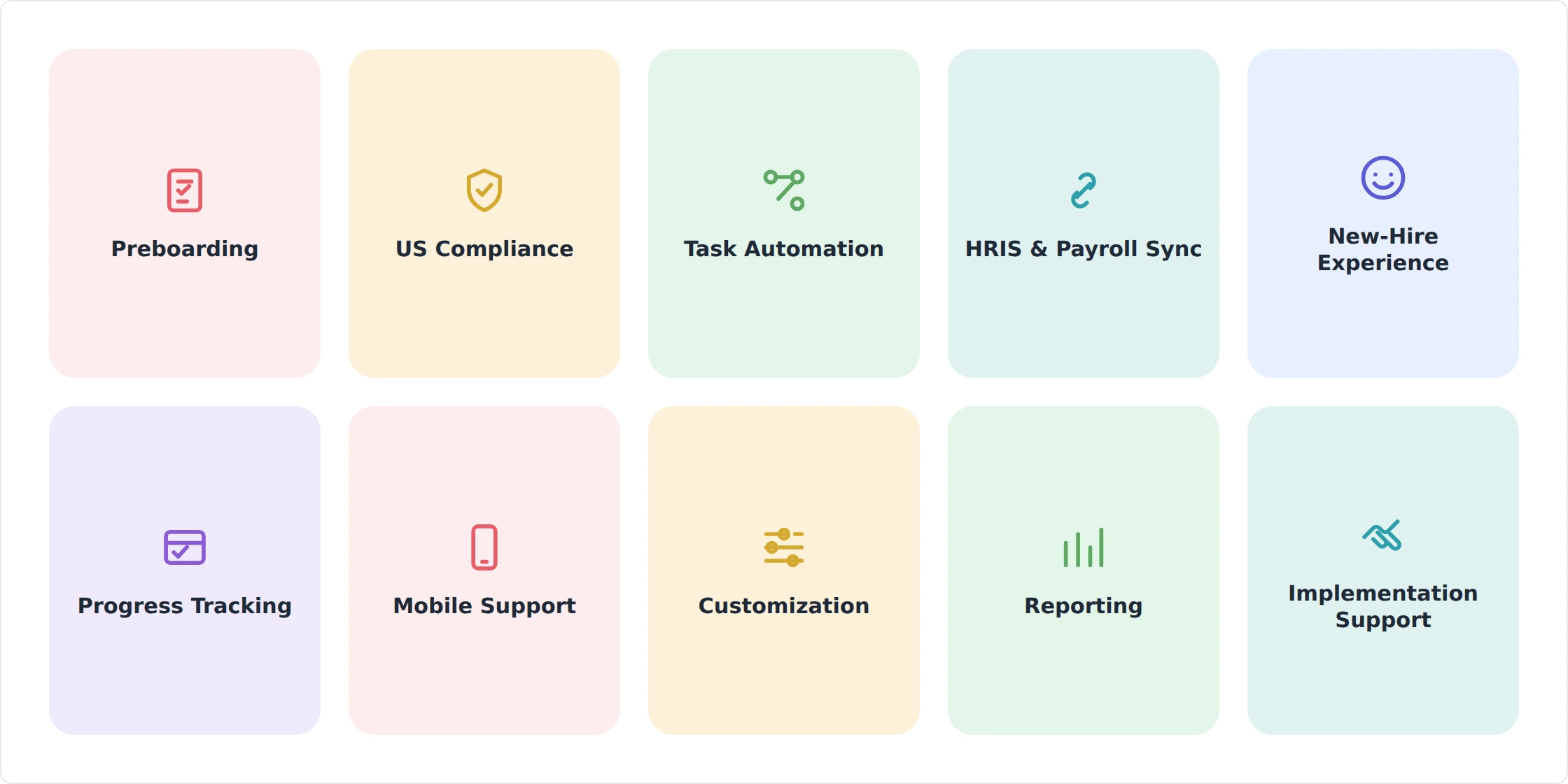
These are the capabilities that separate onboarding software that reduces early turnover from onboarding software that digitizes a broken process. According to Brandon Hall Group's onboarding research, 71% of organizations believe they must do a better job of offering equitable onboarding to on-site and off-site employees, a gap that the right software directly addresses.
Each criterion below includes the failure mode it prevents and at least one named platform that does it well. Platform examples are illustrative, not exhaustive; many vendors offer similar capabilities.
1. Preboarding and Day-One Readiness
The best onboarding starts before the new hire's first day. Offer letter acceptance, e-signatures, tax forms, direct deposit setup, and policy acknowledgments should all be completable in advance, so the first day is a welcome experience rather than an admin session. Preboarding workflows send documents automatically after an offer is accepted, with reminders if something is incomplete.
Failure mode without it: New hires spend day one filling out forms on a borrowed laptop. First impressions are set in the first few hours; a paperwork-first day signals disorganization before the employee has even met the team.
Platform example: BambooHR and Rippling both automate preboarding document flows, triggering form packets as soon as a start date is confirmed. See our BambooHR review and Rippling review for feature breakdowns.
2. US Compliance: I-9, E-Verify, and W-4 Handling
US employers have hard legal obligations when onboarding new hires: Form I-9 (employment eligibility verification) must be completed within three business days of the first day of work, W-4 withholding forms must be filed, and most states require new-hire reporting to a state agency within a defined window. Generic 'compliance' language in a vendor's marketing often means data security certifications (SOC 2, GDPR), not these operational requirements. Ask specifically.
Failure mode without it: A mishandled I-9 carries a per-form civil penalty risk from USCIS. Manual I-9 processes in high-volume hiring also create audit exposure. Many small and mid-size employers do not discover the problem until they receive a notice.
Look for built-in I-9 and E-Verify integration, automated W-4 collection, and state new-hire reporting support. The USCIS penalties page outlines the per-form civil fines employers face for I-9 violations. Confirm which states the platform covers before signing.
3. Workflow Automation and Task Routing
Onboarding is a cross-functional process. HR handles paperwork. IT provisions equipment, email, and system access. The manager schedules introductions and assigns early work. Facilities arranges a desk or access card. Without automation, someone has to chase each of these manually, and at least one step gets missed.
Failure mode without it: A forgotten IT provisioning step means a new hire arrives on day one with no laptop, no email, and no system access. This is one of the most commonly cited onboarding failures, and largely preventable with triggered workflows.
Platform example: Rippling automatically triggers IT device provisioning and app access the moment a hire is confirmed in the system, eliminating the IT handoff entirely. For contractor and global onboarding, Deel handles cross-border workflow routing including local compliance steps.
4. HRIS and Payroll Integration
Onboarding is the source of record for a new hire's data: name, address, tax information, department, role, pay rate, and start date. That data should flow into your HRIS and payroll system automatically after onboarding is complete, not be manually re-entered by an HR administrator.
Failure mode without it: Duplicate data entry creates errors, including transposed digits in a bank account number or a wrong pay rate, that surface on the first paycheck. A payroll error on day one or week one is one of the fastest ways to damage a new hire's trust.
Verify that integration is real-time API-based, not a CSV export that someone has to import manually. Ask the vendor to demonstrate the integration with your specific HRIS during the demo. If your onboarding software is built into your HRIS (as with BambooHR or Rippling), this problem is structurally avoided.
5. New-Hire Experience and Engagement
The administrative side of onboarding is necessary but not sufficient. The experience side, including welcome content, introductions to colleagues, cultural context, a clear view of what the first week looks like, and early goal-setting, is what determines whether a new hire feels connected to the organization or like a transaction.
SHRM research finds that 69% of employees are more likely to stay three years with great onboarding. Gallup's research shows that only 12% of employees strongly agree their organization does a great job of onboarding. The experience layer is where most organizations fall down.
Failure mode without it: A form-only onboarding that skips culture, connection, and context raises early attrition. BambooHR's 2025 benchmarking data found that 39% of new hires have second thoughts about their new job during onboarding. A poor first experience accelerates that reconsideration.
Look for welcome videos, org chart visibility, buddy/mentor matching, and structured 30-60-90 day plan templates. According to BambooHR's 2025 benchmarking report, 39% of new hires have second thoughts during onboarding. The tools you choose to support the experience layer directly shape that outcome.
6. Task and Progress Tracking
Both HR and the new hire need a real-time view of what is complete, what is overdue, and who is blocking what. A checklist that only HR can see is half a solution. The new hire should also have a dashboard showing their own onboarding progress, upcoming tasks, and what to do next.
Failure mode without it: Items fall through the cracks and no one notices until week two, when a manager asks why a new hire still does not have access to the CRM. Visibility on both sides prevents this.
Look for HR dashboards that show completion rates across the whole new hire cohort, manager dashboards that surface what their new hire still needs, and a new-hire portal where the employee can see their own checklist. Completion tracking across cohorts also feeds the reporting that lets you improve onboarding over time.
7. Mobile and Remote/Distributed Support
Not every new hire onboards at a desk. Remote employees, field workers, retail staff, healthcare workers, and deskless employees need to complete onboarding from their phone, on their own time, without a company laptop. A desktop-only or browser-only onboarding tool is a barrier for a large and growing share of the workforce.
Failure mode without it: A field or remote hire cannot complete onboarding, falls behind on compliance documentation, and starts their role with incomplete paperwork and a poor first impression of the organization's systems.
Platform example: Connecteam is purpose-built for onboarding non-desk employees on mobile. For organizations with a predominantly deskless workforce in retail, hospitality, or construction, a mobile-first tool is a requirement, not a preference.
8. Customization and Role-Specific Workflows
A sales hire, a software engineer, a warehouse worker, and a part-time contractor need different onboarding flows. A single universal checklist either overwhelms people with irrelevant steps or undersells the specific requirements of their role. The best onboarding software lets HR build templates by role, department, location, employment type, and hiring manager, then apply them automatically.
Failure mode without it: An engineer gets a sales-focused onboarding flow and misses the security training and repository access steps specific to their role. A contractor gets the same onboarding as a full-time employee and receives benefits enrollment forms that do not apply to them.
Look for conditional logic (if role = X, then add these steps), multi-location support (different forms for different states), custom branding (your logo and colors, not the vendor's), and the ability to duplicate and modify templates rather than rebuilding from scratch each time.
9. Reporting and Analytics
You cannot improve what you cannot measure. Onboarding analytics should tell you how long onboarding takes, where new hires stall, which steps are most frequently incomplete, how completion rates vary by department or manager, and whether onboarding satisfaction correlates with early retention.
Failure mode without it: HR knows onboarding is slow but cannot identify whether the problem is the IT provisioning step, the manager check-in at week two, or the compliance training module that everyone abandons halfway through. Without data, the fix is a guess.
Look for time-to-completion tracking, step-level abandonment data, manager completion scorecards, and exportable reports for HR leadership. If the platform integrates with your HRIS or a BI tool, onboarding data can be connected to downstream retention and performance outcomes.
10. Implementation Support and Pricing Transparency
How a vendor onboards you predicts how much of the platform you will actually use. A tool that takes six months to configure and roll out, or that requires a consultant to change a template, is not an operational improvement. Similarly, pricing that looks straightforward but balloons when you add the modules you actually need (I-9, e-signatures, advanced reporting) is a late-stage trap.
Failure mode without it: HR buys software, completes a limited rollout, and uses 30% of the features. The tool never reaches its potential because no one had the time or support to configure it properly after the sale closed.
During the sales process, ask specifically the following questions. How long does implementation take for an organization our size? What does the implementation include? Is there a named implementation contact? What does pricing look like at 50, 100, and 500 employees, with all the modules we discussed? Make sure that you get the answers in writing.
Red Flags: Onboarding Software Mistakes to Avoid
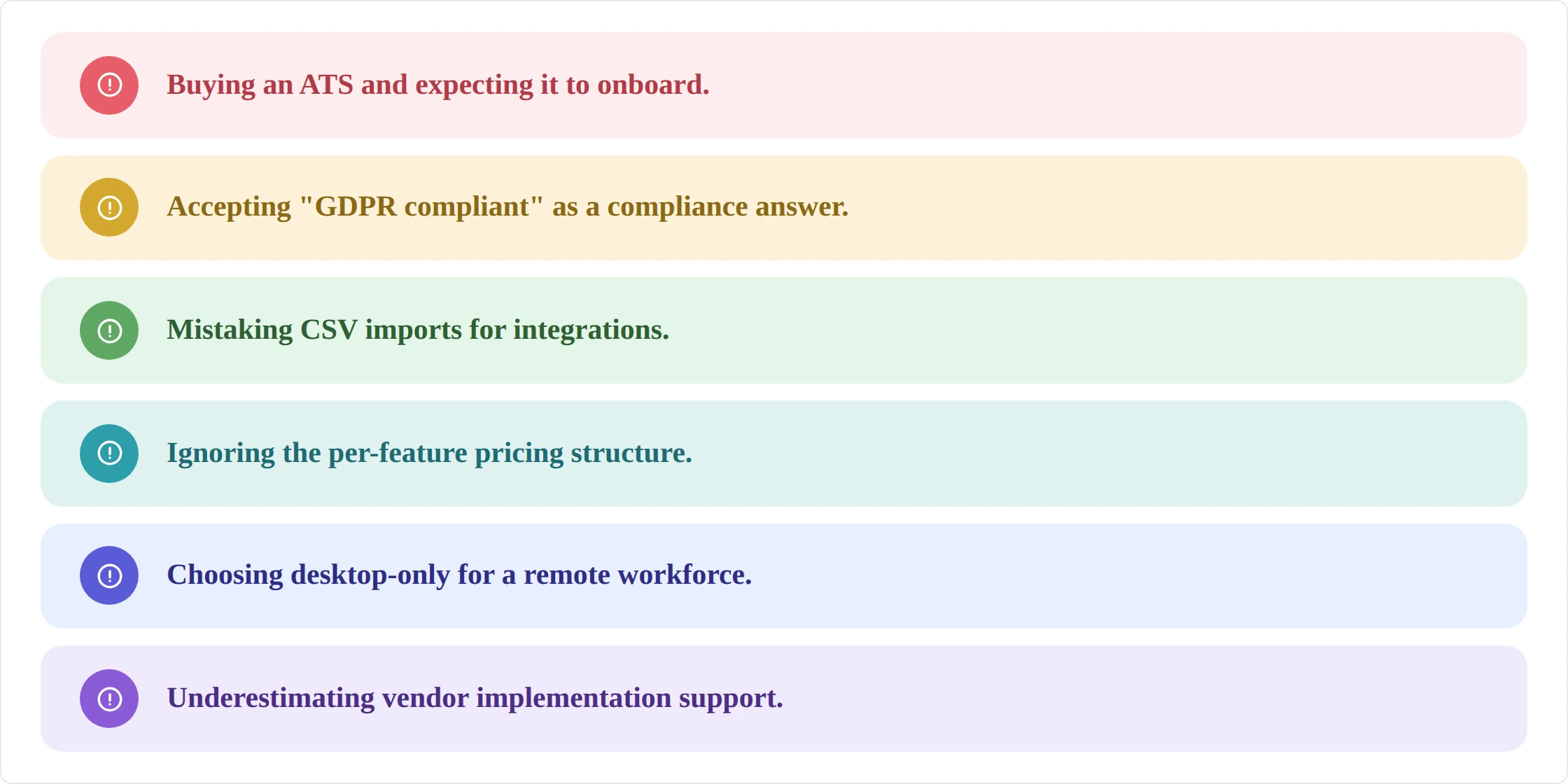
These are the buying mistakes and warning signs that experienced HR teams have learned to watch for. Generic buying guides rarely cover them.
- Buying an ATS and expecting it to onboard. Hiring software and onboarding software solve different problems. An ATS manages candidates up to offer acceptance. What happens after that is a different workflow, and most ATS platforms handle it poorly. Confirm what the tool actually does post-offer before committing.
- Accepting 'GDPR compliant' as a compliance answer. Data security certifications are not the same as operational compliance. I-9, E-Verify, W-4, and state new-hire reporting are the onboarding compliance requirements that create legal exposure for US employers. Ask whether the platform handles each of these specifically.
- Mistaking CSV imports for integrations. A vendor who says 'we integrate with your HRIS' may mean they support a CSV export that you manually import. Ask whether the integration is real-time and API-based. CSV workarounds create the exact data entry errors that onboarding software is supposed to eliminate.
- Ignoring the per-feature pricing structure. Many onboarding platforms price the base platform accessibly and then charge separately for e-signatures, I-9, advanced analytics, and API access. Build out the full cost with every module you actually need before comparing vendors.
- Selecting a desktop-only tool for a remote or deskless workforce. If your new hires do not all sit at a company desk on day one, the platform needs a strong mobile experience. Test it on a phone, not just a browser, before signing.
- Underestimating vendor implementation support. Ask to speak with a customer who went through implementation in the last six months. If the vendor hesitates, that is a signal. Poor implementation support is the most common reason onboarding software fails to deliver on its promise.
How Much Does Onboarding Software Cost?
Onboarding software pricing varies widely depending on company size, feature set, and whether the tool is standalone or part of a broader HR platform.
The most important pricing question to ask is not what the base plan costs but what the all-in cost is with e-signatures, I-9 handling, advanced reporting, and API integrations included. Many platforms price these as add-ons. A platform that looks cheaper at the base level may be more expensive once configured for your actual needs.
Note: Pricing ranges are illustrative based on mid-market US pricing as of July 2026; international and enterprise pricing may fall outside these bands. Ranges vary by vendor, contract length, and modules included. Always request a full quote with all modules factored in before comparing vendors.
A Simple 4-Step Selection Process
Before booking demos, get clear on what you actually need. Most buyers over-shop on features they will not use and under-examine integration fit and implementation realism.
- Define Your Non-negotiables: Start with your workforce reality: How many new hires per month? Are they remote, deskless, or office-based? How many states do you hire in? Do you have an I-9 compliance gap today? These answers narrow the field before you open a product site. A company hiring 200 warehouse workers per month in multiple states has different requirements than a 50-person tech company with a single office.
- Shortlist Based on Integration Fit: Identify your current HRIS and payroll provider and confirm which onboarding platforms integrate with them natively. A beautiful onboarding tool that does not sync with your HRIS creates a new data entry problem rather than solving one.
- Demo Against the 10-feature Checklist: Run each shortlisted vendor through the criteria in this guide. Have them demonstrate preboarding, the I-9 workflow, task routing, and the new-hire dashboard in a live environment, not a slide deck. Ask them to walk through what happens when a manager does not complete their tasks on time. The answer reveals how the system handles real workflow failures.
- Validate With a Reference Customer: Ask for one or two reference customers with a similar company size, industry, and hiring volume who went through implementation in the past year. Speak with an HR manager, not a head of people or an exec. Ask how long implementation took, what they would do differently, and whether the integration with their HRIS worked as advertised from day one.
Next Steps
If you have worked through the criteria above and are ready to compare specific platforms, our best onboarding software roundup covers the leading options for 2026 with side-by-side feature comparisons, pricing details, and independent ratings. Each platform is evaluated against the same criteria outlined in this guide, so you can move directly from buyer's education to shortlisting without starting over.
If you are not sure whether you need a standalone onboarding tool or whether your existing HRIS or ATS can handle the job, the roundup includes a section on when standalone makes sense versus bundled. Most mid-size HR teams are better served by a platform that connects onboarding, HR records, and payroll in one place, but the right answer depends on your hiring volume and workforce type.
Frequently Asked Questions
What is onboarding software, and how is it different from an ATS or HRIS?
An ATS (applicant tracking system) manages candidates through the hiring process up to the offer. An HRIS stores employee records and manages ongoing HR administration. Onboarding software bridges the gap between them: it handles everything from offer acceptance through the new hire's first weeks, including preboarding paperwork, compliance documentation, task routing, and first-day experience. Some HRIS and ATS platforms include onboarding modules, but purpose-built onboarding tools typically offer more depth in automation, compliance handling, and new-hire experience design.
How much does onboarding software cost?
Standalone onboarding software typically falls in the $3 to $12 USD per employee per month range, though this is illustrative of mid-market US pricing and varies significantly by vendor, feature set, and contract length. Platforms that bundle onboarding into a broader HRIS (like BambooHR or Rippling) include it as part of the platform cost. The most important question is the all-in cost with e-signatures, I-9 handling, and integrations included, since many platforms price these as add-ons that raise the effective cost considerably.
Does onboarding software handle I-9 and E-Verify compliance?
Many do, but not all. This is one of the most important questions to ask directly rather than assuming. Look for platforms that include built-in I-9 form completion, document collection, and E-Verify integration as standard features, not add-ons. For US employers, E-Verify is mandatory for certain employers (such as many federal contractors and employers in designated E-Verify states); it is optional elsewhere. I-9 completion, however, is required for all US employers regardless of size or industry.
How long does it take to implement onboarding software?
For a standalone onboarding tool with a small to mid-size team (under 500 employees), implementation typically takes four to eight weeks when the vendor provides active support. Complex implementations with deep HRIS integration, custom workflows for multiple locations, and compliance requirements across many states can take three to six months. Ask the vendor for the typical implementation timeline for a company your size and request references from customers who completed implementation recently.
Can onboarding software handle contractors and global employees?
Some platforms do, but this is a specialized requirement. For US-only full-time employee onboarding, most mid-market tools are adequate. For contractor onboarding (different tax documentation, different compliance requirements), global new hires (local employment law, currency, document requirements), or a mix of employee types, look for platforms designed for that use case. Deel, for example, is built specifically for global and contractor onboarding and handles local compliance requirements across 150+ countries.
.avif)