
.svg)
Workday is a capable platform, but it is not the right fit for every organization. The licensing costs are steep, the implementation timeline can stretch into months, and smaller or mid-sized teams often find themselves paying for complexity they never actually use. If you are evaluating your options, the good news is that the market for Workday alternatives has matured considerably, and several tools match or exceed it in specific areas.
This guide covers 10 of the best Workday alternatives available in 2026. We compared features, pricing, and real user experiences to help you build a shortlist that fits your team's size, budget, and priorities. Whether you need a full HCM suite, a payroll-first platform, or a performance management tool built around Microsoft Teams, there is a strong option here for you.
What to Look for in Workday Alternatives
Before shortlisting any platform, it helps to know what actually separates a good fit from an expensive mistake. Not every Workday alternative handles the same problems equally well.
1. Identify Your Primary Use Cases
Not every platform solves the same problems with equal depth. Before comparing features, define the two or three areas that are non-negotiable for your team. A tool built for payroll accuracy and tax compliance operates differently than one designed for continuous feedback and goal tracking. Match your selection to your most urgent needs, whether that is high-volume recruitment or performance management.
2. Evaluate Integration Compatibility
Software effectiveness depends on how well it communicates with your existing tech stack. Integration friction often leads to manual data entry and increased error rates. Verify if a platform connects natively to tools like Microsoft 365 or Slack. Native connections are typically more stable and require less maintenance than third-party workarounds, allowing employees to complete tasks within the apps they already use daily.
3. Align with Organizational Scale
The ideal software for a startup rarely suits a global enterprise. Selecting a platform that matches your current size while offering room to grow prevents costly migrations later. Small teams should seek all-in-one solutions that prioritize quick setup and ease of use. Larger organizations, however, require platforms built for scale that can handle multi-state compliance, international payroll, and complex reporting. Namely is worth a look here specifically, since it was built for the mid-market gap between a small-business HRIS and a full enterprise suite like Workday.
4. Calculate Total Cost of Ownership
Headline prices are often misleading, so look beyond the base fee to find the actual budget impact. Many vendors gate essential tools like advanced reporting or custom roles behind expensive tiers. Factor in one-time setup fees, data migration, and premium support costs. A cheaper tool requiring manual workarounds may eventually cost more in labor than a premium, automated system.
Top 10 Workday Alternatives in 2026
While Workday remains a powerful name in the enterprise space, many organizations are seeking options that offer more flexibility, faster implementation, and lower costs. The following list highlights ten platforms that provide robust features for payroll, performance, and HR management without the complexity of traditional enterprise software.
1. Paylocity: A Full HCM Suite Built Around the Employee Experience

Paylocity is a cloud-based HCM platform designed primarily for mid-market organizations. It covers payroll, time and attendance, benefits, talent management, learning, and employee engagement in a single system. What makes it stand out among Workday alternatives is how it combines the depth of an enterprise platform with features that feel closer to a consumer product, including a social collaboration tool called Community and a mobile app that employees actually want to use.
For HR and People Ops leaders who need a reliable, all-in-one system with strong payroll at the center, Paylocity is a serious contender.
Key Features
- Payroll and tax management: Automated payroll runs, multi-state tax filing, garnishment handling, and direct deposit across pay schedules
- Time and attendance: Mobile clock-in with GPS, scheduling, overtime calculation, and automated timesheet-to-payroll sync
- Talent management: 9-box assessments, 360-degree feedback, review cycles, and structured onboarding checklists
- Learning management system (LMS): Pre-built course libraries and compliance training tracking for role-based development
- Employee engagement tools: The Community feature acts as an internal social feed, with measurable improvements in announcement engagement reported by users
- Compliance dashboard: Visual overview of HR compliance items, including data completeness and multi-state regulatory tracking
- Analytics and reporting: Customizable dashboards across payroll, workforce, and HR data with over 350 native integrations
What Makes Paylocity Stand Out
- One of the few mid-market platforms that blends robust payroll with genuine employee experience tools in the same system
- Community feature bridges the gap between HR software and internal communications, which is unusual at this price range
- Over 350 native integrations make it a reliable hub for organizations with complex tech stacks
- Strong mobile experience praised by both employees and admins
Pros and Cons
Pros: "There was a lot of built-in support and guidance, so it didn't require a dedicated HRIS person to manage or maintain the system." — Capterra review
- All-in-one system eliminates the need for separate payroll, LMS, and engagement tools
- Compliance dashboard is particularly useful for multi-state employers
- Community and Premium Video tools give the platform a more modern, employee-facing feel
- Reliable payroll accuracy with solid multi-state handling
Cons: "I find setting up tax codes for PA employees challenging. Sometimes it requires us to reach out to the agency, while other times, Paylocity handles it. They should consistently set it up for us every time." — G2 review
- Implementation can take several months for larger organizations
- Customer support quality is inconsistent, with some users reporting long resolution times
- Custom pricing means total cost is harder to predict without a sales conversation
Pricing
- Custom pricing; contact Paylocity for a quote for HR, Finance, or IT modules
- No public starting price, free trial, or free plan available
2. Rippling: Broad Platform for Teams That Need HR and IT in One Place
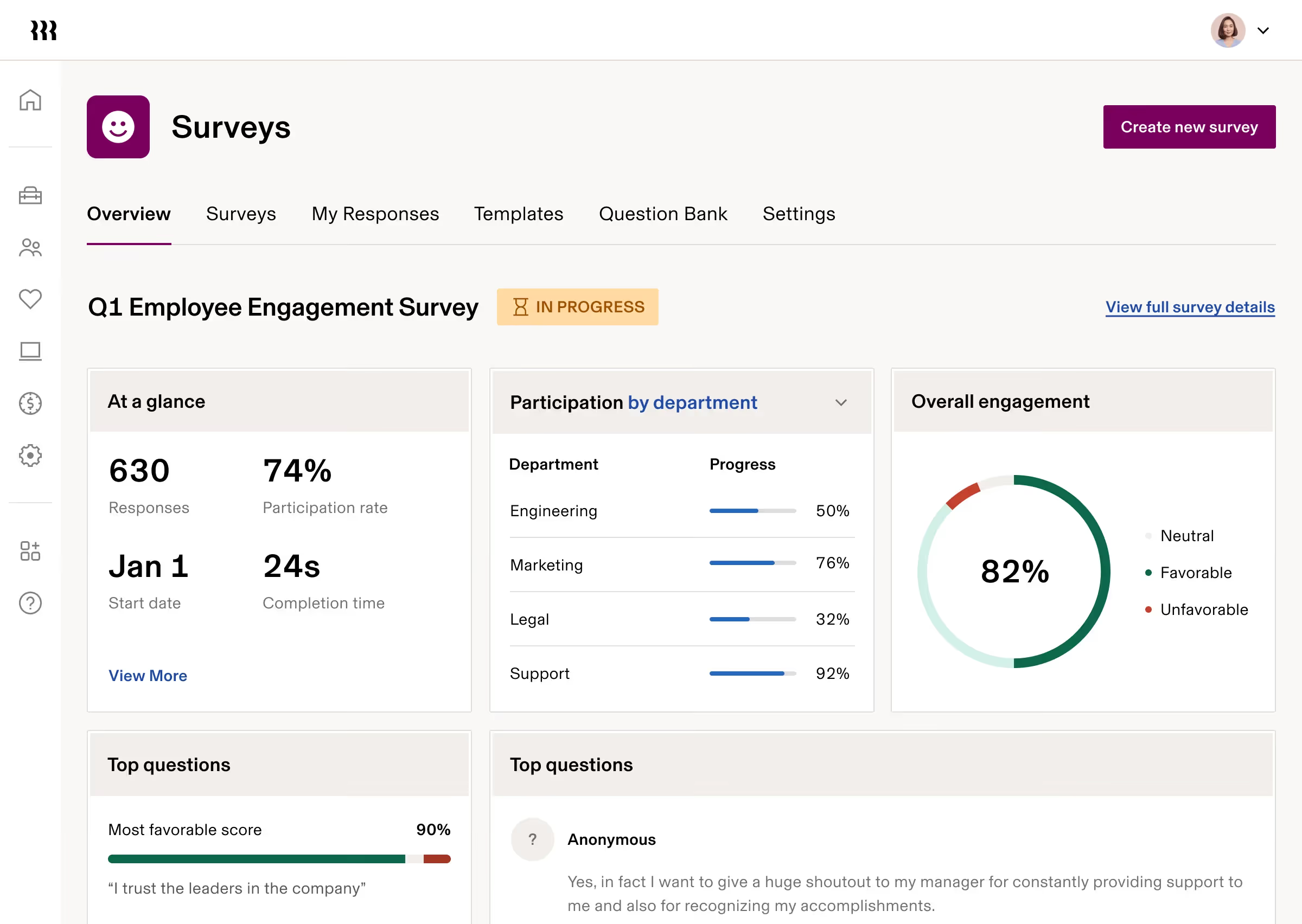
Rippling takes a different approach from most HR software. It combines HR, IT, and finance management in a single platform, so when a new employee joins, their laptop gets provisioned, their apps get configured, and their payroll gets set up all from the same trigger. That level of unification is genuinely rare and makes it one of the more compelling Workday alternatives for tech-forward organizations.
Key Features
- Unified employee record: All HR, IT, and finance data connects to a single employee profile, reducing data silos and manual syncing
- US and global payroll: Multi-country payroll across 90+ countries, with automated tax filings and compliance handling
- Device management: Zero-touch laptop provisioning, returns, and security enforcement without needing a separate IT platform
- Benefits administration: Open enrollment, carrier connections, and self-service updates for employees
- Time and attendance: Scheduling, geofencing, and automated accruals synced directly with payroll
- Expense and spend management: Corporate cards, expense approvals, and budget tracking in the same system as payroll
- 500+ integrations: One of the largest integration libraries in the category
What Makes Rippling Stand Out
- The only HR platform in this list that also functions as an IT management system, making it useful across HR and IT departments simultaneously
- Global payroll coverage across 90+ countries with local compliance handling is unusually strong for a mid-market platform
- Transparent support stats, including published live chat wait times, reflect a level of confidence most vendors don't match
- Scales well from 20 to 2,000+ employees without forcing platform migrations
Pros and Cons
Pros: "Layout is easy to read. Software is intuitive." — G2 review
- Consolidating HR, IT, and finance in one system reduces vendor sprawl and coordination overhead
- Payroll is accurate and fast, with data flowing automatically from employee records
- Modular structure means you can start with what you need and add capabilities as the business grows
- Strong mobile app experience for employees managing payroll, expenses, and time off
Cons: "There are some apps that sound similar and redundant that actually point to two different things particularly the spend and reimbursements. Some clarification could be added to help make the functionality of these features more clear." — Capterra review
- Pricing is modular, so costs compound quickly as you add more capabilities
- The base platform fee applies to every employee before any module pricing, which can make Rippling more expensive than it appears
- Some complex compliance questions, particularly for EOR countries, depend on third-party in-country partners
- A pending legal case with Deel is worth noting as a vendor risk factor
Pricing
- Custom pricing based on modules selected; contact Rippling for a quote
- Free trial not publicly advertised; demo available on request
3. BambooHR: A Straightforward HR Platform for Growing SMBs

BambooHR is one of the best-known HR platforms for small and mid-sized businesses, and its reputation is well-earned. It puts employee data, time-off management, onboarding, performance reviews, and basic recruiting under one roof, with an interface that consistently earns praise for how easy it is to navigate, even for teams without dedicated HR staff.
Key Features
- Centralized employee database: Single source of truth for employee records, org charts, documents, and contact information
- Time-off tracking: Automated PTO requests, approval workflows, accrual policies, and team calendar visibility
- Onboarding automation: Digital new hire packets with e-signatures, task checklists, and document collection before day one
- Applicant tracking system (ATS): Candidate profiles, pipeline stages, and offer letter tools for low-to-moderate hiring volume
- Performance management: 360-degree reviews, self-assessments, and goal tracking
- HR analytics: 15+ pre-built reports and a drag-and-drop custom report builder
- 125+ integrations: Including Slack, Microsoft 365, and a wide range of payroll providers
What Makes BambooHR Stand Out
- Ease-of-use scores among the highest of any mid-market HRIS, making it accessible to HR generalists and non-technical managers alike
- Strong mobile app with high employee adoption rates reported by customers
- Excellent customer support, including a dedicated BambooHR Hero community, is frequently mentioned as a key reason teams stay
- Payroll and benefits are available as add-ons, so you only pay for what you need
Pros and Cons
Pros: "Overall, I'm very pleased with the software! It's been a great addition to our resources and we continue to rely on it more and more." — Capterra review
- Clean, intuitive interface reduces training time significantly
- Centralized data eliminates the need to cross-reference spreadsheets for employee information
- Time-off management and onboarding workflows are consistently rated as standout features
- 7-day free trial is available to test the platform before committing
Cons: "I don't like that you can't submit time off for vacation in hours and that it has to be entered in days—you can only select hours for sick time." — G2 review
- US-only payroll; not suitable for international payroll needs
- Feature depth plateaus for organizations above 150–200 employees with complex compliance or analytics needs
- ATS is limited for high-volume hiring teams and lacks sourcing capabilities
Pricing
- Core: $10/user/month
- Pro: $17/user/month
- Elite: $25/user/month
- Three plans available with volume and nonprofit discounts
- Free trial available; no permanent free plan
4. Teamflect: Best Workday Alternative for Microsoft 365 Teams
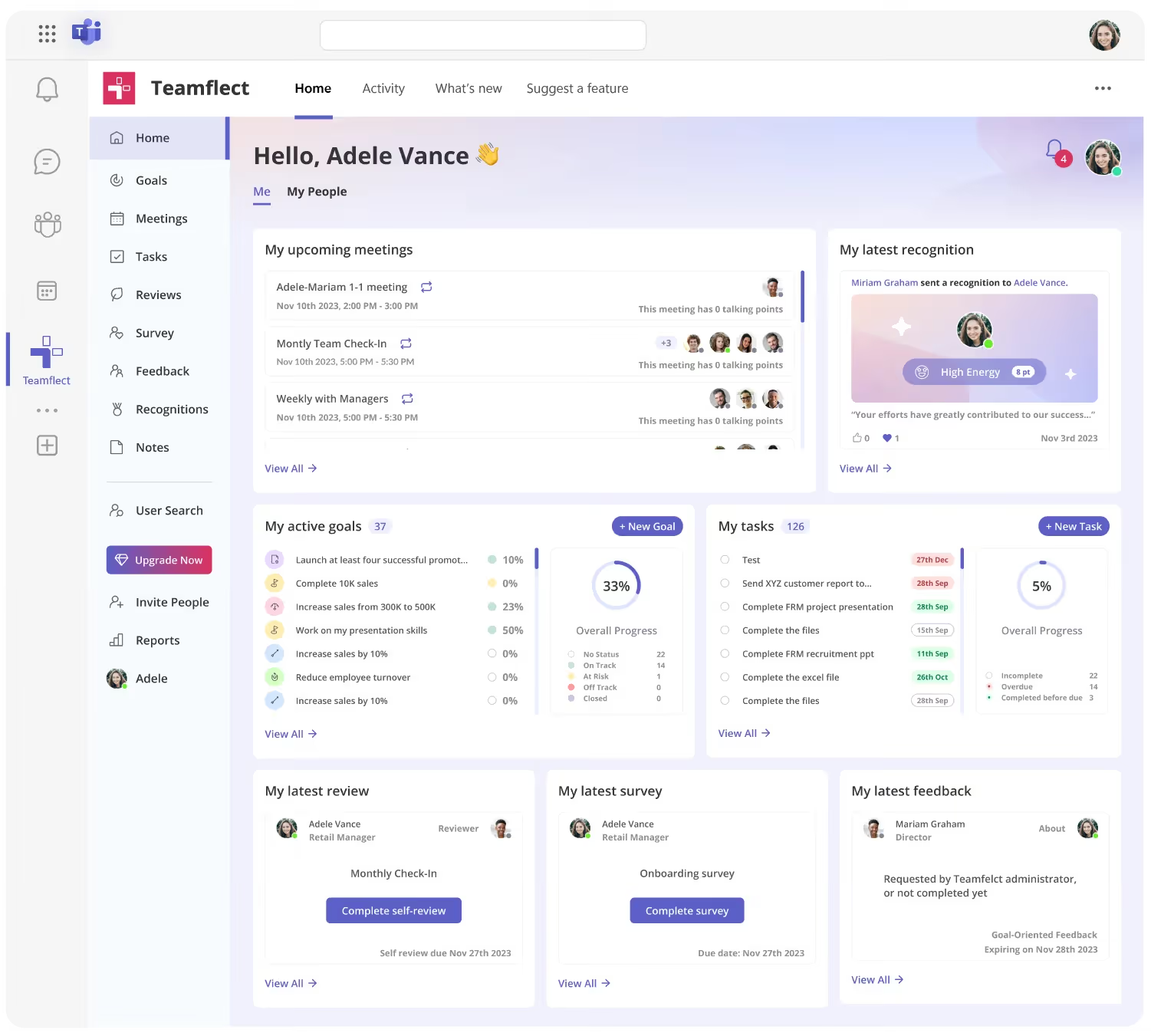
Teamflect earns its spot as the top performance management alternative for organizations running on Microsoft 365. Unlike every other tool on this list, Teamflect does not ask employees to log into another app. It lives entirely inside Microsoft Teams and Outlook, which means performance reviews, goal tracking, feedback, recognition, and 1-on-1 meeting agendas all happen where your team already works.
That design decision changes the adoption equation entirely. Most performance management software fails not because of missing features, but because employees and managers avoid logging into yet another platform. Teamflect removes that friction by design.
For organizations that are tired of chasing completion rates on performance reviews, Teamflect offers a practical answer.
Key Features
- Native Microsoft Teams integration: All functionality lives inside Teams and Outlook; no separate login, no tab-switching, no extra rollout
- Performance reviews: Customizable templates supporting 360-degree reviews, self-assessments, 30/60/90-day onboarding reviews, quarterly cycles, and annual evaluations
- OKR and goal tracking: Cascading goals from company to individual level, with real-time progress updates and OKR check-ins via Teams chat or email
- Continuous feedback: Request or give structured feedback directly in Teams chat using customizable templates, with AI-powered enhancement tools
- Recognition and rewards: Customizable badges and live recognition announcements inside Teams channels
- 1-on-1 and team meetings: Integrated meeting agendas with talking points, tasks, goals, and notes accessible before, during, and after meetings
- Employee surveys: Pulse surveys, engagement surveys, and anonymous survey options with AI-powered summarization of free-form responses
- 9-box talent grid: Visualize performance vs. potential across your team for succession planning and talent review discussions
- Power BI connector: Enterprise-grade analytics for organizations that need custom dashboards and multi-dimensional workforce reporting
What Makes Teamflect Stand Out
- The only performance management platform in this comparison that operates fully inside Microsoft Teams, making it the most natural choice for Microsoft 365 organizations
- Dedicated Customer Success Manager included on every paid plan, along with free implementation and unlimited training
- Nonprofits receive up to a 60% discount on annual contracts
- AI-powered tools help managers generate review summaries, feedback suggestions, and goal insights without leaving the Teams interface
Pros and Cons
Pros: "A well-defined and organized structure that promotes consistency, supports collaboration, and ensures that everyone is working toward shared goals." — Capterra review
- High adoption rates because the tool fits into existing workflows rather than adding a new one
- Comprehensive people management suite covering reviews, goals, feedback, recognition, and meetings in one platform
- Quick implementation with minimal IT involvement required
- Generous free plan for teams under 10 users makes it easy to evaluate without risk
Cons: "It would help to break yearly goals into quarterly progress milestones for easier performance tracking." — G2 review
- Requires a Microsoft 365 environment; organizations outside the Microsoft ecosystem cannot use the platform
Pricing
Teamflect offers three tiers:
- Starter Free up to 10 users, includes all core features with no time limit
- Essential: $7/user/month (annual billing), includes analytics and premium support
- Professional: $11/user/month (annual billing), includes talent management features and advanced integrations
- A 30-day free trial is available on Essential and Professional plans.
- Discounts for non-profit organizations are also available.
5. Connecteam: A Solid Workday Alternative for Frontline and Deskless Teams

Connecteam is purpose-built for teams that spend their days away from a desk. It covers scheduling, GPS time tracking, task management, team communication, HR document storage, and training in a single mobile-first app. If you manage retail, hospitality, healthcare staffing, cleaning crews, or any workforce where employees rarely sit in front of a computer, Connecteam is worth a serious look.
Key Features
- GPS time clock: Location-stamped clock-ins with geofencing options to verify workers are on-site before clocking in
- Employee scheduling: Drag-and-drop calendar with shift templates, open shift bidding, shift replacements, and in-shift task assignments
- Task management: Create and assign one-time or recurring tasks with subtasks, attachments, and progress tracking
- Team communication: Group chat, announcements, and update feeds with manager-controlled permissions
- HR document management: Store, share, and collect signatures on HR documents from the app
- Training and onboarding: Custom courses, quizzes, and knowledge libraries built for mobile delivery
Best For
- Businesses managing frontline or shift-based workforces across retail, restaurants, healthcare, and field services
- Small businesses that need a free tier before committing to a paid plan
- Organizations where scheduling, time tracking, and communication need to work on a phone, not a desktop
Pros and Cons
Pros: "There are so many features to assist with HR and team management. The presentation and layout is great; the team had no issues adjusting." — G2 review
- Mobile-first design means frontline employees can actually use it without training
- Flat-rate pricing for the first 30 users is cost-effective for growing small businesses
- Free plan available for teams under 10 users with access to all three hubs
- Regular feature updates based on user feedback
Cons: "The mobile app can be buggy, it does have a steeper learning curve, can be costly and has limited payroll features." — Capterra review
- Hub-based pricing adds up quickly when you need operations, communications, and HR features together
- Limited payroll functionality; requires third-party integrations with Gusto, QuickBooks, or Paychex
- Advanced features like breadcrumb tracking and live GPS are only available on higher tiers
Pricing
Connecteam uses a hub-based pricing model. Each hub (Operations, Communications, HR and Skills) is priced separately:
- Basic: $29/month for the first 30 users per hub ($0.8/month for each additional user)
- Advanced: $49/month for the first 30 users per hub ($2.5/month for each additional user)
- Expert: $99/month for the first 30 users per hub ($4.2//month for each additional user)
- Enterprise plan available on request
- Free trial and demo available
6. ADP Workforce Now: An Enterprise-Grade Alternative for Compliance-Heavy Organizations

ADP Workforce Now is one of the most established HR platforms on the market, and for mid-to-large organizations where payroll compliance is the primary concern, it is hard to argue against. ADP processes payroll for over 40 million US workers, and that scale gives Workforce Now access to benchmark data through ADP DataCloud that no other platform in this category can replicate.
Key Features
- Payroll and tax management: Automated payroll calculations, multi-state tax filing, garnishments, and compliance monitoring with built-in error detection
- ADP DataCloud: Workforce benchmarking using data from 40 million+ employees, covering compensation ranges, turnover rates, and absence trends by industry and region
- ADP Assist: Generative AI embedded within the platform to validate payroll information and flag anomalies before they become problems
- Time and attendance: Time clocks, timesheets, scheduling, audits, and mobile access for employees and managers
- Benefits administration: Carrier integrations, ACA compliance, open enrollment tools, and employee self-service for benefits updates
- Talent management: Recruiting, onboarding, performance reviews, and learning management as add-on modules
Best For
- Mid-market and enterprise organizations where payroll compliance is the top priority
- Companies operating across multiple US states or expanding internationally through ADP's global payroll network in 140+ countries
- HR teams that want access to meaningful workforce benchmarking data alongside their core HR system
Pros and Cons
Pros: "Setup and ease of use made the onboard process very seamless. My agent (Kyle) checked in with me frequently which was nice." — Capterra review
- Payroll accuracy and tax compliance are consistently rated as strong points by verified users
- ADP DataCloud's benchmarking capability is a genuine differentiator that smaller platforms cannot match
- 350+ certified integrations connect Workforce Now with virtually any HR tech stack
- 75+ years of payroll expertise and a massive client base provide institutional confidence
Cons: "While the core payroll functionality works well, there are areas where the user experience could be smoother — some tasks require more clicks than necessary to complete." — G2 review
- User interface is functional but not modern; rates below Rippling and BambooHR for visual design and ease of navigation
- Support quality varies significantly by account tier; general support queue experiences are frequently criticized
- Add-on module structure means total cost can exceed the quoted base price considerably
Pricing
ADP Workforce Now does not publish pricing. Costs are quote-based and vary by company size and selected modules.
7. Paycor: Integrated Talent Tools for Mid-Market HR Teams
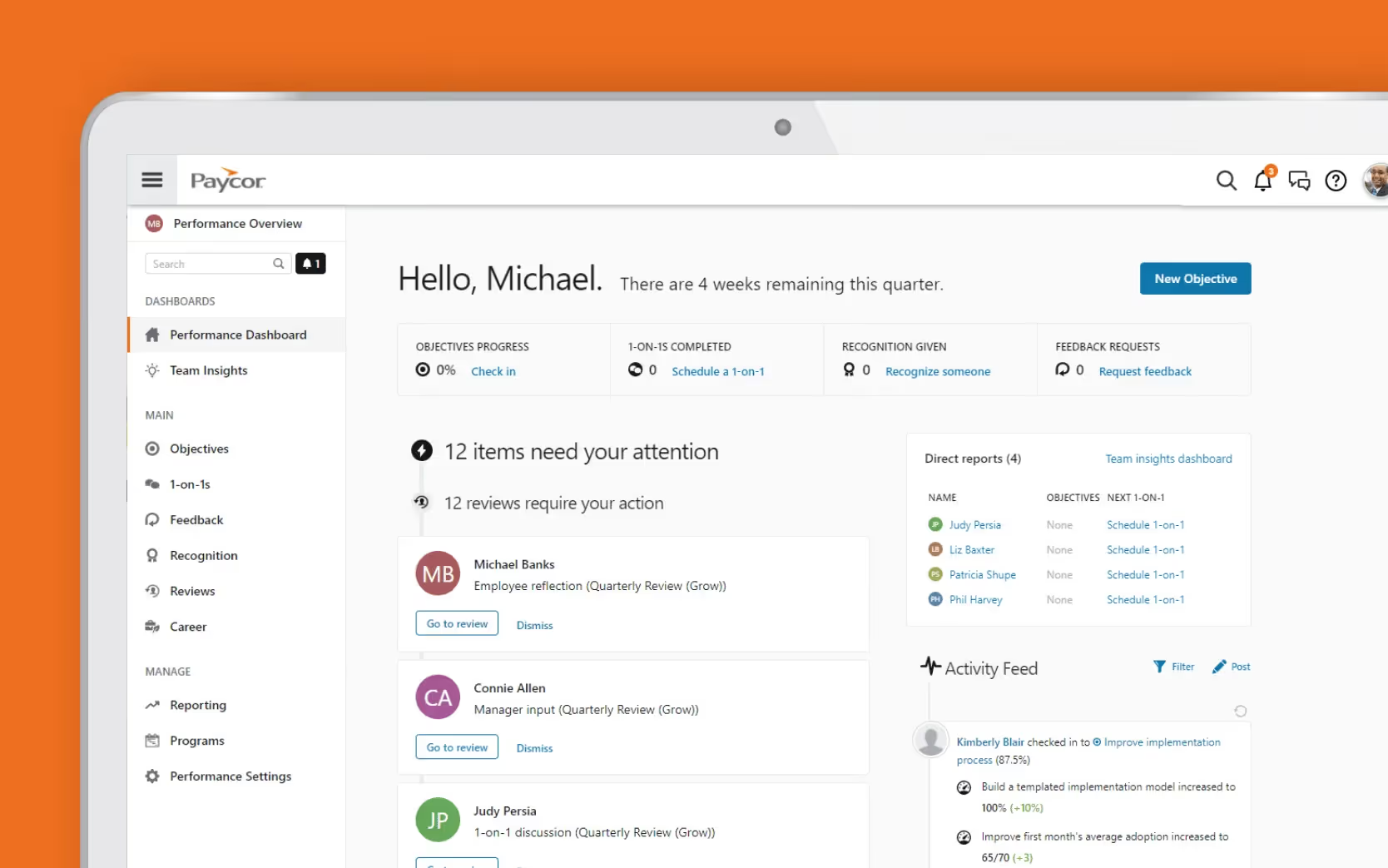
Paycor targets mid-sized organizations that want payroll, HR, and talent management in one place. The platform has grown through strategic acquisitions, adding modern recruiting (Newton ATS) and performance management (7Geese) capabilities to its core payroll and compliance tools. The result is a reasonably well-rounded HCM suite, though some of those acquired modules still feel slightly disconnected from the rest of the experience.
Key Features
- Payroll processing: Automated payroll runs, multi-state tax filing, direct deposit, and compliance support
- Applicant tracking: Job posting, candidate pipeline management, and offer letter tools from the Newton ATS integration
- Performance management: Goal tracking, continuous feedback, and review cycles from the 7Geese-based performance tools
- Benefits administration: Open enrollment, carrier connections, and employee self-service
- Time and attendance: Time tracking, scheduling, and overtime calculation with mobile access
- HR analytics: Reporting dashboards for payroll, headcount, and compliance metrics
Best For
- Mid-sized organizations between 50 and 500 employees looking for payroll and HR in one system
- HR teams that want basic talent management without buying a separate performance management platform
- Companies that value a clean interface and employee self-service for benefits and pay information
Pros and Cons
Pros: "I used it as our main recruiting system at my old job, but it was fairly easy to use. Def user friendly." — Capterra review
- User-friendly interface with a strong mobile app that employees navigate without much guidance
- Payroll automation and tax compliance are well-regarded for accuracy and time savings
- Covers the employee lifecycle from hiring through offboarding in a single platform
Cons: "There tends to be some 'wonkiness' at times. We've encountered employee records getting changed due to configuration settings that didn't get changed on the Admin side and random system slowness." — G2 review
- Some modules still feel disjointed as a result of the acquisition-led growth strategy
- Support responsiveness is among the more common complaints in user reviews
- Pricing transparency is limited; the public pricing page was removed in 2025, requiring a custom quote for all buyers
Pricing
- Paycor pricing is not published. You need to contact them for custom pricing.
- No free plan or trial is available.
8. Gusto: Clear Pricing and Strong Payroll for Smaller Teams

Gusto is one of the most straightforward options on this list. It was built with small businesses in mind, and it shows. The platform covers payroll, benefits administration, onboarding, time tracking, and basic HR in a single system, with publicly listed pricing and a setup process that takes days rather than weeks. For teams that want to stop managing payroll in spreadsheets without committing to enterprise complexity, Gusto is a reliable starting point.
Key Features
- Full-service payroll: Automated payroll runs for W-2 employees and 1099 contractors, with unlimited pay runs and automatic tax filings in all 50 states
- Benefits administration: Health insurance, 401(k), workers' compensation, and employee self-service for benefits updates
- Employee onboarding: Digital offer letters, e-signatures, new hire report filings, and onboarding task management
- Time tracking: Integrated time and attendance tools with PTO management synced directly to payroll calculations
- Contractor payments: International contractor payments in 120+ countries with no monthly per-contractor fee
- Compliance tools: Built-in alerts for labor law changes across states, wage law resources, and overtime compliance
Best For
- Small businesses with 2 to 50 employees that want transparent pricing and fast setup
- Teams that need to pay both W-2 employees and 1099 contractors from the same platform
- Organizations where payroll accuracy and tax compliance are the primary HR software requirements
Pros and Cons
Pros: "I like that everything is literally at your finger tips. My favorite feature is the paycheck tracker; it really helps confirm my pay has been submitted and allows me to keep up with it." — G2 review
- Publicly listed pricing with no hidden fees is one of the clearest in the category
- Highly rated customer support, with reviewers frequently praising knowledgeable agents and proactive communication
- Payroll setup is fast, with most teams running their first payroll within a week
- Strong user satisfaction scores from both administrators and employees
Cons: "What is there not to like? I guess once in a great while there is a glitch, but they are always quick to fix any issues." — Capterra review
- Performance management features are limited compared to dedicated platforms; advanced reviews and goal tracking require a paid add-on
- Not well-suited for organizations above 100 employees that need enterprise-grade analytics or multi-entity payroll
- Mobile app lacks some functionality available on the desktop version
Pricing
Gusto offers transparent, publicly listed pricing:
- Simple: $49/month base + $6/user/month
- Plus: $80/month base + $12/user/month
- Premium: $180/month base + $22/user/month
No free plan is available. Performance reviews and some HR tools require paid add-ons. No long-term contracts are required.
9. Personio: A European-Focused All-in-One HR Platform for SMEs
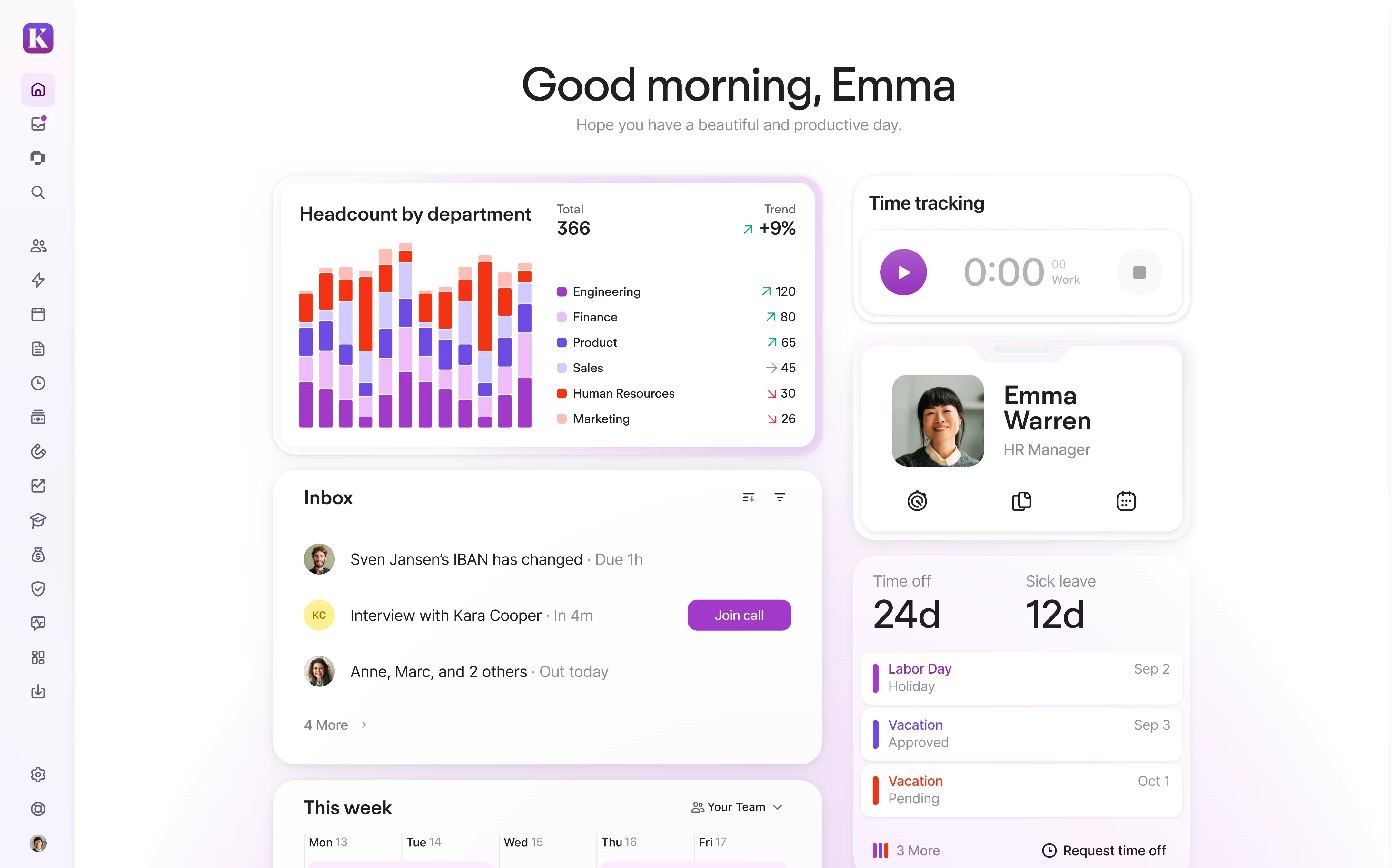
Personio is one of the most popular HR platforms for small and medium-sized businesses in Europe, and it has expanded its reach to organizations across the UK, Germany, Spain, and Ireland in particular. It centralizes employee data, absence management, recruiting, onboarding, payroll preparation, performance management, and employee self-service in a single system, removing the need for multiple disconnected tools.
Key Features
- Core HR and employee database: Centralized records for employee data, contracts, documents, and organizational structure
- Absence and time management: Automated leave requests, approval workflows, accrual policies, and attendance tracking integrated with payroll
- Recruiting and ATS: Applicant tracking, candidate pipelines, and structured interview scheduling to keep hiring organized
- Performance management: Review cycles, continuous feedback tools, and employee development tracking
- Onboarding workflows: Automated task assignments, digital document collection, and role-based access from day one
- Employee self-service: Employees manage their own requests, documents, and personal information without HR involvement
Best For
- European SMEs with 10 to 2,000 employees that need a comprehensive HR system with strong data compliance
- HR teams managing the full employee lifecycle from hiring to offboarding in one platform
- Organizations that want to eliminate scattered spreadsheets and point tools without moving to an enterprise system
Pros and Cons
Pros: "After the update, I like the new logging feature; no need to enter a password every time. Then the new attendance interface is friendly and time off where I see breakout is helpful." — G2 review
- Clean, intuitive interface makes everyday HR tasks accessible without heavy training
- Strong workflow automation reduces manual follow-up on approvals, onboarding steps, and absence requests
- Customer success program, including the Personio Voyager Community, is well-regarded for responsiveness
- AI-powered HR chat and nested org charts in recent updates point toward smarter, more scalable workflows
Cons: "The time tracking system. It's not very self explanatory, and the interface keeps on changing. Too many updates there unfortunately." — Capterra review
- Payroll features are designed around European payroll preparation and may not meet complex or multi-country payroll needs
- Reporting could be more flexible; several reviewers note limitations in customization and the inability to undo certain actions
- Primarily optimized for European markets; organizations outside Europe may find support and compliance features less relevant
Pricing
- Quote-based subscription; monthly fee depends on plan and add-ons
- Free trial available; contact Personio for a tailored quote
10. Sage HR: A Modular, Budget-Friendly HR Option for Small Businesses
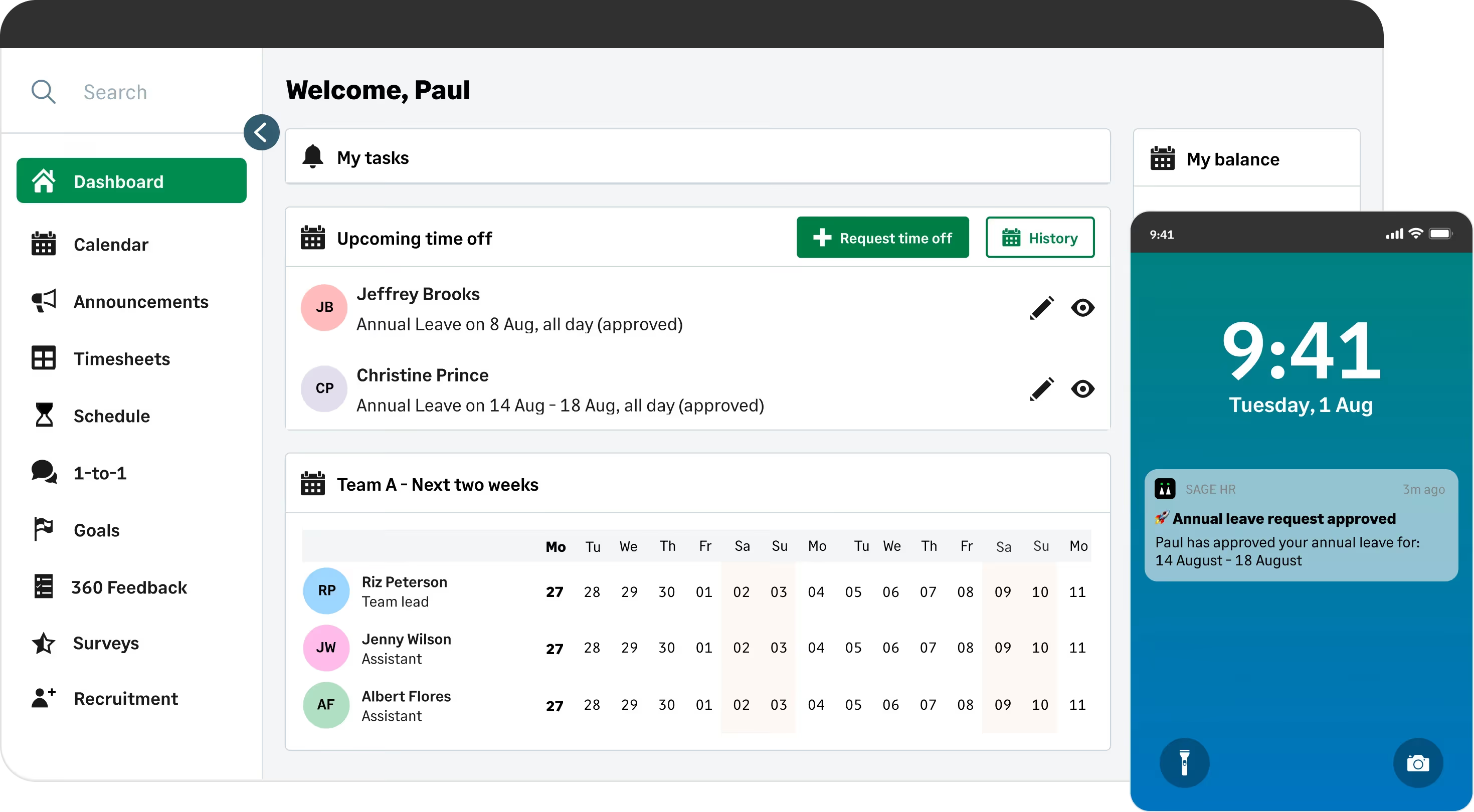
Sage HR earns its place on this list by doing something that most HR platforms struggle with: keeping costs genuinely manageable for small businesses while still covering the essentials. Its modular pricing model means you start with core HR and leave management at $5.50/employee/month and only add the pieces you actually need, whether that is performance management, shift scheduling, recruitment, or expenses.
Key Features
- Core HR and leave management: Employee records, absence requests, approval workflows, and accrual policies included as standard
- Shift scheduling: Visual shift planning with team availability and in-shift task management, particularly strong for hourly and shift-based teams
- Performance management: Goal setting, 1-on-1 scheduling, and 360-degree feedback as an optional add-on module
- Recruitment: Job postings, applicant tracking, and interview scheduling available as an add-on
- Timesheets and expenses: Optional modules for tracking overtime and managing employee expense submissions via mobile
- Integrations: Connects with Slack, Google Workspace, Microsoft 365, Zapier, and Sage Payroll for teams already in the Sage ecosystem
Best For
- Small businesses with 10 to 250 employees that want affordable, no-contract HR software
- Industries with shift-based workforces, including retail, hospitality, and healthcare
- Teams that want to start simple and scale feature coverage as their needs grow
Pros and Cons
Pros: "I like how it integrates with Sage Payroll, with staff information and payslips issuance. The document signing works brilliantly and the reports on headcount, turnover etc. are great." — Capterra review
- Modular pricing means you never pay for features you are not using
- Leave management and shift scheduling are consistently rated as standout capabilities
- No long-term contracts; cancel or upgrade at any time
- 30-day free trial gives teams time to evaluate before committing
Cons: "One thing I dislike about Sage HR is that sometimes the app can feel a bit slow or clunky when uploading multiple documents at once. It can also be a little confusing to navigate certain menus at first until you get used to it." — G2 review
- Native integration library is smaller than competitors like BambooHR or Rippling
- Reporting and analytics are more basic than mid-market alternatives
- Less suitable for organizations above 250 employees that need advanced compliance tools or enterprise analytics
Pricing
- Core HR + Leave Management: £5.00 per employee/month
- Timesheets: £2.50 per employee/month
- Performance: £2.50 per employee/month
- Expenses: £1.25 per employee/month
- Shift Scheduling: £2.50 per employee/month
- Recruitment: £184.45 per month
- A 30-day free trial is available.
How to Choose the Right Workday Alternative
There is no universal answer here, but a few questions will narrow the field quickly.
How large is your team, and how fast are you growing?
Gusto and Sage HR are built for smaller teams where simplicity and price matter most. Paylocity, ADP Workforce Now, and Rippling are better suited for mid-market and enterprise organizations with more complex needs. Picking a platform designed for your current size prevents you from paying for unused functionality or outgrowing it in 18 months.
What does your tech stack look like?
If your team is deeply embedded in Microsoft 365, Teamflect's native
Teams integration is a meaningful advantage. If you need HR and IT management in one system, Rippling is in a category of its own. If you are already a Sage customer, Sage HR's payroll integration is worth factoring in.
Is payroll your primary concern, or is it people management?
Gusto, ADP Workforce Now, and Paylocity are all strong payroll-first platforms. Teamflect and Paycor focus more on performance, talent, and the employee lifecycle. BambooHR sits comfortably in the middle for SMBs.
How important is pricing transparency?
Gusto publishes its full pricing online. Most others require a custom quote. If comparing total cost of ownership is a priority before engaging vendors, Gusto and Connecteam offer the clearest public pricing in this group.
What is your implementation timeline?
Some platforms like Teamflect can run a first review cycle within days of setup. Others like ADP Workforce Now or Rippling may require several weeks to months depending on company size and module complexity. Build that into your evaluation before signing anything.
Ready to Find the Right Fit? Start Here.
Going through a full evaluation takes time, but you do not have to start from zero. If your team runs on Microsoft 365 and performance management is the priority, Teamflect is the strongest starting point on this list. The free plan covers up to 10 users with no time limit, and paid plans include a dedicated Customer Success Manager and a 30-day trial.
For teams with broader payroll and HR needs, Gusto's transparent pricing and fast setup make it one of the easiest platforms to evaluate without a lengthy sales process.
Whichever direction you go, use the comparison table at the top of this guide to match your budget and priorities against each platform's key differentiator before booking a demo.