
.svg)
With roughly 78% of startups surviving their first year, the challenge is shifting from early-stage survival to consistent growth. Many founders falter not because their OKR framework is flawed, but because their tracking process is fragile. That is, objectives written in planning sessions are quickly abandoned, leaving teams with broken spreadsheets and no alignment.
But very often, this is a tooling problem, not a discipline one. A dedicated OKR system creates the focus needed to turn initial survival into long-term stability by tying daily work to high-level strategy.
We analyzed the best 10 OKR software for startups to find which tools actually work as you scale. We looked at costs for teams of 8 versus 40, how quickly a non-technical hire can get started, and which platforms build habits that last past the first quarter.
Below is our independent ranking, including the free tiers and setup times that matter at this stage of your growth.
If you want to skip directly to the top 10 and see how each platform stacks up on pricing, ease of use, and scalability, jump straight to our ranking of the best OKR software for startups.
Comparison Table
What Is OKR Software?
OKR software is a tool for setting Objectives (what you want to achieve) and Key Results (the measurable outcomes that tell you whether you achieved it), then tracking progress against both on a regular cadence, usually weekly or quarterly.
Free OKR software refers specifically to tools, or tiers of tools, that let a team run this process at no cost, typically capped at a small number of users.
What It Means for Startups
Startups tend to adopt OKR software earlier than larger companies because the cost of drift is higher at small scale.
A 200-person company can absorb a few misaligned teams for a quarter. An 8-person startup cannot; every person's time is a meaningful fraction of total output, and a spreadsheet that nobody updates after week three means nobody actually knows what the company is working toward.
OKR software for small businesses generally means the same category of tool, just evaluated against a tighter budget and a smaller team. An OKR platform, in practice, is the software layer that turns the OKR framework from a planning-day exercise into a living, weekly habit.
Key Features to Look For
For a startup, the most valuable tool is one that minimizes friction and encourages consistent participation. Focus on finding a platform that offers the right balance of automation and simplicity to keep your team aligned without creating extra administrative work.
Here are key features to look for in an OKR tool that will actually work for your team:
- Cascading goals, so individual and team key results visibly connect up to company objectives
- Automated check-in reminders, delivered inside Slack or Teams rather than requiring a separate login to remember
- Progress scoring, not just a binary done or not-done status
- Basic reporting, clean enough to show a board or investor without rebuilding it in a slide deck
- A real free tier or affordable entry price, since most startups are testing whether the framework works before committing budget
Benefits of OKR Software for Startups
For startups, implementing OKR software serves as a crucial tool for maintaining discipline and speed. This visibility helps prevent teams from drifting in different directions, keeping everyone synchronized on the same outcomes.
Key advantages of utilizing this approach include:
- Improved Prioritization: Teams can clearly distinguish between essential tasks and busy work by linking daily actions to top-tier objectives.
- Enhanced Alignment: Software provides a single, consistent point of reference, which prevents functional silos as a company grows.
- Rapid Problem Solving: Weekly check-ins within the platform allow managers to identify bottlenecks immediately rather than discovering them during critical reporting periods.
- Investor Credibility: Maintaining a structured, transparent dashboard demonstrates operational discipline to potential backers, which serves as a significant asset during fundraising activities.
How to Choose OKR Software for a Startup
Before booking a demo, work through these questions with your own numbers, not the vendor's marketing page.
What is your realistic headcount in 12 months?
A tool that looks cheap at 8 people can get expensive fast on per-seat pricing. If you expect to double or triple headcount within a year, a flat-fee tool like OKRs Tool or a generous free tier like Teamflect's may save real money.
Do you want a dedicated OKR tool or an all-in-one people platform?
Tability, Perdoo, and OKRs Tool are built purely around OKRs. Teamflect, Profit.co, and ThriveSparrow bundle in performance reviews, feedback, or engagement. Neither approach is automatically better, but paying for a bundle you will not use is a real cost.
Will your team actually do the weekly check-in?
Automated nudges built into Slack or Teams (Tability, Weekdone, Range, OKRs Tool) tend to survive longer than tools relying on a manager to chase updates manually.
What is your current stack?
A startup on Microsoft 365 gets real adoption benefits from Teamflect or Mooncamp's native Teams integration. A Slack-first or Google Workspace team should weight that integration list accordingly.
How fast do you need to be live?
If you want company OKRs running this afternoon, Tability, OKRs Tool, Range, and Teamflect all had first cycles live in under an hour in our testing. Profit.co and Quantive reward patience with more depth, but take longer to configure fully.
The Best OKR Software for Startups in 2026
Startups require tools that integrate directly into existing workflows, like project management or communication apps, rather than adding layers of manual reporting that distract from core work. The following selection focuses on software that excels at turning long-term vision into measurable, weekly progress.
1. Tability

Tability is a lightweight, habit-forming OKR tool built by a team of ex-Atlassian product people, and it shows in how little friction there is between opening the app and writing a first objective. There is no free tier, but the 14-day trial requires no credit card, and the entry price is low enough that most 5 to 10 person startups can afford it from day one.
Key features
- AI-assisted OKR and key-result drafting
- Automated weekly check-ins
- Instant reporting and insights
- Read-only stakeholder seats (2 free per paid user)
- No seat minimums
Integrations: Slack, Microsoft Teams, Jira, Asana, ClickUp, Google Sheets, and more than 60 others.
Pros and Cons
Pros: “The product is easy to use and has made reporting very easy and accurate.” - Capterra review
- No required seat minimums, so a pilot with 3 people costs the same per-seat rate as 30.
Cons: “Nothing significant stands out at the moment. However, it would be helpful to have a whiteboard feature for drafting OKRs.” - G2 review
- No free tier at all, unlike most of the rest of this list.
Pricing
Plans are billed annually, with yearly subscriptions providing two months of savings. The Basic plan costs $6 per user/month, while the Premium plan is $10 per user/month. An upcoming Agentic plan will be $20 per user/month, and Enterprise pricing is available upon request. All options include a 14-day trial, and all prices are in USD.
2. Teamflect
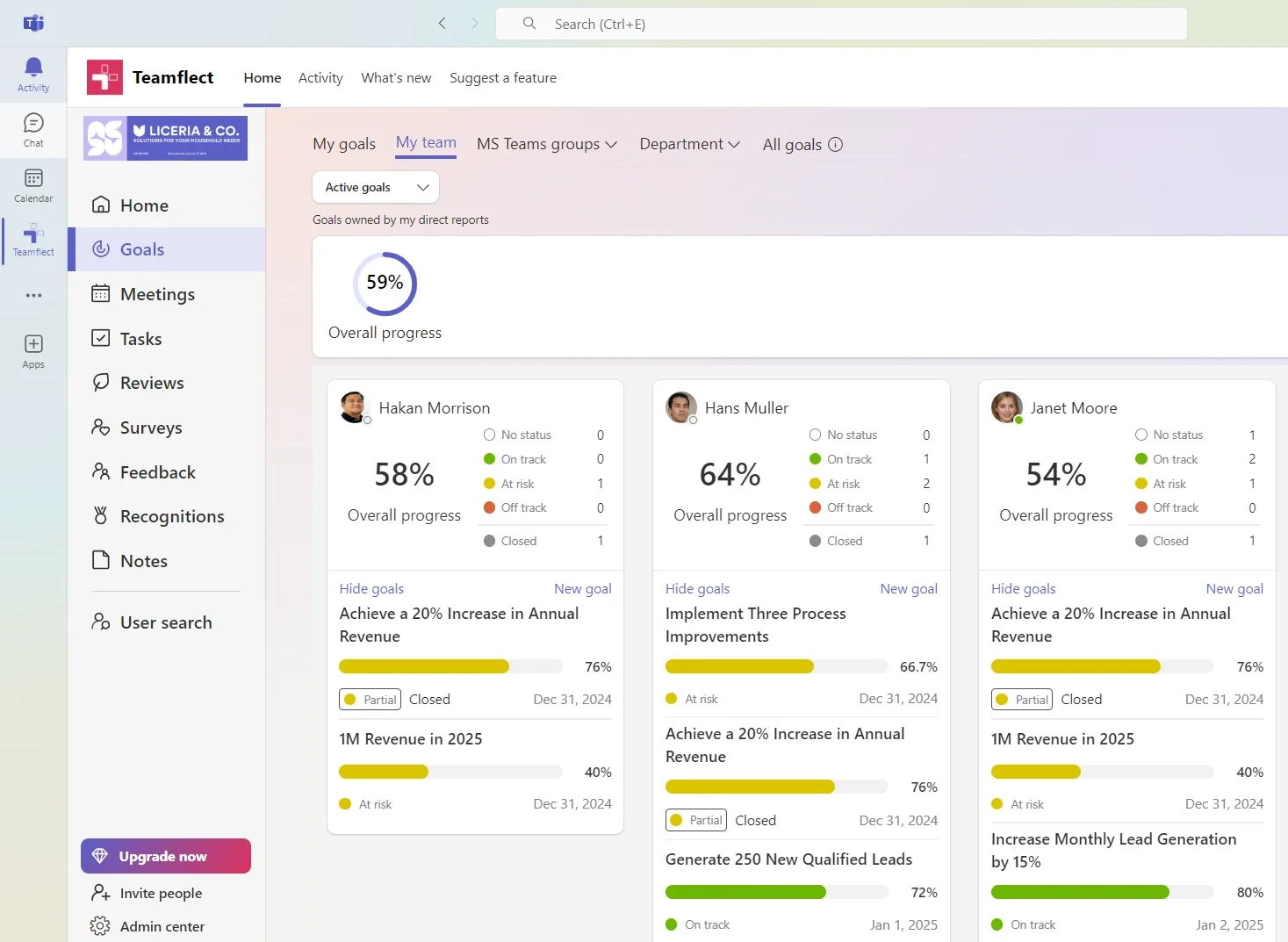
Teamflect is a people management platform built natively inside Microsoft Teams, and Goals and OKRs sit at the center of it rather than as an add-on. Its free tier runs up to 10 users with no time limit and no feature restrictions, which is one of the most generous entry points on this list. After that, pricing is transparent at $7 and $11 per user per month, a rare thing in a category where many vendors hide pricing behind a sales call.
Key features
- Goals and OKRs with progress tracking inside Teams
- 1-on-1 meeting agendas synced to Outlook invites
- AI-assisted goal writing and summaries
- Performance review templates
- Recognition and feedback tools
Integrations: Native Microsoft Teams and Outlook; Power BI connector for reporting; Salesforce, Azure AD and Okta for SSO.
Pros and Cons
Pros: “It is so simple to use, easy to read and ensures easy but meaningful feedback for everyone involved.” - Capterra review
- The free tier has no time limit and includes full functionality, not a stripped-down trial version.
Cons: “I feel the Goal feature can be more simplified. We follow an OKR format, and sometimes, it's time-consuming to set up goals with several KRs.” - G2 review
- Reliance on Microsoft 365 means teams outside that ecosystem miss out on the native-adoption edge that makes Teamflect's OKR tracking easy to stick with day to day
Pricing
Teamflect offers a free Starter plan for up to 10 users. Paid options include the Essential plan at $7 and the Professional plan at $11 per user/month, with annual billing saving 22%. Enterprise pricing is customized, and volume discounts are available, including up to 60% for non-profits. All paid plans feature a 30-day trial with no added implementation or training fees.
3. Perdoo
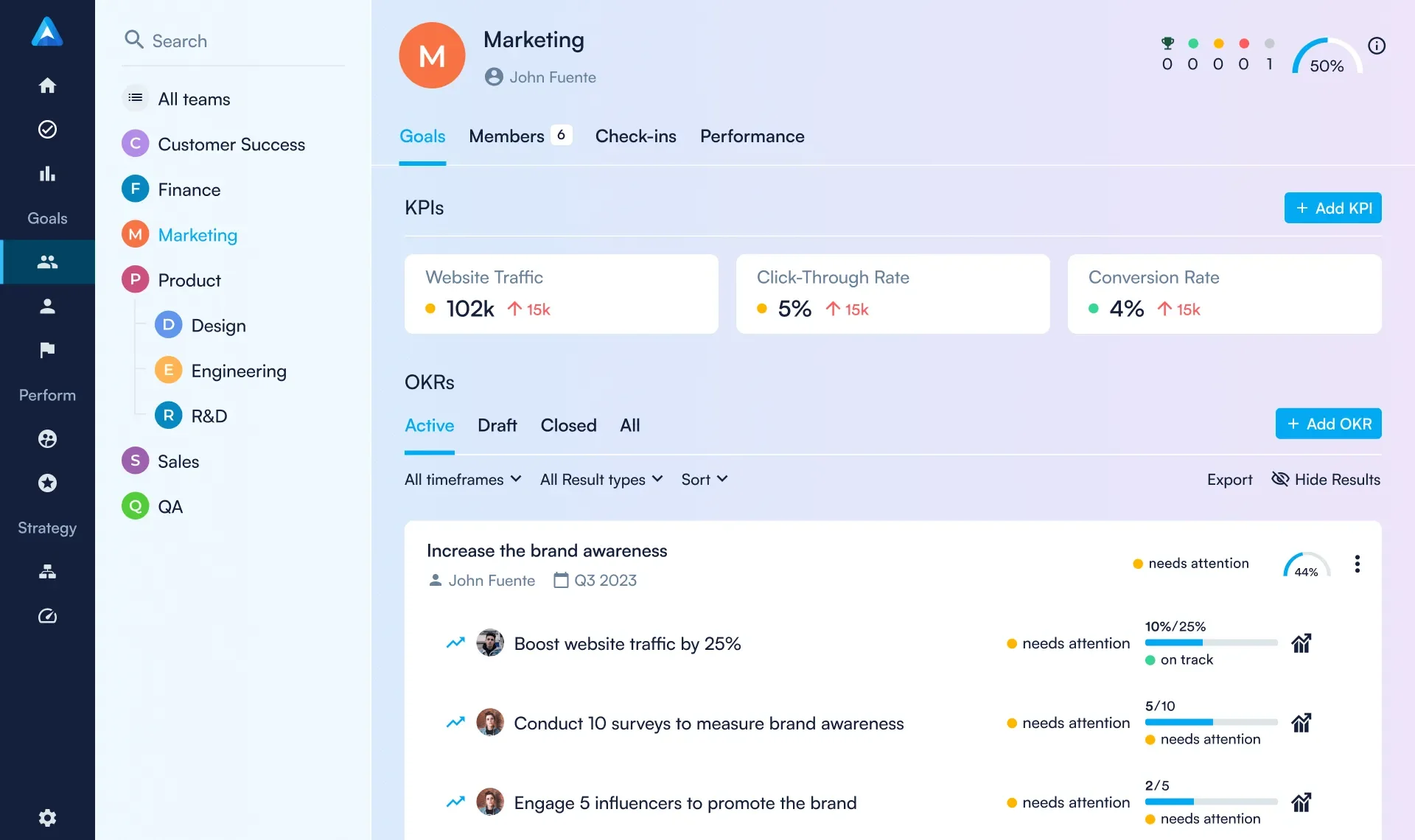
Perdoo pairs OKR tracking with a visual strategy map, so teams can see how a quarterly key result connects back to a multi-year company objective rather than treating OKRs as a floating quarterly exercise. The free tier covers up to 5 users, which is enough for a founding team to test the framework before paying for anything.
Key features
- Strategy map linking company vision to team OKRs
- KPI tracking alongside OKRs
- Weekly check-ins, 1-on-1 meeting tools
- OKR education content and templates included with every plan
Integrations: Microsoft Planner, Google Calendar, Power BI, Salesforce, Azure AD and Okta for SSO.
Pros and Cons
Pros: “Perdoo is software that understand how to set Strategy, OKRs, KPIs and Performance review. Help you connect your vision with daily tasks in one tool. They have great ebooks and free content to learn from.” - Capterra review
- Free tier supports up to 5 users with full functionality, not a limited trial.
Cons: “I would like the Perdoo team to continue refining how all companies' OKRs are displayed visually, for example, in a tree view. It's not essential, but as a leader, I find that layout helpful.” - G2 review
- Paid plans carry a 5-seat minimum, which can feel awkward for a 6 or 7 person team.
Pricing
The Free plan supports up to five users. Paid options include the Premium plan at €6.40 per user/month and the Supreme plan at €8 per user/month, with annual billing saving 10% over quarterly rates. Volume discounts apply as license counts increase, and purchasing 50 or more users includes three free coaching hours.
4. Weekdone
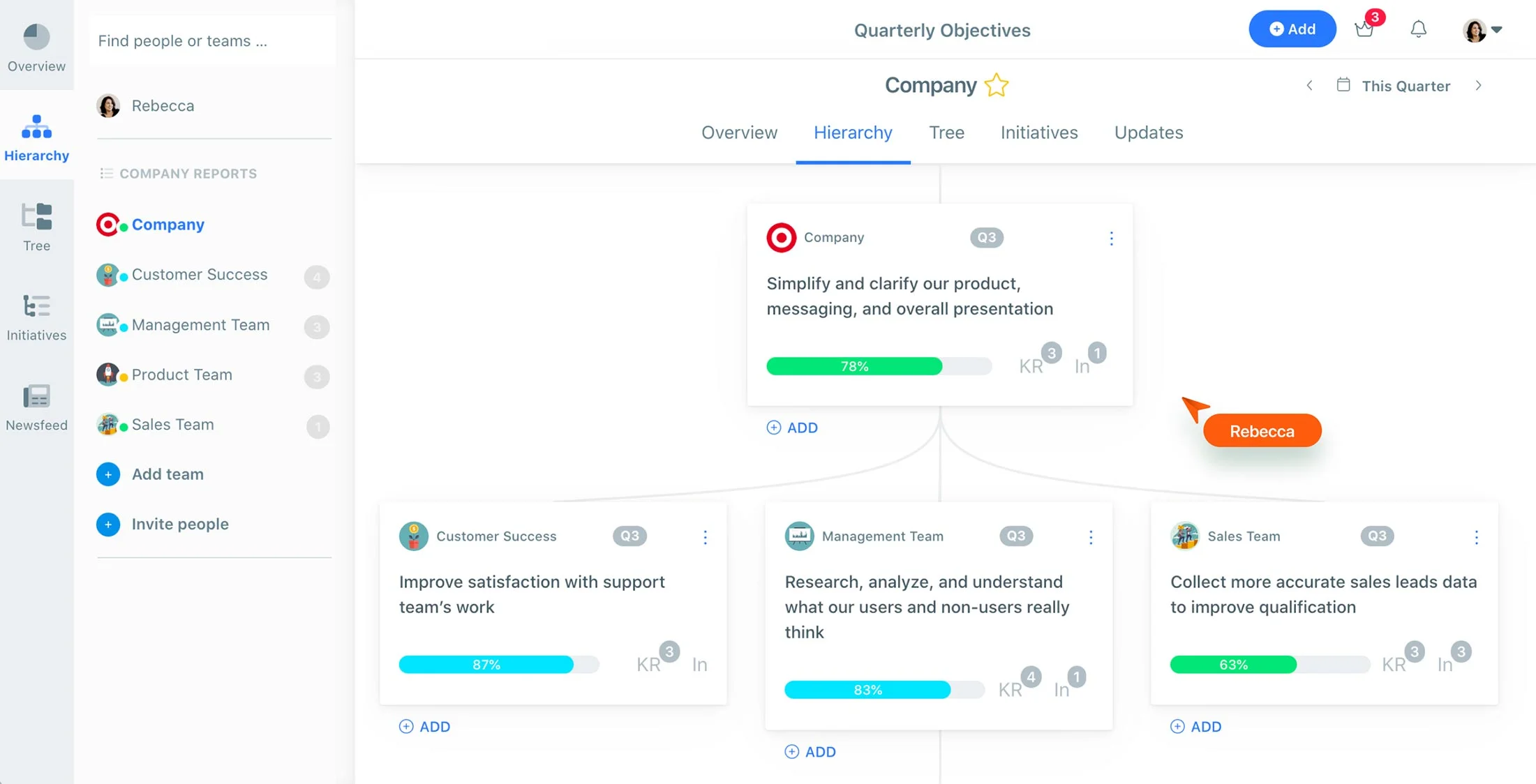
Weekdone combines OKR tracking with a structured weekly planning ritual, PPP (Plans, Progress, Problems), that nudges every team member to report in every week rather than leaving it to memory. For a founding team that has never built a consistent check-in habit before, that structure can be the difference between OKRs that stick and OKRs that quietly die.
Key features
- Company, team, and individual OKRs cascading automatically
- Weekly PPP planning tied to OKR progress
- Automated reminders
- A newsfeed showing company-wide updates
- Personalized OKR coaching included with paid plans
Integrations: Slack, Microsoft Teams, Google Workspace.
Pros and Cons
Pros: “Collaboration, with team members. The interaction and ability to give updates on the task/projects. Very user friendly.” - G2 review
- Free tier is genuinely free, not a countdown trial, for teams of 3 or fewer.
Cons: “Weekdone is a little difficult to setup and implement in the initial stages. Rest of the journey is very smooth.” - Capterra review
- Per-user pricing compounds quickly; a 30-person team can expect to pay roughly six times what a 5-person team pays.
Pricing
The platform offers a free version for up to 3 users and a 14-day trial for larger teams. Paid plans scale based on user count, with a 10-user package priced at $108 per month ($10.80 per user) when billed monthly. Annual billing options are also available.
5. Profit.co

Profit.co is the deepest platform on this list in terms of raw feature count. Alongside OKRs, it bundles task management, performance reviews, and employee engagement into one system built around the PDCA (Plan-Do-Check-Act) cycle.
There is no free plan, but the generous feature set on entry-level paid tiers has made it a common recommendation for teams that want OKRs and performance management from one vendor rather than two.
Key features
- OKRs with PDCA-based workflow
- Task management linked directly to key results
- Performance review cycles
- Employee engagement and recognition tools
- Customizable dashboards
Integrations: Slack, Microsoft Teams, Google Sheets, Jira, Salesforce, Azure DevOps, Power BI, and more than 40 others.
Pros and Cons
Pros: “Functionalities, support, training provided.” - G2 review
- Strong review volume on both G2 (4.7/5, 471 reviews) and Gartner Peer Insights (4.7/5, 109 reviews) gives real confidence in the rating.
Cons: “Some of the KPIs or metrics you have to do the math outside the platform. Some functions are not very intuitive.” - Capterra review
- No free plan, so there is no no-cost way to trial the full experience before paying.
Pricing
Enterprise pricing is customized based on your organization's specific scale, module needs, and deployment requirements. Bespoke proposals are available for high-volume or on-premises needs, featuring volume-based rates, dedicated SLAs, and white-glove onboarding.
6. Quantive (Gtmhub)
.avif)
Quantive positions itself as a strategy execution platform built on the OKR methodology, with analytics and AI-guided planning aimed at organizations that expect to scale fast and need the data to prove it. There is no free tier, but the entry-level Teams plan is transparently priced, which is not always true at this end of the market.
Key features
- OKR planning with AI-guided suggestions
- Weekly reflections tied to progress
- Customizable dashboards and reporting
- Alignment views across departments
- In-person and live training options
Integrations: More than 60 tools including BambooHR, Basecamp, Bitbucket, and Dropbox Business.
Pros and Cons
Pros: “Easy to use, strategized AI inputs are helpful.” - Capterra review
- Strong automation for alerts and progress tracking reduces manual reporting overhead.
Cons: “Sometimes the UI is a bit clunky. The edit button is in different places depending on the view you are or the item you want to edit.” - G2 review
- No free tier, and Enterprise pricing requires a 25-seat minimum.
Pricing
The platform offers a permanent free tier with no time limit or credit card required. The Pro plan costs €90 per year (approximately €7.50/month), which provides a discount compared to monthly billing. All prices are final and exempt from VAT under German legislation.
7. Mooncamp

Mooncamp brings a Notion-like flexibility to OKR tracking, letting teams define their own goal types and terminology instead of forcing a rigid structure onto every objective. It has earned a reputation as one of the more polished-looking tools in the category, and its team was quick to build migration support for the wave of organizations displaced by the Viva Goals retirement.
Key features
- Customizable goal types and terminology
- Native Microsoft Teams and Slack check-ins
- KPI tracking alongside OKRs
- Flexible filtering by due date and team
- GDPR-compliant infrastructure with SSO
Integrations: Microsoft Teams, Slack, Asana, Jira, Excel, Power BI.
Pros and Cons
Pros: “I like that Mooncamp is easy to use and has a clean UI. I also appreciate that it offers more customization options.” - G2 review
- Reviewers consistently note fast, responsive support for missing features or integration requests.
Cons: “Updating progress on goals was a little difficult at first. Other than that, it's a very straightforward tool and looking forward to seeing the Planning feature out of beta.” - Capterra review,
- No free tier, and paid plans lean on annual contracts rather than simple monthly billing.
Pricing
Pricing starts with an Essential plan at €7 per user/month and a Professional plan at €10 per user/month, both billed annually and requiring a minimum of five users. Enterprise pricing is available upon request for organizations with at least 100 users, offering additional security, support, and administrative features.
8. ThriveSparrow

ThriveSparrow is built primarily as an employee engagement and recognition platform, with goal tracking and OKR alignment layered in rather than positioned as the core product. For startups that see engagement and goal-setting as two sides of the same problem, that combination can replace two separate tools with one, at a genuinely low per-employee price.
Key features
- Goal cycles with a visual tree view
- Pulse and eNPS surveys
- Engagement heatmaps and team analytics
- Peer recognition and rewards
- Integrations with major HRIS platforms for employee data sync
Integrations: Slack, Google Workspace, BambooHR, Workday, ADP, Gusto, and other HRIS platforms.
Pros and Cons
Pros: “What I like most about ThriveSparrow is its focus on employee engagement and people-first culture. I appreciate how the platform combines feedback, recognition, and analytics in a way that helps organizations build healthier workplaces.” - G2 review
- Per-employee pricing is among the lowest on this list for a platform that combines OKRs with engagement tools.
Cons: “I think they might want to put the drop down choices currently on the top right, on the left. It can be easy to miss and you need to choose from that to see where you are in the process.” - G2 review
- OKR depth is lighter than a dedicated tool; teams that need advanced cascade visibility should look elsewhere.
Pricing
ThriveSparrow offers four distinct modules billed annually: Goals (OKRs) at $3 per user/month, Performance at $5 per user/month, Kudos at $2 per user/month, and Engage at $3 per user/month. All plans include the feedback suite and 24x5 email and chat support.
9. OKRs Tool

OKRs Tool takes a structural approach that no other product on this list uses: flat, organization-wide pricing instead of per-seat billing. A 30-person team pays the same flat fee as a 10-person team, which removes the single biggest source of pricing anxiety for a startup that plans to hire.
Key features
- AI-assisted OKR writing and initiative suggestions
- Unlimited OKRs and cycles regardless of tier
- Automated progress reminders
- Live alignment view across teams
- Role-based access
Integrations: Slack, Microsoft Teams, plus webhook and API access.
Pros and Cons
Pros: “Nice and clear structure. Easy to follow and use.” - G2 review
- The flat-fee model means a growing team's OKR software bill does not increase every time someone is hired.
Cons: “One area that could be improved is having more flexible reports or visual summaries.” - G2 review
- The integration list is noticeably shorter than more established competitors like Profit.co or Quantive.
Pricing
The platform offers a free Launch plan for up to 5 users. For larger teams, the Scale plan is a $49/month flat fee for up to 50 users, and the Expand plan is $129/month for over 50 users. Annual billing is available with a 20% discount. All paid plans include an adoption guarantee, providing a full refund if 60% adoption isn't reached within 30 days.
10. Range
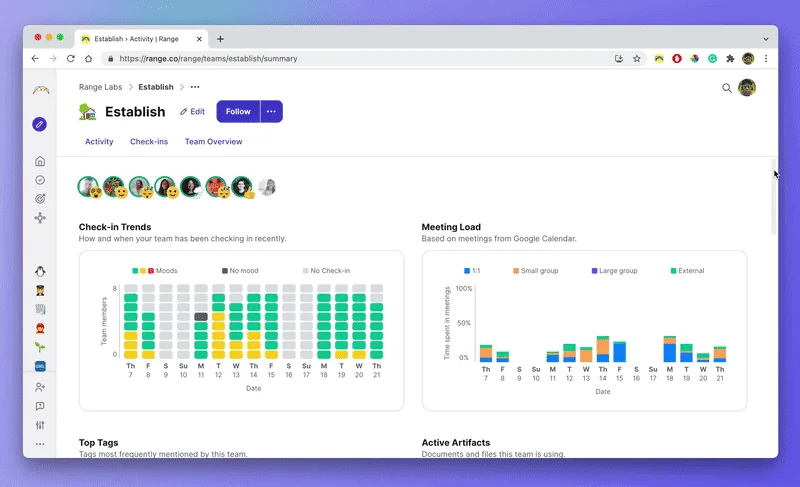
Range began as an async status-update tool and has since added goal tracking, making it less a dedicated OKR platform and more a team-connection tool with OKRs layered on top. For remote-first founding teams whose biggest problem is knowing what everyone else is working on day to day, that combination can be more useful than a standalone OKR tracker.
Key features
- Daily async check-ins with customizable prompts
- Goal and OKR tracking tied to check-ins
- Meeting agendas and notes
- Team directory
- Activity tracking across more than 75 connected tools
Integrations: Slack, Microsoft Teams, Google Calendar, GitHub, Jira, Asana, and dozens more.
Pros and Cons
Pros: “We can find our colleague's task. We can see who is working on which task.” - G2 review
- Free tier supports up to 12 users and 2 teams, generous for an early founding team.
Cons: “It's still a little bit difficult to understand how to set goals and such. It's a good feature, but I feel like it needs more work to make it more simple.” - Capterra review
- OKR-specific tooling is lighter than dedicated platforms; goal cascading and scoring are less developed.
Pricing
The platform provides a free tier for up to 12 users, while the Pro plan costs $8 per user/month and includes unlimited goals and teams. Custom pricing is available for the Enterprise plan, which is recommended for organizations with 100 or more users and includes advanced security features, premium support, and service-level agreements.
Costs and Pricing: What OKR Software Actually Costs a Startup
Pricing structures in this category generally fall into three distinct models. Understanding which model a vendor uses is more important than the initial sticker price at your current size, as the financial impact changes significantly as your organization matures.
When evaluating your options, consider these three primary pricing structures:
- Per-seat pricing: This is the most common model, but it carries a specific risk: a rate that feels affordable at a headcount of 10 can become a significant budget line as you scale. For instance, a $10 per-user monthly plan costs $100 for a small team, but that same plan jumps to $400 for a 40-person team without providing additional utility.
- Flat, organization-wide pricing: This model avoids the growth penalty entirely. Providers like OKRs Tool may charge a fixed monthly fee for a range of users, such as $49 for up to 50 employees, ensuring your costs remain predictable even as your headcount increases within that tier.
- Free and tiered access: The generosity of free plans varies widely. Some services, such as Teamflect, offer a permanent free tier for up to 10 users without feature restrictions, making them highly accessible for early-stage teams. Others cap their free offerings at slightly higher headcounts or, like Tability, Quantive, and Mooncamp, skip free tiers altogether in favor of time-limited trials.
The practical takeaway is to model your costs based on your projected headcount 12 months from now rather than your current size. Before you commit, confirm whether the plan is per-seat or flat-rate to ensure your software budget remains stable as you scale.
Start This Quarter, Not Next Planning Cycle
The startups that get the most out of OKRs are rarely the ones with the most sophisticated tool. They are the ones that pick something affordable, get it running this week, and actually show up for the weekly check-in.
Pick the tool from this list that fits your stack and your budget at your actual headcount, not the headcount you hope to have next year, and give the habit one full quarter before deciding whether to switch.
Frequently Asked Questions
What is the best free OKR software for a startup?
Teamflect and Range currently offer the most generous free tiers on this list, at up to 10 and 12 users respectively with no time limit. OKRs Tool and Perdoo both offer free tiers for up to 5 users.
How much does OKR software cost for a small team?
For a team of 10, expect somewhere between $0 (if you fit inside a free tier like Teamflect's or Range's) and roughly $100 a month on a mid-range per-seat plan like Weekdone or Perdoo. Flat-fee tools like OKRs Tool cost $49 a month regardless of exact headcount within their tier.
Per-seat or flat pricing, which is better as we grow?
Flat pricing protects you from the cost of hiring, since the bill does not move as headcount grows within a tier. Per-seat pricing can offer more features or a cheaper entry point at very small team sizes, but it is worth modeling both against your 12-month headcount plan before choosing.
Do we need dedicated OKR software, or is a spreadsheet enough to start?
A spreadsheet can validate whether OKRs are the right framework for your team in a first quarter. Most teams outgrow it once check-ins stop happening reliably, usually around week five or six, which is exactly the point where dedicated software earns its cost.
How long does it take to set up OKR software?
Among the tools on this list, Tability, Range, OKRs Tool, and Teamflect all had a first company OKR live in under an hour in our testing. Profit.co and Quantive take longer, typically a few days, given their broader feature sets.
Should we use a dedicated OKR tool or an all-in-one people platform?
Dedicated tools (Tability, Perdoo, Weekdone, OKRs Tool) tend to do OKR tracking itself better and are usually cheaper if that is all you need. All-in-one platforms (Teamflect, Profit.co, ThriveSparrow) make more sense if you already know you want performance reviews or engagement tracking in the same system.