

.svg)
Most HR teams already have standard dashboards. What they miss are answers to the question that keeps a CHRO awake: who might leave next quarter, and why. That distinction divides operational reporting from predictive people analytics software.
Gallup reports that only 29% of workers view performance reviews as fair and 26% consider them accurate, while even fewer feel motivated to excel. These specific shortcomings accumulate into organization-wide performance and growth bottlenecks.
This list covers the strongest people analytics platforms of 2026, uniting HRIS, ATS, engagement, and performance data into a single model to answer forward-looking questions rather than pulling backward-looking reports.
We ranked these tools along the axis that matters most to buyers: analytics depth against ease of use. For traditional headcount and turnover dashboards instead of predictive workforce analytics, see our operational HR analytics guide.
What to Look for in People Analytics Software
Before comparing vendors, it helps to know what you're actually buying. The five factors below separate a genuine analytics platform from a reporting tool wearing an analytics label.
1. Analytics Depth Versus Operational Reporting
Decide early whether you need real predictive modeling and driver analysis, or whether headcount and turnover reports would already solve your problem. Dedicated platforms such as Visier and One Model deliver strategic depth built for hard questions. If your needs stop at operational dashboards, a standard HRIS report is cheaper and gets you there faster.
2. Data Integration Across Sources
The value in workforce analytics software comes almost entirely from what data it can connect. A platform that only sees HRIS records answers far fewer questions than one that also pulls in ATS, engagement survey, performance, and payroll data. Confirm the integration list matches your actual stack before you sign anything.
3. Predictive and Prescriptive Capability
Descriptive dashboards tell you what already happened. The more useful category, flight-risk modeling, attrition prediction, workforce planning scenarios, tells you what's likely to happen next. If forward-looking insight is the goal, weigh this criterion heavily and ask vendors for a live model demo, not a slide.
4. Usability for Your Team
A data-science platform is wasted on a team without data-science skills, and a guided tool can feel limiting to a team that has them. Dedicated platforms like One Model reward analytics maturity. Guided or embedded tools like Visier, ChartHop, Culture Amp, and Teamflect serve HR teams without a dedicated analyst on staff. Buying more platforms than your team can use is one of the most common, and most expensive, mistakes in this category.
5. Data Ethics, Privacy, and Governance
People data is the most sensitive data an HR department holds. Look for real access controls, aggregation and anonymization thresholds, and clear governance around who can see what. This matters especially with tools that analyze collaboration or work-pattern data, which belong in aggregate insight only and should never become a way to watch individual employees.
How We Evaluated Each Platform
To rank the 10 best people analytics software solutions for 2026, we scored every tool against five core criteria. The final positions reflect buyer fit and data maturity rather than a single "best overall" winner, helping you avoid enterprise complexity when you need accessible insights.
1. Analytics Depth and Predictive Capability
Evaluates how far each platform moves beyond standard descriptive dashboards into root-cause driver analysis, predictive flight-risk modeling, and workforce scenario planning.
2. User Satisfaction on G2 and Capterra
Analyzes verified customer sentiment as of May 2026, weighted by both overall star ratings and total review volume to ensure reliability.
3. Data Integration Breadth
Measures the platform's ability to natively connect and unify distinct workforce streams, such as HRIS, ATS, engagement, and performance data, into a single, cohesive model.
4. Usability for HR Teams
Assesses whether an operational HR department can independently extract actionable value and build custom queries without needing a dedicated data scientist.
5. Data Governance and Privacy
Examines access controls, automated data anonymization thresholds, and the security measures protecting sensitive employee metrics.
Comparison at a Glance
The Rankings: 10 Best People Analytics Platforms
People analytics transforms HRIS, ATS, engagement, and performance data into forward-looking insights that predict turnover and optimize performance.
Choosing the right tool depends on your data maturity and whether you need out-of-the-box models or custom frameworks. Here are the top-performing solutions on the market for 2026.
1. Visier
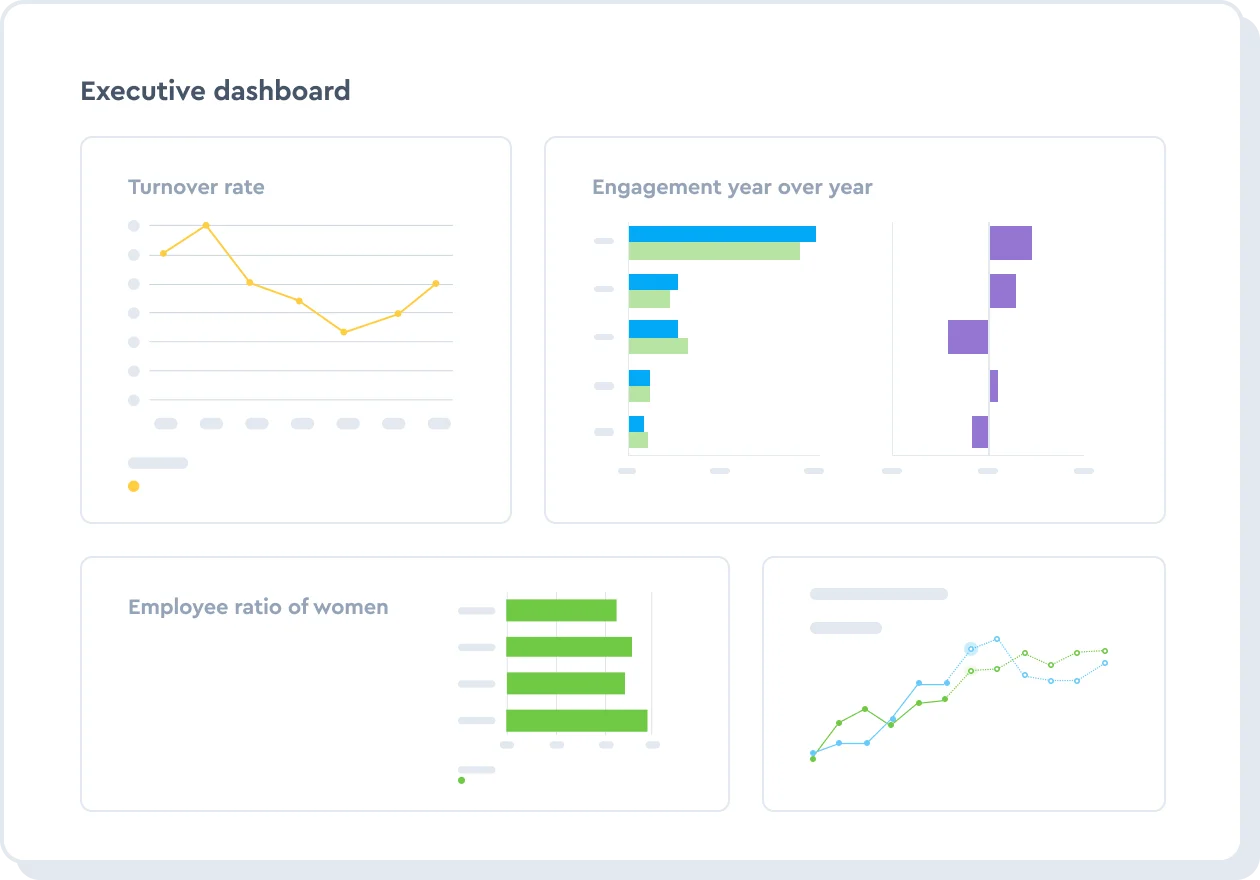
Visier is a dedicated, cross-source people analytics platform built for organizations that want predictive depth, think attrition risk and workforce planning, without needing to hire a data-science team to get it.
Its guided, question-based interface and large library of pre-built metrics are what set it apart from platforms that hand HR a blank canvas instead of a starting point. That combination has made it the brand most People Analytics leads name first when asked which vendor set the standard.
Key Features
- Pre-built metric library spanning attrition, engagement, DEI, and workforce planning
- Predictive modeling for flight risk and attrition
- Cross-source data model connecting HRIS, ATS, payroll, and survey data
- Guided, question-based analysis interface
- Benchmarking against industry data sets
- Role-based access controls for sensitive workforce data
Pros and Cons
Pros: "I like Visier because it can break down the data into bite-sized pieces, making it easier for everyone to understand. It breaks it down and allows you to effectively articulate the data to senior leadership." - G2 review
- The guided interface lets HR teams run genuine predictive analysis without writing a query.
- The pre-built metric library shortens time to first insight compared to building models from scratch.
- Cross-source integration means answers draw on more than one system's view of an employee.
Cons: "The mobile version is a bit clunky, I would like it to be a bit more intuitive and generate better results." - Capterra review
- Enterprise pricing puts it out of reach for smaller organizations, and it's not publicly listed.
- Connecting all relevant data sources during implementation takes real setup time and internal coordination.
- The depth on offer can be more platform than a small HR team without an analytics function needs.
Pricing
- No public pricing
- Quoted individually based on employee count, data sources connected, and module selection
- Enterprise-scale conversation required, not self-serve
2. ChartHop
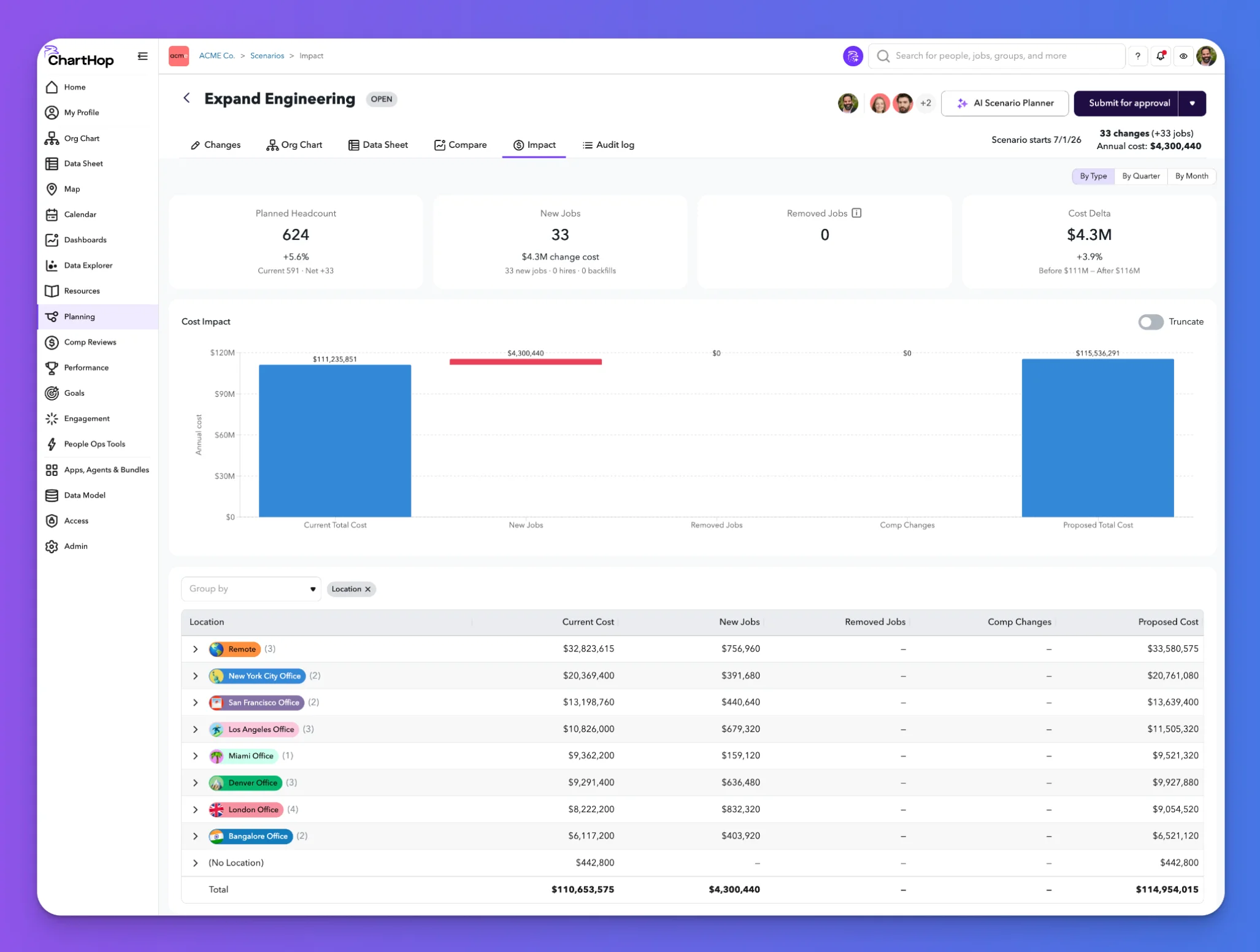
ChartHop pairs people analytics with org design, so a driver-analysis finding and the org chart it affects live in the same platform instead of two separate tools. That combination makes it a strong pick for organizations that want to analyze workforce data and immediately act on structure, headcount, or compensation planning without exporting anything to a slide deck.
Key Features
- Interactive org chart tied directly to live headcount and compensation data
- Scenario planning for reorgs, headcount changes, and compensation modeling
- Custom reporting and dashboards across HR data sources
- Diversity and DEI analytics built into standard reporting
- Compensation planning tools linked to org structure
- API and integration support for HRIS, ATS, and payroll systems
Pros and Cons
Pros: "The ease of using for the first time. It was not complicated and I was able to travel through the software very easily. That it wasn't confusing like many other applications." - Capterra review
- Org design and analytics sharing one platform removes a step most competitors leave to a separate tool
- Compensation and headcount scenario planning are genuinely useful for finance conversations, not just HR ones
- The interface earns consistent praise for being approachable to non-technical HR staff
Cons: "It doesn't include a payroll module; otherwise, we could already be using CH as our main HRIS." - G2 review
- Analytics depth trails dedicated pure-play platforms like Visier or One Model on predictive modeling
- Pricing scales with headcount, which is worth modeling before you commit at your projected size
- Some advanced features are gated to higher tiers, so confirm what's actually included before buying
Pricing
ChartHop operates on a per-employee-per-month (PEPM) modular structure:
- ChartHop Core ($5/employee/month): Includes people analytics, dashboards, AI insights, org charts, employee profiles, map view, and company calendar.
- Optional Add-on Modules ($3–$4/employee/month each): Add specific capabilities like HRIS, Headcount Planning, Compensation, Performance, Engagement, and Goals.
- ChartHop AI Pro: Available as a pay-as-you-go upgrade to automate workflows and take action using Ask ChartHop.
3. Culture Amp
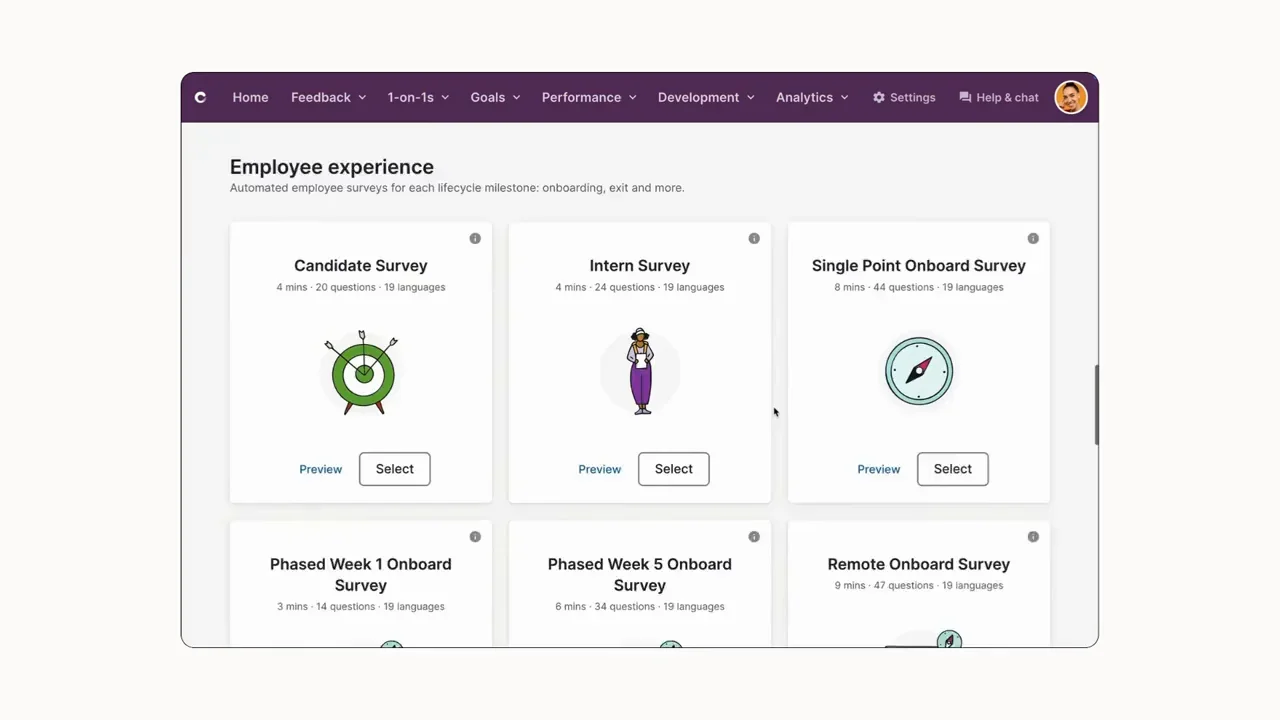
Culture Amp leads with engagement analytics rather than a general-purpose people-data model, and that focus shows in how deep the survey-driven analysis goes. Driver analysis and benchmark comparisons against thousands of other companies are the core of the product, which makes it the strongest choice on this list when sentiment and engagement, not full cross-source workforce data, are the primary analytics question.
Key Features
- Engagement, performance, and development survey analytics
- Driver analysis identifying what most affects engagement and retention
- Benchmark comparisons against a large, cross-industry data set
- Manager-level dashboards for team-specific engagement trends
- DEI-focused reporting and demographic analysis
- Action-planning tools tied directly to survey findings
Pros and Cons
Pros: "We use CultureAmp to collect and provide semi-annual peer and management performance feedback. The platform is relatively simple and straightforward." - Capterra review
- Benchmark data drawn from thousands of companies gives context most standalone survey tools can't offer
- Driver analysis translates survey results into specific, actionable factors instead of a raw score
- The platform stays approachable for HR teams without deep analytics training
Cons: "The inability to speak to the integration team. We are trying to set up exit surveys and have not been able to automate. Everything is through email." - G2 review
- Analytics center on survey data rather than a full cross-source workforce model, so attrition prediction from other data types is limited
- Pricing isn't published, and quotes can vary widely by employee count and module mix
- Support for deeper integration requests has drawn specific complaints in recent reviews
Pricing
- No fixed public pricing tiers
- Quoted based on employee count and selected modules
4. Teamflect
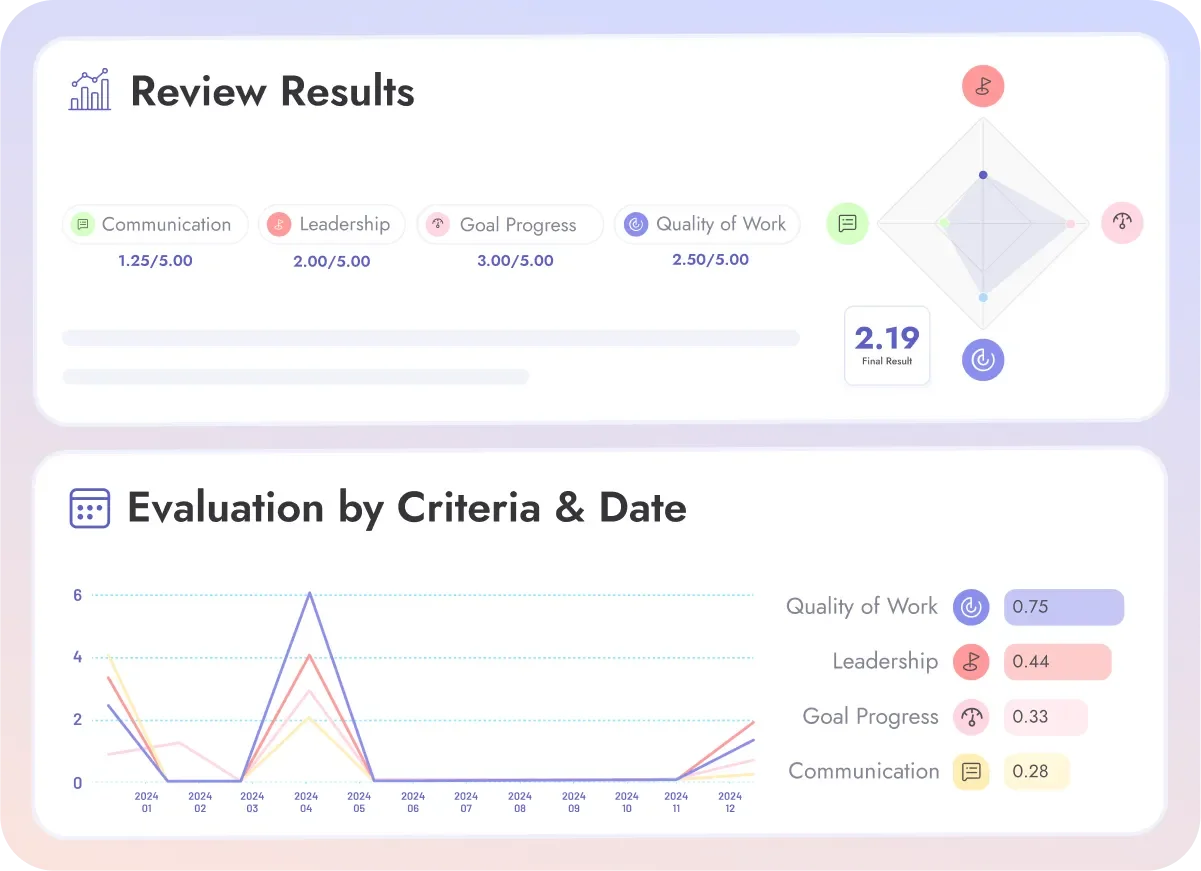
Teamflect is not a dedicated, cross-source people analytics platform, and it's worth saying plainly upfront: this entry is scoped specifically to Microsoft 365 organizations whose analytics needs center on performance and engagement data.
Within that scope, it delivers real value, with dashboards that live natively inside Teams and a Power BI connector for teams that want to build out deeper visualizations without leaving the Microsoft ecosystem.
Key Features
- Performance and engagement dashboards inside Microsoft Teams
- Power BI integration for custom reporting and visualization
- 1:1 and feedback data rolled into manager-level insight
- Goal and OKR progress tracked alongside performance data
- Recognition and engagement trend reporting
- Native Microsoft 365 and Outlook integration, with SSO through Microsoft Entra ID
Pros and Cons
Pros: "It is so simple to use, easy to read and ensures easy but meaningful feedback for everyone involved." - Capterra review
- The free tier for small teams removes the usual procurement friction for a first pilot
- Building performance and engagement insight directly inside Teams removes a separate-portal step most competitors still require
- The Power BI connector gives HR teams a real path to deeper analysis without buying a second analytics tool
Cons: "On Integrations, it works best within the Microsoft ecosystem, so it may feel limiting for companies using a wider mix of third-party tools." – G2 review
- Requires a Microsoft account, so organizations outside the Microsoft 365 ecosystem lose the native-delivery advantage the rest of this entry is built around
- No core HR features like payroll, so people analytics still needs to sync with a separate HRIS for full employee context
Pricing
- Free Starter tier for up to 10 users
- Essential: $7/user/month
- Professional: $11/user/month
- Custom Enterprise options available
- Annual billing brings a 22% discount; non-profits get up to 60% off
- No extra fees for support or training
5. Crunchr
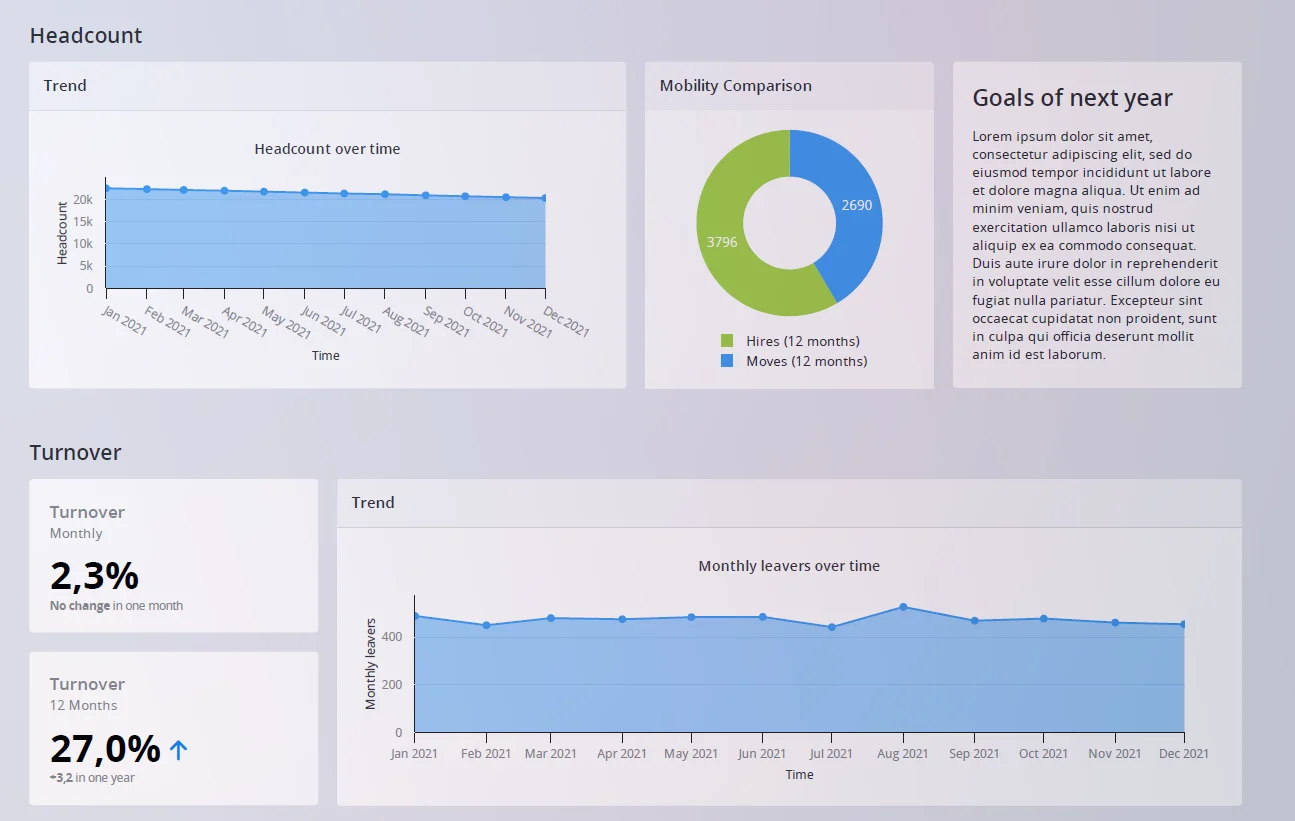
Crunchr built its reputation on speed of setup rather than raw feature count, and that's the right way to frame it. It's a dedicated platform connecting multiple HR data sources into self-service dashboards, aimed at organizations that want real people-analytics depth without a lengthy implementation project standing between purchase and first insight.
Key Features
- Self-service dashboards across HRIS, ATS, and performance data
- Fast implementation compared to enterprise-scale competitors
- Attrition and workforce planning modules
- DEI and pay-equity reporting
- Custom dashboard building without heavy technical support
- Scenario modeling for headcount and workforce planning
Pros and Cons
Pros: "Easy to use throughout the day. Not complicated." - Capterra review
- Faster time to first insight than most dedicated competitors, based on implementation timelines cited across reviews
- Self-service dashboards reduce dependence on an internal analytics team for day-to-day questions
- Strong fit for mid-market organizations moving up from spreadsheets or basic HRIS reporting
Cons: "Some customization options are limited, and it can take time to load large datasets." - G2 review
- Predictive modeling depth trails specialists like One Model for organizations with mature data-science needs
- Performance can lag on very large datasets, per multiple reviewer reports
- Brand recognition and ecosystem size are smaller than category leaders like Visier
Pricing
Crunchr operates on a tiered, per-user subscription model with volume discounts and a free 7-day trial:
- Small Business (Up to 12 users): $4.49 per user/month for App-only or Desktop, or $6.49 per user/month for the combined bundle.
- Medium Business (12 to 20 users): 10% discount, bringing rates to $4.04 per user/month (App/Desktop) or $5.84 per user/month (Combo).
- Enterprise (20+ users): 15% discount, reducing pricing to $3.82 per user/month (App/Desktop) or $5.52 per user/month (Combo), alongside custom-built enterprise solutions.
Inclusions: All plans feature centralized corporate invoicing, onboarding support, Admin Portal access, custom GL codes, and automated reporting.
6. Workday People Analytics
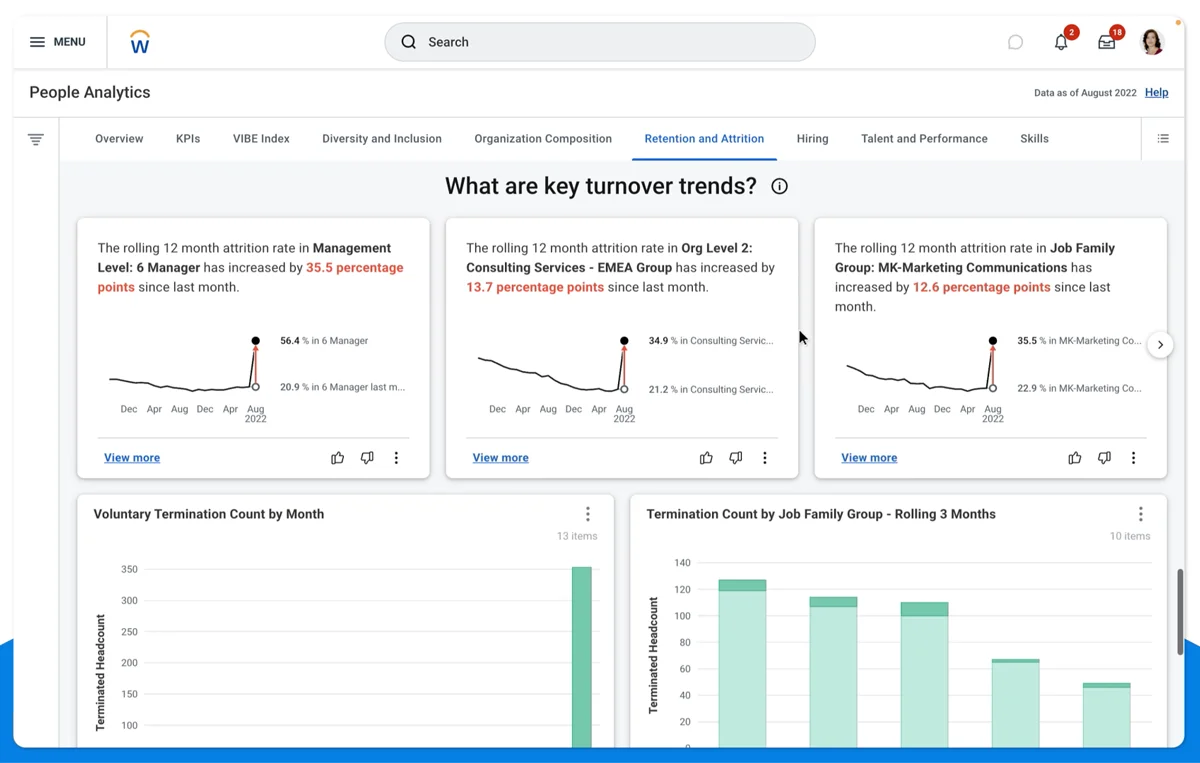
Workday People Analytics is enterprise HCM-native analytics, meaning its real value shows up almost entirely for organizations already running Workday HCM. Augmented analytics and workforce insight are built directly into the suite, so an existing Workday customer gets analytics on the same data model they already trust, without adding a new vendor relationship.
Key Features
- Augmented analytics built into the Workday HCM suite
- Natural-language querying of workforce data
- Workforce planning tied to the same records used for payroll and HR
- Skills Cloud data feeding into workforce insight
- Manager-level dashboards embedded in existing Workday workflows
- Predictive insight for attrition and workforce risk
Pros and Cons
Pros: "Vendor management and candidate management help to manage the data for business leaders, as well as with self-work productivity." - Capterra review
- One data model across HR, payroll, and analytics removes integration work a standalone platform would require
- Existing Workday customers benefit from years of data already sitting in the system
- Predictive workforce insight is delivered on the same trusted records used for core HR processes
Cons: "The rate at which Workday releases new features in HCM module are great but very frequently rolled out. Overall no complaints, its a great HCM platform." - G2 review
- Value is tied almost entirely to being a Workday HCM customer already; it's not a realistic standalone analytics layer
- The pace of feature releases, while positive overall, means ongoing training to keep teams current
- Enterprise cost and complexity put it out of reach for organizations not already on the platform
Pricing
- Bundled into the broader Workday HCM suite
- Enterprise-scale pricing, quoted individually
- No standalone rate
7. One Model
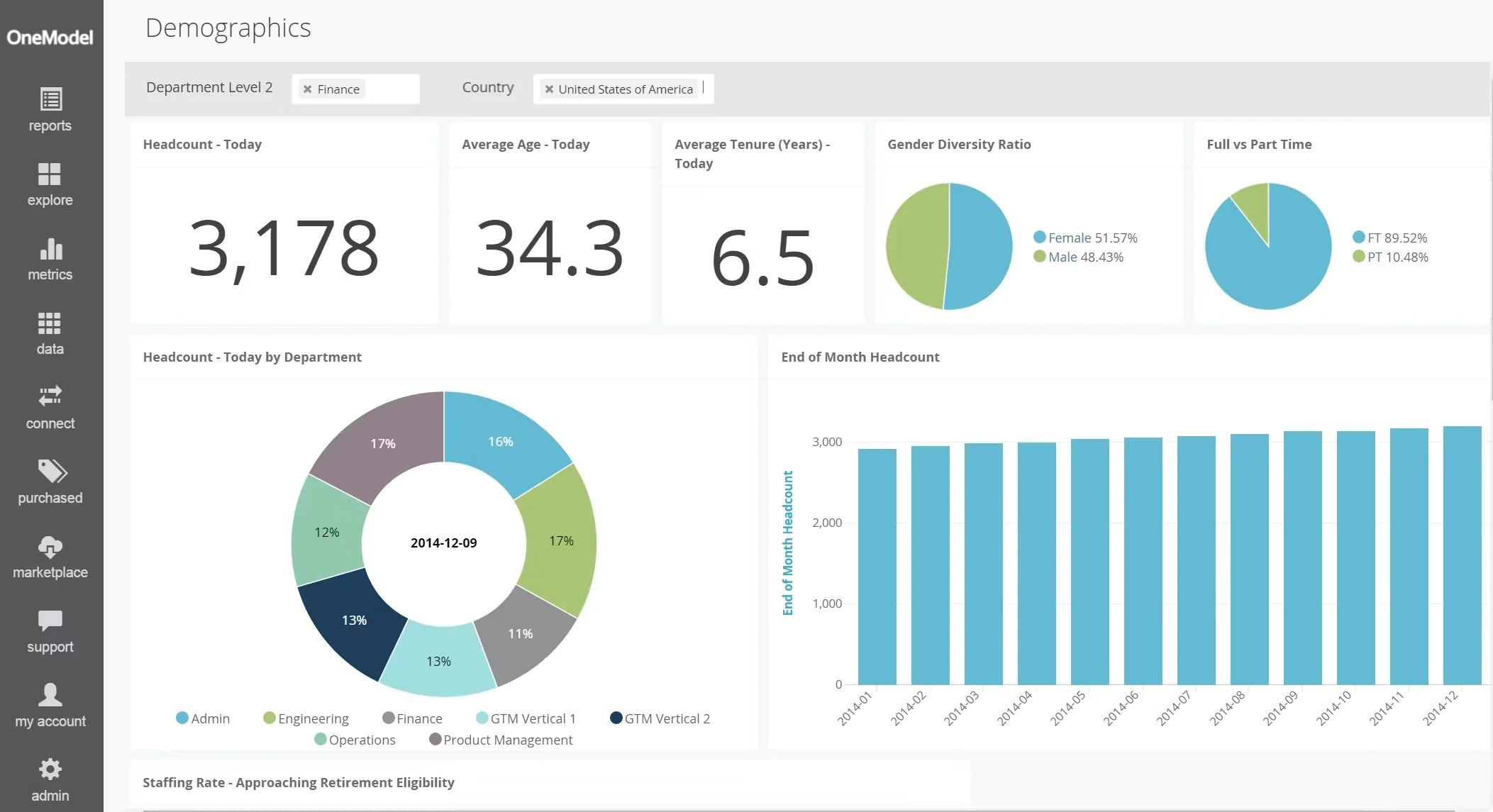
One Model is the platform on this list built for teams that want to own their own models, not borrow someone else's. It's a data-science-grade people analytics platform with real modeling flexibility, and it rewards an organization with an existing analytics function far more than one still deciding whether it needs one.
Key Features
- Flexible data modeling with control over pipelines and transformations
- AI-assisted analysis for pattern detection and prediction
- Custom metric building beyond a fixed library
- Support for large, complex, multi-source data sets
- Enterprise-grade security and governance controls
- Open architecture for integrating with existing data infrastructure
Pros and Cons
Pros: "Easy implementation, fully customizable, and infinitely scalable." - G2 review
- Modeling flexibility gives mature analytics teams control that guided platforms don't offer
- Scalability holds up for organizations with genuinely large or complex data sets
- Open architecture makes it easier to fit into an existing data infrastructure rather than working around it
Cons: "As the AI component is relatively new, we are still 'teaching' it and teaching our users how to interact with it to get the best responses." - G2 review
- The platform assumes analytics skill on staff; HR teams without one will find the learning curve steep
- Newer AI features are still maturing, per user reports, and require training time on both sides
- Implementation effort is real, and organizations should budget time accordingly, not just license cost
Pricing
- No public pricing
- Enterprise quotes based on data volume, modules, and implementation scope
8. Lattice
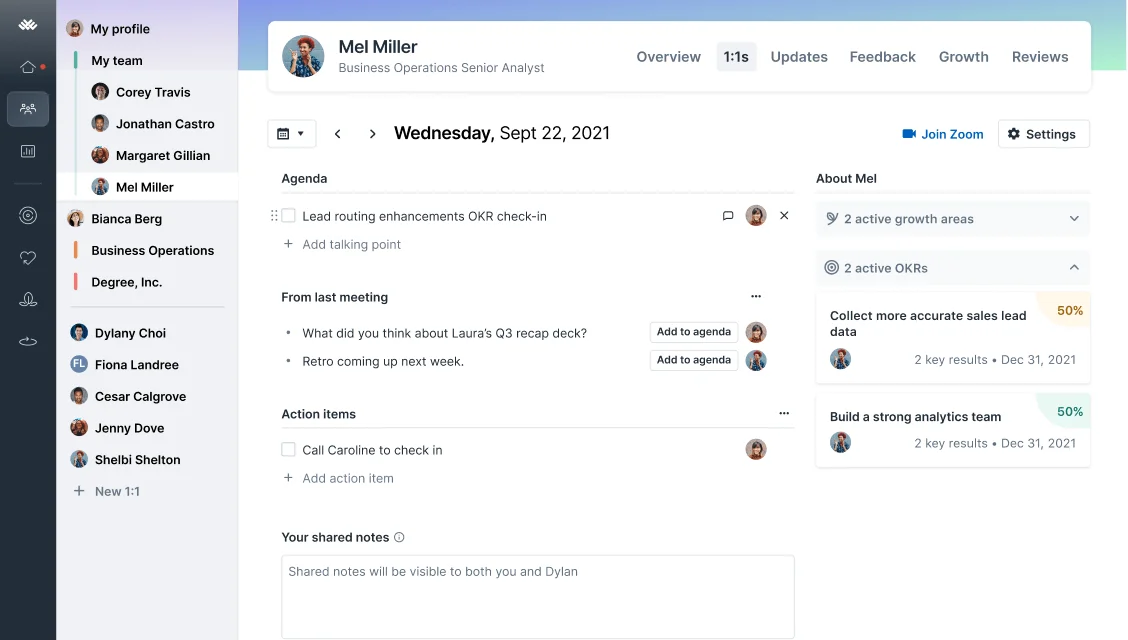
Lattice puts people insight inside the same platform where performance reviews, goals, and engagement data are already being generated, rather than exporting them somewhere else to analyze. That's a real advantage for organizations that want analytics sitting next to the workflow, though it comes with an honest tradeoff: the analytics are scoped to Lattice's own data, not a full cross-source workforce model.
Key Features
- Performance, goals, and engagement data unified in one platform
- People insight dashboards tied directly to review and 1:1 cycles
- Org chart and headcount visibility
- Manager-level analytics on team performance trends
- Feedback and recognition data feeding into engagement insight
- Compensation module available as an add-on
Pros and Cons
Pros: "It does a ton - employee reviews, 1:1 meeting tracking, employee org chart, employee feedback, performance summaries." - Capterra review
- Analytics sitting alongside the workflow that generates the data removes an export step other platforms require
- Broad feature coverage means fewer tools for a mid-sized HR team to manage day to day
- Performance and engagement data connect naturally without a separate integration project
Cons: "It's very 1:1, some teams need more group functionalities." - G2 review
- Insight is limited to Lattice's own data; it's not a cross-source people analytics platform in the Visier or ChartHop sense
- Modular pricing means costs escalate as additional analytics and HR modules get added
- Group-level analysis trails platforms built specifically around team and org-level modeling
Pricing
Lattice uses a modular, per-seat subscription model with base packages and add-on options:
- Foundations Package: Priced at $13 per seat/month, serving as a popular bundled option that includes Performance Reviews, PIPs & Calibrations, Goals & OKRs, 1:1s, Weekly Updates, Feedback & Praise, Analytics, and an AI Agent.
- Standalone Base Products: Can also be configured individually, such as Performance ($10 seat/month), Goals & OKRs ($8 seat/month), and Engagement ($4 seat/month).
- Add-on Modules: Specialized add-ons include Growth ($4 per seat/month) and Compensation ($6 per seat/month).
- Enterprise Custom Pricing: Available for larger organizations, scaling based on total seats, system complexity, and organizational scope.
9. Orgnostic
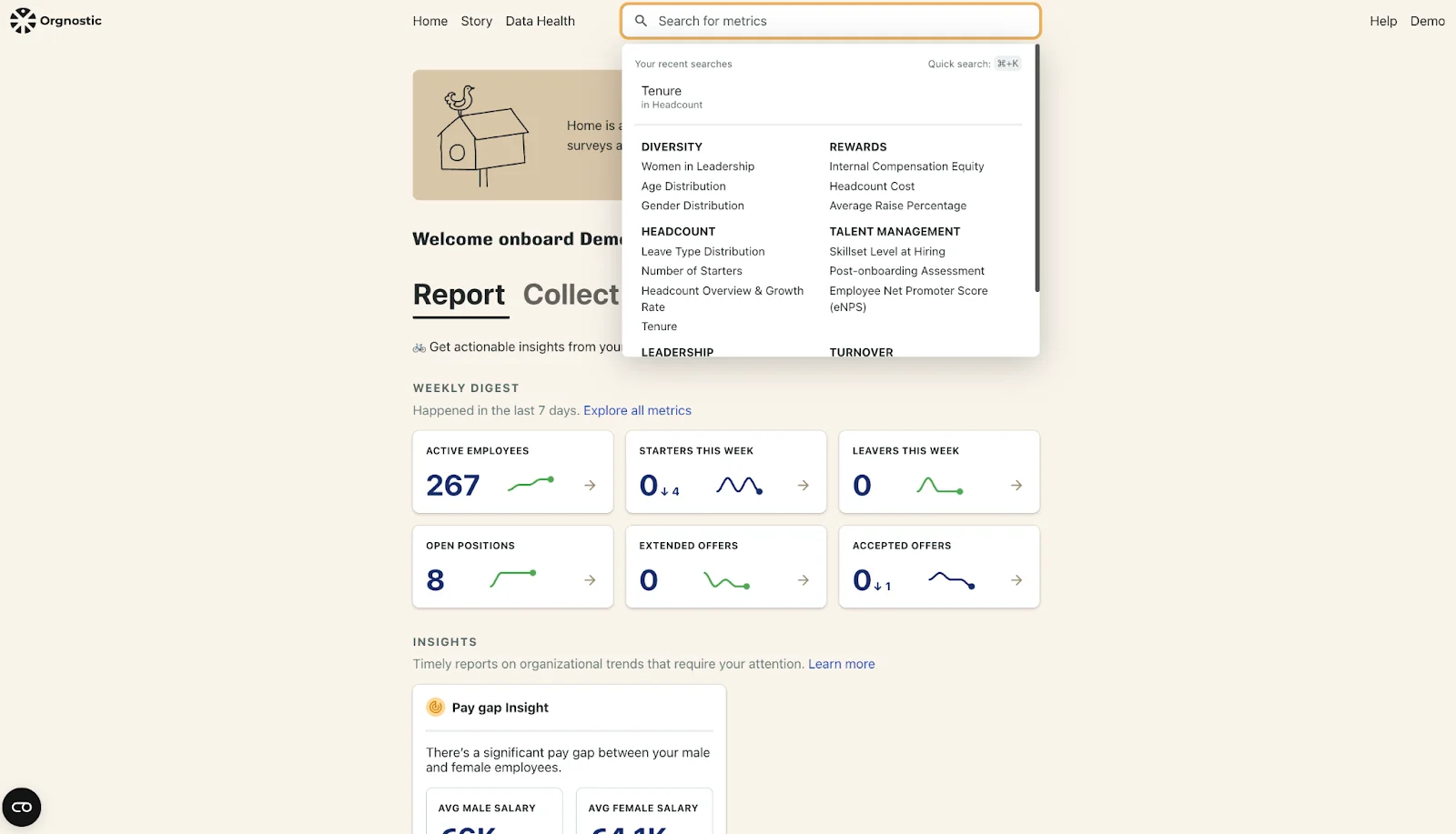
Orgnostic takes ready-made metrics and benchmarks and connects them directly to a company's existing HR data sources, aimed squarely at growth-stage organizations trying to stand up a people-analytics practice without hiring a large data team first. It's a younger brand than most others on this list, and that shows up mainly in review volume rather than in the core feature set.
Key Features
- Pre-built metric library connected to existing HR data sources
- Benchmarking against comparable companies
- Attrition and retention analysis for growth-stage teams
- Dashboards designed for HR teams without a dedicated data function
- Integration support for common HRIS and ATS platforms
- Reporting built for board and leadership visibility
Pros and Cons
Pros:
- Ready-made metrics shorten the path to a working analytics practice for teams starting from close to zero
- Built specifically for growth-stage organizations rather than adapted down from an enterprise product
- Requires less internal setup than data-science platforms aimed at larger, more mature teams
Cons:
- Publicly available third-party reviews are thinner than for more established platforms on this list, so buyers should ask for references directly
- Analytics depth trails enterprise-scale specialists like Visier and One Model
- Integration coverage should be checked carefully against your specific stack before committing
Pricing
- No public pricing
- Quoted based on company size and modules selected
10. Worklytics
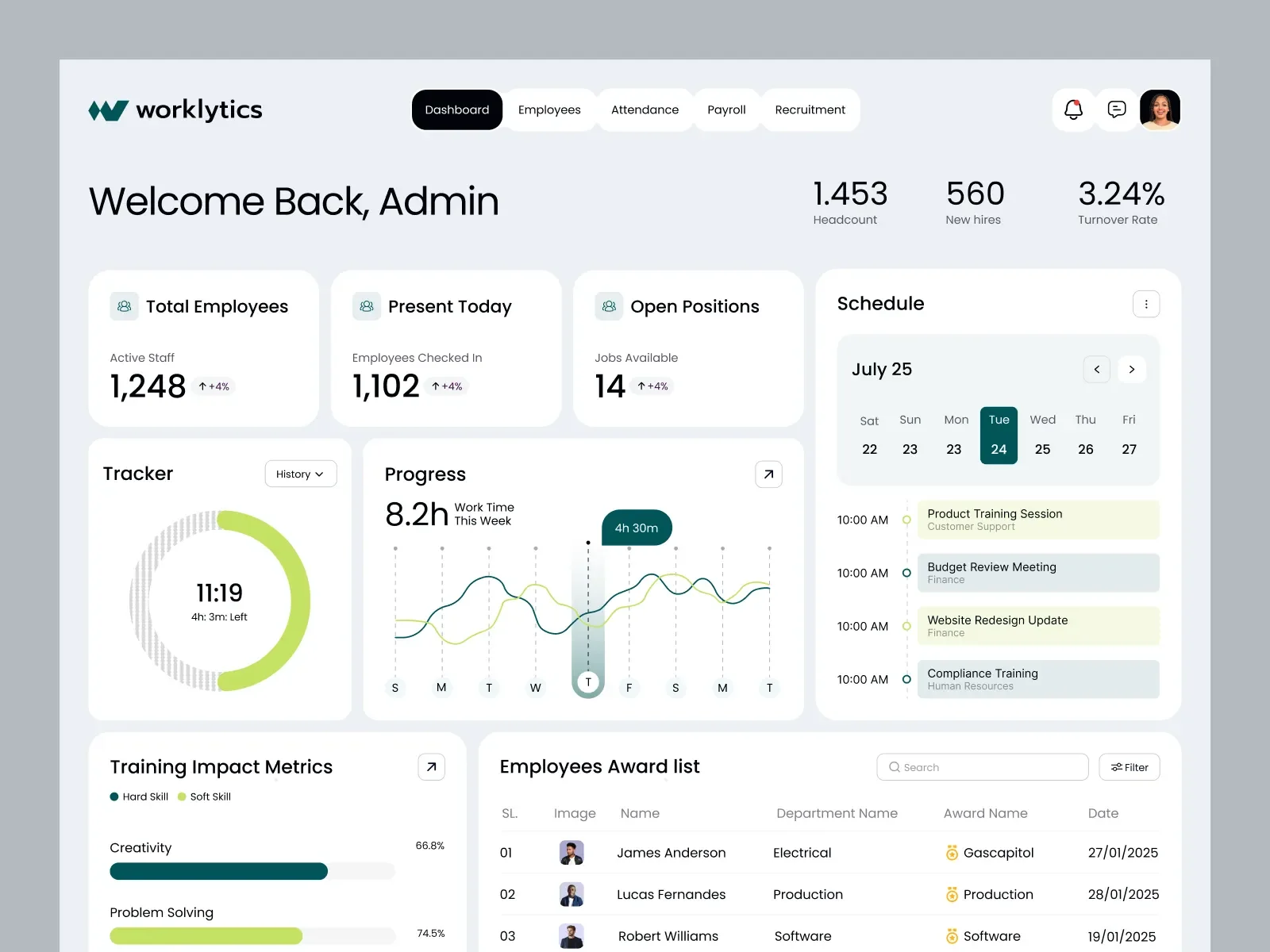
Worklytics takes a different data source entirely: collaboration metadata from tools like Teams, Slack, and calendars, to surface organizational network patterns rather than survey or HRIS records. Used well, that surfaces how work actually flows across an organization. Used poorly, the same data becomes a surveillance risk, and that distinction has to be part of how any organization deploys it.
Key Features
- Organizational network analysis from collaboration metadata
- Work-pattern insight across meetings, messaging, and calendar data
- Aggregate reporting designed to protect individual privacy
- Integration with Microsoft 365, Slack, and Google Workspace
- Benchmarking of collaboration patterns across teams
- Governance controls for aggregation thresholds and access
Pros and Cons
Pros: “Easy installation Friendly customer care service Competitive price Photo audit function to avoid clock-ins by other employees.” - Capterra review
- Collaboration data surfaces informal work patterns that HRIS or survey data can't show on its own
- Aggregate reporting design reflects a genuine effort to build in privacy protection rather than bolt it on afterward
- Useful for identifying overload, silos, and network gaps that don't show up in standard engagement surveys
Cons: “The same pros might become cons for some users. For instance, one might feel lonely as you can not interact with real people as you do not need office space. This very thing might result in problems like miscommunication and many more.” - Capterra review
- This is a narrower category than full people analytics; it doesn't replace HRIS-connected attrition or workforce planning tools
- Deployment requires real transparency with employees about what's measured and how, and that's a governance requirement, not an optional add-on
- Value depends heavily on how thoughtfully aggregation and communication are handled going in
Pricing
Worklytics offers three primary subscription tiers tailored to team size and data maturity:
- Free Plan (Free forever): Designed for calendar-only insights, supporting up to 100 users, 30 days of data history, dashboard access, and basic meeting/collaboration metrics.
- Business Plan (Starts at $2,500/month): Best for organizations with 100 to 1,000 employees. Includes up to 200 users (with additional users at $10 per user/month), up to 5 integrations, 3 months of data history, org-wide reporting, AI adoption insights, and pre-built collaboration metrics.
- Enterprise Plan (Custom pricing): Built for organizations requiring raw data pipeline access (API/warehouse), individual row-level datasets, predictive analytics, advanced security controls (SSO, on-prem proxy), and dedicated data science support.
How to Choose People Analytics Software for Your Team
The right platform on this list depends on two honest answers: how deep your analytics needs actually go, and whether your team can use a data-science-grade platform or would be better served by a guided one.
- If you're a large organization with a mature analytics function, Visier or One Model give you the cross-source depth and modeling control to match that team.
- If org design and headcount planning are as important as the analytics itself, ChartHop keeps both in one place instead of two separate tools.
- If engagement and sentiment are your main question, Culture Amp's benchmark data and driver analysis are built specifically for that.
- If you're on Microsoft 365 and your analytics center on performance and engagement, Teamflect delivers that scoped insight natively inside Teams, with Power BI available for anyone who wants to go further.
- If you want dedicated analytics without a long implementation, Crunchr and Orgnostic both prioritize speed over raw depth.
To choose the right software, match your tool to your team's actual capabilities rather than buying for an idealized future. Pick two or three platforms that align with your data maturity, request a live demonstration focused on your specific attrition or engagement questions, and compare how well each platform handles your real-world workflow.
Final Words
There’s no single best people analytics platform, only a best fit for your team's data maturity and the questions you actually need answered. While Visier, ChartHop, and Culture Amp remain the strongest choices for genuine cross-source, predictive intelligence, other options serve narrower operational needs. Knowing which category you are shopping in is most of the decision.
To narrow it down, pick two or three platforms from this list that match your actual buyer profile rather than an ideal world with unlimited headcount. Book a demo with each, ask specifically how they would model your attrition or engagement questions, and compare the answers side by side.