.avif)
.avif)

.svg)
Compensation management software is one of the most searched and least understood categories in the HR tech market. Many buyers arrive looking for something that turns out to be payroll software, which is a different product entirely. Payroll tools process payments. Compensation management software handles how pay is structured, benchmarked, planned, and governed before a single dollar moves.
If your HR team is running merit cycles across a stack of conflicting spreadsheets, or if a pay equity audit has surfaced gaps you can't easily explain, you are the buyer this guide is written for. The best compensation planning software replaces that manual process with structured workflows, reliable benchmarking data, and reporting that holds up to scrutiny.
This guide covers the 10 best compensation management tools available in 2026, evaluated across benchmarking data quality, merit cycle workflow, pay equity features, integrations, and pricing transparency.
If you want a quick glimpse on the best compensation management software, here's a video covering our top 5 picks:
What to Look for in Compensation Management Software
Not every compensation management system is built for the same buyer. Before you start booking demos, it helps to know which capabilities actually matter for your organization's size, industry, and compliance obligations.
If you're not yet sure whether compensation software is the right category for your problem, our step-by-step guide to choosing HR software walks through the category-sizing question first.
1. Benchmarking Data Source and Freshness
Choosing a data source is the most vital part of the process. Real-time platforms (like Pave or Ravio) pull data directly from HRIS systems for instant accuracy, which is ideal for fast-paced industries like tech. Annual surveys (like Mercer or Payscale) have a six-to-eighteen-month lag but may suffice for stable sectors.
2. Merit Cycle Workflow and Manager Experience
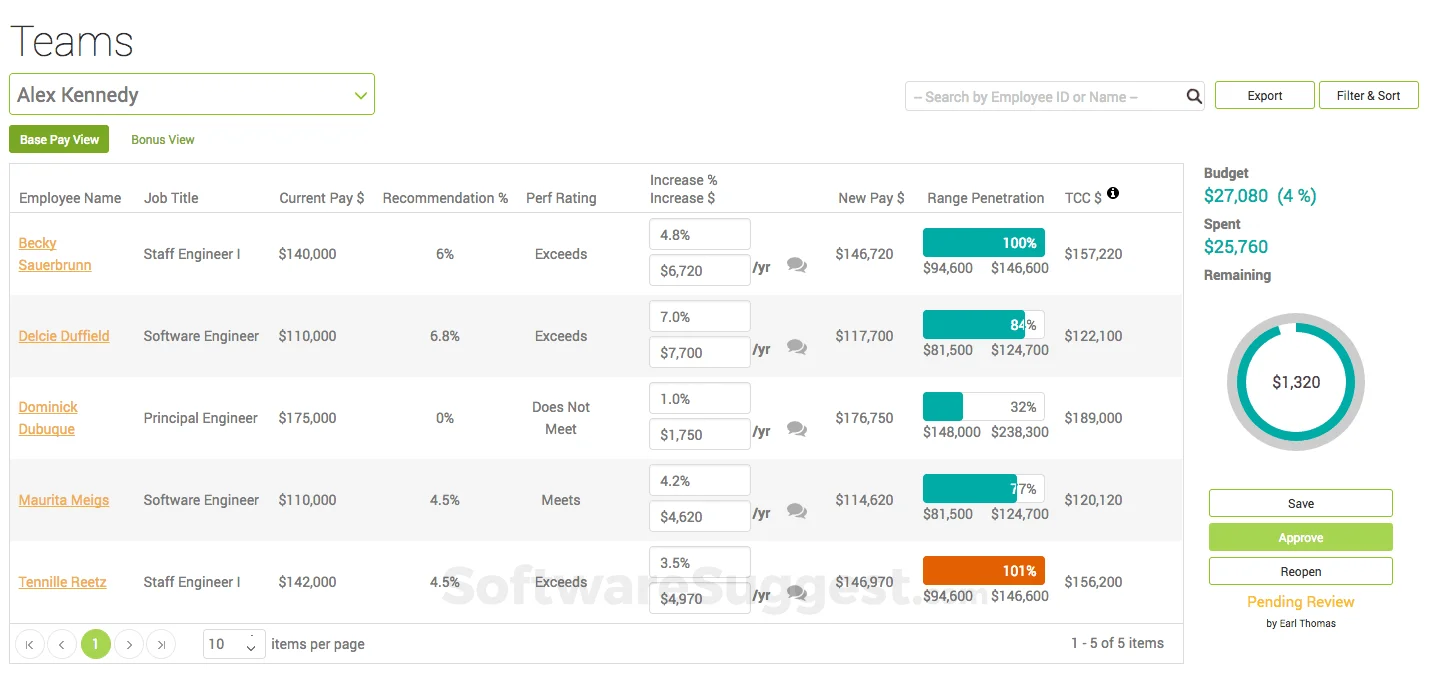
Effective software replaces manual spreadsheets by providing managers with a clear view of salaries and budgets. The platform must enforce budget guardrails and approval paths automatically. If HR still has to manually check every recommendation against pay bands, the tool isn't solving the primary workflow issue.
3. Pay Equity Analysis and Compliance
With the rise of global pay transparency laws, your software must automate gap analysis for protected characteristics like gender and ethnicity. Ensure the tool generates reports that satisfy specific legal audits in your region, as not all platforms offer mature compliance features.
4. Integration with Your HRIS and Performance Platform
To remain useful, compensation tools must sync with your HRIS (e.g., Workday or BambooHR) to maintain accurate headcount. Native integrations with performance data allow managers to weigh recent ratings against pay ratios, leading to better-informed raises without the hassle of manual data transfers. Namely is another HRIS commonly in this mix for mid-sized companies, particularly those that want compensation planning to sync with a system that already handles core HR and benefits.
5. Pricing Model and Total Cost of Ownership
Costs vary wildly, often requiring custom quotes based on headcount. Beyond the monthly fee, look for hidden costs like implementation charges, price hikes, and whether benchmarking data is a paid add-on. Confirm data portability so you can retain your records if you switch providers.
10 Best Compensation Management Software Tools in 2026
The following platforms represent the strongest options available across the core buyer types: those who need salary benchmarking data primarily, those who need merit cycle workflow automation, and those who need both in the same system.
1. Lattice: Best Compensation Software for Performance-Connected Pay
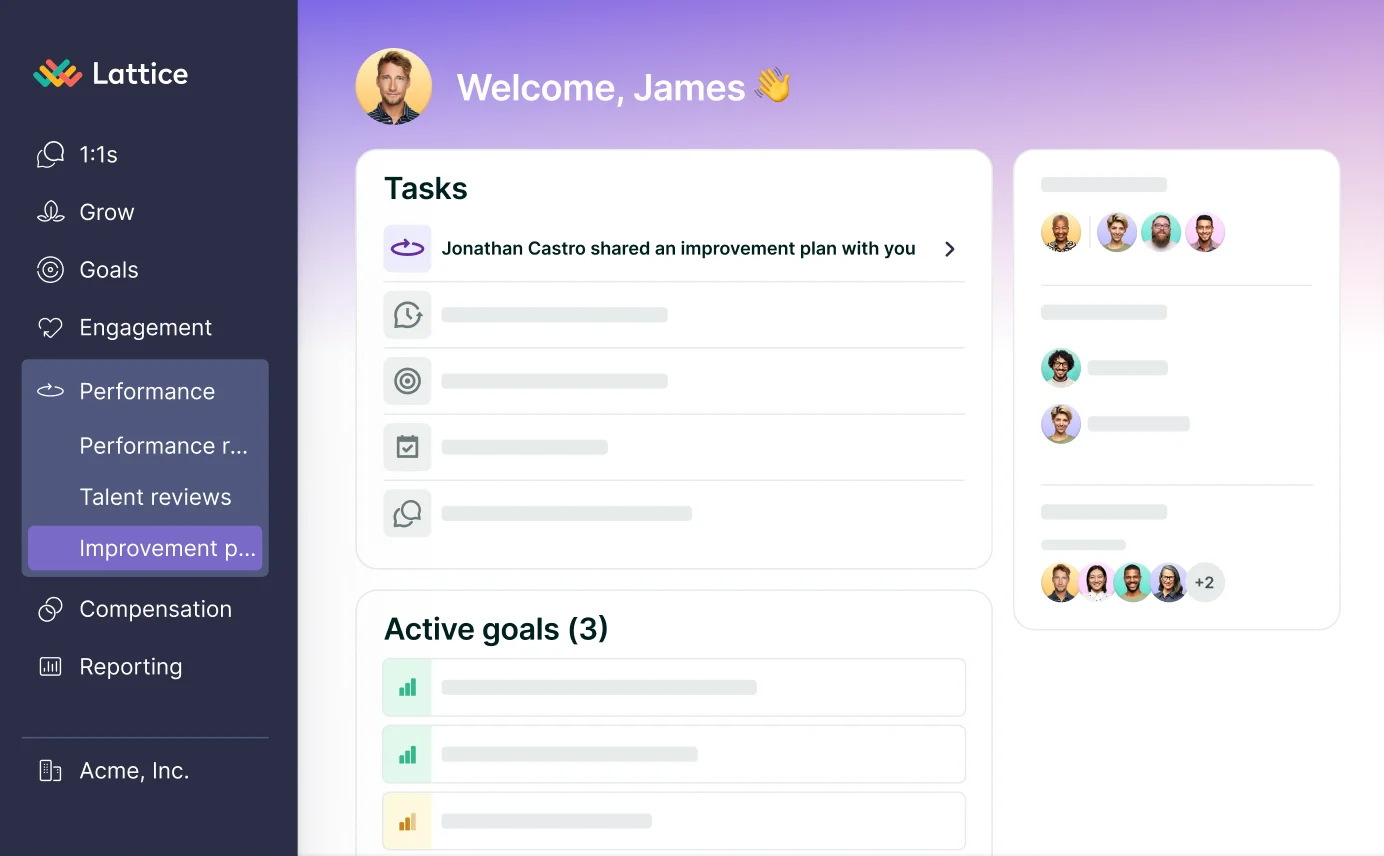
Lattice offers a compensation add-on that sits directly on its performance management suite. This setup allows HR teams to link merit cycles to performance ratings and goals without external integrations.
The module handles salary bands, approval workflows, pay equity, and total rewards statements. However, its benchmarking data relies on Mercer’s annual surveys; organizations in fast-paced industries should consider if this reporting lag meets their needs.
Key Features
- Merit cycles that sync performance data and goal progress directly into compensation planning
- Salary band setup and pay ratio visibility within manager dashboards
- Approval paths with built-in restrictions to maintain budget and pay range compliance
- Automated pay equity assessments housed within the module
- Employee access to personalized total rewards statements
- Market benchmarking provided through Mercer's annual survey database
- Native connections to major systems like Workday and BambooHR
What Makes Lattice Stand Out
- Unified environment where performance results drive pay decisions without external data syncing
- Fast deployment for existing users due to familiar workflows and shared data structures
- Enhanced employee transparency through reward statements that help strengthen retention efforts
Pros and Cons
Pros: "It helped to organize our growth and development within the organization." — G2 Review
- Performance-linked compensation planning is the clearest differentiator from standalone benchmarking tools
- Pay equity analysis is included without a separate add-on purchase
- Strong adoption among mid-market HR teams already invested in the Lattice ecosystem
Cons: "I wish it had more features and trainings offered for their services offered. Sometimes I stumble upon new things that the service can do and wish I’d known sooner about particular details." — Capterra Review
- Benchmarking relies on Mercer annual survey data, which carries a six-to-eighteen-month lag
- Compensation is an add-on, not a core product; organizations with complex benchmarking needs may eventually require a dedicated tool
- Minimum $4,000 annual spend applies even for smaller teams
Pricing
The Lattice compensation module costs $6 monthly per user and must be added to a Talent Management base plan, for which specific rates are available upon request. To utilize these services, organizations must meet a minimum annual expenditure of $4,000. Additionally, the HRIS plan is available as a separate offering at a rate of $10 per user each month.
2. HiBob: Best for HRIS Users Adding Compensation Management
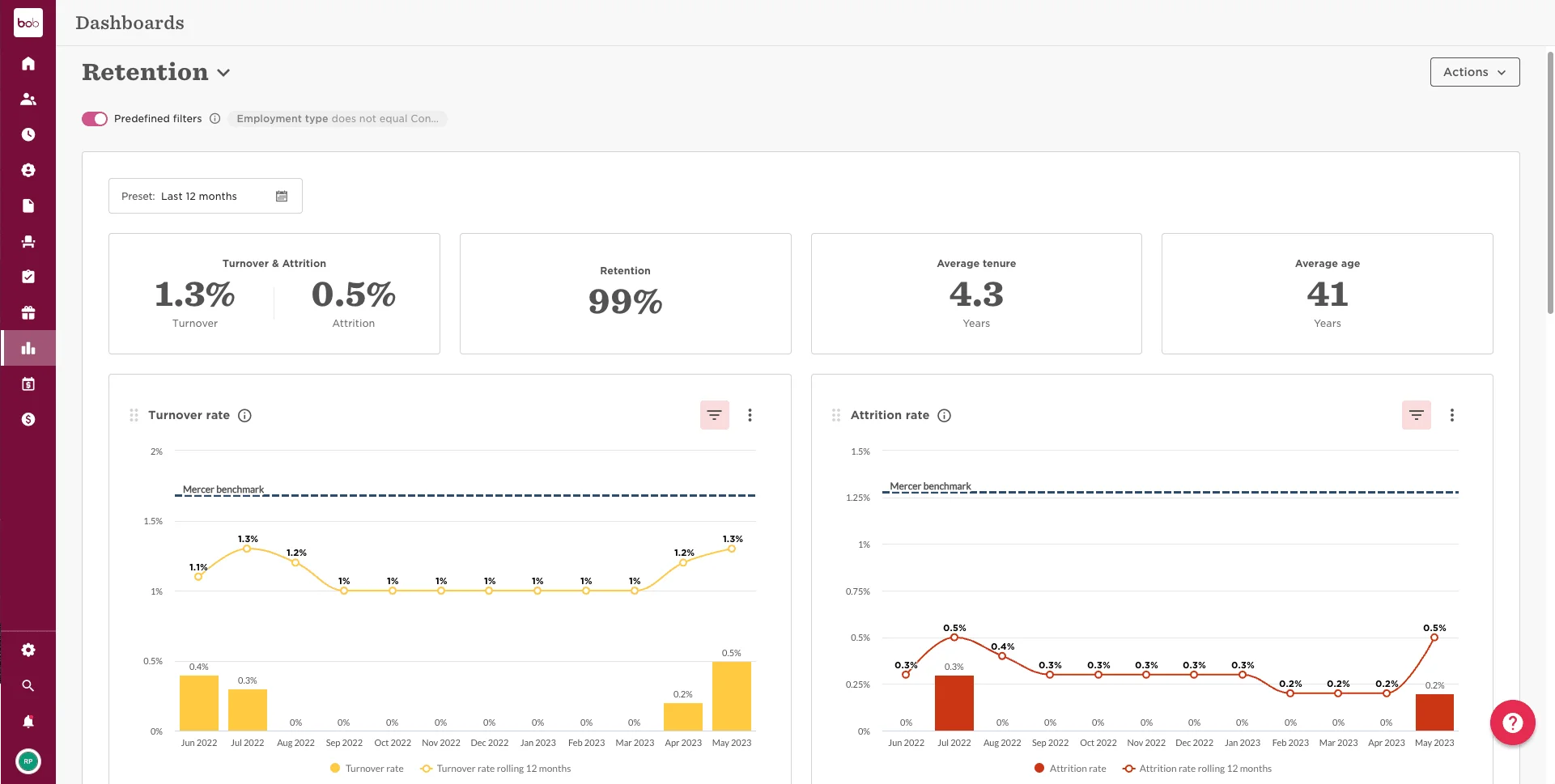
HiBob is a comprehensive HRIS that offers a compensation module for existing users who want to manage salary and merit cycles within their primary HR system. The main benefit is the native connection to live employee data, which removes the need for external integrations.
The module supports budget tracking, manager approvals, and pay equity reporting. It uses Mercer Comptryx for annual benchmarking, functioning as a seamless extension of the core platform rather than a dedicated, standalone compensation tool.
Key Features
- Pay planning and merit cycle oversight with manager-led approval paths
- Expense monitoring and total rewards transparency within the dedicated module
- Internal reporting for pay fairness and regulatory compliance
- Market data access through Mercer Comptryx annual surveys
- Zero integration setup needed for current HiBob users
- Automatic syncing with primary HR records for real-time staff and position accuracy
What Makes HiBob Stand Out
- Existing users skip the complex technical hurdles and data syncing required by independent platforms
- Centralizing pay and core HR data creates a more efficient environment for audits and documentation
- Fairness analysis and equity reporting come standard in the module at no extra cost
Pros and Cons
Pros: "There are many things I like about HiBob HRIS. The custom fields and categories are all reportable, and it’s great having all employee data in one place, from hire to retire." — G2 Review
- Significantly faster implementation for existing HiBob customers than a standalone compensation platform
- Core HR data and comp data in one system reduces reconciliation work
- Pay equity reporting is available without a separate tool
Cons: "I would change a bit the interface and the structure of the website. The structure of the website is not very straightforward: it was not easy to figure out that there are two tabs: Bob and Talent, so I couldn't find right away the space for my 1-on-1 and performance review." — G2 Review
- Mercer Comptryx benchmarking carries the annual survey lag shared by all traditional survey-based providers
- Organizations not already on HiBob lose the primary advantage; those customers will need to configure a separate HRIS integration
- Compensation is not HiBob's core product, and organizations with complex comp needs may find the module less capable than dedicated platforms
Pricing
HiBob offers a modular platform starting with its Core package, which includes an employee database, document management, and AI-driven analytics. Organizations can expand this foundation with additional payroll and finance modules as they grow.
Pricing is customized based on company size and specific feature needs, requiring a direct proposal for exact rates.
3. Assemble (by Deel): Best for Equity-Heavy Private Companies
.webp)
Assemble by Deel serves private companies in sectors like biotech and pre-IPO tech, where equity is a core component of pay. Through a Carta integration, the platform provides specialized equity benchmarking data that many competitors lack.
Beyond equity, the tool manages salary bands, merit cycles, and bonus planning. Its job architecture feature is particularly helpful for rapidly growing companies, allowing them to standardize titles and pay structures before beginning compensation reviews.
Key Features
- Equity benchmarking for private firms through direct Carta connectivity
- Access to the specialized CompGrid database for healthcare and biotech salary trends
- Unified workflows for pay band creation, merit reviews, and bonus oversight
- Systematized job architecture to align titles, levels, and pay ranges before reviews
- Budget forecasting tools that project the financial impact of compensation changes
- Available entry-level pricing beginning at $625 monthly for small organizations
What Makes Assemble Stand Out
- Exclusive private company equity data via Carta provides a level of insight that competitors generally lack
- Focus on job architecture allows fast-scaling companies to build a formal pay foundation rather than just managing existing data
- Transparent starting rates for smaller teams offer a rare point of clarity in a market dominated by hidden pricing
Pros and Cons
Pros: "I liked how easy it is to manage international payments and contracts in one place. The platform is user-friendly, and it simplifies things like compliance, invoicing, and getting paid across different countries." — Capterra Review
- Private company equity benchmarking is more developed than any other platform in this category
- Job architecture tooling addresses a real need for companies scaling compensation structure for the first time
- Published SMB pricing provides a clear entry point for smaller teams
Cons: "Deel restricted me from withdrawing payments on the due date for two consecutive months. My funds have been held for a week now. This delay caused foreign exchange losses (USD/BRL) and opportunity costs from foregone investment returns. Support has remained evasive, providing no clear justification or firm resolution deadline." — Capterra Review
- US-focused; benchmarking coverage for non-US organizations is limited
- Salary benchmarking (as distinct from equity benchmarking) is less mature than dedicated benchmarking platforms like Pave or Payscale
- Organizations not using Carta for equity management will find the primary differentiator less relevant
Pricing
Deel offers managed payroll services starting at $29 per employee monthly for global or US-based tax and compliance needs. For companies seeking a co-employment model, their US PEO plan starts at $125 per employee monthly and includes HR support and benefits administration.
4. Leapsome: Best Compensation Software for European Teams
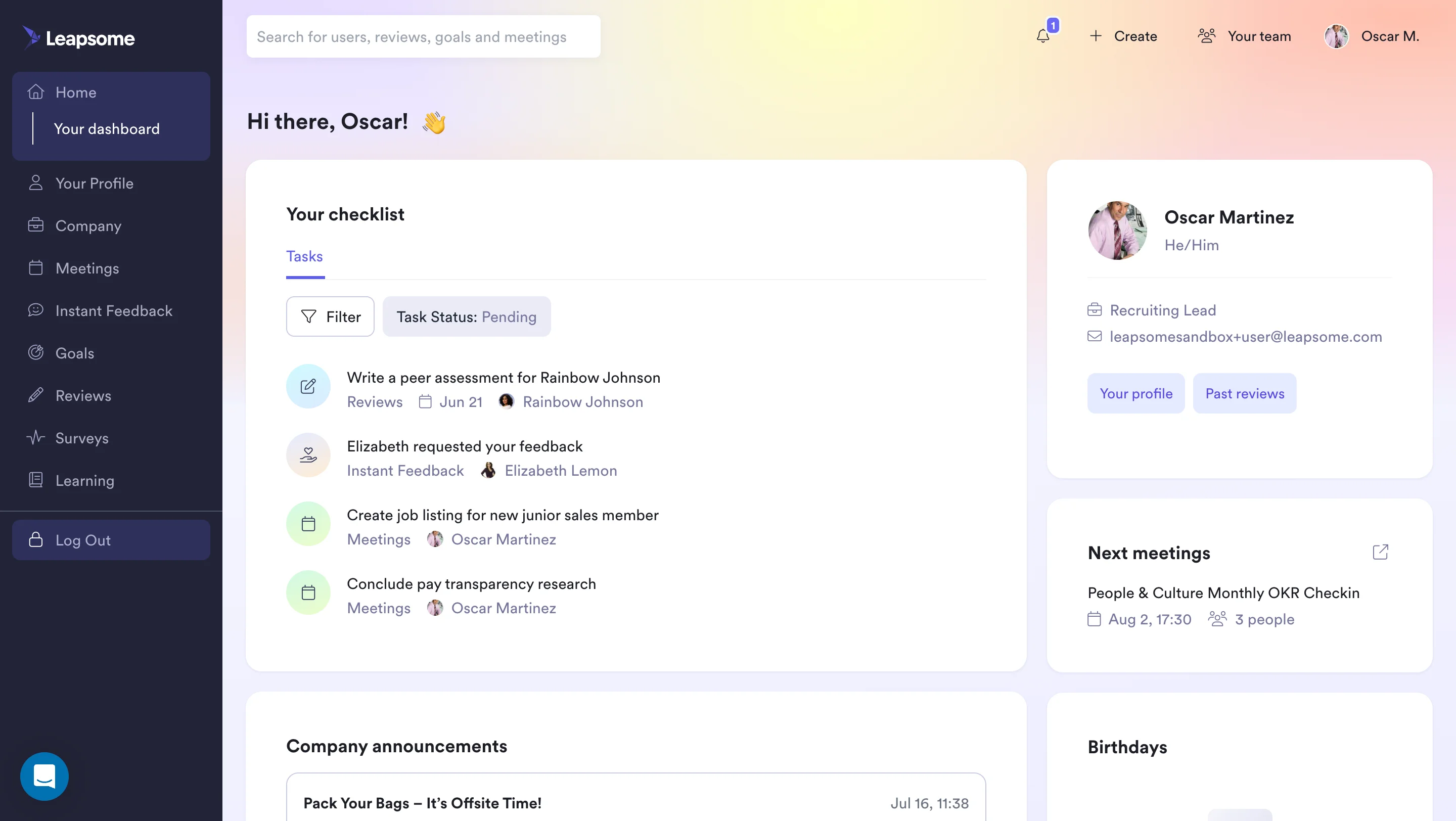
Leapsome is a European-focused people management suite that links pay reviews directly to performance metrics. Its GDPR-compliant framework and specialized reporting tools help organizations meet the requirements of the EU Pay Transparency Directive.
The platform handles salary bands, merit workflows, and budget oversight. While it utilizes Mercer Comptryx for annual benchmarking data, its primary strength lies in its ability to connect compensation decisions to internal performance data rather than the market data itself.
Key Features
- Pay review cycles that integrate performance scores and competency data directly
- Frameworks for salary band oversight and merit budget planning with manager-led approvals
- Internal tools for auditing pay fairness and generating equity reports
- Market benchmarking data sourced through Mercer Comptryx annual surveys
- Feature sets specifically designed for EU Pay Transparency Directive requirements
- Secure infrastructure meeting GDPR standards and SOC 2 Type II certification
- Flexible pricing that permits adding compensation tools to existing performance plans
What Makes Leapsome Stand Out
- Advanced compliance features for the EU Pay Transparency Directive provide a superior solution for European firms facing strict regulatory demands
- Direct link between performance metrics and pay cycles functions natively, eliminating the need for manual data syncing
- Privacy-first design ensures GDPR compliance is a core component of the platform rather than an added layer
Pros and Cons
Pros: "Leapsome has been great to work with! I’ve enjoyed the platform very much and it’s super simple to use!" — Capterra Review
- Best-suited for European organizations that need pay transparency compliance alongside merit cycle management
- Performance ratings feed directly into comp planning without integration work
- Modular pricing lets organizations start with performance management and add compensation later
Cons: "I think we could improve the history sections of previously completed items." — G2 Review
- Mercer Comptryx benchmarking carries an annual survey lag; not suitable as the sole data source for tech or AI-focused talent markets
- Platform cost and complexity increase as more modules are added
- Organizations outside Europe may find other platforms offer more relevant benchmarking coverage
Pricing
Leapsome offers a modular, AI-driven platform that allows organizations to select specific HR processes as needed. Prospective users can schedule a live demonstration with a product expert to evaluate the software's fit for their specific business requirements.
5. Comprehensive: Best for Teams Replacing Compensation Spreadsheets
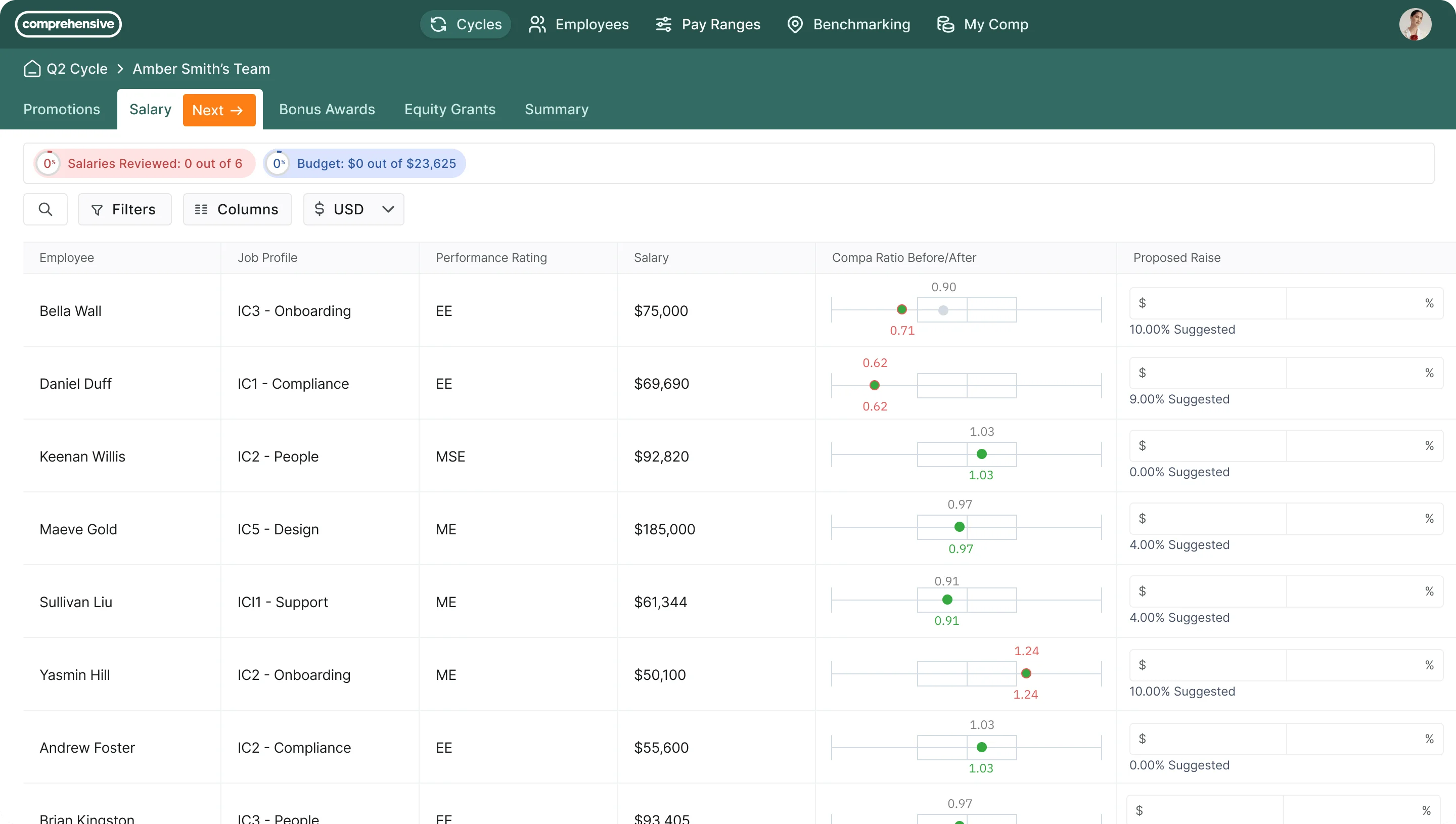
Comprehensive is a specialized platform designed to replace manual spreadsheet-based merit cycles. It consolidates merit, bonus, and equity planning into one workflow, offering managers live budget tracking and providing HR with customizable approval limits.
A key advantage is its rapid deployment, which takes weeks instead of months—ideal for mid-market teams. With native integrations for major HR and equity tools like Workday, BambooHR, and Carta, it fits into most existing tech stacks.
Key Features
- Consolidated planning for merit increases, bonuses, and equity in one streamlined process
- Live budget tracking that reflects manager-proposed salary changes instantly
- Pre-configured restrictions for pay ranges and approval steps to maintain compliance
- Extensive connectivity with major platforms like Workday, BambooHR, ADP, and Carta
- Rapid deployment schedule completed in weeks rather than months
- Optimized for mid-sized organizations with 100 to 2,000 staff members
What Makes Comprehensive Stand Out
- Instant budget updates for managers eliminate the need for HR to reconcile manual spreadsheets after the cycle
- Proven setup speed provides a significant advantage over complex enterprise tools that require long lead times
- Hard-coded guardrails prevent managers from proposing out-of-band raises, directly solving the primary pain point of manual compensation planning
Pros and Cons
Pros: "What I like best about Comprehensive is that it centralizes the entire compensation cycle into a single, structured workflow instead of relying on multiple spreadsheets and ad hoc documents." — G2 Review
- Workflow design is straightforward and requires minimal training for managers
- Fast implementation reduces the internal resource burden during deployment
- Broad integration library covers the most common mid-market HRIS and payroll platforms
Cons: "Our biggest pain point is the benchmark insights for sales roles, because the benchmark mapping feature currently shows base salary and doesn’t yet incorporate OTE." — G2 Review
- No proprietary benchmarking dataset; organizations need to import market data from a separate source
- Less suitable for organizations that need deep compensation benchmarking capabilities in the same platform
- Pricing is not publicly disclosed; contact vendor for a quote
Pricing
Comprehensive does not provide publicly disclosed pricing tiers. To receive a tailored quote, organizations must contact the company directly for custom pricing.
6. Ravio: Best Pay Equity Software for European Compliance

Ravio offers a real-time benchmarking and pay equity solution tailored for European firms and global companies with an EU presence. By connecting directly to HRIS platforms across 46 countries, it provides continuous data updates for over 300 roles, bypassing the delays of traditional annual cycles.
The platform excels in compliance, specifically for the EU Pay Transparency Directive. Features like pay gap analysis and audit-ready reporting are integrated natively rather than sold as add-ons, all within a GDPR and SOC 2 Type II certified environment.
Key Features
- Live salary benchmarks pulled from HRIS data across 46 nations and updated constantly
- Coverage for more than 300 distinct roles within the benchmarking network
- Compliance features for the EU Pay Transparency Directive including gap analysis and audit-ready reports
- Pay band creation and oversight informed by active market figures
- Structures for merit reviews and compensation cycle management
- Full GDPR compliance and SOC 2 Type II certification
What Makes Ravio Stand Out
- Active European market data provides a level of geographic depth and freshness that remains unmatched in this category
- Legislative support for EU transparency requirements is exceptionally robust, featuring specialized reporting for mandatory disclosures
- Privacy standards are integrated into the core platform design to ensure strict adherence to GDPR guidelines
Pros and Cons
Pros: "I find it useful due to its fine granularity; I use it to determine if my pay packages are competitive enough to catch the right attention and hire the recruits for our startup." — G2 Review
- Best real-time European benchmarking coverage of any platform in this category
- Pay transparency compliance tools are the most complete available for EU-based organizations
- Strong data security credentials for European buyers with strict data governance requirements
Cons: "For an early stage startup, I wonder if a pay-as-you-use model might be more appropriate as I only use it a few times a year to check benchmarks and versus an everyday tool." — G2 Review
- Benchmarking coverage is strongest in Europe; US-only organizations would be better served by Pave or Payscale
- Custom pricing means no public benchmark for budget planning; requires a sales conversation
- Less suitable for organizations whose primary compensation challenge is merit cycle workflow rather than benchmarking
Pricing
Figures offers a modular platform for evidence-based compensation management, focusing on three core areas:
- Benchmarking: Provides real-time total reward data for over 48 countries, featuring automated HRIS syncing and professional role mapping.
- Salary Bands: Enables teams to create and visualize pay ranges, analyze their health against market data, and run budget projections.
- Pay Equity: Automates gap analysis and root cause identification to support compliance with regulations like the EU Pay Transparency Directive.
Pricing is tailored to the specific modules and benchmarking data required, with custom quotes available via a product demo.
7. ChartHop: Best for Compensation Inside a People Analytics Layer
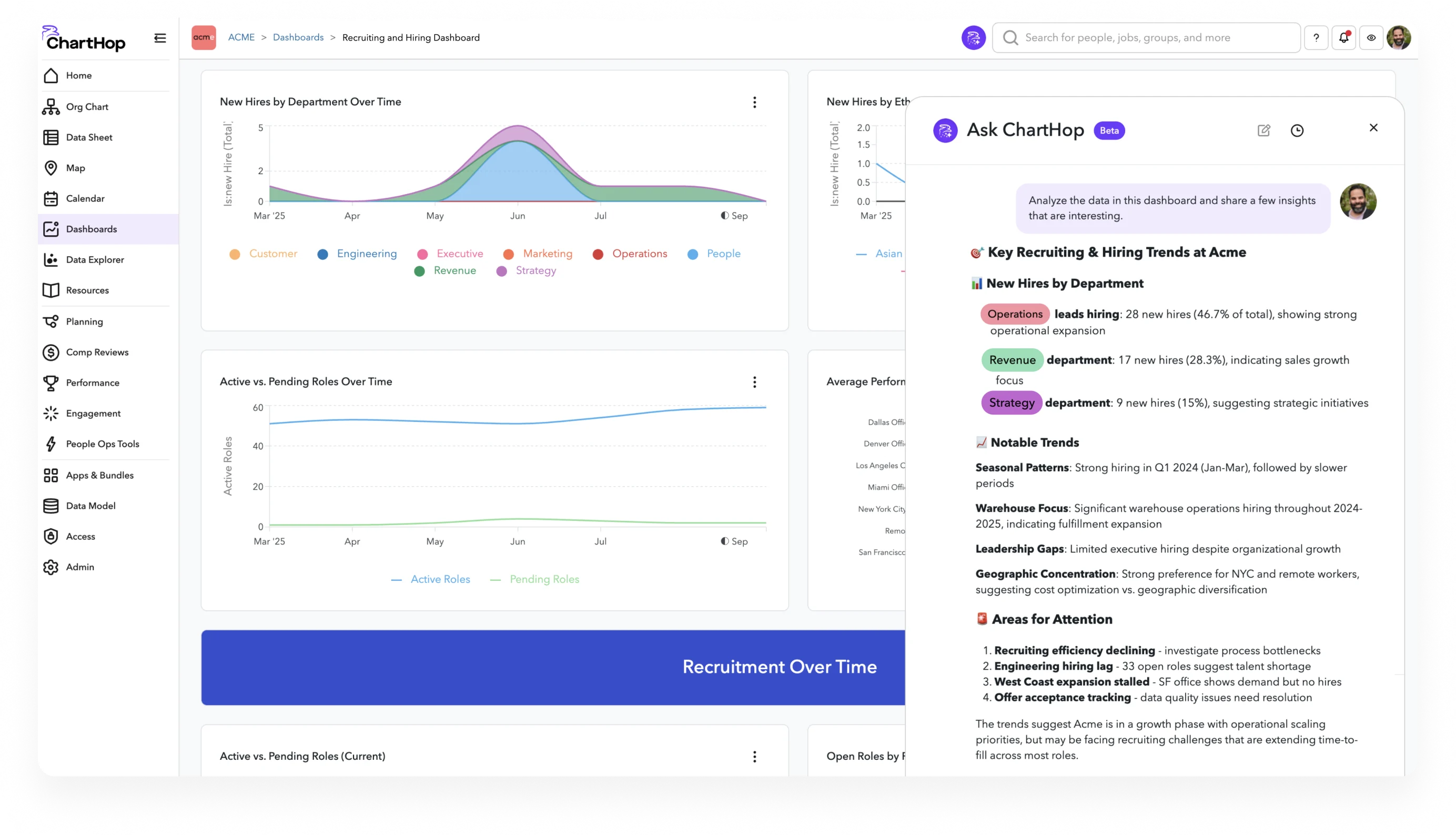
ChartHop integrates compensation management into a broader people analytics suite, providing a holistic view of the organization. Unlike isolated tools, it displays salary data alongside org charts, performance metrics, and headcount plans, allowing leaders to make decisions with full workforce context.
The platform features advanced scenario modeling to project the financial impact of raises, promotions, and new hires. It facilitates manager-led compensation reviews with built-in budget controls and connects easily to existing HRIS, payroll, and ATS platforms.
Key Features
- Pay review cycles featuring manager dashboards and built-in budget restrictions set by HR
- Unified interface displaying organizational charts and hiring plans next to pay data
- Strategic modeling to forecast the financial impact of raises, promotions, and new staffing
- Integrated workforce analytics that present performance metrics and retention risks during pay cycles
- Native connectivity with leading HRIS, applicant tracking, and payroll systems
What Makes ChartHop Stand Out
- Combining organizational structure with pay data provides a collaborative workspace for HR and Finance that specialized tools often miss
- Workforce-level modeling goes beyond individual adjustments to project broader budgetary shifts across the company
- Strategic analytics allow leaders to use the platform for high-level organizational planning rather than just administrative merit tasks
Pros and Cons
Pros: "The ease of using for the first time. It was not complicated and I was able to travel through the software very easily. That it wasn’t confusing like many other applications." — Capterra Review
- Workforce planning and compensation in one view reduces the need to reconcile data across separate tools
- Scenario modeling at the org level is valuable for Finance-HR collaboration
- Strong integration library across HRIS, ATS, and payroll platforms
Cons: "there is some delays for the org chart in ChartHop compared to the ground truth" — G2 Review
- More platform than organizations need if the primary requirement is compensation planning without the broader analytics layer
- Implementation complexity is higher than purpose-built compensation tools
- Organizations that only need merit cycle management may find simpler platforms more practical
Pricing
ChartHop uses a modular pricing model starting with ChartHop Core, which costs $5 per employee monthly. This foundational layer provides organizational charts, people analytics, and AI-driven insights.
Organizations can then add specialized workflow modules for an additional $4 per employee monthly each, including:
- Compensation: For merit, promotion, and equity cycles.
- Headcount Planning: To track budget impacts and approvals.
- HRIS: To centralize all people data.
- Performance: To manage reviews and goal setting.
Lower-cost modules for Engagement and Goals are available at $3 per employee monthly. For large-scale organizations, an Enterprise tier offers volume discounts and dedicated support with custom rates available upon request.
8. Payscale: Best for Multi-Source Compensation Data
Payscale manages a massive database by combining employer data, major third-party surveys, and employee-reported figures. Its Payfactors product serves mid-market teams with tools for salary range creation, merit planning, and pay equity compliance.
The platform distinguishes itself with robust "what-if" scenario modeling. This allows teams to project the financial impact of market shifts or internal adjustments, ensuring alignment between HR and finance before finalizing budgets.
Key Features
- Comprehensive data blending from employer records, external surveys, and crowdsourced employee reports
- Predictive modeling to calculate the financial footprint of potential pay adjustments
- Centralized management for participating in and accessing major industry surveys
- Dedicated modules for building salary structures and executing merit reviews
- Regulatory reporting and analysis for pay fairness
- Advanced enterprise tools for consolidating complex, high-volume survey sources
- Introductory access to core features via a complimentary trial
What Makes Payscale Stand Out
- Diverse data streams ensure broad market coverage across varied sectors without relying on a lone source
- Advanced planning capabilities allow teams to share data-backed financial forecasts with executives
- Streamlined submission workflows automate the tedious task of managing multiple annual survey requirements
Pros and Cons
Pros: "I am using using software since last many years and can say that it is a totally reliable and trustworthy tool for the dept. Very much happy with the software." — Capterra Review
- Broad industry coverage across multiple data sources reduces gaps for non-tech roles
- Scenario modeling supports budget planning in a way that benchmarking-only tools do not
- Free trial availability is rare in this category
Cons: "We started out on the original PayScale product, it worked ok but it took literal hours to load and occasionally data from api pulls was miss matched. We were told that to fix this we should upgrade to the new Insight Lab product, which we did of course at an additional cost." — Capterra Review
- Multiple overlapping product lines (Payfactors, MarketPay, CompAnalyst) create a complicated selection process
- Annual survey data shares the same freshness limitations as other traditional providers; no real-time data option
- Implementation and onboarding can require significant internal resources for large organizations
Pricing
Payscale offers three main service tiers tailored to different stages of compensation management. The Basics plan provides quick access to market data for job pricing, while the Professional plan adds technology for building pay strategies, salary structures, and HRIS data integration.
For complex needs, the Advanced plan includes comprehensive survey management. All tiers utilize Payscale’s proprietary data, and specific pricing is available via their sales team.
9. Pave: Best for Real-Time Salary Benchmarking

Pave centers its platform on a real-time benchmarking network, pulling live salary and equity data from over 8,000 connected companies. This provides a clear advantage for tech firms by offering actionable market rates that annual surveys often fail to capture.
Beyond benchmarking, the tool manages merit cycles, salary bands, and pay equity. It distinguishes itself by providing deep visibility into equity grants and vesting schedules for both managers and employees through total rewards statements.
Key Features
- Live salary and equity benchmarking refreshed constantly through thousands of HRIS connections
- Pay band architecture informed by current market trends
- Compensation cycles featuring manager dashboards for pay, ratios, and equity
- Tools for pay equity audits and comprehensive rewards summaries
- Detailed equity tracking including vesting timelines and grant worth during planning
- Complimentary market data access for US entities and one extra region
What Makes Pave Stand Out
- Continuous data updates from active systems provide a sharper edge over traditional annual surveys for fast-moving markets
- Deep focus on equity as a primary metric makes it a strong choice for high-growth or equity-focused companies
- Accessible entry point through a free data tier that is rare among premium compensation tools
Pros and Cons
Pros: "Pave has helped us better figure out compensation, raises, and our budget, making the whole process easier." — G2 Review
- Continuously updated data is the strongest benchmarking option for US tech organizations
- Equity benchmarking is more developed than most platforms in this category
- Free tier provides meaningful access to market data before committing to paid plans
Cons: "It is a little bit hard to go from being a PC user to a Mac user at first but once you learn, you like it." — Capterra Review
- Benchmarking depth is strongest in the US tech ecosystem; specialized or non-tech roles may need supplemental data sources
- Pricing scales up as features and data access increase; full platform cost requires a custom quote
- International coverage outside the US is more limited compared to European-focused platforms like Ravio
Pricing
Pave provides compensation solutions for every stage of growth, starting with Market Data Lite, which offers free benchmarking for startups with up to 200 employees. The Market Data Pro tier adds global insights across 55 countries and advanced reporting for larger enterprises.
For a complete solution, PaveOS allows teams to license the full platform or select specific modules for planning, market pricing, and total rewards.
10. Salary.com CompAnalyst: Best for Large Compensation Databases

Salary.com's CompAnalyst platform blends data from major providers like Mercer and Willis Towers Watson with employer records to form a massive US database. It focuses on job pricing and pay band creation, allowing users to match internal roles to market data and apply regional pay adjustments.
The platform is ideal for regulated sectors like finance and healthcare that require detailed audits and documentation. It also stands out by offering a 14-day free trial, a rare opportunity for hands-on evaluation in the compensation software market.
Key Features
- Expansive US pay database combining data from Mercer, Willis Towers Watson, PayScale, and employer records
- Tools for role matching and precise market pricing for specific positions
- Design frameworks for creating and confirming salary ranges using market benchmarks
- Adjustments for regional pay variations across various US locations
- Fairness analytics and documentation designed for regulatory audits
- Two-week complimentary trial period for platform evaluation
What Makes Salary.com Stand Out
- Consolidating data from several major survey leaders provides a depth of industry coverage that individual providers rarely achieve
- The 14-day trial offers a rare chance to test the software directly without the typical requirement of a formal sales process
- Advanced regional tools provide superior support for US companies managing complex pay scales across different states and cities
Pros and Cons
Pros: "i liked most about is tha how detailed and reliable data is. This platform provides well researched compensation insights including base pay and benefits." — Capterra Review
- Broad industry and role coverage makes it useful for organizations with diverse job families
- Pay equity analytics and audit-ready reporting meet the documentation requirements of regulated industries
- Free trial availability supports proper evaluation before committing
Cons: "potentially limited information based upon participants in surveys." — G2 Review
- Data is aggregated from annual surveys; no real-time benchmarking option
- Interface is less modern than newer platforms and requires more user training
- Implementation for large organizations can be resource-intensive
- US-focused; international benchmarking coverage is limited
Pricing
Salary.com provides custom, quote-based pricing for its enterprise software and data services. Rates are determined by organizational size and specific data needs, with a focus on mid-market and large-scale companies.
Find the Right Compensation Management Software for Your Team
The right compensation management platform depends on where your organization's biggest challenge actually sits. If your team is in a fast-moving talent market and needs current salary data, Pave or Ravio will serve you better than annual-survey-based platforms.
If you are already running performance reviews in Lattice or Leapsome and want merit cycles to reference that data, the add-on module approach avoids redundant integration work. If your primary problem is replacing a broken spreadsheet-based merit cycle quickly, Comprehensive and Assemble offer faster implementation paths than enterprise platforms.
Pay equity compliance is no longer optional for most organizations. Before selecting a platform, confirm exactly what its pay equity analysis covers and whether the reporting format aligns with the specific regulations that apply to your organization.
For teams evaluating HR software more broadly, it is worth reviewing how performance management software connects to compensation decisions, and whether the payroll software you currently use already handles any part of what you are looking to solve.
Most platforms in this category require a custom quote, so the evaluation process takes time. Use the criteria in this guide to sharpen your demo questions before you start conversations with vendors.
.png)