
.svg)
Finding the right intranet software is one of those decisions that sounds straightforward until you’re actually in the middle of it. The market is crowded, the feature lists blur together, and most buyers only realize what they need after they have already signed a contract.
This guide cuts through that noise. It covers the 10 best employee intranet platforms available in 2026, with honest assessments of what each tool does well, where it falls short, and who it is best suited for. Whether you are replacing an aging SharePoint setup, consolidating a fragmented mix of email and chat tools, or starting from scratch, there is a solid option here for your organization.
For a quick overview of the top employee intranet platforms for 2026, here's a short video:
What to Look for in an Employee Intranet Platform
Before scheduling demos, identify the specific criteria that distinguish a valuable tool from a costly error. The ideal platform depends on your workforce structure, current technology, and approach to content management.
1. Adoption: Will Employees Actually Use It?
A platform is only effective if your team uses it consistently. Prioritize an intuitive interface that requires no training, a high-quality mobile app, and personalized feeds to prevent information overload. When evaluating vendors, request daily active user data; consistent engagement below 50% indicates a potential failure.
2. Ecosystem Fit: Microsoft 365, Google Workspace, or Neither
Integration with your current tools is vital. If employees must exit their primary workflow to access the intranet, engagement will drop. Microsoft 365 users should seek deep Teams and SharePoint integration, while Google Workspace environments perform better with tools like LumApps or Happeo. Verify technical alignment before finalizing your shortlist.
3. Frontline and Mobile-First Capability
For organizations with significant deskless staff, mobile functionality is essential. Many platforms treat mobile access as a secondary feature. If your team includes retail, healthcare, or logistics workers, select a provider like Staffbase or Blink, which prioritizes frontline communication as its core function.
4. Content Governance: Who Owns the Content, and What Happens When It Goes Stale?
Intranets often fail when outdated information erodes user trust. Effective platforms automate maintenance by assigning page owners and setting expiration alerts for reviews. Ask vendors how the system handles content that remains unverified for a year; the response reveals their commitment to data integrity and search accuracy.
10 Best Intranet Platforms in 2026
The following tools represent the strongest options across a range of organization sizes, industries, and use cases.
1. Simpplr: Best Overall Modern Intranet

Simpplr leads the 2026 market for organizations seeking high engagement, intuitive design, and rapid deployment with minimal IT support. Recognized as a top-tier provider by research and advisory firms like Gartner (2025) and Forrester (2024), it excels in AI capabilities and user adoption. For mid-sized companies with 200 to 5,000 employees, Simpplr is the most effective solution for overcoming previous engagement challenges.
Key Features
- AI-powered content personalization that surfaces relevant updates based on role, location, and team
- Native mobile app with push notifications and offline access
- Automated content governance with expiry reminders and content owner assignments
- Employee directory with searchable profiles and org chart visualization
- Integration with Microsoft 365, Google Workspace, Slack, and major HRIS platforms
- Analytics dashboard showing content engagement, search trends, and adoption metrics
Pros and Cons
Pros: "I like that is it very simple to use and I really like the keyword functionality." — G2 Review
- Launches in weeks without requiring a development team or custom coding
- Consistently high user adoption rates, with a 97% user recommendation rate reported by Simpplr
- Strong analyst recognition across Gartner, Forrester, and IDC provides confidence for enterprise buyers
Cons: "Some of the more advanced customisation options can feel a bit limited or require additional support. It would also be helpful to have more flexibility in design and layout options." — Capterra Review
- Advanced customization options are more limited than enterprise-focused competitors like Unily
- Pricing is not publicly listed, which makes early budget planning harder
- Less suited to heavily deskless workforces compared to Staffbase or Blink
Pricing
Custom pricing; contact Simpplr for a quote. No free plan available. Implementation timelines vary by organization size.
2. Staffbase: Best for Large Organizations and Frontline Workforces
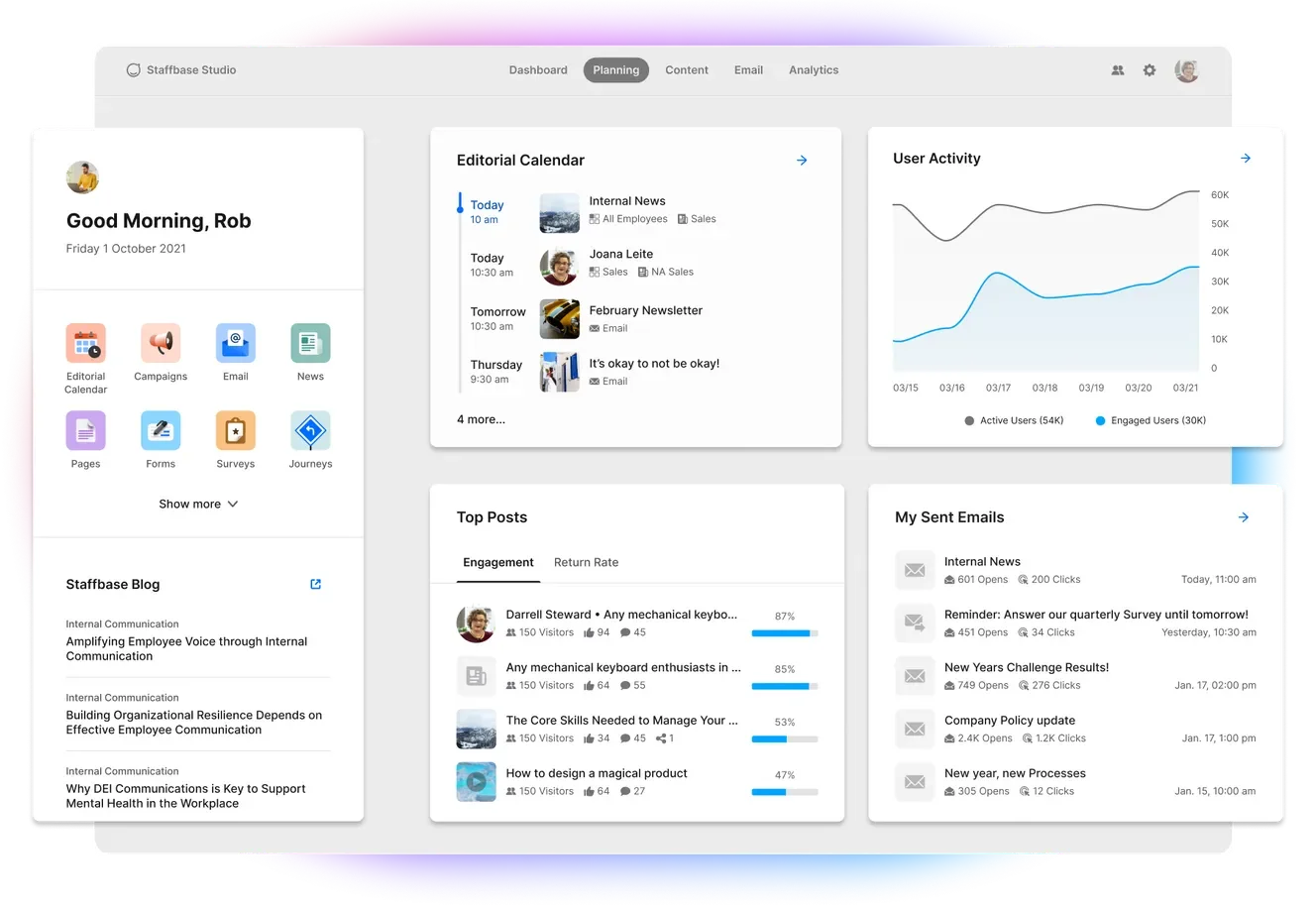
Staffbase addresses the communication gap for deskless staff, securing its position as a Gartner Leader for three straight years through 2025. Unlike traditional platforms, its architecture prioritizes non-desk workers. For enterprises with over 1,000 employees and a large frontline presence, Staffbase provides unmatched specialized capabilities.
Key Features
- Multichannel communication from a single platform: intranet, mobile app, and email newsletters
- Branded mobile app with push notifications, available without requiring a corporate email address
- Content targeting by role, location, department, and language
- Strong content governance tools including approval workflows, owner assignment, and audit trails
- Integration with Microsoft 365, SAP, Workday, and major HRIS systems
- Analytics covering reach, readership, and employee engagement by segment
Pros and Cons
Pros: "Software general usability and effectiveness in employees recognition. Easy integration of the software with Google analytics and SurveyMonkey." — Capterra Review
- One of the few platforms built equally for desk-based and frontline employees from the ground up
- Multichannel publishing reduces the need for separate tools for email newsletters, mobile, and intranet
- Strong governance controls make it well-suited to regulated industries
Cons: "At first, it's a bit difficult to find one's way, but over time it becomes understandable." — G2 Review
- Implementation complexity is higher than platforms like Simpplr or Happeo
- Pricing is custom and can be significant for organizations below 500 employees
- The breadth of features can feel overwhelming without a dedicated internal communications owner to manage the platform
Pricing
Custom pricing based on organization size and modules. Contact Staffbase for a quote. No free plan or publicly listed pricing.
3. Teamflect: Best for Microsoft 365 Organizations Combining Engagement and Performance Management

Teamflect is a people management platform built to run entirely within Microsoft Teams and Outlook, consolidating recognition, engagement surveys, and performance management software into a single interface employees already use daily. Unlike traditional intranets, it does not offer document storage or a content governance layer, but for organizations that live in Microsoft 365, that tradeoff is often irrelevant.
The platform is best suited for companies with 10 to 500 employees that want to unify HR workflows without introducing a separate tool or login. Teams outside the Microsoft ecosystem, or those requiring structured knowledge bases and document management, will need to look elsewhere.
Key Features
- Works directly inside Microsoft Teams and Outlook, so employees access everything through tools they already open every day
- Managers can post company announcements and shout-outs to staff without leaving their Teams workspace
- Internal job boards built into the company intranet to encourage internal mobility across the organization.
- Unified companywide search hub for people, roles, competencies, open positions.
- Organizational resources such as policies, and codes of conduct easily accessible for everyone inside the intranet.
- Custom widgets for birthdays and anniversary reminders.
Pros and Cons
Pros: "Overall, this is a great tool and I love how it already is part of Teams so my team and other folks I mentor are already listed for me to choose from." — Capterra Review
- High adoption rates driven by the native Teams experience; employees do not need to learn a new platform
- Covers recognition, surveys, performance, and goals in a single tool, reducing vendor sprawl
- Transparent published pricing with a free plan for teams under 10 users
- Dedicated Customer Success Manager and free implementation support included on every paid plan
Cons: "The user interface is sometimes clunky, and difficult to navigate or adapt to different screens especially when expanding text boxes for longer entries. Some of the features for tagging and categorizing are not always obvious either." — G2 Review
- Requires Microsoft 365; organizations that do not use Teams and Outlook as their primary tools will not benefit from the platform
- Does not offer document management, a traditional knowledge base, or SharePoint-equivalent content governance
- The intranet and HRIS integration features are gated behind the Professional plan, which may push costs higher for teams that need the full feature set
Pricing
Teamflect offers a tiered performance management platform integrated with Microsoft Teams, ranging from a free Starter plan for up to 10 users to a Professional suite for $11 per user monthly.
4. Workvivo (by Zoom): Best for Culture-First Engagement and Social Communication
.webp)
Acquired by Zoom in 2023, Workvivo combines social-style feeds with news, recognition, and video. Named a 2025 Gartner Leader, it excels at building culture and connection for organizations with over 250 employees, offering a level of engagement traditional intranets rarely match.
Key Features
- Social media-style activity feed with likes, comments, and reactions on company posts
- Live video streaming and on-demand video content for town halls and company updates
- Peer-to-peer recognition with public shoutouts and milestone celebrations
- Podcasts and multimedia content publishing natively within the platform
- Deep Zoom integration for live events and video content
- Integration with Microsoft 365, Slack, and major HRIS platforms
Pros and Cons
Pros: "Workvivo is very easy and fun to use. I like the layout of the homepage and accessibility of the apps I use on a daily basis." — G2 Review
- Deepest video and live events integration in the intranet category, driven by Zoom ownership
- Social feed design drives habitual daily use in a way that traditional document-heavy intranets do not
- Strong mobile experience supports both desk-based and remote employees
Cons: "Some features feel basic compared to more advanced HR platforms. Engagement depends heavily on adoption, and without active use it can feel quiet." — Capterra Review
- Content governance controls are lighter than platforms like Interact or Staffbase
- Less suited to heavily regulated industries with strict audit and compliance requirements
- Organizations that need a structured knowledge base alongside social communication may find the feature set insufficient on its own
Pricing
Custom pricing based on organization size. Contact Workvivo for a quote. No free plan available.
5. LumApps: Best Intranet for Google Workspace Organizations

LumApps is the premier intranet for Google Workspace users, offering unparalleled integration with Drive, Calendar, and Meet. A 2025 Gartner Leader, it recently expanded its frontline communication capabilities by acquiring Blink. This platform is ideal for organizations seeking a cohesive digital environment across both office and deskless teams.
Key Features
- Native Google Workspace integration including Drive, Calendar, Meet, and Chat
- AI-powered content personalization based on role, location, and behavior
- Multilingual content support for global and distributed organizations
- Frontline mobile app capabilities expanded through the Blink acquisition
- Content targeting, approval workflows, and governance controls
- Analytics covering content reach, engagement, and search behavior
Pros and Cons
Pros: "It took a bit of used to as a non-IT person when migrating from an old Google Sites instance. But the original set of widgets met our needs." — Capterra Review
- Google Workspace integration depth is unmatched by any competitor in this category
- Strong multilingual support makes it well-suited to international organizations
- AI-powered personalization improves content relevance without manual curation
Cons: "It really struggles to display content outside of it's pre-picked options. I wish there was more flexibility, especially with images." — Capterra Review
- Implementation complexity and cost make it less suitable for organizations below 500 employees
- Microsoft 365 integration exists but is not as deep as the Google Workspace experience
- The Blink acquisition means some product areas are still being integrated; verify feature availability before signing
Pricing
Custom pricing based on organization size and modules. Contact LumApps for a quote. No free plan or publicly listed pricing.
6. Microsoft Viva and SharePoint: Best for Microsoft 365 Organizations That Want No Additional Tooling
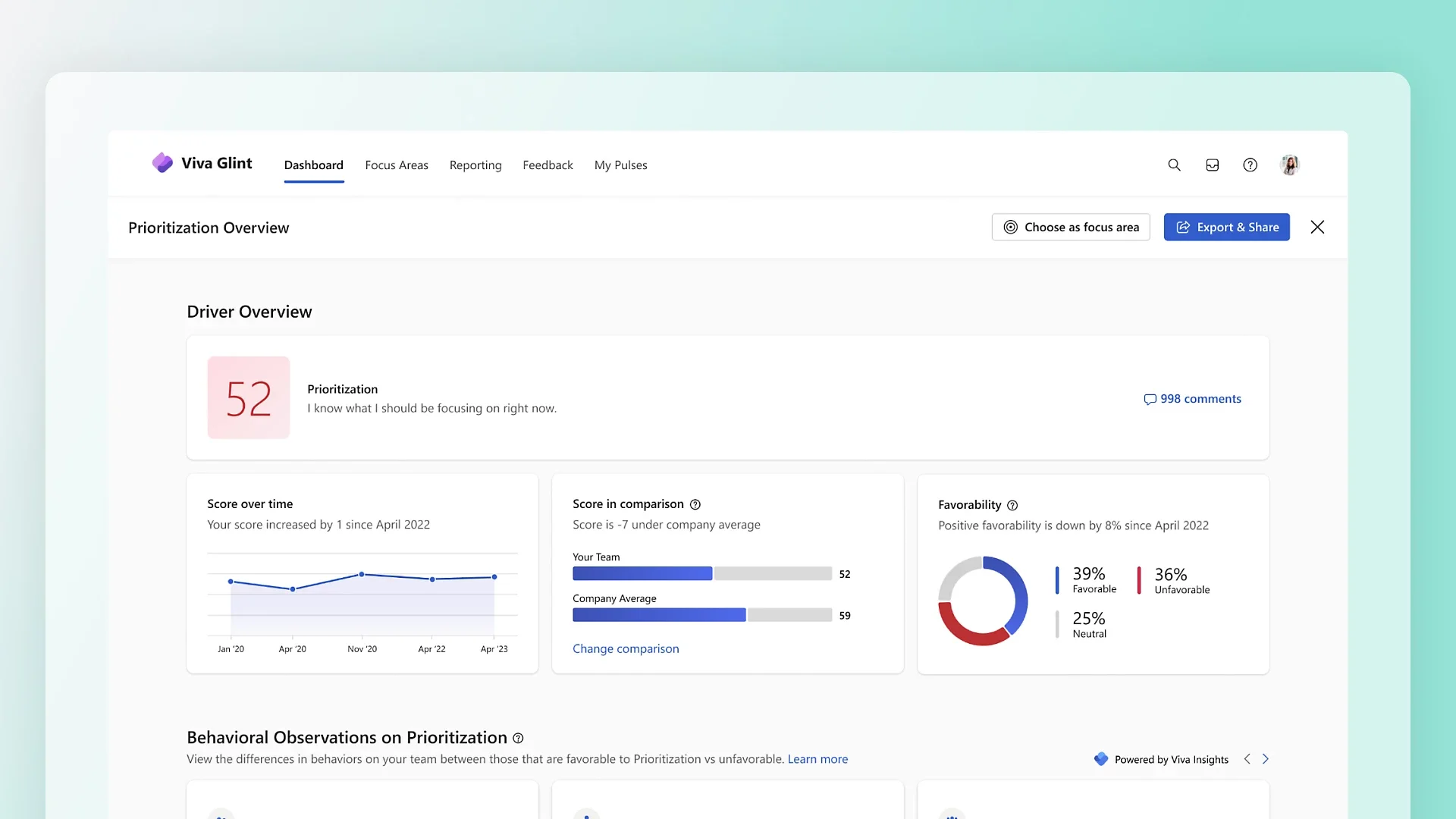
For organizations already running Microsoft 365, Viva Connections and SharePoint Online provide intranet capability directly inside Teams without requiring a new vendor relationship. It is not the most polished or feature-rich intranet experience available, but for IT-led organizations that want to keep the tool count down and stay within their existing Microsoft investment, it is a practical and cost-effective option.
Key Features
- Viva Connections surfaces SharePoint news, announcements, and the company feed inside Teams
- SharePoint Online provides document libraries, intranet pages, and knowledge management
- Integration with the full Microsoft 365 suite including Outlook, Teams, and OneDrive
- Viva Engage (formerly Yammer) adds social communication and community features
- Role-based permissions, compliance controls, and audit trails built into the Microsoft ecosystem
- Full Viva suite available as an add-on from $4/user/month for Microsoft 365 subscribers
Pros and Cons
Pros: "Love the focus time function that automatically book my time one week ahead! I also love the stay connected function reminders to make sure that i didn't miss any follow-ups or emails." — Capterra Review
- No additional vendor required for organizations already on Microsoft 365
- Deep compliance and governance capabilities built on Microsoft's security infrastructure
- Scales from small teams to global enterprises within the same platform
Cons: "The user interface isn’t very intuitive, and in some cases it’s confusing or inconsistent when I’m trying to find information across different sites and libraries." — G2 Review
- Setup and ongoing maintenance require dedicated IT or SharePoint admin expertise
- User experience is notably less polished than purpose-built intranet platforms like Simpplr
- Content governance depends heavily on how well the IT team configures and maintains the environment
Pricing
Microsoft Viva offers tiered employee experience pricing, starting with basic features included in Microsoft 365. Specialized plans for communications ($2.00/user/month) and analytics ($6.00/user/month) provide targeted tools for publishing and feedback, while the full Viva Suite ($12.00/user/month) combines all modules with learning and AI capabilities.
7. Unily: Best for Large Enterprises Needing Deep Customization

Unily is built for large, complex enterprises that need a high degree of configurability, multi-brand support, and deep Microsoft 365 integration. It was recognized as a Major Player in the IDC MarketScape 2025. Its ideal customer is an organization with 10,000 to 50,000 or more employees managing multiple brands or business units under one intranet infrastructure.
Key Features
- Multi-brand architecture supporting distinct intranet experiences for different business units
- Deep Microsoft 365 integration including Teams, SharePoint, and OneDrive
- Strong governance controls with content owner assignment, approval workflows, and audit trails
- AI-powered search and content personalization across large content libraries
- Advanced analytics for communications, content performance, and employee engagement
- Highly configurable page templates and branding tools without requiring custom code
Pros and Cons
Pros: "Home page customization was a highlight for me. I was able to fully customize my experience, having quick access to the tools and apps I use most frequently." — Capterra Review
- Multi-brand and multi-entity capability is genuinely strong and purpose-built, not bolted on
- Governance tools are robust enough for regulated industries and large compliance teams
- Deep Microsoft 365 integration makes it a natural fit for enterprise Microsoft environments
Cons: "Search can be unreliable, making content harder to find. The platform may feel heavy or slow at times, and new users can struggle with its complexity and navigation." — G2 Review
- Implementation timelines and costs are significant; not suited to organizations below 1,000 employees
- The platform's configurability requires dedicated internal ownership to maintain effectively
- Pricing is not transparent and is typically among the higher end of the category
Pricing
Custom pricing. Contact Unily for a quote. No free plan or publicly listed pricing.
8. Interact: Best for Governance and Compliance-Heavy Organizations
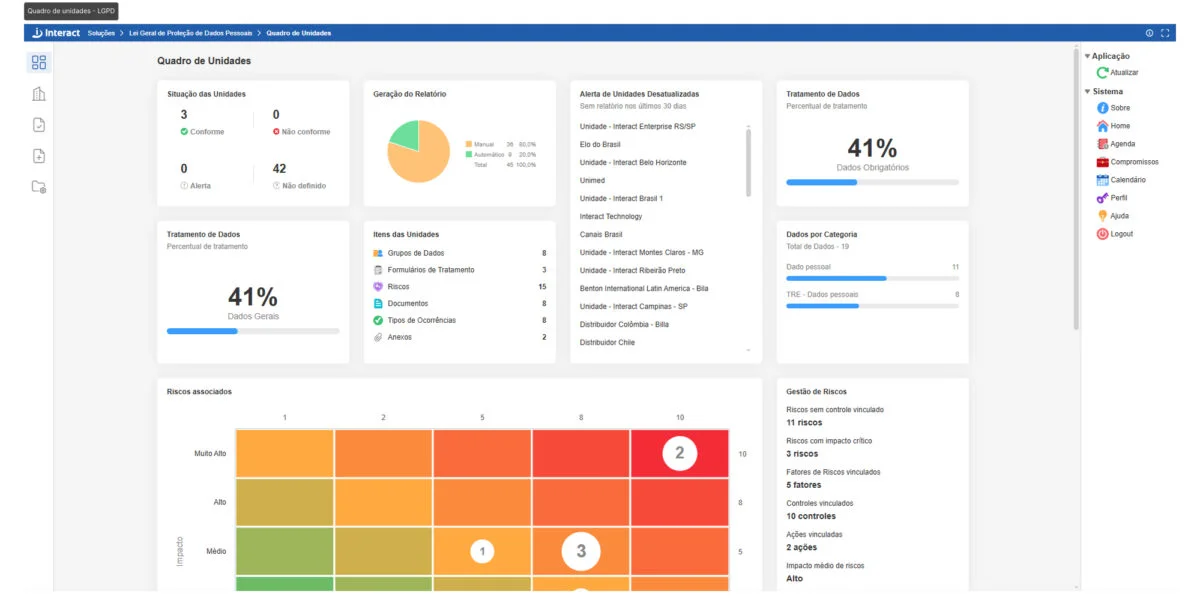
Interact is one of the more governance-focused intranet platforms in this category. It is a strong fit for regulated industries such as finance, healthcare, and legal, where content accuracy, audit trails, and clear ownership of information are not optional. Interact holds a G2 rating of 4.6 out of 5.
Key Features
- Content governance with automated expiry reminders, owner assignments, and approval workflows
- Audit trails for content changes and publishing history
- Employee directory with searchable skills, expertise, and team profiles
- Forms and policy acknowledgment tools for compliance tracking
- Integration with Microsoft 365, Google Workspace, and major HRIS platforms
- Mobile app with role-based content targeting
Pros and Cons
Pros: "Logic jump/branching is very easy to use." — Capterra Review
- Content governance controls are among the strongest available in the intranet category
- Well-suited to regulated industries that need clear audit trails and policy management
- Strong G2 rating of 4.6 reflects consistent user satisfaction
Cons: "Lots of new features with not as much of a focus on quality of life, but that does appear to be changing." — G2 Review
- The interface is more utilitarian than platforms like Simpplr or Workvivo, which may affect general adoption
- Less suited to organizations that want a social or culture-first intranet experience
- Setup and configuration require meaningful IT involvement
Pricing
Custom pricing. Contact Interact for a quote. No free plan available.
9. Happeo: Best Google Workspace Intranet for SMBs and Mid-Market Teams

Happeo sits in an interesting position: it offers genuine Google Workspace integration at a price point and setup complexity that is more accessible than LumApps. For organizations between 100 and 500 employees running Google Workspace that find LumApps too large or too expensive, Happeo is a practical and well-regarded alternative.
Key Features
- Native Google Workspace integration including Drive, Calendar, and Meet
- Channels-based communication for team and department updates alongside static Pages for company knowledge
- Intranet search that pulls results from Google Drive and other connected tools
- Employee profiles and org chart with Google Directory sync
- Analytics covering page views, search queries, and content engagement
- No-code page builder for content teams without technical resources
Pros and Cons
Pros: "Signe click sign in with google or Microsoft account, easy integration, we can find All user profiles at one place in the Directory. Apart from that we have different channels to broadcast to respective teams." — G2 Review
- Faster setup and lower cost than LumApps while maintaining strong Google Workspace integration
- The combination of Channels for communication and Pages for structured content suits most mid-market needs well
- Clean interface with a manageable learning curve for non-technical admins
Cons: "I wish all the analytics tools were included in the base purchase and not add ons. It would be easier to submit a check or credit card instead of wiring annual payment (organization is based outside of the US)." — G2 Review
- Less feature-rich than LumApps for large or complex organizations
- Analytics depth is limited compared to enterprise-focused competitors
- Microsoft 365 integration is available but not as strong as its Google Workspace offering
Pricing
Happeo offers three scalable tiers (Starter, Growth, and Enterprise) to centralize company knowledge and communication through tools like directories, analytics, and custom widgets. Each plan is quote-based, and interested organizations can book a demo to determine the best fit for their specific operational needs.
10. MyHub: Best Budget-Friendly Intranet for Small Businesses

MyHub is the most accessible entry point on this list for small businesses that need core intranet features without enterprise pricing or a lengthy implementation. Its flat-fee model starting at $83/month for up to 25 users makes it straightforward to budget for, and its drag-and-drop page builder means most teams can get up and running without IT support.
Key Features
- Drag-and-drop page builder with pre-built templates, no coding required
- Company news feed, employee directory, and document storage in a single platform
- Forms builder for internal requests, surveys, and policy acknowledgments
- Mobile-responsive design accessible on any device
- Role-based permissions and basic content management controls
- 30-day free trial, the most accessible evaluation option in the category
Pros and Cons
Pros:
"I've been slowly but surely learning MyHub. I love how mobile friendly it is to stay on top of things on my cell phone. I think it's great to have files easily accessible too." — G2 Review
- Flat-fee pricing model is easy to budget and scales predictably as the team grows
- 30-day free trial allows meaningful evaluation before committing
- Quick setup without requiring IT involvement or a dedicated intranet administrator
Cons: "There were some initial learnings that required customer support help, however this was mainly due to our staff becoming familiar with the software." — G2 Review
- Feature depth is limited compared to mid-market and enterprise platforms
- Integration library is narrower than competitors like BambooHR or Rippling
- Not suited to organizations above 250 employees that need advanced analytics or multi-entity support
Pricing
Starting at $3.50 per user monthly, MyHub offers three tiers (Core, Business, and Enterprise) that offer unlimited storage and free setup for a minimum of 50 users. Advanced tiers include SSO and dedicated support, while non-profits receive a 30% discount. Pricing is customized via quote, and interested teams can book a demo or start a free trial.
How to Choose the Right Intranet Platform for Your Organization
With ten options in front of you, narrowing the field comes down to a few honest questions about your organization.
1. Start With Your Workforce
If more than 20% of your employees are deskless or frontline workers, that filter alone removes most of the platforms on this list. Staffbase and Blink are the clearest choices for frontline-first organizations. Everyone else is designed primarily for desk-based teams.
2. Get Clear on Your Ecosystem
Microsoft 365 organizations have the widest range of options, from Viva and SharePoint at the no-additional-cost end to Simpplr and Staffbase at the full-featured end, with Teamflect as a strong option if performance management and engagement need to sit alongside internal communications inside Teams. Google Workspace organizations should start with LumApps for enterprise scale or Happeo for mid-market budgets.
3. Be Honest About Governance Needs
If your industry is regulated or your organization has struggled with
stale content and poor search results, content governance should be near the top of your criteria list. Interact and Staffbase are the strongest options here.
4. Match the Tool to Your Team Size
Small businesses under 250 employees should start with MyHub's free trial before committing to anything more complex. Mid-market teams between 200 and 1,000 employees will find the most options in this range, with Simpplr and Happeo both offering good value. Enterprise organizations above 1,000 employees should look closely at Staffbase, LumApps, and Unily.
Whichever direction you go, use the comparison above to match your priorities against each platform's core strengths before booking a demo. For more guidance on building out your HR technology stack, take a look at our guide on how to choose HR software.
.avif)